
GTKZW K2002
GTKZW Electric Cooktop Instruction Manual
Model: K2002
Product Overview
The GTKZW Electric Cooktop is a versatile 2-burner appliance designed for both countertop and built-in use. It features dual heating zones, multiple power and temperature levels, and essential safety features like a child lock and overheat protection, making your cooking experience easier and more enjoyable.
Key Features
- Compatible For All Material Cookware: Suitable for stainless steel, copper, aluminum, glass ceramic, and more.
- Dual Heating Zones: Features two independently heated cooking zones (1200W and 900W) operating on 110V voltage.
- Multiple Power Levels & Temperature Ranges: Offers 20 temperature levels (176℉-1202℉) and 9 power levels (P1-P9) for precise cooking control.
- LED Sensor Touch Control: Easy-to-use panel for adjusting temperature, power, cooking mode, child lock, or setting the timer.
- Built-in or Free Standing: Flexible installation options with a durable, scratch-resistant, and easy-to-clean black ceramic glass surface.

The GTKZW Electric Cooktop, showcasing its dual heating zones and intuitive touch control panel.
Important Safety Information
- Always ensure the cooktop is placed on a stable, flat surface or properly installed in a countertop.
- Residual Heat Indicator: The ceramic plate will be hot after cooking. Do not touch it directly. The residual heat indicator will alert you when the surface is still warm.
- Child Lock: Utilize the child lock function to prevent accidental operation, especially in households with children.
- Overheat Protection: The cooktop is equipped with overheat protection. If the temperature exceeds safe limits, the unit will automatically shut off.
- Ensure proper ventilation around the unit, especially for built-in installations, to prevent overheating.
Setup and Installation
The GTKZW Electric Cooktop offers flexible installation options to suit your kitchen layout.
Freestanding Use
Place the cooktop on a flat, stable, heat-resistant surface. Ensure adequate clearance around the unit for proper ventilation. Plug the 110V/120V plug into a standard electrical outlet.
Built-in Installation
For built-in installation, ensure your countertop has a cutout that matches the cooktop's bottom dimensions. The unit is designed to sit flush within the cutout. Refer to the 'Specifications' section for precise measurements.

This image illustrates the versatility of the cooktop, showing it both as a portable countertop unit and seamlessly integrated into a kitchen counter.

Detailed dimensions are provided for precise built-in installation, ensuring a perfect fit within your kitchen island or countertop.
Operating Instructions
Powering On/Off
Touch the ON/OFF button on the LED sensor touch control panel to turn the cooktop on or off.
Adjusting Power and Temperature
The cooktop features 9 power levels (P1-P9) and 20 temperature levels (176℉-1202℉). Use the "+" and "-" buttons to adjust the desired power or temperature for each heating zone independently.

A close-up view of the LED touch screen, illustrating how to adjust power and temperature settings.
Child Lock Function
To activate the child lock, press and hold the child lock button until "LOC" appears on the display. This prevents accidental changes to settings. To deactivate, press and hold the button again.
Timer Setting
Use the timer function to set a specific cooking duration (0-120 minutes). The cooktop will automatically turn off once the timer expires.
Compatible Cookware
This electric cooktop is compatible with all types of cookware, including stainless steel, copper, aluminum, glass ceramic, iron pans, glass pots, and cast iron pots. Note that ceramic pots or those with bumpy bottoms may heat up slower.

An illustration showing the wide range of cookware materials that can be used with this electric cooktop.
Maintenance and Cleaning
The black ceramic glass surface is designed for easy cleaning and maintenance.
- Always ensure the cooktop is cool before cleaning.
- Wipe the surface with a soft, damp cloth and mild detergent.
- Avoid using abrasive cleaners, scouring pads, or iron scraping tools, as these can scratch the surface.
- For stubborn stains, a specialized ceramic cooktop cleaner can be used.
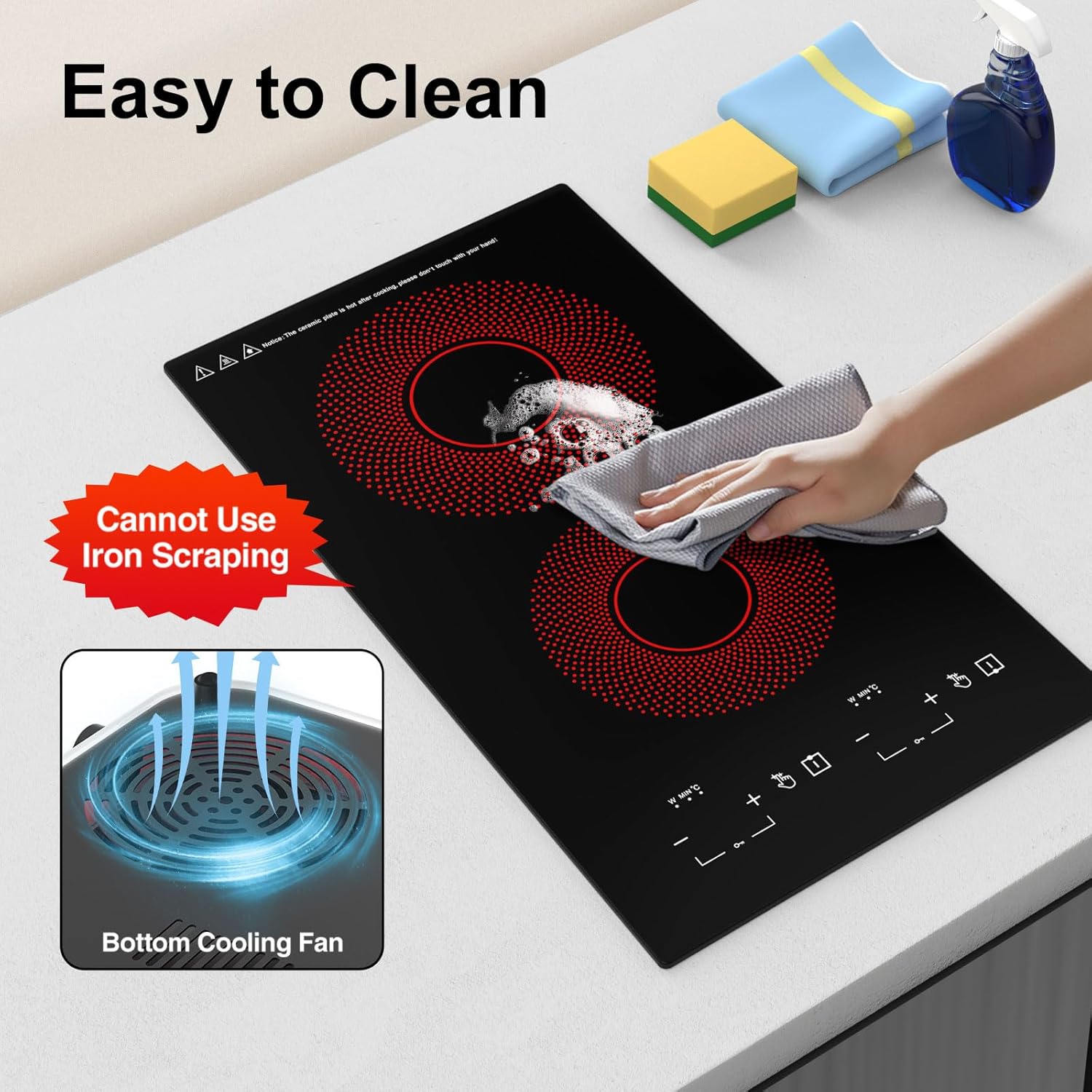
This image demonstrates the ease of cleaning the cooktop's smooth ceramic glass surface with a soft cloth.
Troubleshooting
Common Issues and Solutions
| Problem | Possible Cause | Solution |
|---|---|---|
| Cooktop not turning on | Not plugged in; power outage; child lock active. | Check power connection; verify power supply; deactivate child lock. |
| Uneven heating | Incompatible cookware; pan not centered. | Use flat-bottomed, compatible cookware; center pan on heating zone. |
| Display shows "LOC" | Child lock is active. | Press and hold the child lock button to deactivate. |
| Cooktop shuts off unexpectedly | Overheat protection activated; timer expired. | Allow unit to cool; check timer settings. |
Specifications
| Feature | Detail |
|---|---|
| Brand | GTKZW |
| Model Number | K2002 |
| Item Weight | 0.212 ounces |
| Product Dimensions | 3.35 x 20.08 x 11.42 inches |
| Installation Type | Freestanding / Built-in |
| Burner Type | Induction |
| Heating Elements | 2 |
| Voltage | 1.2E+2 Volts (110V-120V) |
| Wattage | 2100 watts |
| Material Type | Glass Ceramic |
Warranty and Customer Support
For any shopping questions or support needs, please feel free to contact GTKZW customer service. We are committed to providing assistance within 24 hours.
For detailed warranty information, please refer to the product's official documentation or contact the seller directly.
You can visit the official GTKZW store for more products and information: GTKZW Store
Ask a question about this manual
Ask about setup, troubleshooting, compatibility, parts, safety, or missing instructions. Manuals+ will review the question and use this page’s manual context to help answer it.