
Introduction
Thank you for choosing the Maozhren TV Base Stand. This product is designed to provide a stable and secure tabletop solution for your compatible Hisense TV. Please read this manual carefully before installation and use to ensure proper setup and long-lasting performance.
Important Compatibility Notes
This TV base stand is specifically designed for certain Hisense TV models. It is not a universal TV stand and may not be compatible with all TVs. Please verify your TV model, the shape of the bottom holes, and the distance between them before purchase and installation.

Image: Critical steps before purchase, showing correct and incorrect TV bottom hole shapes and hole spacing measurements for compatibility.
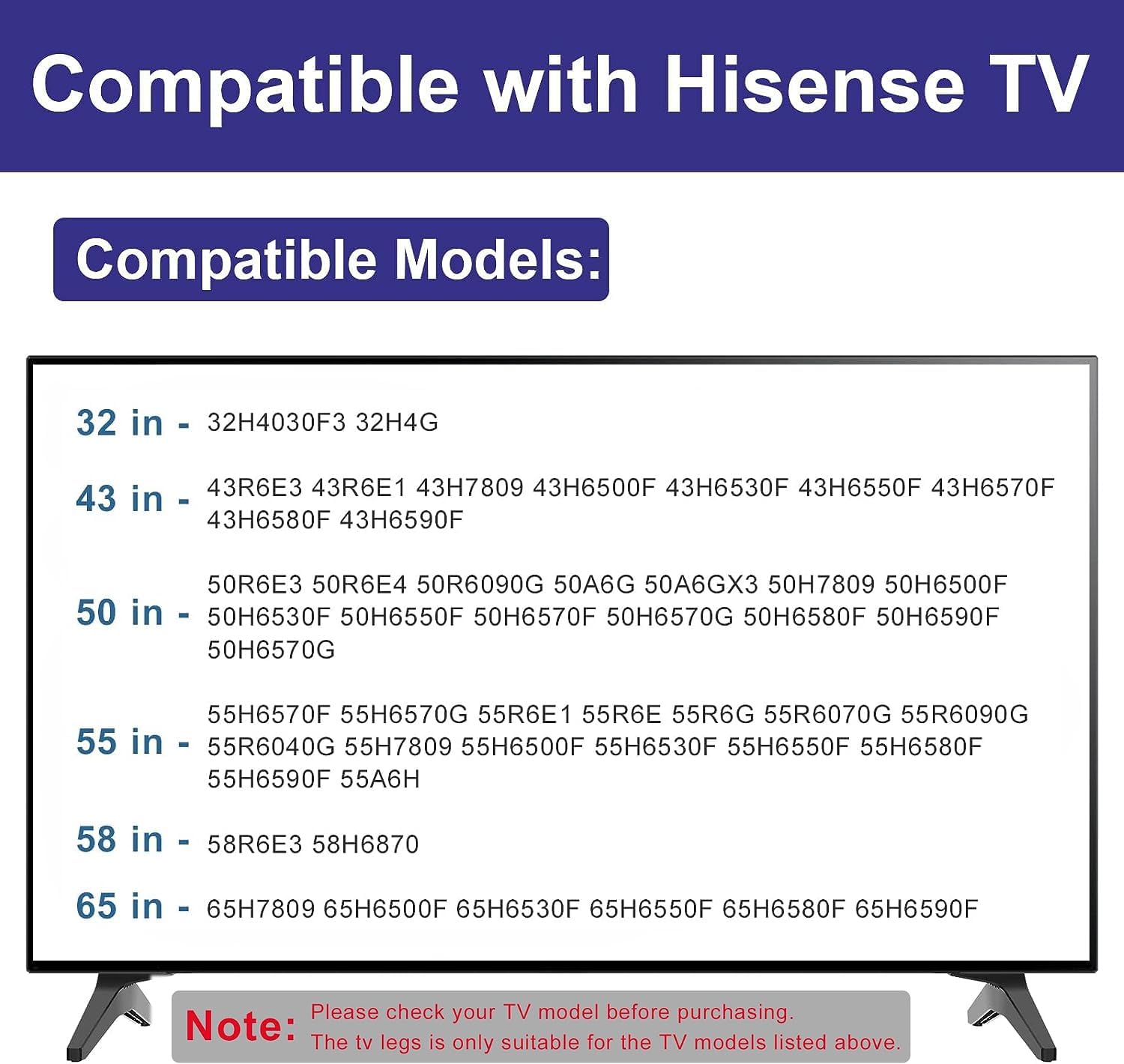
Image: A list of compatible Hisense TV models, categorized by screen size, for which this stand is suitable.
Compatible Models Include:
- 32 inch: 32H4030F3, 32H4G
- 43 inch: 43R6E3, 43R6E1, 43H7809, 43H6500F, 43H6530F, 43H6550F, 43H6570F, 43H6580F, 43H6590F
- 50 inch: 50R6E3, 50R6E4, 50R6090G, 50A6G, 50A6GX3, 50H7809, 50H6500F, 50H6530F, 50H6550F, 50H6570F, 50H6570G, 50H6580F, 50H6590F
- 55 inch: 55H6570F, 55H6570G, 55R6E1, 55R6E, 55R6G, 55R6070G, 55R6090G, 55R6040G, 55H7809, 55H6500F, 55H6530F, 55H6550F, 55H6580F, 55H6590F, 55A6H
- 58 inch: 58R6E3, 58H6870
- 65 inch: 65H7809, 65H6500F, 65H6530F, 65H6550F, 65H6580F, 65H6590F
Note: Even if your TV model is listed, differing bottom hole shape and distance may mean incompatibility. Always confirm the TV hole shape and measure the distance before purchasing.
Package Contents
Your Maozhren TV Base Stand package includes the following items:
- 2 x TV Base Legs
- 16 x Screws (various sizes for compatibility)
- Installation Instructions

Image: The complete package contents, including two black TV stand legs and a variety of screws for different TV models.

Image: A selection of anti-rust screws provided with the stand, designed to prevent corrosion and prolong the lifespan of the TV bottom.
Setup Instructions
Follow these simple steps to install your TV base stand:
- Prepare the TV: Carefully place your TV face down on a clean, soft, flat surface to prevent screen damage.
- Identify Mounting Holes: Locate the mounting holes on the bottom of your TV.
- Attach Legs: Insert the TV base stand legs into the bottom slots on your TV. Ensure they are oriented correctly (left and right).
- Secure with Screws: Use the provided screws that best fit your TV's mounting holes. Tighten the screws firmly but do not overtighten to avoid damaging the TV or stand.
- Verify Stability: Gently lift and place the TV on your desired surface. Ensure the stand is stable and the TV does not wobble.

Image: A visual comparison illustrating the benefit of a tabletop stand over a wall mount, highlighting 'hole-free assembly' and protection for your wall.

Image: A graphic demonstrating the easy installation process, showing how the TV legs are attached to the television.
Product Features & Usage
The Maozhren TV Base Stand is designed for stability and convenience:
- Solid and Sturdy: Made from thick, high-quality Acrylonitrile Butadiene Styrene (ABS) plastic, ensuring heavy-duty construction and stability. It supports up to 80 lbs on flat screen panel TVs.
- Non-Slip Protection: Features a 3mm non-slip pad on the base to prevent scratching of your cabinet surface and ensure the TV does not slide.
- Versatile Placement: Suitable for various rooms and surfaces, providing a modern look to your home.

Image: Illustration highlighting the high-quality ABS material used, emphasizing its strength to hold your TV.

Image: Close-up view of the 3mm non-slip pad on the base of the TV stand leg, designed to protect surfaces.

Image: Examples of the TV stand being used in various room types, such as a bedroom, living room, and meeting room.
Maintenance
To maintain the appearance and longevity of your TV base stand:
- Cleaning: Wipe with a dry cloth. Avoid abrasive cleaners or harsh chemicals that could damage the finish.
- Inspection: Periodically check that all screws are securely tightened to ensure continued stability.
Troubleshooting
If you encounter any issues with your TV base stand, please refer to the following common solutions:
- Stand Does Not Fit TV:
- Double-check the compatibility notes in this manual. Ensure your TV model is listed and that the bottom hole shape and spacing match the requirements.
- Verify you are using the correct screws for your TV model. The package includes various sizes.
- TV Feels Unstable/Wobbly:
- Ensure all screws attaching the legs to the TV are fully tightened.
- Confirm the TV is placed on a flat, level, and sturdy surface.
- Check that the non-slip pads are properly positioned on the bottom of the legs.
- Missing Accessories:
- If any accessories are missing from your package, please contact Maozhren customer support for replacements.
Specifications
| Feature | Detail |
|---|---|
| Brand | Maozhren |
| Material | Acrylonitrile Butadiene Styrene (ABS) |
| Color | Black |
| Product Dimensions (L x W x H) | 2.36 x 1.18 x 1.97 inches |
| Item Weight | 5.6 ounces |
| Maximum Recommended Load | 80 Pounds |
| Assembly Required | Yes |
| Care Instructions | Wipe with Dry Cloth |
Warranty and Support
For any questions, concerns, or if you find that your product is missing accessories, please contact Maozhren customer support. Your satisfaction is important to us.
This product is eligible for a 30-day return/replacement policy through Amazon. Please refer to Amazon's return policy for details.