
Introduction
This manual provides comprehensive instructions for the installation, operation, maintenance, and troubleshooting of your ARDWOLF A30 Keypad Door Lock. Please read this manual carefully before installation and use to ensure proper function and longevity of your lock.

Figure 1: ARDWOLF A30 Keypad Door Lock, showing the sleek design and integrated keypad.
Package Contents
Before beginning installation, verify that all components are present in your package:

Figure 2: All components included in the ARDWOLF A30 package, including the lock assembly, keys, RFID cards, and installation hardware.
- Exterior Keypad Assembly with Lever
- Interior Lever Assembly
- Mortise Latch
- Strike Plate
- Mounting Screws
- Mechanical Keys (2)
- RFID Keyfobs/Cards (2)
- Installation Tools (Wrench)
- User Manual
Installation Guide
1. Pre-Installation Checks
- Ensure your door thickness is between 1-3/8" (35mm) and 1-3/4" (45mm).
- Verify your door's backset is adjustable to either 2-3/8" or 2-3/4".
- This model is built for left-opening doors. While it can be reversed, it is not recommended due to complexity.
2. Install the Mortise Latch
Insert the mortise latch into the door edge. Ensure the latch bolt faces the correct direction for your door swing. Secure with screws.

Figure 3: The mortise latch installed into the door edge, showing proper alignment.
3. Install Exterior and Interior Assemblies
Align the exterior keypad assembly and interior lever assembly with the mortise latch. Pass the spindle through the latch mechanism. Secure the assemblies using the provided mounting screws.
4. Battery Installation
The lock requires 4 AA batteries (not included). Open the battery cover on the interior assembly and insert the batteries according to the polarity indicators.
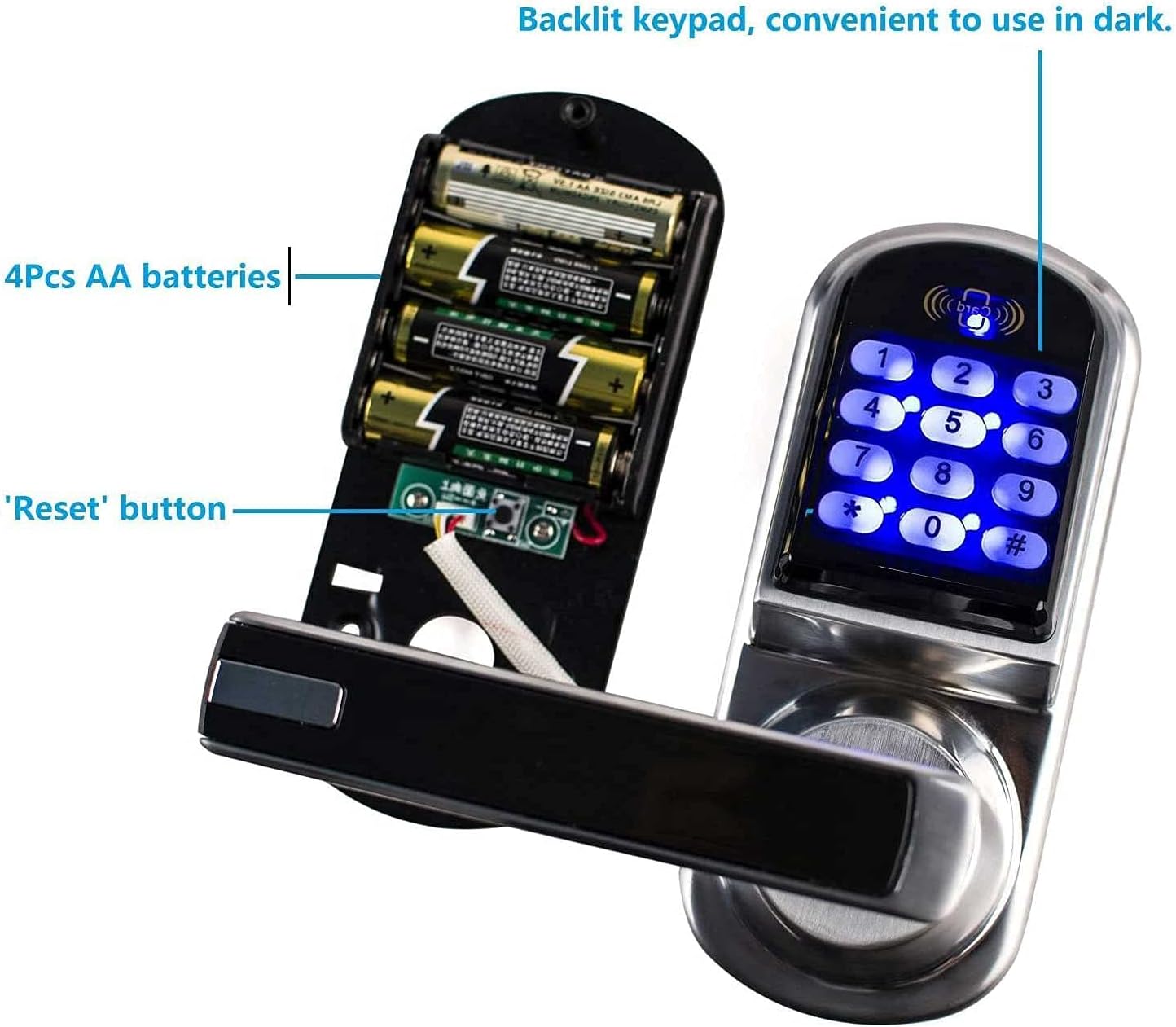
Figure 4: Interior view of the lock showing the battery compartment for 4 AA batteries and the location of the reset button.
5. Install Strike Plate
Install the strike plate on the door frame, ensuring it aligns correctly with the latch bolt when the door is closed.
Operating Instructions
The ARDWOLF A30 offers three convenient ways to unlock your door: user codes, RFID cards, and mechanical keys.

Figure 5: Close-up of the backlit keypad, which is convenient for use in low-light conditions.
1. Unlocking with User Codes
- User codes are between 4-8 digits. The lock supports up to 200 user codes.
- To unlock: Enter your user code on the keypad, then press the '#' key. The lock will disengage.
2. Unlocking with RFID Cards
- The lock is compatible with 13.56MHz RFID keyfobs/cards. Two cards are included.
- To unlock: Present an enrolled RFID card to the card reader area on the top of the keypad. The lock will disengage.
3. Unlocking with Mechanical Keys
- A hidden mechanical keyhole provides a backup unlocking method.
- To access the keyhole: Press the small button located on the underside of the exterior handle to reveal the keyhole.
- To unlock: Insert the mechanical key and turn to disengage the lock.

Figure 6: The hidden mechanical keyhole, accessible by pressing a button on the handle, provides a discreet backup entry method.
4. Automatic Locking
By default, the lock will automatically re-lock 5 seconds after a valid entry. This feature enhances security by ensuring the door is always locked after use.
5. Passage Mode
If you do not wish for the lock to automatically re-lock, you can set the lock to passage mode. Refer to the programming section of the full manual (not included in this summary) for instructions on how to enable or disable passage mode.
Maintenance
- Battery Replacement: When the battery level is low, the lock will provide an audible or visual indicator. Replace all four AA batteries promptly to ensure continuous operation. Do not mix old and new batteries.
- Cleaning: Clean the keypad and lock body with a soft, dry cloth. Avoid using abrasive cleaners or solvents, as these can damage the finish or electronic components.
- Environmental Conditions: This lock is designed for interior use and is not waterproof. Avoid exposure to direct water or extreme humidity.
Troubleshooting
- Lock Not Responding: Check battery levels. Replace batteries if necessary.
- Code/Card Not Working: Ensure you are entering the correct code or presenting an enrolled RFID card. If issues persist, try resetting the lock to factory defaults.
- Resetting the Lock: To reset the lock to manufacturer default status, press and hold the reset button located on the interior assembly (refer to Figure 4) until you hear a confirmation tone. This will erase all user codes and RFID cards.
- Keypad Buttons Sticking: Ensure the keypad is clean and free of debris. If a button continues to stick, contact customer support.
- Lock Does Not Unlock After Code/Card Entry: Verify the spindle is correctly engaged with the latch mechanism. Ensure no obstructions are preventing the latch from retracting.
Specifications

Figure 7: Detailed dimensions of the ARDWOLF A30 Keypad Door Lock components.
| Feature | Detail |
|---|---|
| Brand | ARDWOLF |
| Model | A30 |
| Lock Type | Keypad, RFID, Mechanical Key |
| User Codes | 4-8 digits, up to 200 codes |
| RFID Compatibility | 13.56MHz Mifare cards |
| Door Thickness | 1-3/8" (35mm) to 1-3/4" (45mm) |
| Adjustable Backset | 2-3/8" or 2-3/4" |
| Power Source | 4 x AA Batteries (not included) |
| Item Weight | 1 Pound |
| Dimensions (Exterior) | Approx. 152mm (H) x 66mm (W) x 84mm (D) |
| Color | Left-handle (Silver/Black) |
| Special Feature | Automatic Locking, Hidden Keyhole |
Warranty and Support
For specific warranty information, please refer to the documentation included with your product or contact ARDWOLF customer support directly. Keep your purchase receipt as proof of purchase.
If you encounter any issues not covered in this manual or require further assistance, please visit the official ARDWOLF website or contact their customer service department for support.