
Introduction
This manual provides comprehensive instructions for the Timex Men's DGTL Rugged 46mm Watch, model TW5M411009J. Please read this manual carefully to understand the functions and proper operation of your watch. Keep this manual for future reference.
Key Features:
- Adjustable black 20mm resin strap, fitting up to an 8-inch wrist circumference.
- 24-hour chronograph with 1/100-second resolution.
- Daily alarm function.
- Two independent time zones.
- 24-hour military time mode.
- Day, date, and month calendar display.
- Black 46mm resin case with an acrylic lens.
- Gray digital display with Indiglo light-up watch dial.
- Water resistant to 50 meters (165 feet), suitable for short periods of recreational swimming.
Setup
Initial Setup and Time/Date Setting
Your watch comes with a pre-installed lithium metal battery. To set the time and date:
- Identify Buttons: Locate the buttons on the sides of your watch. Typically, these are labeled or have distinct functions (e.g., MODE, SET, START/STOP, RESET).
- Enter Setting Mode: Press and hold the SET or MODE button until the time display begins to flash, indicating you are in setting mode.
- Adjust Time: Use the START/STOP or RESET buttons to adjust the flashing digits (hours, minutes). Press MODE or SET again to move to the next setting (e.g., minutes, 12/24-hour format).
- Set Date: Continue to cycle through settings to adjust the year, month, and day.
- Exit Setting Mode: Once all settings are correct, press the SET or MODE button to exit the setting mode.
Strap Adjustment
The resin strap is adjustable to fit various wrist sizes up to 8 inches. Use the buckle to find a comfortable and secure fit. Ensure the watch is not too tight or too loose for optimal comfort and sensor accuracy (if applicable).
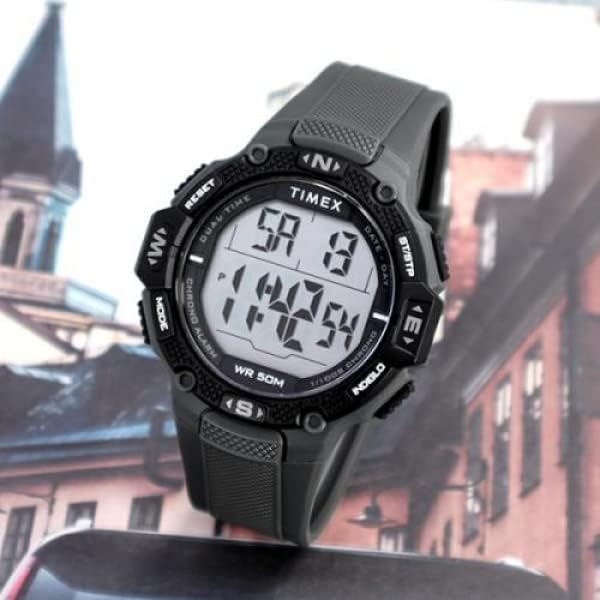
Image: The Timex DGTL Rugged watch displayed on a person's wrist, showing its fit and size.
Operating Instructions
Basic Time Display
The watch defaults to displaying the current time, day, and date. The gray digital display ensures clear readability.

Image: Front view of the Timex DGTL Rugged 46mm watch, showcasing its digital display and button layout.
Indiglo Night-Light
To activate the Indiglo night-light, press the button typically located on the upper left side of the watch case. The entire display will illuminate for a few seconds, allowing you to read the time in low-light conditions.
Chronograph Function
The 24-hour chronograph measures elapsed time with 1/100-second resolution.
- Access Chronograph: Press the MODE button repeatedly until 'CHRONO' or 'STOPWATCH' appears on the display.
- Start/Stop: Press the START/STOP button to begin timing. Press it again to pause.
- Reset: While paused, press the RESET button to clear the chronograph to zero.
Daily Alarm
Set a daily alarm to sound at a specific time.
- Access Alarm: Press the MODE button until 'ALARM' is displayed.
- Set Alarm Time: Use the SET button to enter alarm setting mode, then use START/STOP or RESET to adjust hours and minutes.
- Activate/Deactivate: Press a designated button (often START/STOP or RESET while in alarm mode) to toggle the alarm on or off. An alarm icon will typically appear when active.
Dual Time Zones (T2)
The watch allows you to track a second time zone.
- Access T2: Press the MODE button until 'T2' or 'DUAL TIME' is displayed.
- Set T2: Use the SET button to adjust the second time zone.
24-Hour Military Time Mode
The watch can display time in either 12-hour (AM/PM) or 24-hour (military) format. This setting is usually adjusted within the main time setting mode.
Maintenance
Water Resistance
Your Timex DGTL Rugged watch is water resistant to 50 meters (165 feet). This means it is suitable for short periods of recreational swimming. It is not suitable for diving or snorkeling. Avoid pressing buttons underwater to prevent water ingress.
Cleaning
Clean your watch with a soft, damp cloth. Avoid using harsh chemicals or abrasive materials, which can damage the resin case, acrylic lens, or strap.
Battery Replacement
The watch uses 1 Lithium Metal battery (included). When the display dims or functions become erratic, the battery may need replacement. It is recommended to have the battery replaced by a qualified watch technician to ensure proper sealing and water resistance.
Troubleshooting
Display is Blank or Dim
- Battery: The battery may be low or depleted. Replace the battery.
- Temperature: Extreme temperatures can affect LCD performance. Allow the watch to return to normal operating temperature.
Buttons are Unresponsive
- Reset: A soft reset might resolve the issue. If possible, remove and reinsert the battery (consult a professional).
- Debris: Check for any debris lodged around the buttons.
Time is Incorrect
- Setting: Re-enter the time setting mode and ensure all digits are set correctly.
- Battery: A low battery can sometimes affect timekeeping accuracy.
Specifications
| Feature | Detail |
|---|---|
| Model Number | TW5M411009J |
| Product Dimensions | 1.57 x 3.94 x 2.36 inches |
| Item Weight | 1.76 ounces (0.11 Pounds) |
| Case Material | Resin |
| Case Diameter | 46 Millimeters |
| Case Thickness | 15 Millimeters |
| Band Material | Resin |
| Band Color | Black |
| Band Width | 20 Millimeters |
| Band Length | 8 Inches |
| Display Type | Digital |
| Crystal Material | Acrylic |
| Watch Movement Type | Quartz |
| Water Resistance Depth | 50 Meters (165 Feet) |
| Power Source | Battery Powered (1 Lithium Metal battery included) |
| Additional Features | Indiglo Light Up, Military Time |
| Clasp Type | Buckle |

Image: Side profile of the Timex DGTL Rugged 46mm watch, showing the case and button design.

Image: Rear view of the Timex DGTL Rugged 46mm watch, highlighting the stainless steel case back and strap texture.
Warranty
This product is covered by a Manufacturer Warranty. For specific details regarding the duration and terms of your warranty, please refer to the warranty card included with your purchase or visit the official Timex website. Keep your proof of purchase for warranty claims.
Support
For further assistance, technical support, or service inquiries, please contact Timex Customer Service. You can find contact information on the official Timex website or through the documentation provided with your watch.
Online Support: Visit the official Timex website for FAQs, digital manuals, and support contact details.
Service Centers: Information on authorized service centers can be found on the Timex website.