
Introduction
This manual provides essential information for the safe and effective use of your Digital Energy 8 Outlet Surge Protector. Please read these instructions carefully before use and retain them for future reference.
Important Safety Instructions
WARNING: To reduce the risk of electric shock, fire, or injury, always follow basic safety precautions.
- Do not connect to another relocatable power tap.
- Do not 'daisy chain' surge protectors.
- Do not use with aquarium equipment.
- Do not use in wet environments or near water.
- Do not use if the surge protector housing is damaged.
- Ensure the total power consumption of connected devices does not exceed the surge protector's rating (1875 W).
- This product is designed for indoor use only.
- The surge protector is ETL Listed, indicating compliance with recognized safety standards.
Product Features
The Digital Energy 8 Outlet Surge Protector is designed to protect your electronic devices from power surges and spikes. Key features include:
- 8 Grounded Outlets: Provides ample space for multiple devices.
- Surge Protection: 350 Joules of surge protection to safeguard electronics.
- Illuminated On/Off Switch: Features a built-in circuit breaker for overload protection.
- Flat Plug Design: Allows for convenient placement behind furniture and in tight spaces.
- Durable Construction: Built for reliable performance in home and office environments.

Image: The surge protector mounted discreetly under a desk, powering a computer monitor, speakers, and other peripherals. This demonstrates its practical application in an office or home setup.
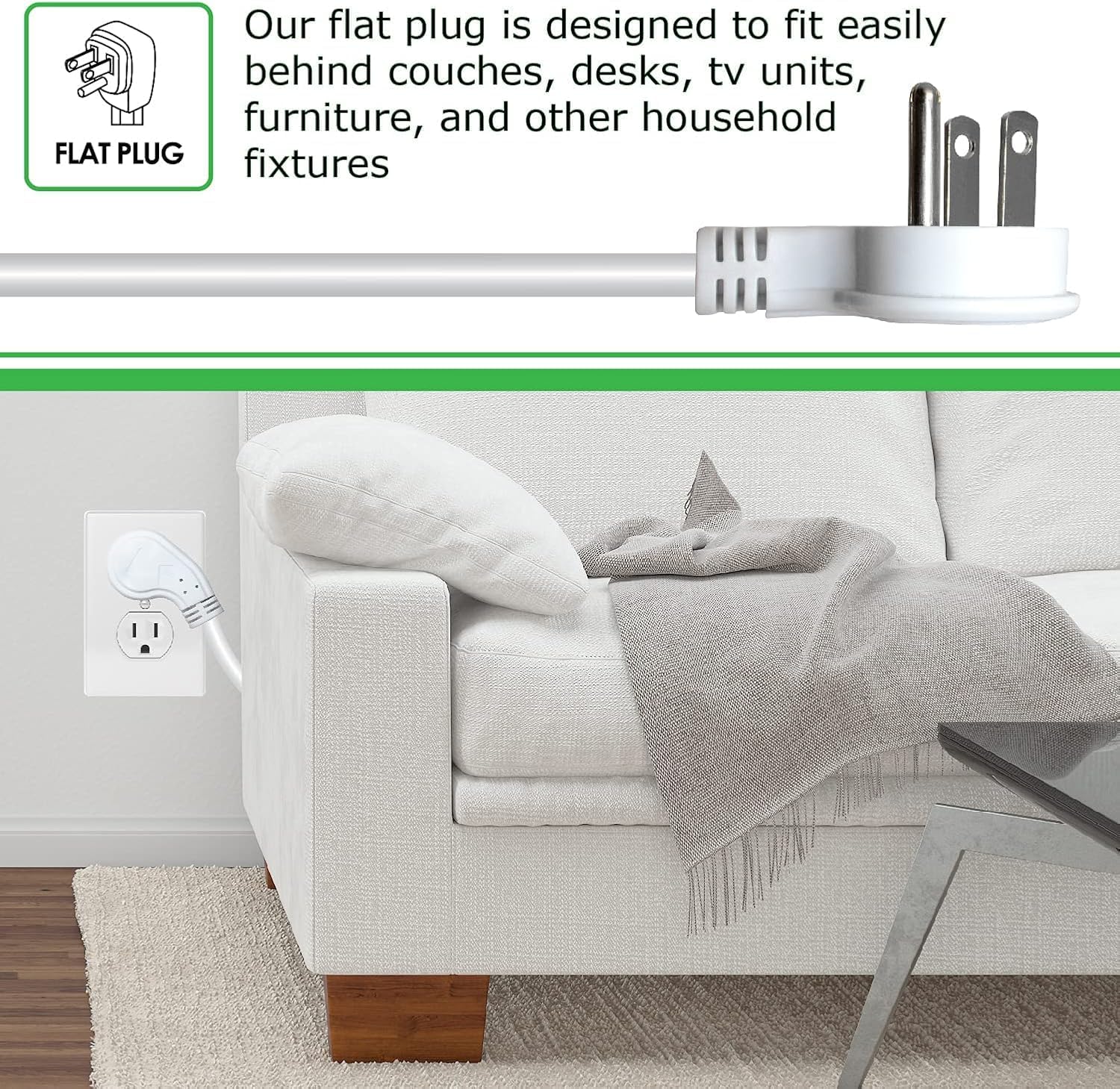
Image: A detailed view of the flat plug, illustrating how it allows furniture to be placed closer to the wall without damaging the cord or plug. This design enhances space efficiency and safety.
Setup Instructions
- Unpack: Carefully remove the surge protector from its packaging.
- Placement: Position the surge protector in a dry, indoor location, away from heat sources and direct sunlight. Ensure the cord can reach the wall outlet without being stretched or pinched.
- Plug In: Insert the surge protector's flat plug into a standard 3-prong, 125V AC wall outlet.
- Connect Devices: Plug your electronic devices into the 8 available outlets on the surge protector. Ensure the total wattage of all connected devices does not exceed 1875W.
- Activate: Press the illuminated On/Off switch to the 'On' position. The switch will light up, indicating power is supplied to the outlets.
Operating Instructions
Using your Digital Energy 8 Outlet Surge Protector is straightforward:
- Power On/Off: The red illuminated switch controls power to all 8 outlets. Press the switch to turn power on (light will be red) or off (light will be off).
- Surge Protection Indicator: This surge protector includes a protection indicator (often a small LED, not explicitly detailed in provided data but common). If this indicator light goes out, it means the surge protection components have been consumed, and the unit should be replaced to ensure continued protection.
- Circuit Breaker: The On/Off switch also functions as a circuit breaker. In case of an overload, it will automatically trip to cut power, protecting your devices.
Maintenance
To ensure optimal performance and longevity of your surge protector:
- Cleaning: Disconnect the surge protector from the wall outlet before cleaning. Use a dry, soft cloth to wipe the exterior. Do not use liquid cleaners or aerosols.
- Inspection: Periodically inspect the cord and housing for any signs of damage. If damage is found, discontinue use and replace the unit.
- Avoid Overloading: Always ensure the total wattage of connected devices does not exceed the maximum rating of 1875W.
Troubleshooting
If your surge protector is not functioning as expected, consider the following:
- No Power to Devices:
- Check if the On/Off switch is in the 'On' position and illuminated.
- If the switch is off and does not reset, the circuit breaker may have tripped due to an overload. Disconnect some devices, then try to reset the switch.
- Ensure the surge protector is securely plugged into a functioning wall outlet. Test the wall outlet with another device.
- Surge Protection Light Off: If the surge protection indicator light (if present) is off, the surge protection components may have been sacrificed to protect your devices from a significant power surge. The unit will still function as a power strip, but it will no longer provide surge protection. It is recommended to replace the unit.
Specifications
| Feature | Specification |
|---|---|
| Model Number | DEE1-1211 |
| Total Power Outlets | 8 |
| Voltage Rating | 125 Volts |
| Amperage Rating | 15 AMP |
| Wattage Rating | 1875 W |
| Surge Protection | 350 Joules |
| Cord Length | 3 FT (as per product variant) |
| Plug Type | Flat Plug, 3-prong grounded |
| Certifications | ETL Listed |
| Product Dimensions | 36 x 36 x 0.04 inches (approximate, based on product data) |
| Item Weight | 1.65 pounds |
Warranty and Support
Digital Energy is committed to providing quality electronic accessories. For any questions or concerns regarding your 8 Outlet Surge Protector, please contact Digital Energy customer support. While specific warranty details are not provided in this manual, customer satisfaction is our main priority.
For further assistance, please refer to the contact information provided with your purchase or visit the official Digital Energy website.