
vidaXL 147889
vidaXL Double Outlet Automatic Water Timer
Model: 147889
Introduction
This manual provides essential information for the proper installation, operation, and maintenance of your vidaXL Double Outlet Automatic Water Timer. Please read this manual thoroughly before using the device to ensure optimal performance and longevity. This timer is designed to automate watering for two separate garden zones, offering convenience and water conservation.
Safety Information
Please observe the following safety precautions:
- Do not expose the timer to freezing temperatures. Drain water and store indoors during winter months to prevent damage.
- Ensure all connections are tight to prevent leaks.
- Use only clean water. Do not use with chemicals or other liquids.
- Keep out of reach of children.
- California Proposition 65 Warning: This product can expose you to chemicals including lead, which is known to the State of California to cause cancer and birth defects or other reproductive harm. For more information go to www.P65Warnings.ca.gov.
Product Overview
The vidaXL Double Outlet Automatic Water Timer features two independent watering zones, each with its own frequency and run time controls. It is constructed from durable ABS material, ensuring waterproof and corrosion-resistant performance.

Figure 1: Angled view of the vidaXL Double Outlet Automatic Water Timer, showing the two outlets and the control dials under a clear protective cover.

Figure 2: Top-down view of the water timer with the protective cover open, clearly displaying the 'FREQUENCY' and 'RUN TIME' dials for both Zone 1 and Zone 2, along with the battery indicator.
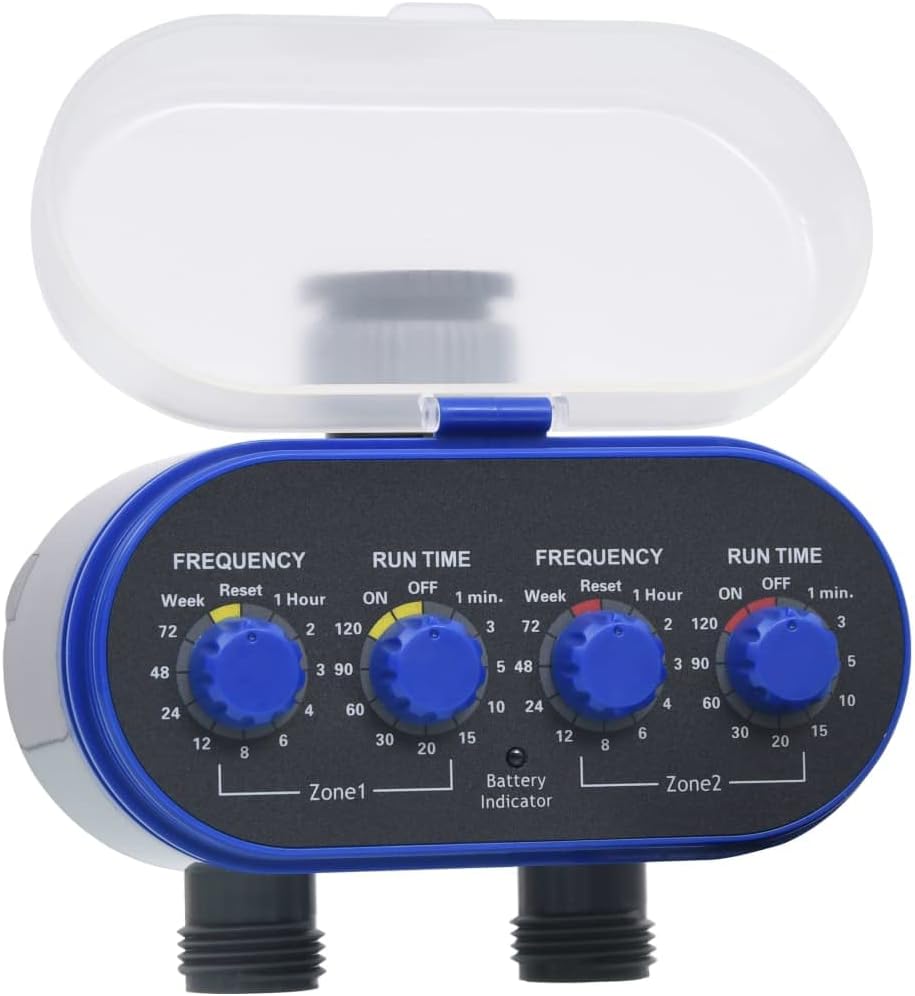
Figure 3: Front view of the water timer, highlighting the two threaded outlets for connecting hoses or irrigation lines.

Figure 4: Side view of the water timer, showing the threaded input connection where the timer attaches to a standard garden faucet.

Figure 5: Rear view of the water timer, showing the mounting points and the battery compartment cover.
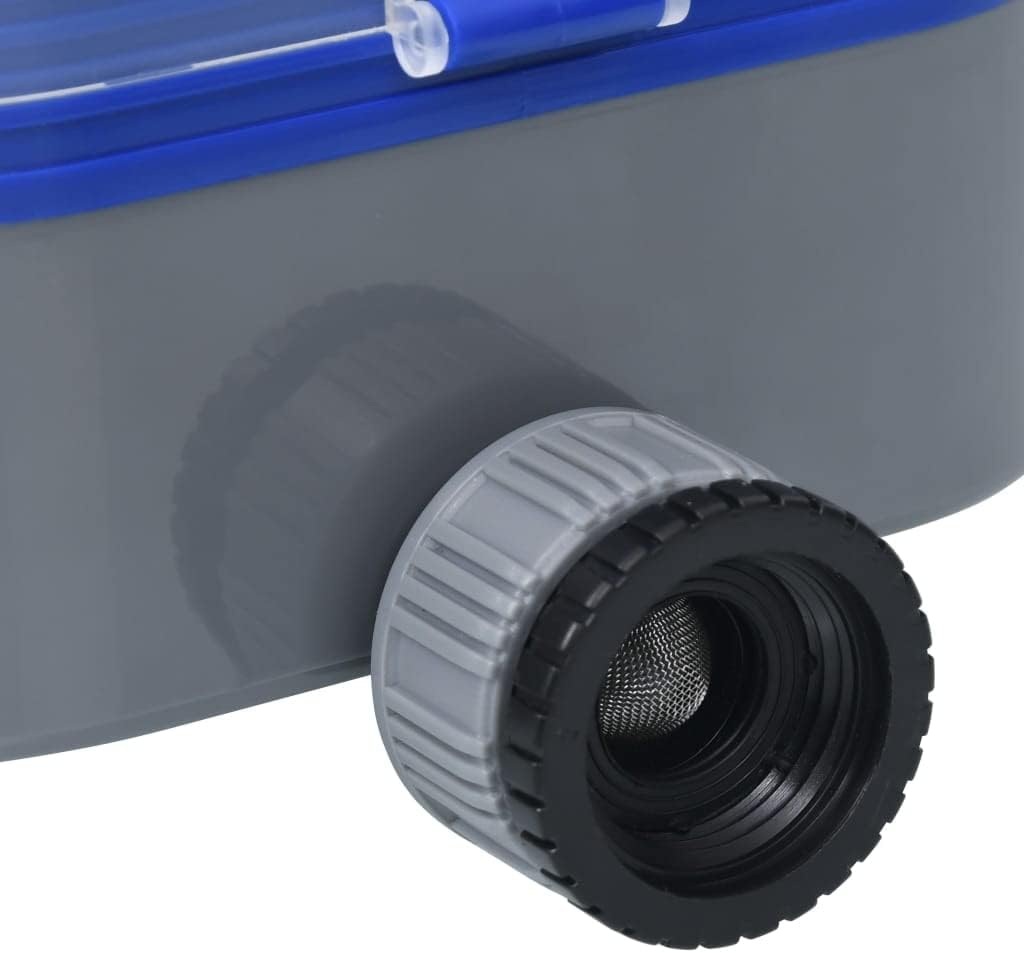
Figure 6: Close-up view of the water timer's input connection, showing the integrated mesh filter designed to prevent debris from entering the unit.
Setup
- Battery Installation: Open the battery compartment (refer to Figure 5). Insert the required batteries (not included) according to the polarity markings. Close the compartment securely. The battery indicator on the front panel will show battery status.
- Connect to Faucet: Screw the timer's input connection (top) onto a standard outdoor garden faucet. Ensure the connection is hand-tight to prevent leaks. Do not overtighten.
- Connect Hoses: Attach your garden hoses or irrigation lines to the two independent outlets at the bottom of the timer (Zone 1 and Zone 2).
- Initial Test: Turn on the water supply from the faucet. Check for any leaks at the connections.
Operating Instructions
The timer features two independent zones, each controlled by a 'FREQUENCY' dial and a 'RUN TIME' dial.
Setting Watering Frequency:
- For each zone, rotate the 'FREQUENCY' dial to select how often watering occurs. Options typically range from every 6 hours to once a week, or 'ON' for continuous watering, and 'Reset' to clear settings.
- Refer to the markings on the dial for specific intervals (e.g., 6, 12, 24, 48, 72 hours, or 1 week).
Setting Run Time:
- For each zone, rotate the 'RUN TIME' dial to select the duration of each watering cycle. Options typically range from 1 minute to 120 minutes, or 'OFF' to disable the zone.
- Refer to the markings on the dial for specific durations (e.g., 1, 3, 5, 10, 15, 20, 30, 60, 90, 120 minutes).
Example Setting: To water Zone 1 for 30 minutes every 24 hours, set the Zone 1 'FREQUENCY' dial to '24 Hour' and the Zone 1 'RUN TIME' dial to '30 min'.
The timer will automatically begin its cycle based on the set frequency and duration after the dials are set.
Maintenance
- Battery Replacement: Replace batteries when the battery indicator shows low power. Always use fresh batteries of the specified type.
- Filter Cleaning: Periodically check the mesh filter located at the input connection (refer to Figure 6) for debris. Remove and rinse the filter under running water to clear any blockages.
- Winter Storage: Before the first frost, disconnect the timer from the faucet and hoses. Drain all water from the unit. Store the timer indoors in a dry, frost-free location.
- Cleaning: Wipe the exterior of the timer with a damp cloth. Do not use abrasive cleaners or solvents.
Troubleshooting
| Problem | Possible Cause | Solution |
|---|---|---|
| Timer not watering. | No water supply; low batteries; 'RUN TIME' dial set to 'OFF'; 'FREQUENCY' dial set to 'Reset'. | Ensure faucet is fully open. Replace batteries. Adjust 'RUN TIME' dial to desired duration. Adjust 'FREQUENCY' dial to desired interval. |
| Water leaking from connections. | Loose connections; damaged O-rings/washers. | Tighten connections. Inspect and replace O-rings or washers if damaged. |
| Water flow is weak or blocked. | Clogged filter; debris in hose. | Clean the mesh filter at the input connection. Check hoses for kinks or blockages. |
| Timer not responding to dial adjustments. | Dead batteries; internal malfunction. | Replace batteries. If problem persists, contact customer support. |
Specifications
- Model: 147889
- Brand: vidaXL
- Color: Blue
- Material: Acrylonitrile Butadiene Styrene (ABS)
- Product Dimensions (D x W x H): 5.1" x 5.9" x 3.9"
- Item Weight: Approximately 0.97 Pounds (15.5 ounces)
- Number of Settings: 2 independent zones (Frequency and Run Time per zone)
- Power Source: Batteries (not included)
- Country of Origin: China
Warranty and Support
For warranty information or technical support, please refer to the warranty card included with your product or visit the official vidaXL website. You may also contact vidaXL customer service directly for assistance with product issues or inquiries.
Manufacturer: vidaXL
Website: www.vidaxl.com
Ask a question about this manual
Ask about setup, troubleshooting, compatibility, parts, safety, or missing instructions. Manuals+ will review the question and use this page’s manual context to help answer it.