1. Introduction
This manual provides detailed instructions for the setup, operation, and maintenance of your SKMEI B36PRO Smart Watch. Please read this manual thoroughly before using the device to ensure proper function and to maximize your user experience. The SKMEI B36PRO is a versatile fitness activity tracker compatible with both Android and iOS smartphones, featuring heart rate and sleep monitoring, multi-sport modes, and smart notifications.
2. What's in the Box
- 1 x SKMEI B36PRO Smart Watch
- 1 x Charging Cable
- 1 x User Manual (this document)

Image: The SKMEI B36PRO Smart Watch, charging cable, and user manual as typically found in the product packaging.
3. Device Overview
The SKMEI B36PRO Smart Watch features a round touchscreen display with a gold-colored aluminum alloy frame and a black silicone strap. The back of the watch houses the heart rate sensor and charging contacts. A physical button is located on the side for power and screen activation.

Image: Visual representation of the smart watch highlighting various features and components.
4. Setup
4.1 Charging the Device
Before initial use, fully charge your smart watch. The device takes approximately 2 hours to charge and can last for 7-10 days of normal use or up to 30 days on standby. Connect the charging cable to the charging contacts on the back of the watch and plug the USB end into a power source.
4.2 App Installation
To unlock the full functionality of your SKMEI B36PRO Smart Watch, you need to download and install the 'RaceFitpro' application on your smartphone. The app is compatible with iOS 8.2 and above or Android 4.4 and above devices.
- Scan the QR code provided in the watch's quick start guide or search for 'RaceFitpro' in your phone's app store (App Store for iOS, Google Play Store for Android).
- Download and install the application.
4.3 Device Pairing
After installing the 'RaceFitpro' app, follow these steps to pair your smart watch with your smartphone:
- Ensure your smart watch is charged and powered on.
- Enable Bluetooth on your smartphone.
- Open the 'RaceFitpro' app and create an account or log in.
- Navigate to the device section within the app (often labeled 'Device' or 'My Watch').
- Select 'Add Device' or 'Bind Device' and allow the app to search for your watch.
- Select your watch from the list of found devices (e.g., 'Watch B36PRO'). Confirm the pairing request on both your phone and the watch if prompted.
- Once connected, the app will display 'Connected'.
For a visual guide on app installation and pairing, please refer to the video below:
Video: Demonstrates the unboxing, app download, and pairing process for the SKMEI Smart Watch. This video is provided by the seller to assist with initial setup.
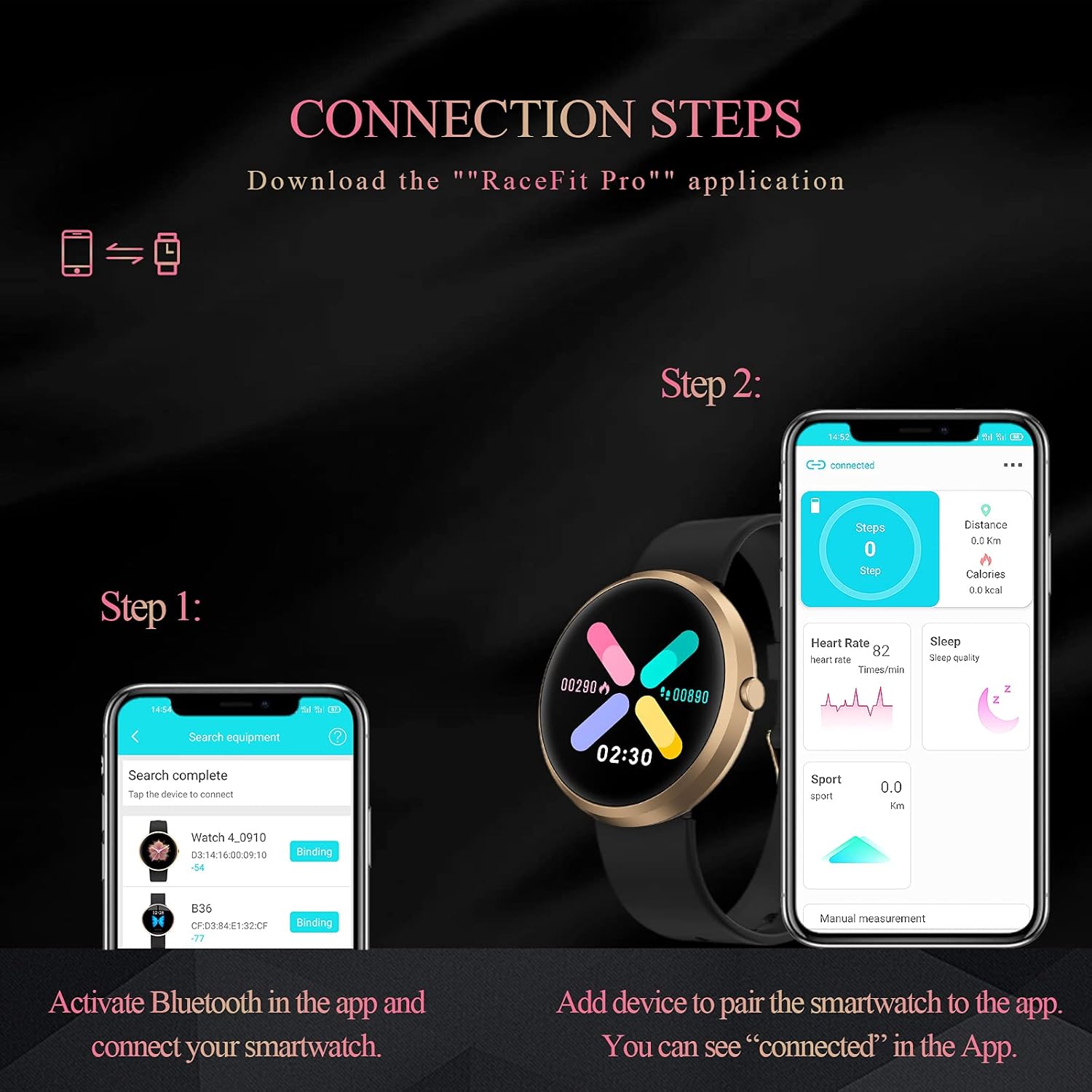
Image: Step-by-step visual guide for connecting the smart watch to the 'RaceFitpro' application on a smartphone.
5. Operating Instructions
5.1 Basic Navigation
The smart watch features a full touch screen. Swipe left, right, up, or down to navigate through different menus and functions. Short press the side button to wake the screen or return to the main watch face.
5.2 Activity Tracking
The watch automatically tracks your daily activities including steps, distance, and calories burned. You can view these statistics directly on the watch or in the 'RaceFitpro' app.
5.3 Heart Rate Monitoring
The advanced HR sensor provides accurate heart rate monitoring throughout the day. To view your current heart rate, swipe to the heart rate interface on the watch. The app provides historical data and trends.

Image: The smart watch interface showing real-time heart rate and sleep quality data.
5.4 Sleep Monitoring
Wear the watch to bed for automatic sleep tracking. It monitors your sleep patterns, including light sleep, deep sleep, and awake time. View detailed sleep analysis in the 'RaceFitpro' app.
5.5 Multi-Sport Modes
The watch supports 11 sports modes to help you track your workouts effectively. These include:
- Walking
- Running
- Badminton
- Mountain Climbing
- Table Tennis
- Cycling
- Football
- Basketball
- Yoga
- Plank
- Rope Skipping
When connected to your phone's GPS, the app can track your workout routes and distances.

Image: Icons representing the different multi-sport modes available on the smart watch.
5.6 Smart Notifications
Receive real-time notifications for calls, texts, and SNS messages directly on your watch when connected to your smartphone. Supported apps include Email, Facebook, Instagram, Twitter, WhatsApp, QQ, WeChat, LinkedIn, and Messenger. Note: You cannot reply to messages or make calls directly from the watch.
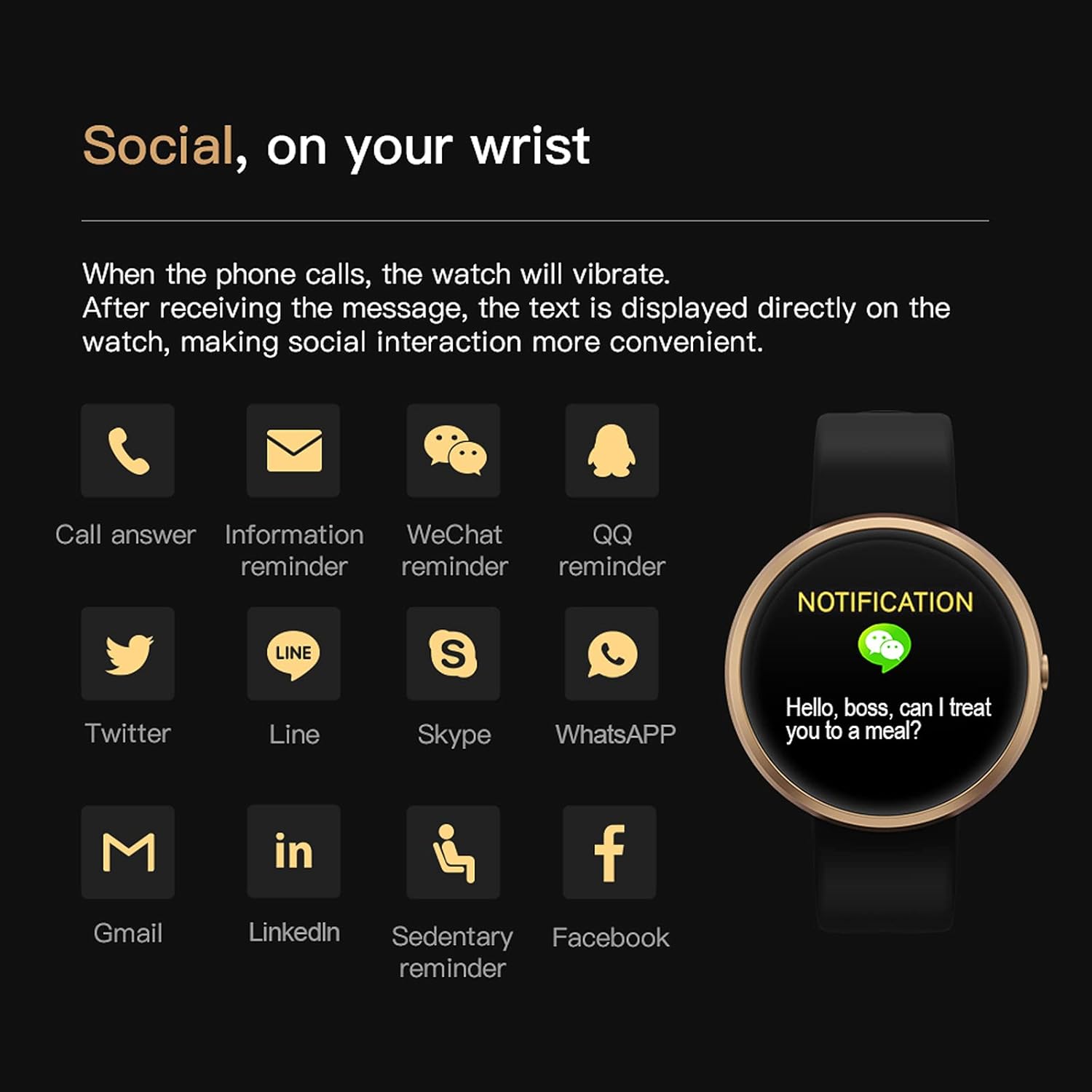
Image: The smart watch screen displaying an incoming notification, alongside icons for various supported communication apps.
5.7 Watch Face Customization
The smart watch comes with 11 pre-installed dials, with over 30 more available in the 'RaceFitpro' app. You can also customize your watch face using any photo from your phone.

Image: A selection of different watch faces that can be chosen or customized for the smart watch.
5.8 Additional Functions
The SKMEI B36PRO includes several other useful features:
- Remote Music Control: Control music playback on your phone.
- Remote Camera Control: Use your watch as a remote shutter for your phone's camera.
- Weather Report: Get current weather information.
- Sedentary Reminder: Alerts you to move after periods of inactivity.
- Alarm Clock: Set silent vibrating alarms.
- Stopwatch: Basic stopwatch functionality.
- Find Phone: Helps locate your paired smartphone.
- Call Rejection: Decline incoming calls from your watch.
- Brightness Adjustment: Adjust screen brightness.
- Power-Saving Mode: Optimize battery usage.
6. Water Resistance
The SKMEI B36PRO Smart Watch has an IP67 waterproof rating. This means it is resistant to splashes, rain, and can be worn during hand washing. However, it is not suitable for swimming, showering with hot water, saunas, or diving. Avoid using it in water temperatures exceeding 100.4°F (38°C).

Image: Illustration of the smart watch's IP67 water resistance, indicating suitability for rain, hand-washing, and showering, with a note to avoid wearing while diving.
7. Specifications
| Feature | Specification |
|---|---|
| Model Name | B36PRO |
| Brand | SKMEI |
| Screen Size | 1.09 Inches |
| Operating System | Android/iOS (Android 4.4+, iOS 8.2+) |
| Connectivity Technology | Bluetooth |
| Special Features | Notifications, GPS (via phone), Heart Rate Monitor, Sleep Monitor, Multi-Sport Modes |
| Battery Type | Lithium Ion |
| Battery Power Rating | 200 Milliamp Hours |
| Item Weight | 5 ounces |
| Product Dimensions | 9.53 x 1.61 x 0.47 inches |
| Water Resistance | IP67 |
8. Maintenance
8.1 Cleaning
Regularly clean your smart watch and strap to prevent skin irritation and maintain device longevity. Use a soft, damp cloth to wipe the screen and strap. Avoid using harsh chemicals or abrasive materials.
8.2 Storage
When not in use for extended periods, store the watch in a cool, dry place. Ensure it is fully charged before storing to prolong battery life.
8.3 Software Updates
It is recommended to keep the 'RaceFitpro' app and your watch's firmware updated to the latest versions for optimal performance and new features. The app will typically notify you of available updates.
9. Troubleshooting
If you encounter issues with your SKMEI B36PRO Smart Watch, please refer to the following common solutions:
- Device Not Turning On: Ensure the watch is fully charged. Connect it to the charging cable and a power source for at least 30 minutes.
- Unable to Connect/Sync:
- Verify Bluetooth is enabled on your smartphone.
- Ensure the 'RaceFitpro' app is open and running in the background.
- Restart both your smartphone and the smart watch.
- Try unpairing and re-pairing the device through the 'RaceFitpro' app.
- Check if the app requires any permissions (e.g., location, Bluetooth) that might be denied.
- Inaccurate Data (Heart Rate, Steps, Sleep):
- Ensure the watch is worn snugly on your wrist, but not too tight.
- Clean the sensor on the back of the watch.
- Ensure your personal information (height, weight, age) is correctly entered in the 'RaceFitpro' app.
- Notifications Not Appearing:
- Confirm the watch is successfully paired and connected to the app.
- Check notification settings within the 'RaceFitpro' app to ensure desired apps are enabled.
- Verify that your phone's notification settings allow the 'RaceFitpro' app to send notifications.
- Short Battery Life:
- Reduce screen brightness.
- Disable continuous heart rate monitoring if not needed.
- Limit the number of apps sending notifications to the watch.
- Ensure the watch is fully charged each time.
If these steps do not resolve your issue, please contact customer support.
10. Warranty and Support
For warranty information and customer support, please refer to the documentation included with your purchase or visit the official SKMEI website. Keep your proof of purchase for warranty claims.


