
iProtool 55.13032.400
60-190 Celsius Degree Germany EGO Temperaturregler Dial Capillary Thermostat 55.13032.400 Thermal Switch Temperature Controller User Manual
Model: 55.13032.400 | Brand: iProtool
1. Introduction
This user manual provides comprehensive instructions for the installation, operation, and maintenance of the iProtool 60-190 Celsius Degree Germany EGO Temperaturregler Dial Capillary Thermostat, Model 55.13032.400. Please read this manual thoroughly before using the device to ensure safe and efficient operation.
2. Product Overview
The iProtool EGO Temperature Controller is a high-quality dial capillary thermostat designed for precise temperature regulation and overheat protection. It features a robust construction with metal, plastic, and resin components, ensuring durability and reliable performance. This thermal switch is suitable for a wide range of applications requiring constant temperature control.

Figure 2.1: Front view of the iProtool EGO Capillary Thermostat, showing the main body, dial, and capillary tube extending from the side.
Key Features:
- Constant temperature control and overheat protection.
- Easy operation with a responsive switch.
- Long service life.
- Wide operating temperature range: 60-190 degrees Celsius.
- Durable construction with SUS capillary material.
3. Components and Parts
The thermostat consists of several key components that work together to provide accurate temperature control.

Figure 3.1: Exploded view of the thermostat components, including the control dial, main switch body, and the capillary tube with its sensing bulb.
- Control Dial: Used to set the desired temperature. Features clear markings for temperature values.
- Main Switch Body: Houses the internal electrical contacts and temperature sensing mechanism.
- Capillary Tube: A thin tube containing a temperature-sensitive fluid that expands and contracts with temperature changes.
- Sensing Bulb (Probe): The end of the capillary tube, placed in the environment where temperature needs to be measured.
- Terminals: Electrical connection points for power input and output to the heating/cooling element.

Figure 3.2: Bottom view of the thermostat, highlighting the electrical terminals for connection. Labels indicate voltage and current ratings.
4. Specifications
Detailed technical specifications for the EGO Temperature Controller Model 55.13032.400:
| Parameter | Value |
|---|---|
| Product Name | EGO Temperature Controller |
| Model Number | 55.13032.400 |
| Operating Temperature Range | 60-190 degrees Celsius |
| Differential | 3±2 degrees Celsius |
| Voltage | AC 250V |
| Current | 16A |
| Probe Length | 77mm (3.03'') |
| Probe Diameter | 5mm (0.2'') |
| Terminal Type | S.P.D.T, S.P.S.T |
| Capillary Length | 830mm (32.68'') |
| Capillary Material | SUS |
| Switch Type | NC (Normal Close) |
| Life Expectancy | 10,000 (times) |
| Product Certification | CQC |
| Applicable Uses | Electric water heater, water boiler, electric oven, warm air heater, washing machine, fryer, kitchen equipment, fridge, freezer, hot and cool dispenser, air conditioner, sauna, water bed, ATM machine. |
5. Setup and Installation
Warning: Installation should only be performed by qualified personnel. Ensure power is disconnected before beginning any installation or wiring work.
- Mounting: Securely mount the thermostat body in a suitable location within the appliance or system. Ensure it is protected from physical damage and excessive vibration.
- Probe Placement: Position the capillary tube's sensing bulb (probe) in the area where temperature control is required. The probe must be in direct contact with the medium (air, liquid, surface) whose temperature is to be regulated. Avoid placing the probe near heat sources that are not representative of the overall temperature.
- Wiring: Connect the electrical wires to the appropriate terminals on the thermostat. Refer to the wiring diagram provided with your appliance or system. The thermostat typically acts as a switch, interrupting or completing a circuit based on temperature. Ensure all connections are secure and insulated.
- Dial Installation: If the dial is separate, carefully align and attach it to the thermostat shaft. Ensure it rotates smoothly and the temperature markings are visible.
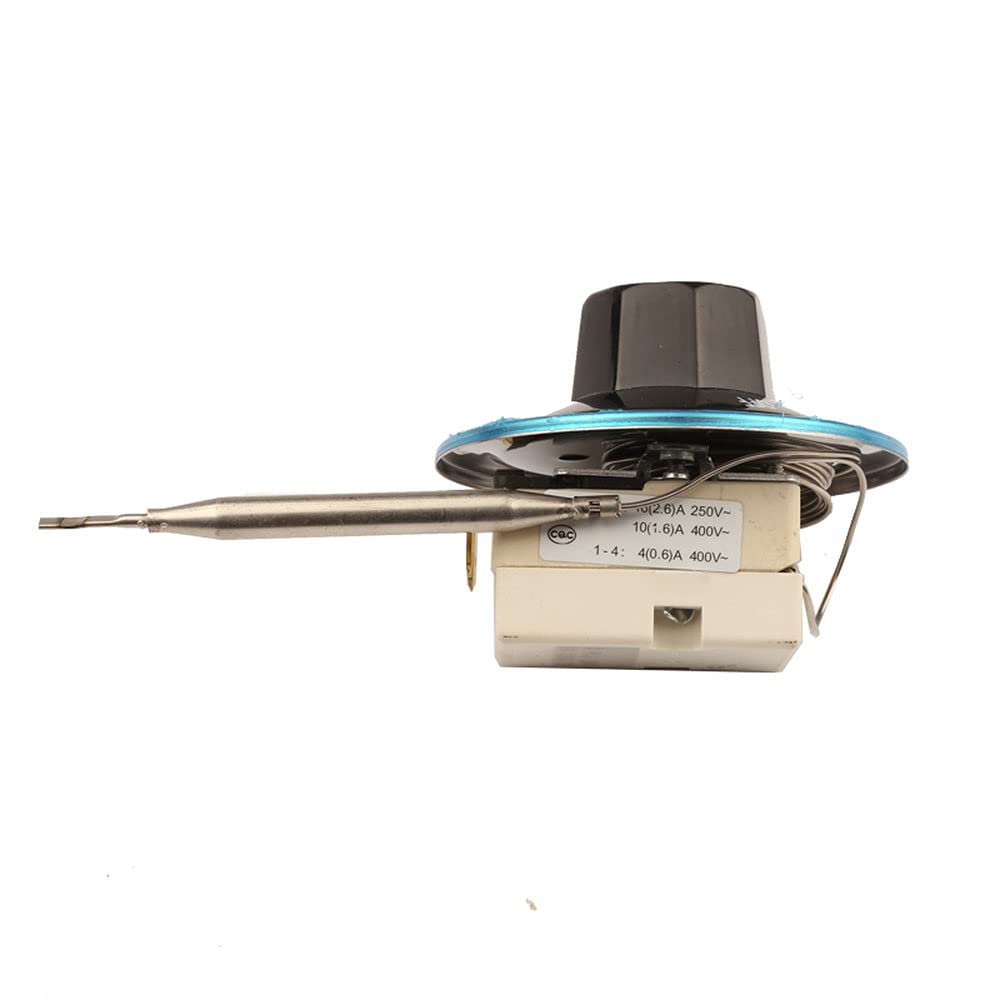
Figure 5.1: Side view illustrating the capillary tube, which needs careful handling during installation to avoid kinks or damage.
6. Operating Instructions
Once installed and wired correctly, operating the thermostat is straightforward:
- Power On: Restore power to the appliance or system containing the thermostat.
- Set Desired Temperature: Rotate the control dial to the desired temperature setting. The thermostat will then maintain the temperature within a narrow range around this set point.
- Monitoring: Observe the appliance's operation to ensure the thermostat is cycling correctly and maintaining the desired temperature.

Figure 6.1: Top view of the thermostat dial, showing the temperature scale from 60 to 190 degrees Celsius and the 'OFF' position.
Note: The thermostat operates as a Normal Close (NC) switch, meaning it is typically closed (conducting) and opens (breaks the circuit) when the set temperature is reached, or in case of overheat protection activation.
7. Maintenance
The iProtool EGO Temperature Controller is designed for long-term, reliable operation with minimal maintenance. However, periodic checks can help ensure optimal performance:
- Cleaning: Keep the thermostat body and dial clean and free from dust or debris. Use a soft, dry cloth for cleaning. Do not use abrasive cleaners or solvents.
- Connections: Periodically inspect electrical connections to ensure they remain tight and free from corrosion.
- Probe Condition: Ensure the capillary tube and sensing bulb are not bent, kinked, or damaged. Any damage to the capillary system can affect accuracy and functionality.
- Calibration Check: If you suspect inaccurate temperature readings, compare the thermostat's behavior with a known accurate thermometer. If significant discrepancies are found, professional inspection may be required.
Caution: Do not attempt to open or repair the thermostat yourself. Refer to qualified service personnel for any repairs.
8. Troubleshooting
This section addresses common issues you might encounter with your thermostat. For problems not listed here, contact customer support.
| Problem | Possible Cause | Solution |
|---|---|---|
| Thermostat not controlling temperature |
|
|
| Inaccurate temperature readings |
|
|
| Thermostat cycles too frequently/infrequently |
|
|
9. Warranty and Support
iProtool products are manufactured to high-quality standards. For specific warranty information, please refer to the warranty card included with your purchase or contact your retailer. For technical support, inquiries, or service requests, please contact iProtool customer service through their official website or the contact information provided at the point of purchase.
Please have your model number (55.13032.400) and purchase details ready when contacting support.