Introduction
Thank you for choosing the Vinsetto High Back Ergonomic Mesh Office Chair. This manual provides detailed instructions for the assembly, operation, maintenance, and troubleshooting of your new office chair. Please read this manual thoroughly before assembly and use to ensure proper function and longevity of the product. Keep this manual for future reference.

Image: The Vinsetto High Back Ergonomic Mesh Office Chair, showcasing its design and features.
Safety Information
- Weight Capacity: Do not exceed the maximum weight recommendation of 300 pounds (136 kg).
- Assembly: Ensure all parts are correctly assembled and tightened before use. Periodically check all bolts and screws for tightness.
- Usage: Use the chair only for its intended purpose as an office chair. Avoid standing on the chair or using it as a step stool.
- Children: Keep children away from the chair during assembly. Small parts may pose a choking hazard.
- Floor Protection: Consider using a chair mat to protect flooring from caster wear.
Package Contents
Before beginning assembly, verify that all components listed below are present and undamaged. If any parts are missing or damaged, please contact customer support.

Image: Key components of the Vinsetto office chair, including the mesh back, padded seat, gas lift, and sturdy base.
| Part | Description | Quantity |
|---|---|---|
| A | Chair Backrest with Headrest | 1 |
| B | Seat Cushion | 1 |
| C | Armrests | 2 |
| D | Mechanism Plate | 1 |
| E | Gas Lift Cylinder | 1 |
| F | Star Base | 1 |
| G | Casters | 5 |
| H | Hardware Pack (Screws, Allen Wrench) | 1 |
Assembly Instructions
Follow these steps carefully to assemble your chair. It is recommended to assemble the chair on a soft, clean surface to prevent damage.
- Attach Casters to Star Base: Insert each of the five casters (G) into the holes at the end of each leg of the star base (F). Push firmly until they click into place.
- Insert Gas Lift: Place the gas lift cylinder (E) into the center hole of the assembled star base (F).
- Attach Armrests to Seat: Secure the armrests (C) to the underside of the seat cushion (B) using the provided screws from the hardware pack (H). Ensure the armrests are oriented correctly (left and right). Do not fully tighten screws until all are in place.
- Attach Mechanism Plate to Seat: Align the mechanism plate (D) with the pre-drilled holes on the underside of the seat cushion (B). Secure it with screws from the hardware pack (H). Ensure the front of the mechanism faces the front of the seat.
- Attach Backrest to Seat: Connect the backrest (A) to the mechanism plate (D) or directly to the seat cushion (B) as indicated by the pre-drilled holes, using the appropriate screws from the hardware pack (H).
- Connect Seat Assembly to Gas Lift: Carefully place the assembled seat (B) with attached backrest (A) and mechanism (D) onto the gas lift cylinder (E) that is already in the star base (F). The tapered end of the gas lift should fit into the center hole of the mechanism.
- Final Tightening: Once all components are loosely assembled, go back and securely tighten all screws. Do not overtighten.
Operating Instructions
Your Vinsetto office chair features several adjustable components to customize your seating experience.
1. Seat Height Adjustment
To adjust the seat height, pull the lever located under the right side of the seat upwards. While holding the lever, stand up to raise the seat or remain seated to lower it. Release the lever at the desired height.

Image: Illustration showing the lever for seat height adjustment (Up/Down) and seat depth adjustment (Forwards/Back).
2. Seat Depth Adjustment
To adjust the seat depth, locate the lever or knob under the seat (often near the height adjustment lever). Pull or turn it to slide the seat cushion forwards or backwards to your preferred position. Release to lock.
3. Reclining Function
To recline the backrest, pull the recline lever (typically on the left side under the seat) outwards. Lean back to the desired angle (up to 120 degrees) and push the lever inwards to lock the position. To return to an upright position, pull the lever outwards again and lean forward slightly.

Image: Visual representation of the chair's backrest reclining up to 120 degrees, suitable for working, watching, or relaxing.
4. Lumbar Support Adjustment
The lumbar support can be adjusted vertically to align with the natural curve of your lower back. Gently push the lumbar support pad up or down to find the most comfortable position.
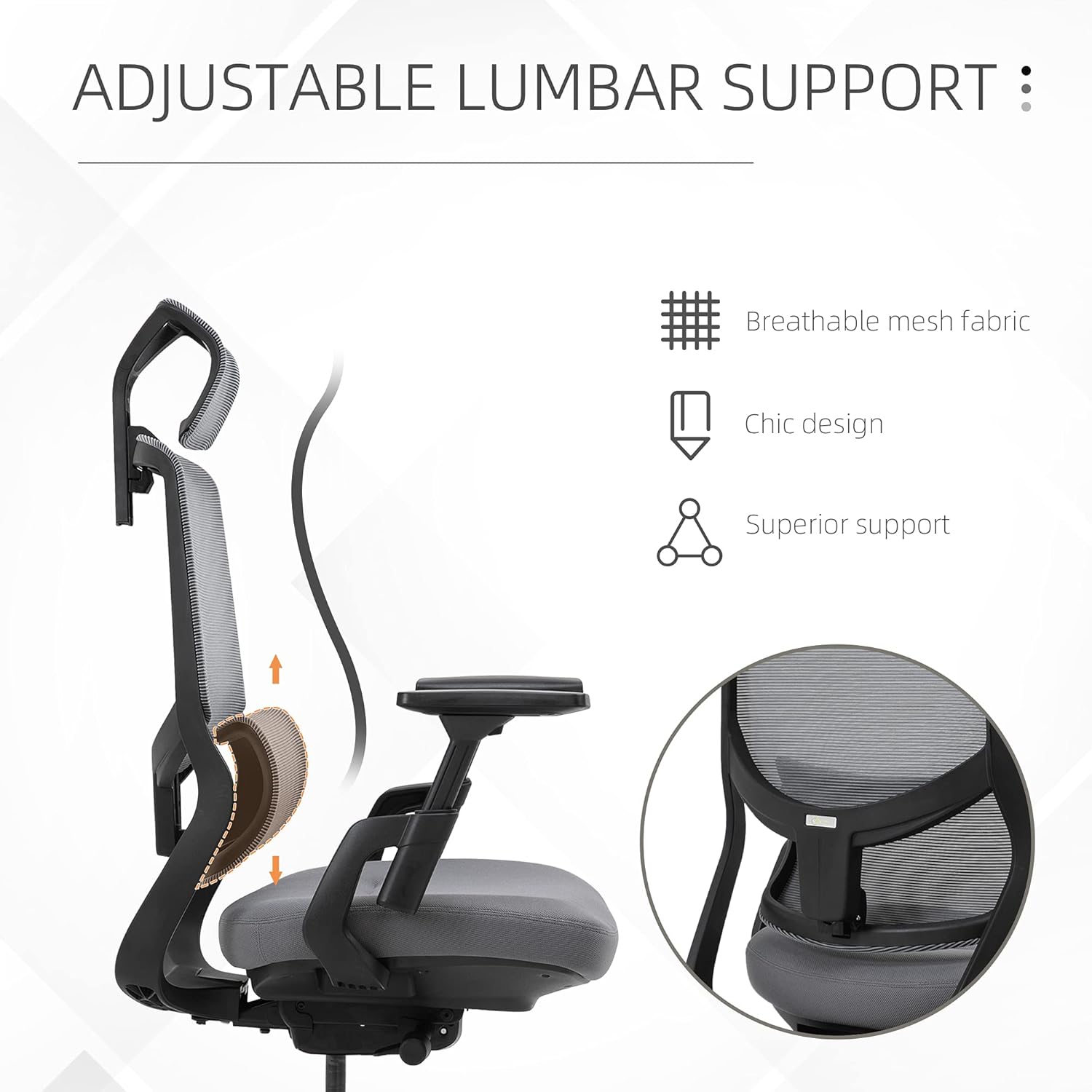
Image: Diagram illustrating the vertical adjustment of the lumbar support for personalized back comfort.
5. Armrest Adjustment
The armrests are adjustable. Press the button on the side of the armrest and slide it up or down to your desired height. Release the button to lock. Some models may also allow for forward/backward or swivel adjustments.
6. Headrest Adjustment
The headrest can be adjusted vertically. Gently pull the headrest up or push it down to position it for optimal neck and head support.

Image: Illustration demonstrating the up/down adjustment of the chair's headrest.
7. Swivel Function
The chair is designed with a 360-degree swivel function, allowing for easy rotation without moving the base.

Image: Depiction of the chair's 360-degree swivel capability.
Maintenance
- Cleaning: For mesh and fabric surfaces, use a soft cloth dampened with mild soap and water. Avoid harsh chemicals or abrasive cleaners. For plastic and metal parts, wipe with a damp cloth.
- Inspection: Periodically check all screws and bolts to ensure they are tight. Retighten if necessary.
- Casters: Keep casters clean from hair and debris to ensure smooth movement.
- Avoid Direct Sunlight: Prolonged exposure to direct sunlight can cause fading of fabric and degradation of plastic components.
Troubleshooting
| Problem | Solution |
|---|---|
| Chair wobbles or feels unstable | Ensure all screws and bolts are securely tightened. Check that the gas lift is properly seated in the star base and mechanism. |
| Gas lift does not adjust height | Verify that the height adjustment lever is fully engaged. If the issue persists, the gas lift may need replacement. Contact customer support. |
| Casters do not roll smoothly | Check casters for accumulated hair, dust, or debris and clean them. Ensure they are fully inserted into the star base. |
| Backrest does not recline or lock | Ensure the recline lever is fully engaged or disengaged as required. Check for any obstructions in the reclining mechanism. |
| Armrests are loose | Tighten the screws that secure the armrests to the seat. |
Specifications

Image: Detailed dimensions of the Vinsetto High Back Ergonomic Mesh Office Chair.
| Feature | Detail |
|---|---|
| Model Name | Vinsetto 921 |
| Brand | Vinsetto |
| Maximum Weight Recommendation | 300 lbs (136 kg) |
| Product Dimensions (Overall) | 24.25" W x 26.75" D x 45.75"-48.5" H |
| Seat Depth | 19.75 inches |
| Seat Height Adjustment Range | 17"-19.75" |
| Armrest Height Adjustment Range | 7.5"-10.75" (from seat) |
| Recline Angle | Up to 120 degrees |
| Material | Mesh fabric, Plastic, Metal |
| Special Features | Adjustable Height, Armrests, Lumbar Support, Headrest, 360° Swivel |
Warranty and Support
This Vinsetto product comes with a standard manufacturer's warranty. For specific warranty details, please refer to the documentation included with your purchase or contact Vinsetto customer support. If you encounter any issues or require assistance, please visit the official Vinsetto website or contact their customer service department for support.
Contact Information: Please refer to the packaging or the official Vinsetto website for the most current customer support contact details.


