
1. Introduction
Thank you for purchasing the LP&No.1 LPSC026 Vinyl Record Player. This manual provides essential information for the safe and efficient operation of your new turntable. Please read it thoroughly before use and retain it for future reference.

Image 1.1: The LP&No.1 LPSC026 Vinyl Record Player.
The LP&No.1 LPSC026 is a versatile 3-speed belt-drive turntable designed to play 7-inch, 10-inch, and 12-inch vinyl records at 33-1/3, 45, and 78 RPM. It features integrated stereo speakers, wireless connectivity for streaming digital music, and USB functionality for playing and recording audio. The unit also includes a durable ceramic cartridge with a diamond stylus and an intelligent auto-stop setting to protect your records.
2. Safety Instructions
- Power Source: Use only the provided power adapter. Ensure the voltage matches your local power supply.
- Water and Moisture: Do not expose the unit to rain, moisture, or liquids. Avoid placing objects filled with liquids, such as vases, on the apparatus.
- Ventilation: Ensure adequate ventilation. Do not block ventilation openings.
- Heat: Keep the unit away from heat sources such as radiators, heat registers, stoves, or other apparatus (including amplifiers) that produce heat.
- Cleaning: Unplug the unit from the wall outlet before cleaning. Use a soft, dry cloth only.
- Servicing: Do not attempt to service the unit yourself. Refer all servicing to qualified service personnel.
- Placement: Place the unit on a stable, level surface to prevent damage and ensure proper operation.
3. Package Contents
Verify that all items listed below are included in your package:
- LP&No.1 Turntable Unit
- Power Cord & Adapter
- 45 RPM Adapter
- User's Manual (this document)
- Dust Cover
4. Product Overview
4.1 Components and Controls
Familiarize yourself with the various parts and controls of your record player:
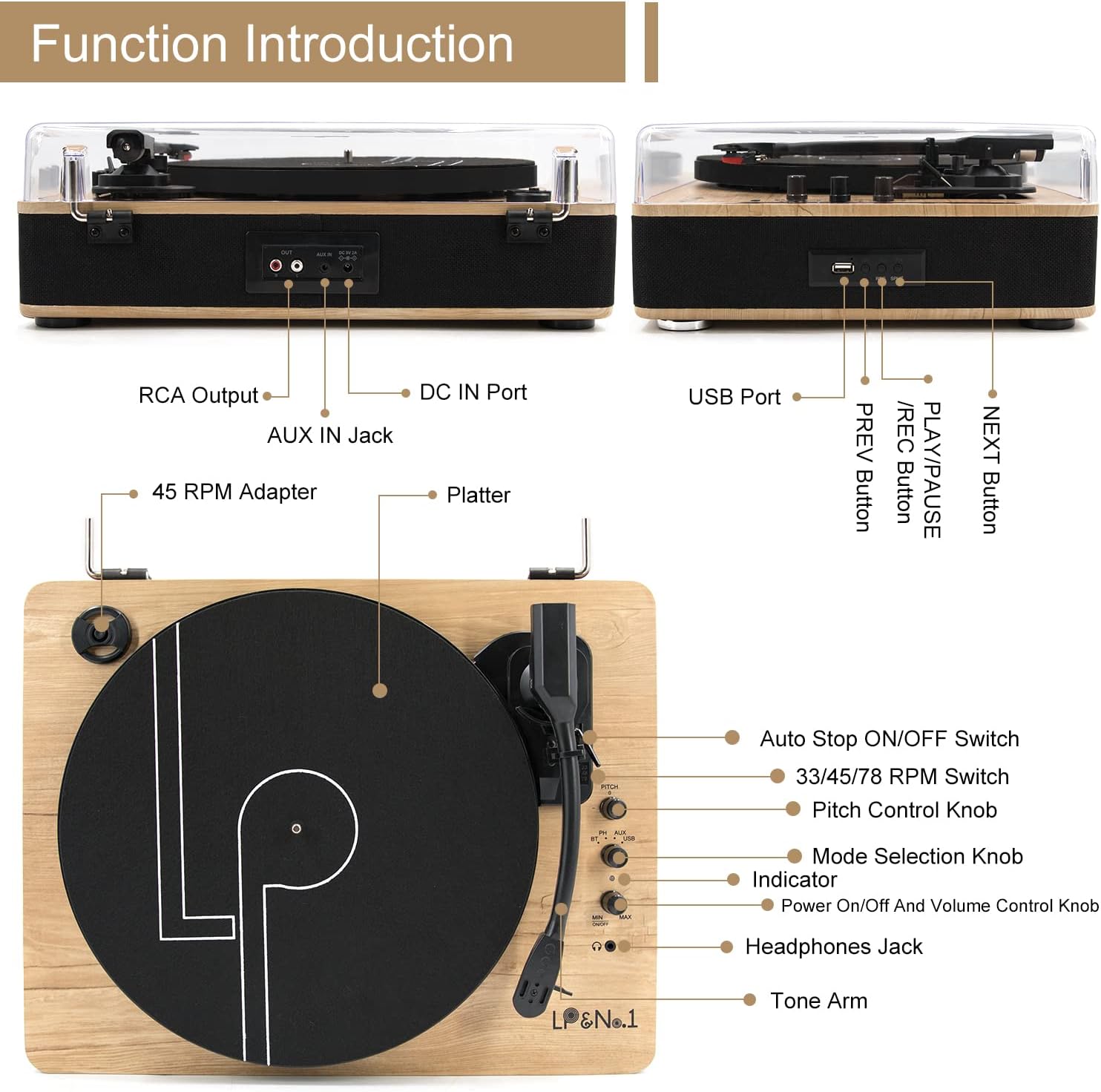
Image 4.1: Front, Back, and Top Panel Controls.
- RCA Output: Connects to external speakers or an amplifier.
- DC IN Port: Power input for the adapter.
- AUX IN Jack: Connects external audio devices.
- USB Port: For USB play and recording functions.
- PLAY/PAUSE / PREV Button: Controls playback and navigates tracks.
- REC Button: Initiates USB recording.
- NEXT Button: Navigates to the next track.
- 45 RPM Adapter: Used for playing 45 RPM records.
- Platter: The rotating surface where records are placed.
- Auto Stop ON/OFF Switch: Enables or disables the automatic stop function at the end of a record.
- 33/45/78 RPM Switch: Selects the playback speed.
- Pitch Control Knob: Adjusts the playback speed fine-tuning.
- Mode Selection Knob: Switches between Phono, Wireless, AUX, and USB modes.
- Power On/Off And Volume Control Knob: Turns the unit on/off and adjusts volume.
- Headphones Jack: For private listening with headphones.
- Tone Arm: Holds the cartridge and stylus.
4.2 Key Features
- Ceramic Cartridge: Equipped with a durable, high-quality diamond stylus for extended record player life.
- Stable and Anti-shake Platter: Designed to provide optimal performance and minimize vibrations during playback.
- Intelligent Auto-Stop Setting: Automatically stops the platter rotation when a record finishes, helping to protect your vinyl records and stylus.

Image 4.2: Detailed view of the Ceramic Cartridge, Stable Platter, and Auto-Stop Switch.
5. Setup
- Unpacking: Carefully remove the turntable from its packaging. Retain the packaging for future transport or storage.
- Placement: Place the turntable on a flat, stable surface away from direct sunlight, heat sources, and excessive dust or vibration.
- Dust Cover: Install the dust cover by aligning its hinges with the slots on the back of the turntable.
- Power Connection: Connect the power adapter to the DC IN port on the back of the turntable, then plug it into a wall outlet.
- Initial Power On: Turn the Power On/Off and Volume Control Knob clockwise to power on the unit.
6. Operating Instructions
6.1 Playing Vinyl Records

Image 6.1: The turntable supports 7", 10", and 12" records at 33/45/78 RPM.
- Power On: Turn the Power On/Off and Volume Control Knob clockwise to turn on the turntable.
- Select Mode: Turn the Mode Selection Knob to 'PHONO'.
- Select Speed: Set the 33/45/78 RPM Switch to the appropriate speed for your record (33-1/3 for LPs, 45 for singles, 78 for older shellac records). Use the 45 RPM adapter for 7-inch singles if needed.
- Place Record: Carefully place a vinyl record on the platter.
- Auto Stop: If desired, set the Auto Stop ON/OFF Switch to 'ON'. The platter will stop rotating automatically when the record finishes.
- Lower Tone Arm: Gently lift the tone arm and position the stylus over the desired track on the record. Slowly lower the tone arm onto the record.
- Adjust Volume: Adjust the volume using the Power On/Off and Volume Control Knob.
- Pitch Adjustment: Use the Pitch Control Knob to fine-tune the playback speed if necessary.
6.2 Wireless Music Playback

Image 6.2: Wireless music streaming from a smartphone to the turntable.
- Power On: Turn the Power On/Off and Volume Control Knob clockwise to turn on the turntable.
- Select Mode: Turn the Mode Selection Knob to 'WIRELESS'. The indicator light will flash, indicating pairing mode.
- Pair Device: On your smartphone, tablet, or other wireless-enabled audio device, search for 'LP&No.1' in the wireless settings and select it to pair.
- Play Music: Once paired, play music from your device. The audio will stream through the turntable's speakers.
- Adjust Volume: Control the volume using both your device and the turntable's volume knob.
6.3 USB Play and Recording
The turntable supports playing audio files from a USB drive and recording vinyl audio directly to a USB drive.
- USB Playback:
- Insert a USB drive into the USB Port.
- Turn the Mode Selection Knob to 'USB'.
- Use the PLAY/PAUSE / PREV and NEXT buttons to navigate and play tracks.
- USB Recording (Vinyl to WAV):
- Insert a USB drive into the USB Port.
- Set the Mode Selection Knob to 'PHONO'.
- Start playing your vinyl record.
- Press the 'REC' button to begin recording. The indicator light will change to confirm recording is active.
- Press the 'REC' button again to stop recording. The recorded audio will be saved as a WAV file on the USB drive.
7. Maintenance
- Dust Cover: Always keep the dust cover closed when the turntable is not in use to protect the platter and stylus from dust and debris.
- Cleaning the Unit: Wipe the exterior of the turntable with a soft, dry, lint-free cloth. Do not use abrasive cleaners, waxes, or solvents.
- Stylus Care: Handle the stylus with extreme care. Clean the stylus periodically using a soft brush, brushing gently from back to front.
- Record Care: Keep your records clean and free of dust. Store them vertically in their sleeves to prevent warping.
8. Troubleshooting
| Problem | Possible Cause | Solution |
|---|---|---|
| No power | Power adapter not connected; Power knob off | Ensure power adapter is securely connected and plugged in; Turn the Power On/Off knob clockwise. |
| No sound from speakers | Volume too low; Incorrect mode selected; Stylus protector still on | Increase volume; Select correct mode (PHONO, WIRELESS, AUX, USB); Remove stylus protector. |
| Record skips | Record is dirty or scratched; Turntable not level; Stylus worn out | Clean record; Place turntable on a level surface; Replace stylus if necessary. |
| Wireless pairing fails | Turntable not in pairing mode; Device too far; Interference | Ensure Mode Selection Knob is set to 'WIRELESS' and indicator is flashing; Move device closer; Reduce interference from other wireless devices. |
| USB recording not working | USB drive full or incompatible format; REC button not pressed | Ensure USB drive has sufficient space and is formatted correctly (FAT32 recommended); Press the 'REC' button firmly. |
9. Specifications

Image 9.1: Dimensions of the LP&No.1 LPSC026 Turntable.
| Feature | Detail |
|---|---|
| Model Number | LPSC026 |
| Brand | LP&No.1 |
| Playback Speeds | 33-1/3, 45, 78 RPM |
| Record Sizes Supported | 7", 10", 12" |
| Motor Type | DC Motor (Belt-Drive) |
| Cartridge Type | Ceramic with Diamond Stylus |
| Connectivity | Wireless, USB, AUX In, RCA Out |
| Special Features | Vinyl LP to WAV recording, Auto-Stop, Pitch Control |
| Material | Plastic, Wood |
| Item Weight | 10.3 pounds (approx. 4.67 kg) |
| Package Dimensions | 19 x 18 x 9 inches (approx. 48.26 x 45.72 x 22.86 cm) |
10. Warranty and Support
LP&No.1 provides lifetime technology support for this product. Additionally, a 30-day money-back guarantee is offered for any reasons, and an extra 60 days quality warranty for freely returning and exchanging new products.
For technical assistance or warranty claims, please contact LP&No.1 customer support through the retailer where the product was purchased or visit the official LP&No.1 brand store online.


