
1. Introduction
Thank you for choosing the Seesii SE008 Portable Spot Welder. This device is designed for efficient and precise spot welding of nickel sheets onto cylindrical batteries, featuring adjustable power, a high-capacity battery, and an intuitive LCD display. Please read this manual thoroughly before operation to ensure safe and correct usage.
2. Safety Information
- Always wear appropriate personal protective equipment, including safety glasses, during operation.
- Ensure the work area is well-ventilated and free from flammable materials.
- Do not operate the spot welder near water or in damp conditions.
- Avoid touching the welding pens or workpieces immediately after welding, as they may be hot.
- Do not attempt to weld materials other than those specified (nickel sheets, cylindrical batteries).
- Keep the device out of reach of children.
- If the device exhibits unusual behavior, smoke, or excessive heat, immediately power it off and disconnect it.
3. Package Contents
Verify that all items listed below are included in your package:
- 1 x Seesii SE008 Spot Welder Unit
- 2 x Spot Welding Pens (16-inch gold-plate terminal)
- 1 x 5M Nickel Sheet
- 1 x Type-C USB Cable
- 1 x Metal File
- 1 x Instruction Manual
- Anti-static stickers
- Battery Insulation Paper

The package includes the main spot welder unit, two welding pens for precise application, a roll of nickel sheet for immediate use, a Type-C USB cable for charging, a metal file for preparing surfaces, and essential documentation and accessories.
4. Product Overview
The Seesii SE008 is a compact and powerful spot welder designed for battery pack assembly. Key features include:
- 30 Gears Adjustable Output Power: Allows for precise control over welding strength for various nickel sheet thicknesses.
- 5000mAh Large Capacity Battery: Provides extended operation time and can also function as a power bank.
- 0.1mm-0.25mm Nickel Sheet Welding: Capable of welding nickel sheets within this thickness range.
- 1.8 Inch HD Colorful LCD Display: Offers clear visibility of settings, battery status, and other operational parameters.
- 16 Inch Gold-Plate Terminal Welding Pens: Flexible and durable pens with low resistance for efficient welding.
- Intelligent Temperature Control: Automatically shuts down if the internal temperature exceeds safe limits.
- Power Bank Function: Can charge external devices via its USB output.
- Compatibility: Suitable for spot welding 18650, 26650, and 32650 cylindrical batteries (Ni/MH, Ni/Cd).
4.1. Device Interfaces
This video demonstrates the LCD screen display, power-on sequence, and various adjustable settings including states switch, preheat pulse, 1-30 gears, and advanced menu options. It also highlights the Type-C interface, soldering pen interface, output interface, and the On/Off button with select functionality.
4.2. LCD Display and Controls

The 1.8-inch HD colorful screen provides an accurate display of various operational values, including current, preheat settings, gear selection, and battery information. This allows for easy monitoring and adjustment of welding parameters.
5. Setup
5.1. Initial Charging
Before first use, fully charge the spot welder. Connect the provided Type-C USB cable to the device and a 5V/2A power adapter. A full charge typically takes approximately 3 hours.

It is recommended to recharge the battery when its charge level drops to 70% to maintain optimal performance and battery longevity.
5.2. Connecting Welding Pens
- Ensure the spot welder is powered off.
- Insert the two welding pens into the designated soldering pen interfaces on the device. Ensure they are securely connected.

The gold-plated terminals ensure ultra-low resistance and stable current flow for effective welding.
5.3. Powering On
Press and hold the power button for 3 seconds to turn on the device. The LCD screen will illuminate, displaying the main interface.
6. Operating Instructions
6.1. Adjusting Welding Gears
The Seesii SE008 features 30 adjustable gears for output power. Adjust the gear setting based on the thickness of the nickel sheet and the desired weld strength. Higher gears provide more power for thicker materials.

Refer to the display for current gear settings and pulse durations (e.g., 1ms, 20ms, 30ms) to fine-tune your welding process.
6.2. Welding Nickel Sheets
The device is capable of welding nickel sheets from 0.1mm to 0.25mm thickness. Proper gear selection is crucial for strong welds.
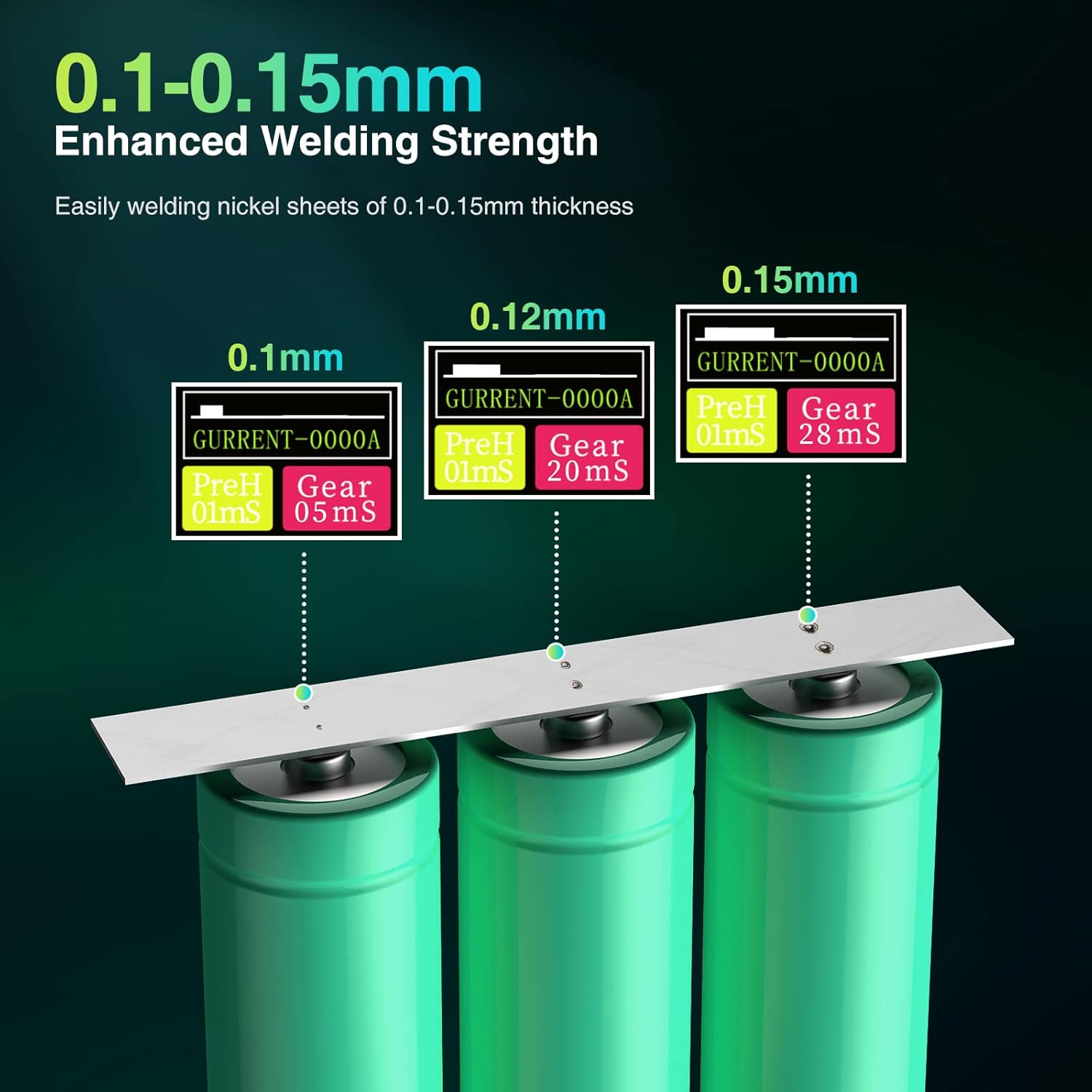
For 0.1mm nickel sheets, a lower gear setting (e.g., Gear 05ms) may be sufficient. For 0.12mm nickel sheets, a medium gear setting (e.g., Gear 20ms) is often appropriate. For 0.15mm nickel sheets, a higher gear setting (e.g., Gear 28ms) is typically required. For 0.2mm nickel sheets, use 24-28 gears with 3-5s contact time. For 0.25mm nickel sheets, use 28-30 gears with 3-5s contact time. Always perform test welds on scrap material to find the optimal settings for your specific application.
This video illustrates the process of welding nickel sheets of varying thicknesses (0.2mm and 0.25mm) onto cylindrical batteries, demonstrating the recommended gear settings and contact times for each thickness.
6.3. Welding Process
- Prepare the battery terminals and nickel strip by ensuring they are clean and free of oxidation. Use the included metal file if necessary.
- Place the nickel strip firmly onto the battery terminal where the weld is desired.
- Position both welding pen tips onto the nickel strip, ensuring good contact and even pressure. The tips should be close together but not touching.
- The device will automatically detect contact and initiate the weld based on the selected gear settings. A spark will occur, indicating a successful weld.
- Lift the welding pens and inspect the weld. Adjust gear settings as needed for stronger or weaker welds.

The Seesii SE008 is compatible with various cylindrical battery types, including 18650, 26650, and 32650, for both Ni/MH and Ni/Cd chemistries.
6.4. Power Bank Function
The Seesii SE008 can also function as a power bank. Connect your mobile device or other USB-powered gadgets to the USB output port (USB 5V 2.1A/2.4A) on the spot welder to charge them.

7. Maintenance
- Cleaning: Regularly clean the welding pen tips with the included metal file or fine-grit sandpaper to remove oxidation and ensure good electrical contact. Wipe the main unit with a dry, soft cloth.
- Storage: Store the spot welder in a cool, dry place away from direct sunlight and moisture. Ensure the battery is partially charged (around 50-70%) before long-term storage.
- Battery Care: Avoid fully discharging the battery frequently. Recharge promptly when the battery level is low.
- Temperature Control: The intelligent temperature control system will protect the device from overheating. Allow the unit to cool down if it automatically shuts off due to high temperature.
8. Troubleshooting
| Problem | Possible Cause | Solution |
|---|---|---|
| No weld or weak weld | Low power setting (gear), dirty welding tips, poor contact, nickel strip too thick. | Increase gear setting. Clean welding tips. Ensure firm and even pressure. Use appropriate nickel strip thickness. |
| Device does not power on | Battery discharged, faulty power button. | Charge the device fully. Contact support if issue persists. |
| Overheating shutdown | Continuous heavy use, high ambient temperature. | Allow the device to cool down. Operate in a cooler environment. Reduce welding frequency. |
| Welding pens not working | Loose connection, damaged pens. | Ensure pens are securely plugged in. Inspect pens for damage; replace if necessary. |
9. Specifications
| Feature | Detail |
|---|---|
| Model Number | SE008 |
| Brand | Seesii |
| Adjustable Gears | 30 Gears |
| Battery Capacity | 5000mAh |
| Nickel Sheet Welding Thickness | 0.1mm - 0.25mm |
| Display | 1.8 Inch HD Colorful LCD |
| Welding Pen Length | 16 inches (Gold-Plate Terminal) |
| Charging Input | Type-C, 5V/2A |
| Power Bank Output | USB 5V 2.1A/2.4A |
| Item Weight | 1.15 pounds |
| Product Dimensions | 5.51 x 4.33 x 1.97 inches |
| Power Source | Battery Powered |
| Special Feature | Portable, Intelligent Temp Control |
10. Warranty and Support
For warranty information or technical support, please refer to the contact details provided with your purchase or visit the official Seesii website. Keep your purchase receipt as proof of purchase for warranty claims.
Seesii Store: Visit the Seesii Store on Amazon


