
1. Introduction
This manual provides detailed instructions for the safe and efficient operation, setup, and maintenance of the Furukawa Fitel S326 High Precision Fiber Optic Cleaver. Please read this manual thoroughly before using the device to ensure proper function and to prevent damage or injury.
1.1 Product Overview
The Fitel S326 is a high-precision fiber optic cleaver designed for single and ribbon fiber applications. It features an automatic blade rotation system and a simple, one-step cleaving process, ensuring consistent, high-quality cleaves essential for fusion splicing.
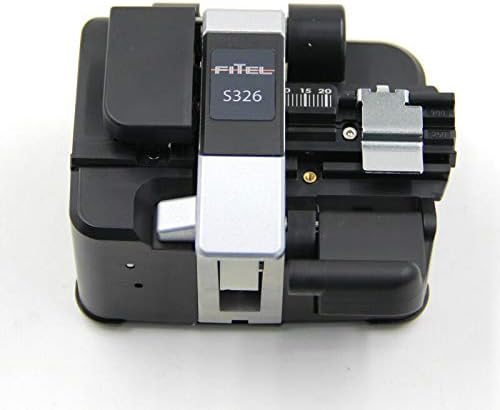
Figure 1: Fitel S326 High Precision Fiber Optic Cleaver in its closed position, showing the Fitel logo and S326 model number on the top cover.
2. Safety Information
Always observe the following safety precautions to prevent personal injury and damage to the cleaver.
- Eye Protection: Always wear appropriate eye protection when handling optical fibers and operating the cleaver. Fiber shards are extremely sharp and can cause severe eye injury.
- Sharp Blade: The cleaver contains an extremely sharp blade. Exercise extreme caution when handling the blade or performing maintenance. Keep fingers clear of the blade path.
- Fiber Shard Disposal: Dispose of all fiber shards properly in a designated fiber waste container. Do not leave shards exposed on work surfaces.
- Clean Environment: Operate the cleaver in a clean, dust-free environment to prevent contamination of fiber ends and internal mechanisms.
- Authorized Personnel: Only trained and authorized personnel should operate and maintain this equipment.
3. Package Contents
Verify that all items are present and undamaged upon unpacking.
- Fitel S326 High Precision Fiber Optic Cleaver
- Carrying Case
- Fiber Waste Bin (integrated or separate, depending on model variant)
- User Manual (this document)

Figure 2: The Fitel S326 cleaver positioned next to its protective carrying case, both in black.
4. Setup
4.1 Unpacking and Inspection
- Carefully remove the cleaver from its packaging.
- Inspect the cleaver for any visible damage that may have occurred during shipping. If damage is found, contact your supplier immediately.
- Place the cleaver on a stable, clean, and level work surface.
4.2 Familiarization with Components
Before operation, familiarize yourself with the main components of the cleaver.
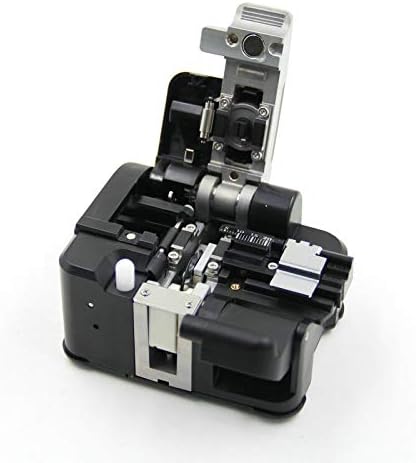
Figure 3: The Fitel S326 cleaver shown with its top cover open, exposing the fiber clamping mechanism, blade, and waste bin area.
5. Operating Instructions
Follow these steps for a precise fiber cleave.
- Prepare the Fiber: Strip the fiber coating to the required length (typically 30-40mm) and clean the bare fiber with an approved fiber cleaning wipe and isopropyl alcohol.
- Open the Cleaver: Lift the top cover of the cleaver. This will typically open the fiber clamp and position the blade for cleaving.
- Place the Fiber: Carefully place the prepared fiber into the V-groove. Ensure the bare fiber extends beyond the cleaving blade and aligns with the measurement scale for the desired cleave length.
- Secure the Fiber: Close the fiber clamp (if not automatic) to gently hold the fiber in place.
- Perform the Cleave: Close the top cover of the cleaver. This action will automatically initiate the cleaving process, scoring and breaking the fiber.
- Remove Fiber: Once the cleave is complete, open the top cover. Carefully remove the cleaved fiber.
- Dispose of Waste: Ensure the cleaved fiber end (waste) is deposited into the integrated fiber waste bin.

Figure 4: A user's hands carefully inserting a prepared optical fiber into the V-groove of the Fitel S326 cleaver, ensuring proper alignment.

Figure 5: A detailed view of the Fitel S326 cleaver's internal mechanism, showing an optical fiber securely clamped within the V-groove, ready for the cleaving process.
6. Maintenance
Regular maintenance ensures optimal performance and extends the life of your cleaver.
- Blade Cleaning: Periodically clean the cleaver blade and surrounding areas with a lint-free swab and isopropyl alcohol. Ensure no fiber debris accumulates.
- V-Groove Cleaning: Keep the V-groove clean from dust and fiber particles. Use a soft brush or compressed air.
- Blade Rotation: The S326 features an automatic blade rotation. If cleave quality degrades, it may indicate the blade needs to be rotated to a new position or replaced. Refer to the blade rotation mechanism instructions (if applicable to your specific S326 variant) or contact support.
- Blade Replacement: When all blade positions have been used, the blade must be replaced. This is a delicate procedure and should only be performed by trained personnel or a service technician. Always use genuine Fitel replacement blades.
- General Cleaning: Keep the exterior of the cleaver clean with a soft, dry cloth. Avoid using harsh chemicals.
7. Troubleshooting
This section addresses common issues you might encounter.
| Problem | Possible Cause | Solution |
|---|---|---|
| Poor cleave quality (angled, rough, or chipped ends) |
|
|
| Fiber not cleaving |
|
|
| Fiber shards accumulating | Full or blocked waste bin | Empty and clean the fiber waste bin. |
8. Specifications
| Feature | Specification |
|---|---|
| Model | S326 |
| Manufacturer | Furukawa |
| Cleave Angle | Typically < 0.5 degrees (dependent on fiber and environment) |
| Fiber Type | Single fiber, ribbon fiber (specific models) |
| Blade Life | Approximately 48,000 cleaves (16 positions x 3,000 cleaves/position) |
| Dimensions | Compact design for portability (exact dimensions vary slightly by variant) |
| Weight | Lightweight for field use |
9. Warranty and Support
The Furukawa Fitel S326 High Precision Fiber Optic Cleaver is backed by a manufacturer's warranty against defects in materials and workmanship. For specific warranty terms and conditions, please refer to the warranty card included with your product or contact your authorized Fitel distributor.
For technical support, service, or to order replacement parts, please contact your local Fitel representative or authorized service center. When contacting support, please have your product model number (S326) and any relevant purchase information available.