
Introduction
Welcome to your new WeighTAJ OCS-WZ-5t Wireless Crane Scale. This manual provides essential information for the safe and effective operation, setup, and maintenance of your device. Please read it thoroughly before use to ensure optimal performance and longevity of the product.
Product Overview
Components


Key Features
- Ideal for various overhead weighing applications including shipping, logistics, industrial, farm, and machine shop environments.
- High capacity: 5 tons (5000 kg / 11000 lbs) with an accuracy of 2 kg.
- Extended wireless range of up to 120 meters in open areas for flexible operation.
- Designed for ease of use, sturdiness, compact form factor, durability, and minimal maintenance.
- Features a handheld wireless display for convenient and remote weight monitoring.
Setup
Unpacking
Carefully remove all components from the packaging. Verify that the crane scale unit and the wireless receiver are present. Inspect for any visible damage from shipping.
Charging the Device
The crane scale unit and the wireless receiver both contain rechargeable batteries. Connect the provided charger to the charging socket on each device. The charging socket on the crane scale unit is located near the power switch. Ensure a full charge before the first use to maximize battery life.
Initial Pairing
The crane scale and wireless display are typically pre-paired at the factory. To confirm connection, power on both devices. If the display does not show readings or indicates a connection error, ensure both units are within the 120-meter wireless range and try power cycling them. Refer to specific instructions if re-pairing is required.
Operating Instructions
Power On/Off
Press the 'ON/OFF' button on the handheld wireless display to power the unit on or off. The crane scale unit also has a separate power switch.
Weighing Procedure
- Ensure both the crane scale and the wireless display are powered on and the display shows '0.00'.
- Securely attach the item to be weighed to the crane scale's hook. Ensure the load is balanced.
- Lift the item steadily. The weight will be displayed on the handheld unit. Wait for the 'STABLE' indicator to confirm the reading.
Tare Function
To subtract the weight of a container or lifting accessory, first place the empty container/accessory on the scale. Once stable, press the 'TARE' button on the remote display. The display will reset to zero. Then, add the item to be weighed into the container.
Zero Function
If the display does not show zero when nothing is on the hook, press the 'ZERO' button to reset it. This ensures accurate measurements for subsequent weighing.
Unit Conversion
The scale supports both kilograms (kg) and pounds (lb). Use the designated button on the remote display (often labeled 'UNIT' or indicated by 'ib'/'kg' on the display) to switch between measurement units.
Maintenance
Cleaning
Wipe the scale and display unit with a soft, damp cloth. Do not use abrasive cleaners, solvents, or immerse the devices in water. Ensure all ports are dry before charging.
Battery Care
Recharge batteries regularly, especially if the scale will not be used for extended periods. Avoid completely draining the batteries frequently. Store the scale in a cool, dry place when not in use.
Storage
When not in use, store the crane scale and remote display in a safe location, protected from extreme temperatures, direct sunlight, dust, and moisture. Ensure the units are powered off before storage.
Troubleshooting
- No Display / Power Issue: Ensure both the crane scale unit and the remote display are fully charged. Press the 'ON/OFF' button firmly. Check the charging cables and adapters.
- Inaccurate Readings: Verify that the scale is hanging stably and not swinging. Ensure the scale has been tared or zeroed correctly before weighing. Confirm that the weight being measured does not exceed the scale's maximum capacity (5 tons).
- Wireless Connectivity Issues: Ensure both the crane scale and remote display are powered on and within the specified 120-meter wireless range. Check for any large metallic obstructions or strong electromagnetic interference between the units. Try moving closer or restarting both devices.
- Error Codes: If an error code appears on the display, power cycle the device (turn off and on again). If the error persists, consult the manufacturer's support or contact customer service.
Specifications

| Feature | Detail |
|---|---|
| Brand | WeighTAJ |
| Model Number | OCS-WZ-5t |
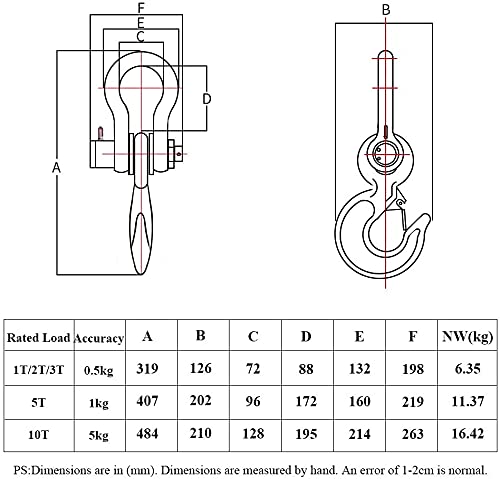
| Weight Limit | 5 Tons (5000 kg / 11000 lbs) |
| Readout Accuracy | 2 Kilograms |
| Display Type | Hand Held Wireless LED Display |
| Wireless Transmission | Up to 120 meters (open area) |
| Material | Metal |
| Item Weight | 11 Kilograms |
| Batteries | Rechargeable (included) |
| Included Components | 1 x Wireless Receiver |

Warranty and Support
For warranty information or technical support, please contact WeighTAJ customer service. Refer to your purchase documentation for specific warranty terms and contact details. Keep your proof of purchase for any warranty claims.
Manufacturer Information
- Manufacturer: Taj, Taj Instruments
- Importer: Taj
- Packer: Taj Instruments
- Date First Available: 25 June 2021