
Introduction
This manual provides essential instructions for the safe and effective use of your Emanjor KB06XL replacement laptop battery. It covers compatibility, specifications, installation, operation, maintenance, and troubleshooting for HP Spectre X360 15-BL series laptops. Please read this manual thoroughly before installation and use.
Important Safety Information
Please store the battery in a dry and cool place. Do NOT dispose of in fire or water. Avoid short circuits, over-voltage, over-discharge, and over-current conditions. Ensure proper handling to prevent damage or injury. Do not disassemble, crush, or puncture the battery. Keep away from children.
Compatibility
This Emanjor KB06XL battery is designed as a replacement for specific HP Spectre X360 15-BL series laptops and compatible part numbers. Please verify your laptop model and original battery part number before installation.
Compatible Laptop Models:
- HP Spectre X360 15-bl000, 15-bl100, 15-bl0xx, 15-bl1xx Convertible PC series
- HP Spectre X360 15-bl002xx, 15-bl000na, 15-bl000ng, 15-bl001na, 15-bl001ng, 15-bl030ng, 15-bl031ng, 15-bl050na, 15-bl050sa, 15-bl051na, 15-bl051sa, 15-bl075nr
- HP Spectre X360 15-bl010ca, 15-bl012dx, 15-bl018ca, 15-bl062nr, 15-bl108ca, 15-bl112dx
- HP Spectre X360 15t-bl000, 15t-bl100, 15T-bl100, 15t-bl101ng series
- HP Z6K96EA, Z6K97EA, Z6K99EA, Z6L00EA, Z6L01EA, Z6L02EA, 2PG91EA
Compatible Part Numbers:
- KB06XL, KBO6XL, KB06079XL
- HSTNN-DB7R, HSTNN-DB8I, TPN-Q179
- 902401-2C1, 901307-2C1, 902499-855
- Z4Z35UA#ABA, Z4Z37UA#ABA

Image illustrating how to identify your original battery's part number and laptop model name for compatibility verification.
Product Specifications
| Model Name | KB06XL Rechargeable battery |
| Battery Type | Li-ion |
| Voltage | 11.55V |
| Capacity | 79.2Wh |
| Cells | 6-Cell |
| Dimensions | Approximately 12.1 x 4 x 0.45 inches |
| Weight | Approximately 15 ounces / 0.94 lb |
| Condition | Brand New |
| Certifications | CE, FCC, RoHS |
| Safety Features | Short circuit protection, over voltage protection, discharge protection, over current protection, temperature anomaly protection, overpower protection, electromagnetic safety, charge time protection, chip monitoring, power protection, reserve protection |
Note: Specifications are subject to actual product.
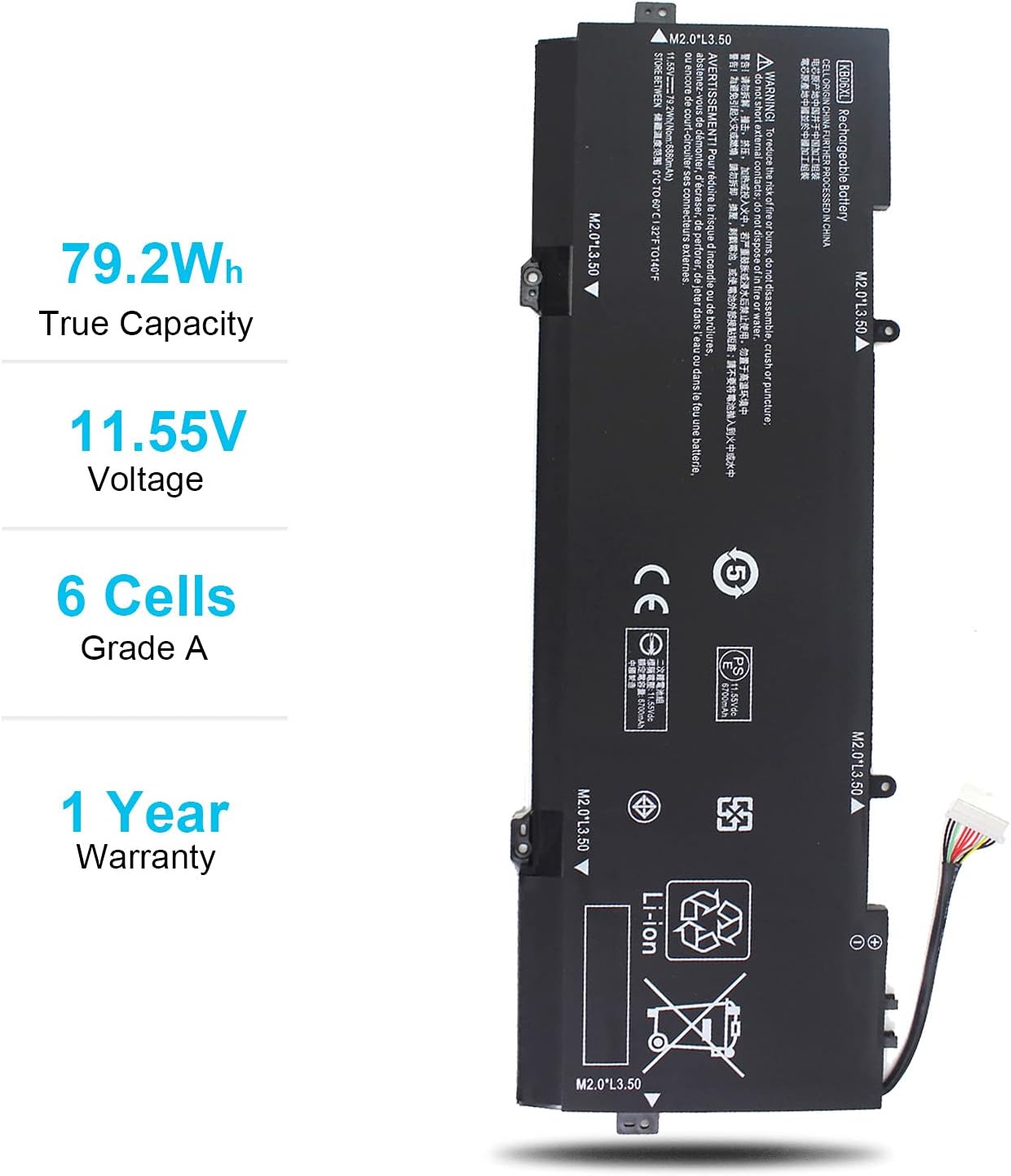
Image displaying the key specifications of the KB06XL battery: 79.2Wh True Capacity, 11.55V Voltage, and 6 Cells.

Diagram highlighting the intelligent security technology and multi-protection features integrated into the KB06XL battery.
Installation Guide
Replacing a laptop battery requires careful handling and some technical proficiency. It is highly recommended to consult a professional or refer to a detailed video guide specific to your laptop model before proceeding. The package includes two screwdrivers to assist with installation.
- Preparation: Power off your laptop completely and disconnect it from the AC adapter. Remove any external devices. It is advisable to discharge any residual power by holding the power button for a few seconds.
- Access the Battery: Carefully open the laptop casing. This usually involves removing screws from the bottom panel. Refer to your laptop's service manual or an online guide for precise instructions on opening your specific HP Spectre X360 model.
- Disconnect Old Battery: Locate the old battery. Gently disconnect the battery connector from the motherboard. Be cautious not to pull on the wires.
- Remove Old Battery: Unscrew any retaining screws holding the old battery in place and carefully lift it out.
- Install New Battery: Place the new Emanjor KB06XL battery into the compartment. Secure it with the screws.
- Connect New Battery: Connect the new battery's cable to the motherboard. Important: Ensure the connector is properly seated and oriented correctly. Some laptop connectors are not keyed and can be inserted backward, leading to the battery not being recognized or charging issues. If the laptop shows a warning or the charging light is an incorrect color (e.g., white instead of orange for charging), try flipping the connector 180 degrees and reinserting it.
- Reassemble: Carefully close the laptop casing and secure all screws.
- Initial Charge: Connect the AC adapter and allow the battery to fully charge before its first use.

Image showing the durable power interface and strong ABS+PC shell of the KB06XL battery. Pay attention to the connector for proper installation.

The Emanjor KB06XL laptop battery shown with the two screwdrivers provided for installation assistance.
Operating Instructions
Once installed, your new battery will power your laptop. For optimal performance and longevity, follow these guidelines:
- First Use: Fully charge the battery before using your laptop on battery power for the first time.
- Charging Cycles: Lithium-ion batteries benefit from regular discharge and charge cycles. Avoid constantly keeping the laptop plugged in at 100% charge if possible.
- Temperature: Operate your laptop in moderate temperatures. Extreme heat or cold can degrade battery performance and lifespan.
- Battery Life Estimation: Actual battery life varies based on usage patterns, screen brightness, running applications, and laptop age. Typical estimated usage times are:
- Daily slight usage: 2.5-4 hours
- Heavy study/work use: 1.5-3 hours
- Game/movie/music: 1-2 hours

Illustration of estimated battery life under different usage conditions: leisure, office, and entertainment. Actual results may vary.
Maintenance and Storage
Proper maintenance can extend the lifespan of your battery:
- Regular Use: Use your laptop on battery power regularly to keep the battery cells active.
- Avoid Deep Discharge: Do not let the battery completely drain to 0% frequently, as this can reduce its lifespan.
- Optimal Charge Level: For daily use, try to keep the battery charge between 20% and 80%.
- Storage: If storing the battery for an extended period (more than a month), charge it to about 50-70% and store it in a cool, dry place away from direct sunlight and extreme temperatures. Avoid storing fully charged or fully discharged.
- Cleaning: Keep the battery and laptop's internal components free from dust and debris to ensure proper cooling and prevent overheating.
Troubleshooting
Common Issues and Solutions:
- Battery Not Recognized / Not Charging:
This is a common issue. First, ensure the battery connector is properly seated and oriented correctly. Some laptop connectors are not keyed and can be inserted backward. If the laptop shows a warning or the charging light is an incorrect color (e.g., white instead of orange for charging), try flipping the connector 180 degrees and reinserting it. If the issue persists, ensure all internal connections are secure and consider updating your laptop's BIOS or battery drivers. A full system restart may also resolve temporary recognition issues.
- Battery Stops Accepting Charge After a Few Months:
If the battery initially works but then fails to charge, first try recalibrating the battery (fully discharge, then fully charge). Ensure your AC adapter is functioning correctly. If the problem continues, it may indicate a defective battery or a laptop charging circuit issue. Contact customer support for assistance.
- Short Battery Life:
Battery life can be affected by many factors. Check your laptop's power settings, reduce screen brightness, close unnecessary applications, and ensure no background processes are consuming excessive power. Over time, all batteries naturally degrade, leading to reduced capacity.
- Laptop Not Powering On After Installation:
Double-check all internal connections, especially the battery connector and any other components that may have been disconnected during the installation process. Ensure the battery is properly seated. If the issue persists, try reinstalling the old battery to determine if the problem is with the new battery or another component of the laptop.
Warranty and Support
Emanjor provides a 12-month replacement warranty for any issues with the KB06XL laptop battery. Additionally, a 60-day money-back refund is supported if you encounter any problems within this period. For any questions, concerns, or technical assistance, please contact Emanjor customer support via email. We are committed to providing solutions to our customers and ensuring your satisfaction.
Customer Support: Available 24x7 via email. Please refer to your purchase documentation for specific contact details.