Introduction
Thank you for choosing the HAAM HWM10S-21N 10 kg Top Load Washing Machine. This manual provides essential information for the safe and efficient use of your appliance. Please read it thoroughly before installation and operation, and keep it for future reference.
Safety Information
Always follow basic safety precautions when using electrical appliances to reduce the risk of fire, electric shock, and injury.
- Ensure the washing machine is properly grounded.
- Do not operate the machine with a damaged power cord or plug.
- Keep children and pets away from the appliance during operation.
- Do not wash items that have been cleaned in, washed in, soaked in, or spotted with combustible or explosive substances.
- Unplug the appliance before cleaning or performing any maintenance.
- Do not attempt to repair or replace any part of the appliance unless specifically recommended in this manual.
Product Overview
Familiarize yourself with the components of your HAAM HWM10S-21N washing machine.
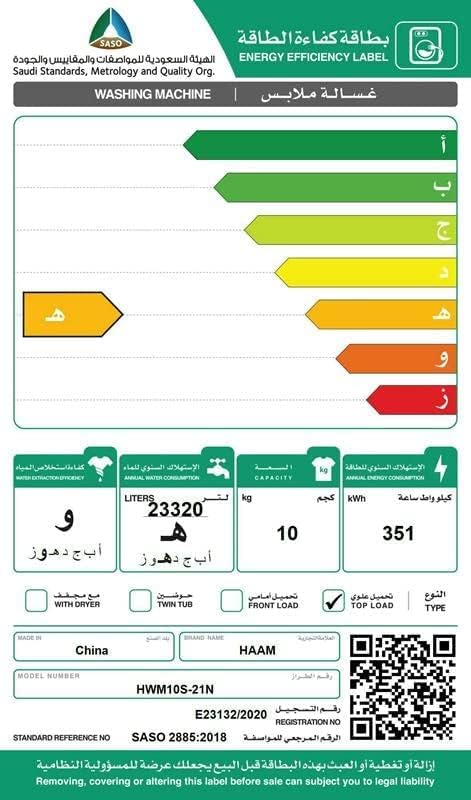
Image 1: Top view of the HAAM HWM10S-21N washing machine, showing the transparent lid and the push-button control panel at the front.

Image 2: Side view of the HAAM HWM10S-21N washing machine, highlighting its silver finish and compact design.
Control Panel
The washing machine features a user-friendly push-button control console. Specific buttons include:
- Power On/Off: To switch the machine on or off.
- Start/Pause: To begin or temporarily stop a wash cycle.
- Program Selection: Buttons for various wash programs like Delicate, Strong, Normal, Jeans, and Quick Wash.
- Water Level: To adjust the water level according to the load size.
- Child Lock: To prevent accidental changes to settings during operation.
Setup and Installation
1. Unpacking
Carefully remove all packaging materials, including the base packaging and any protective films. Inspect the machine for any damage incurred during transit.
2. Location and Leveling
Place the washing machine on a firm, level surface. Ensure there is adequate space around the machine for ventilation and access. Adjust the leveling feet at the bottom of the machine until it is stable and does not wobble.
3. Connecting Water Supply
Connect the inlet hose to the water tap and the other end to the water inlet valve at the back of the washing machine. Ensure all connections are tight to prevent leaks. Use only new hoses provided with the appliance.
4. Connecting Drain Hose
Position the drain hose correctly. It can be hooked over the edge of a sink or connected to a standpipe. Ensure the drain hose is not kinked or blocked, and that its end is at an appropriate height to allow proper drainage without siphoning.
5. Power Connection
Plug the power cord into a grounded electrical outlet. Ensure the voltage and frequency of your power supply match the specifications of the washing machine.
Operating Instructions
1. Loading Laundry
Open the top lid and load clothes loosely into the drum. Do not overload the machine; ensure there is enough space for clothes to move freely during washing. The maximum capacity is 10 kg.
2. Adding Detergent
Add the appropriate amount of detergent to the detergent dispenser. Refer to your detergent packaging for recommended quantities based on load size and water hardness.
3. Selecting a Wash Program
Press the Power button to turn on the machine. Use the Program Selection buttons to choose the desired wash cycle:
- Delicate Wash: For fragile items requiring gentle care.
- Strong Wash: For heavily soiled and durable garments.
- Normal Wash: Standard cycle for everyday laundry.
- Jeans: Optimized for denim and heavy fabrics.
- Quick Wash: For lightly soiled items or when time is limited.
You may also adjust the water level if your chosen program allows manual adjustment.
4. Starting the Cycle
Close the top lid securely. Press the Start/Pause button to begin the wash cycle. The machine will automatically fill with water and proceed with the selected program.
5. Child Lock Feature
To activate the Child Lock, press and hold the designated Child Lock button (if available, or a combination of buttons as indicated on the control panel) for a few seconds. This will lock the control panel to prevent accidental changes by children. Repeat the action to deactivate.
Maintenance
Regular maintenance ensures the longevity and optimal performance of your washing machine.
1. Cleaning the Magic Filter
The machine is equipped with a magic filter to collect impurities. Regularly remove and clean this filter to maintain washing efficiency. Typically, the filter is located inside the drum. Pull it out, remove accumulated lint and debris, rinse under running water, and reinsert it.
2. Cleaning the Exterior
Wipe the exterior surfaces of the washing machine with a soft, damp cloth. Do not use abrasive cleaners or solvents that could damage the finish.
3. Cleaning the Drum
Periodically run a self-clean cycle or a hot wash cycle with an empty drum and a washing machine cleaner to remove detergent residue and prevent odors.
4. Water Inlet Filter
Check and clean the filter screen at the water inlet valve periodically to prevent blockages caused by sediment in the water supply.
Troubleshooting
Before contacting service, refer to the following table for common issues and their solutions.
| Problem | Possible Cause | Solution |
|---|---|---|
| Machine does not start | Power cord not plugged in; Lid not closed; Power outage. | Check power connection; Ensure lid is fully closed; Check household power supply. |
| No water filling | Water tap closed; Water inlet hose kinked; Water supply cut off. | Open water tap; Straighten hose; Check household water supply. |
| Machine vibrates excessively | Machine not level; Load unbalanced; Shipping bolts not removed. | Adjust leveling feet; Redistribute laundry evenly; Ensure all shipping bolts are removed (if applicable). |
| Water leakage | Hoses not properly connected; Drain hose blocked or improperly positioned. | Tighten hose connections; Clear drain hose blockage and ensure correct height. |
| Poor washing results | Overloading; Insufficient detergent; Incorrect program selection; Dirty magic filter. | Reduce load size; Use correct detergent amount; Select appropriate program; Clean magic filter. |
Specifications
Technical details for the HAAM HWM10S-21N washing machine.
| Brand | HAAM |
| Model Number | HWM10S-21N |
| Capacity | 10 Kilograms |
| Product Dimensions | 75.5 x 43 x 97 cm (L x W x H) |
| Item Weight | 20 Kilograms |
| Annual Energy Consumption | 351 Kilowatt Hours |
| Installation Type | Freestanding |
| Control Console | Push Button |
| Access Location | Top Load |
| Material Type | ABS |
| Special Features | Child Lock |
| Color | Silver |

Image 3: Energy Efficiency Label for the HAAM HWM10S-21N washing machine. It indicates an annual energy consumption of 351 kWh and a capacity of 10 kg. For more details, visit the official Saudi Standards, Metrology and Quality Org. website: SASO Certificate Authentication.
Warranty and Support
Warranty Information
This HAAM washing machine comes with a 2-year warranty from the date of purchase. Please retain your proof of purchase for warranty claims. The warranty covers manufacturing defects under normal use conditions. It does not cover damage caused by misuse, improper installation, or unauthorized repairs.
Customer Support
For technical assistance, service requests, or installation inquiries, please contact HAAM customer service at the following numbers:
- Riyadh: +966 -11- 4094006 Ext – 113
- Jeddah: +966- 12- 6577714
- Dammam: +966-13- 8343691
- Qassim: +966 581044198
- Abha: +966 593322785
When contacting support, please have your model number (HWM10S-21N) and purchase details ready.