
Introduction
This manual provides instructions for the safe and effective use of your Boston Tech WE108-V2 Infrared Therapy Lamp. This device is designed for thermotherapy, offering localized heat treatment to aid in muscle pain relief, improve circulation, and support joint health.
Important Safety Information
- Read all instructions before use.
- Do not use near water or in damp environments.
- Keep out of reach of children and pets.
- Ensure proper ventilation during use to prevent overheating.
- Do not touch the hot bulb during or immediately after use. Allow sufficient time for cooling.
- Consult a healthcare professional before use if you have any medical conditions, are pregnant, or have sensitive skin.
- Unplug the device from the power outlet when not in use and before cleaning or bulb replacement.
- If you notice any persistent burning smell, unusual noises, or abnormal operation, immediately unplug the device and contact customer support.
- Do not cover the lamp during operation.
Package Contents
- 1 x Boston Tech WE108-V2 Infrared Therapy Lamp unit
- 1 x 275W E27 Infrared Bulb
- 1 x Flexible and stable base with wheels
- 1 x Desk clamp accessory
Setup Instructions
1. Assembling the Base
Insert the five legs into the central base unit. Ensure they are securely fastened. Attach the wheels to the end of each leg for mobility.

2. Attaching the Lamp Arm
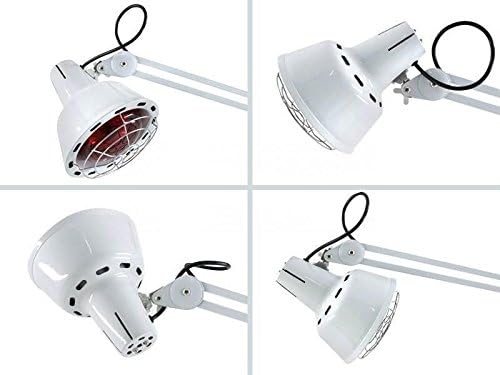
Securely attach the lamp arm to the main pole of the base. The arm is designed for multiple positions and articulation.

3. Installing the Bulb
Carefully screw the 275W E27 infrared bulb into the lamp head socket. Do not overtighten.

4. Optional Desk Clamp Installation
If using the desk clamp, attach it to a stable surface and secure the lamp arm into the clamp. This provides an alternative to the wheeled base.

Operating Instructions
1. Power Connection
Plug the power cord into a suitable electrical outlet (100-240V, 50Hz).
2. Turning On/Off
Use the power switch located on the control unit to turn the lamp on or off.
3. Adjusting Intensity (Dimmer)
Rotate the dimmer knob on the control unit to adjust the infrared light intensity to your desired level.

4. Positioning the Lamp
Adjust the flexible arm to direct the infrared light to the desired treatment area. Maintain a comfortable distance from the skin to avoid overheating.
5. Treatment Duration
Typical treatment sessions range from 10 to 20 minutes. Do not exceed 30 minutes per session on a single area. Always monitor your skin for excessive heat or discomfort.
Maintenance
Cleaning
Ensure the lamp is unplugged and completely cool before cleaning. Wipe the exterior with a soft, dry cloth. Do not use abrasive cleaners or immerse the unit in water.
Bulb Replacement
If the bulb needs replacement, ensure the lamp is unplugged and cool. Carefully unscrew the old bulb and replace it with a new 275W E27 infrared bulb.
Troubleshooting
Lamp Does Not Turn On
- Check if the power cord is securely plugged into the outlet and the lamp.
- Ensure the power switch is in the "On" position.
- Verify the electrical outlet is functional by testing it with another device.
Burning Smell During Initial Use
- A slight burning smell may occur during the first few uses due to manufacturing residues. This should dissipate after a few uses.
- If the smell persists, is strong, or is accompanied by smoke, immediately unplug the device and contact customer support.
Lamp Feels Unstable
- Ensure all five legs of the base are fully inserted and securely tightened.
- If using the desk clamp, ensure it is tightly fastened to a stable surface.
Specifications
| Feature | Detail |
|---|---|
| Model Number | WE108-V2 |
| Power Output | 275 Watts |
| Bulb Type | Infrared, Incandescent |
| Bulb Base | E27 |
| Voltage | 100-240 Volts, 50 Hz |
| Light Color | Yellow (Infrared Spectrum) |
| Special Features | Dimmable, Flexible Arm, Wheeled Base, Desk Clamp Included |
| Dimensions (assembled) | 60 x 60 x 29 cm (approximate) |
| Weight | 6.8 kg |
| Material (bulb filament) | Tungsten |
| Intended Use | Physiotherapy, Thermotherapy, Muscle Pain Relief, Circulation Improvement |
Warranty and Support
The Boston Tech WE108-V2 Infrared Therapy Lamp comes with a 3-year warranty. For technical assistance, warranty claims, or any questions regarding your product, please contact Boston Tech's official national technical service.
For more information or to explore other Boston Tech products, please visit the official Boston Tech store:
