
1. Introduction
This manual provides essential instructions for the safe and efficient operation, maintenance, and care of your Panasonic SD-MDX4-K Home Bakery Bistro. Please read this manual thoroughly before using the appliance and retain it for future reference.

This image displays the Panasonic SD-MDX4-K Home Bakery Bistro, a compact black bread maker with a control panel on top. The panel features a digital display and various buttons for program selection and operation. A handle is visible on the right side.
2. Important Safety Information
WARNING: This appliance is designed for AC100V power supply only. Using it with a different voltage (e.g., 120V or 240V) without a suitable step-down transformer will damage the unit and poses a fire hazard. Ensure you have the correct voltage converter if operating outside of Japan.
- Always unplug the appliance from the power outlet when not in use, before cleaning, or if a malfunction occurs.
- Do not immerse the appliance, power cord, or plug in water or other liquids.
- Keep hands, hair, and clothing away from moving parts during operation.
- Do not operate the appliance with a damaged cord or plug.
- Ensure the appliance is placed on a stable, heat-resistant surface, away from walls and other appliances to allow for proper ventilation.
- The bread pan and internal components become very hot during and after operation. Use oven mitts when handling hot parts.
- This appliance is for household use only.
3. Product Components
Familiarize yourself with the main parts of your Panasonic Home Bakery Bistro:
- Main Unit: Houses the motor, heating element, and control panel.
- Control Panel: Features a digital display, program selection buttons, and start/stop controls.
- Bread Pan: Removable non-stick pan where ingredients are placed.
- Kneading Blade: Detachable blade inside the bread pan for mixing and kneading dough.
- Yeast Dispenser: Automatically adds yeast at the optimal time.
- Ingredient Dispenser: Automatically adds additional ingredients like nuts or dried fruit.
- Measuring Cup and Spoon: For accurate ingredient measurement.
4. Initial Setup
- Unpacking: Carefully remove all packaging materials and accessories.
- Cleaning: Before first use, wash the bread pan, kneading blade, and measuring utensils with warm soapy water. Wipe the main unit with a damp cloth. Ensure all parts are completely dry before assembly.
- Placement: Place the bread maker on a flat, stable, and heat-resistant surface. Ensure adequate ventilation around the unit.
- Power Connection: Connect the power cord to a suitable AC100V outlet. If using outside Japan, connect to a certified step-down transformer first, then plug the transformer into your local power outlet.
5. Operating Instructions
5.1 Basic Bread Making Process
- Insert Kneading Blade: Place the kneading blade onto the shaft inside the bread pan.
- Add Ingredients: Add liquid ingredients first, followed by dry ingredients (flour, sugar, salt, etc.). Ensure yeast is placed in the yeast dispenser, not directly into the pan with other ingredients, unless specified by the recipe.
- Place Bread Pan: Securely place the bread pan into the main unit. Close the lid.
- Select Program: Use the control panel to select your desired bread program (e.g., Basic, Whole Wheat, French). The display will show the program number and estimated baking time.
- Start: Press the Start button. The bread maker will begin the process of kneading, rising, and baking.
- Remove Bread: Once the program is complete, the unit will beep. Unplug the appliance. Using oven mitts, carefully remove the bread pan. Invert the pan to release the bread onto a wire rack to cool.
5.2 Advanced Features
The Panasonic SD-MDX4-K features advanced technologies for optimal bread quality:
5.2.1 3D Kneading Technology
This bread maker utilizes a unique 3D kneading technique that mimics professional hand-kneading, ensuring thorough mixing and optimal gluten development for a smooth, elastic dough.

This image illustrates the "3D Kneading" technique. The top part shows hands actively kneading dough, emphasizing the thorough mixing process. The bottom part shows the dough inside the bread maker's pan, demonstrating how it is kneaded to achieve a smooth, elastic texture, essential for well-risen bread.
5.2.2 W-Sensing Fermentation
The appliance is equipped with sensors that detect both room temperature and the internal temperature of the bread maker. This allows for precise temperature control during fermentation, optimizing the process for consistent results regardless of ambient conditions.
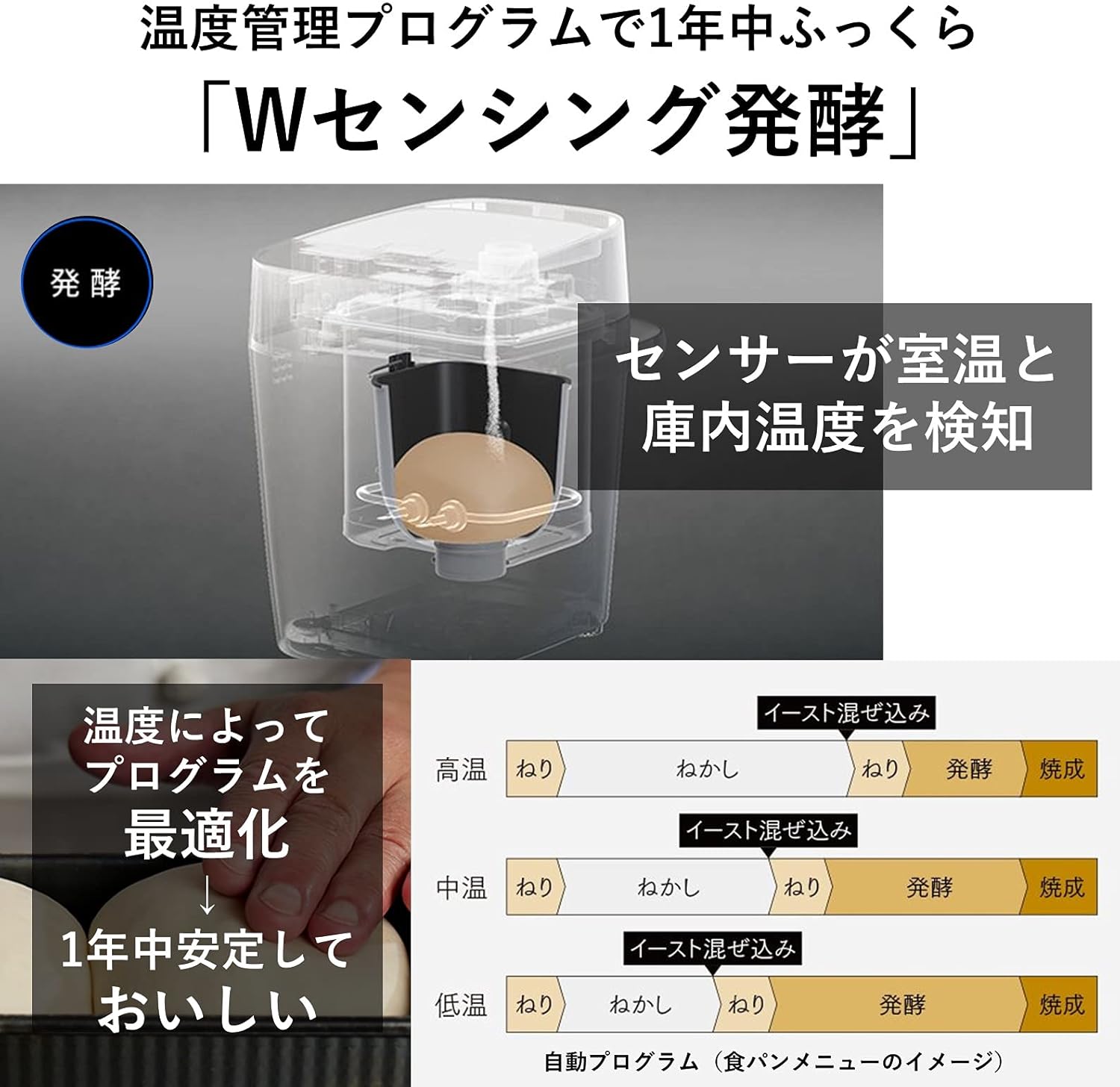
This diagram explains the "W-Sensing Fermentation" process. It shows a sensor detecting both room temperature and the internal temperature of the bread maker. Based on these readings, the fermentation program is optimized (high, medium, or low temperature settings) to ensure stable and delicious results throughout the year. The process involves kneading, resting, yeast mixing, fermentation, and baking stages.
6. Recipes and Programs
Your Panasonic SD-MDX4-K comes with a comprehensive recipe book offering over 43 menu options and 100 recipes. These include various bread types, doughs, and specialty items.
6.1 Specialty Bread Programs
- Rich Pain de Mie: A program designed to produce a soft, fine-textured, and moist loaf, ideal for sandwiches.
- Low-Carb Bread: A dedicated program for baking low-carbohydrate bread, which remains soft and fluffy.

This image showcases a freshly baked loaf of "Rich Pain de Mie" bread, sliced to reveal its soft, fine-textured, and moist crumb. The bread is presented on a wooden board, highlighting its appealing appearance and texture.

This image features slices of low-carb bread, described as soft and fluffy despite its reduced sugar content (approximately 60% less sugar compared to standard bread mixes). A package of Panasonic's low-carb bread mix (SD-LCM10) is also shown, indicating the use of plant-based protein for a delicious, non-dry result.
6.2 Manual Functions
The manual function allows you to customize kneading, fermentation, and baking levels to create your own unique bread recipes.

This image highlights the extensive recipe support provided with the bread maker, featuring a Panasonic Recipe Book. It mentions over 43 menu options and 100 recipes, including dough menus and manual functions. A table illustrates different kneading levels (Level 1 to Level 4), explaining how each level contributes to dough development, from gently connecting dough to creating strong gluten for fluffy results.
7. Care and Maintenance
Proper cleaning and maintenance will extend the life of your bread maker.
- Cleaning the Main Unit: Wipe the exterior of the main unit with a dry cloth. Do not use abrasive cleaners or immerse in water.
- Cleaning the Bread Pan and Kneading Blade: After each use, remove the bread pan and kneading blade. Wash them with warm, soapy water and a soft sponge. Ensure all food residue is removed, especially around the kneading blade shaft. Dry thoroughly.
- Cleaning Dispensers: Clean the yeast and ingredient dispensers regularly to prevent residue buildup. Use a small brush if necessary.
- Storage: Store the bread maker in a clean, dry place when not in use.
8. Troubleshooting
If you encounter issues with your bread maker, refer to the following common problems and solutions:
| Problem | Possible Cause | Solution |
|---|---|---|
| Bread does not rise | Expired yeast, incorrect water temperature, too much salt/sugar, yeast added incorrectly. | Check yeast expiry, use lukewarm water, ensure correct ingredient measurements, place yeast in dispenser. |
| Bread is too dense | Too much flour, not enough liquid, insufficient kneading. | Measure ingredients precisely, ensure kneading blade is properly installed. |
| Bread pan sticks | Non-stick coating damaged, residue buildup. | Ensure proper cleaning, avoid using metal utensils in the pan. |
| Appliance does not turn on | Not plugged in, power outage, incorrect voltage. | Check power connection, verify power supply, ensure correct AC100V voltage or use appropriate transformer. |
If the problem persists after attempting these solutions, please contact Panasonic customer support.
9. Product Specifications
- Brand: Panasonic
- Model: SD-MDX4-K
- Color: Black
- Product Dimensions: 10.35"D x 14.02"W x 17.99"H (26.3 cm D x 35.6 cm W x 45.7 cm H)
- Item Weight: 13.2 pounds (6 kg)
- Wattage: 430W
- Power Supply: AC100V (Japanese market specification)
- Number of Programs: 43
- Product Care Instructions: Wipe with Dry Cloth
- Manufacture Year: 2021
10. Warranty and Support
For warranty information, please refer to the warranty card included with your product or visit the official Panasonic website for your region. Keep your purchase receipt as proof of purchase for warranty claims.
For technical support, service, or to order replacement parts, please contact Panasonic customer service in your country or region. Contact details can typically be found on the Panasonic official website or in the product packaging.


