
AKD Part Amber LED Light Bar
AKD Part 30 Inch Amber LED Light Bar Kit Instruction Manual
Model: Amber LED Light Bar
1. Introduction
This manual provides comprehensive instructions for the installation, operation, and maintenance of your AKD Part 30 Inch Amber LED Light Bar Kit. Designed for off-road vehicles, trucks, SUVs, and UTVs, this high-intensity LED light bar offers superior illumination with its unique spot and flood combo beam pattern. Please read this manual thoroughly before installation and use to ensure proper function and safety.
2. Safety Information
- Always disconnect the vehicle's battery before performing any electrical work.
- Ensure all wiring connections are secure and properly insulated to prevent short circuits.
- Do not look directly into the light bar when it is illuminated, as it can cause eye damage.
- Verify local regulations regarding auxiliary lighting before installation and use on public roads.
- Install the light bar in a location that does not obstruct the driver's view or interfere with vehicle safety systems.
- Consider adding additional waterproofing sealant to all seams and screw points for enhanced durability, especially in harsh environments.
3. Package Contents
Please verify that all items listed below are included in your package:
- 1 x 30" Single Row Amber Light Bar
- 1 x Light Bar Black Cover
- 1 x 9.8FT Nylon Wiring Harness Kit (with Rocker Switch, Power Relay, and Blade Fuse)
- 2 x Aluminum Adjustable Mounting Brackets
- 1 x L-Wrench
- 1 x Necessary Screw Set

Figure 3.1: All components included in the AKD Part 30 Inch Amber LED Light Bar Kit.
4. Specifications
| Feature | Description |
|---|---|
| Model | Amber LED Light Bar |
| Light Source Type | LED (High-intensity Imported P8 LED chips) |
| Wattage | 168 Watts (24pcs* 7W) |
| Brightness | 16,800 Lumens |
| Color Temperature | 3,000K (Amber) |
| Beam Pattern | Optimal Combo Beam (12 flood 5D optics, 12 spot 3D optics) |
| Voltage | 12 Volts (DC) |
| Amperage | 14 Amps |
| Material | Aluminum Housing, PC Lens |
| Finish Type | Black |
| IP Rating | IP68 (Waterproof, Shockproof, Dustproof) |
| Lifespan | Over 50,000 hours |
| Product Dimensions | 31.8"L x 3.6"W x 2"H |
| Item Weight | 5.23 Pounds |

Figure 4.1: Detailed dimensions of the light bar and wire kit.
5. Setup and Installation
The AKD Part light bar is designed for straightforward installation. Follow these steps for proper setup:
- Mounting the Light Bar:
- Identify a suitable mounting location on your vehicle (e.g., bumper, grille, roof).
- Attach the adjustable mounting brackets to the light bar using the provided screws.
- Secure the light bar to your vehicle using the brackets and appropriate hardware. Ensure the mounting surface is strong enough to support the light bar's weight and vibrations.
- Adjust the angle of the light bar for optimal illumination using the adjustable brackets.
- Wiring Connection:
- The included 9.8FT Nylon Wiring Harness Kit simplifies installation.
- Connect the light bar's plug to the corresponding connector on the wiring harness.
- Connect the red wire from the harness to the positive (+) terminal of your vehicle's 12V DC battery.
- Connect the black wire from the harness to the negative (-) terminal of your vehicle's battery or a suitable ground point on the vehicle chassis.
- Install the rocker switch in a convenient location inside your vehicle's cabin.
- Ensure the power relay and blade fuse are properly integrated into the circuit as per the wiring diagram.

Figure 5.1: Simplified wiring diagram and installation overview.
6. Operating Instructions
Once installed, operating your AKD Part Amber LED Light Bar is simple:
- Turn on the light bar using the installed rocker switch.
- The light bar features an optimal combo beam, providing both wide flood illumination for close-range visibility and focused spot illumination for long-distance reach.
- The 3,000K amber light output is specifically chosen to enhance visibility in adverse weather conditions such as fog, dust, rain, and snow, by reducing glare and improving contrast.
- When not in use or when required by road regulations, place the included black light cover over the light bar.
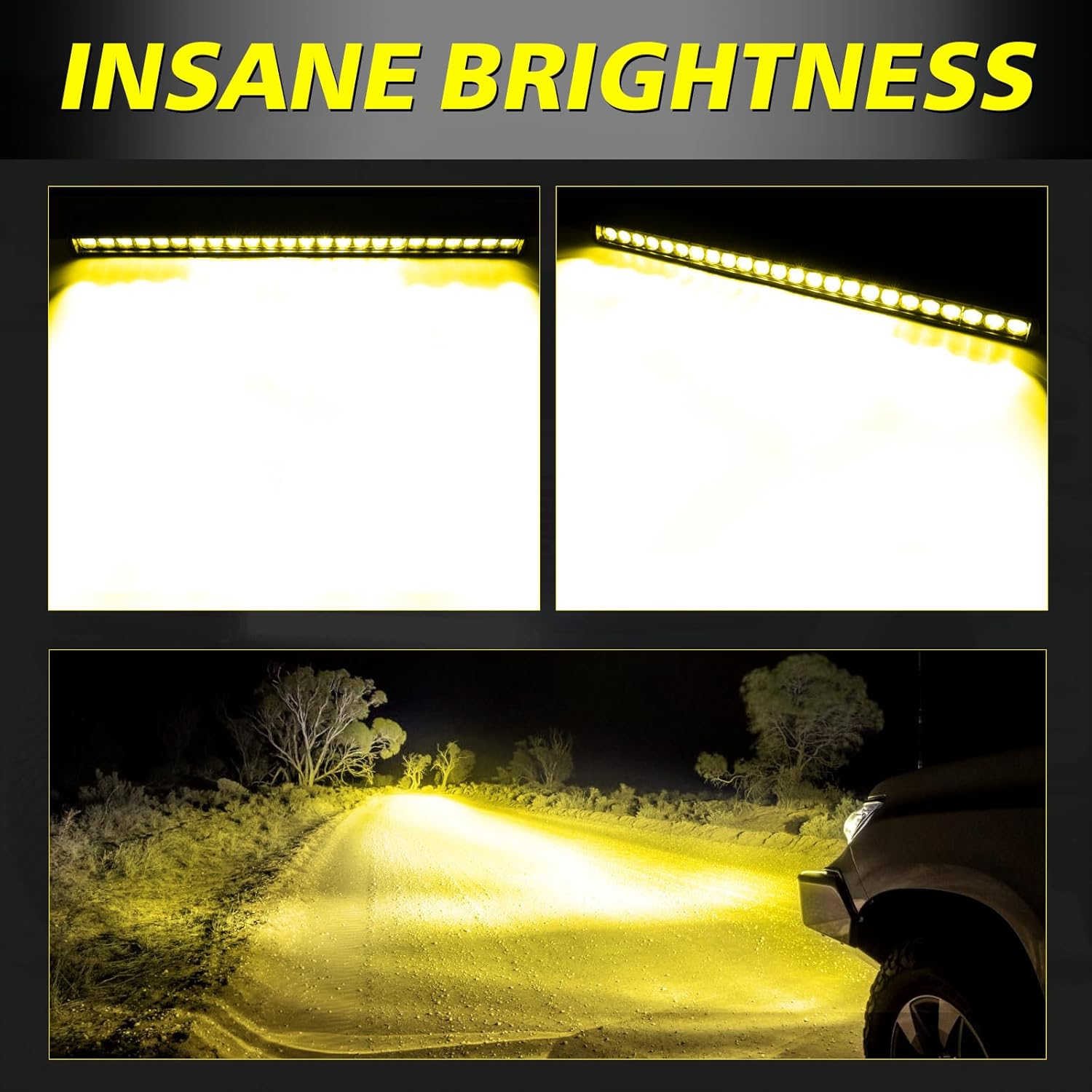
Figure 6.1: The light bar's powerful illumination in a night driving scenario.

Figure 6.2: Enhanced visibility during foggy driving conditions with the amber light bar.
7. Maintenance
To ensure the longevity and optimal performance of your AKD Part Amber LED Light Bar, follow these maintenance guidelines:
- Cleaning: Regularly clean the lens and housing with a soft cloth and mild soap solution. Avoid abrasive cleaners that could scratch the lens.
- Waterproofing: Although the light bar is IP68 rated for water and dust resistance, it is recommended to periodically inspect all seals and screw points. For extreme conditions or prolonged exposure to water, consider applying an additional layer of automotive-grade silicone sealant around the seams and bolt entries to further enhance waterproofing.
- Connections: Periodically check all electrical connections for corrosion or looseness. Ensure the wiring harness is securely routed and protected from abrasion or heat.
- Cooling: The light bar features an efficient cooling design. Ensure that the cooling fins on the back of the light bar are free from mud, dirt, or debris to allow for proper heat dissipation.

Figure 7.1: The light bar's IP68 waterproof design, suitable for challenging conditions.

Figure 7.2: Airflow diagram illustrating the efficient cooling mechanism of the light bar.
8. Troubleshooting
If you encounter issues with your AKD Part Amber LED Light Bar, refer to the following common troubleshooting steps:
| Problem | Possible Cause | Solution |
|---|---|---|
| Light bar does not turn on. | No power to the light bar; Blown fuse; Faulty wiring connection; Defective switch. | Check battery connections. Inspect the fuse in the wiring harness and replace if blown. Verify all wiring connections are secure. Test the rocker switch for functionality. |
| Light bar flickers or is dim. | Loose wiring connection; Insufficient power supply; Corroded terminals. | Tighten all electrical connections. Ensure the vehicle's electrical system can provide adequate power. Clean any corroded battery or harness terminals. |
| Moisture inside the lens. | Compromised seal; Extreme temperature changes. | Allow the light bar to dry out. Inspect the seals around the lens and housing. Apply additional silicone sealant if necessary, especially around screw points. |
| Light bar gets excessively hot. | Obstructed cooling fins; Overvoltage. | Clear any debris from the cooling fins. Ensure the light bar is connected to a 12V DC power source and not a higher voltage. |
9. Warranty and Support
AKD Part is committed to providing high-quality products and excellent customer service.
- Warranty: For information regarding the product warranty, please refer to the warranty card included with your purchase or visit the official AKD Part website.
- Customer Support: If you have any inquiries, require assistance with installation, or encounter any issues not covered in this manual, the AKD Part team is available 24/7 for prompt online support.
- Contact Information: Please refer to the contact details provided on the AKD Part packaging or official website for direct support.
Ask a question about this manual
Ask about setup, troubleshooting, compatibility, parts, safety, or missing instructions. Manuals+ will review the question and use this page’s manual context to help answer it.