Introduction
This manual provides comprehensive instructions for the setup, operation, and maintenance of your Arspic 4L Automatic Cat Food Dispenser. Please read this manual thoroughly before using the product to ensure proper function and longevity. This feeder is designed to simplify pet feeding, ensuring your companion receives consistent and appropriate portions.
Product Overview
The Arspic 4L Automatic Pet Feeder is designed to provide a consistent and controlled feeding schedule for your pets. It features programmable meal times, precise portion control, and a voice recording function to personalize meal calls.
Key Components:
- Food Storage Container (4L capacity)
- Main Unit with Control Panel and Dispenser
- Food Tray
- 5V Power Adapter
- Desiccant Bags (2 included)

The main unit of the Arspic 4L Automatic Pet Feeder, showcasing the transparent food container, control panel, and detachable food tray.
Setup
- Unpack Components: Carefully remove all components from the packaging. Ensure all parts listed in the 'Included Components' are present.
- Assemble Food Tray: Attach the food tray to the main unit. It should securely click into place.
- Install Desiccant Bag: Open the desiccant compartment located on the underside of the lid. Insert one desiccant bag to help keep food fresh and dry. Close the compartment securely.
- Fill Food Container: Open the top lid by pressing the two tabs on the sides and lifting. Pour dry pet food into the 4L storage container. Ensure the food is suitable for automatic feeders (kibble size should be appropriate to prevent jamming). Close the lid securely, ensuring the locking tabs engage.
- Power Connection: Connect the 5V power adapter to the feeder and plug it into a wall outlet. For backup power, install three D-size batteries (not included) in the battery compartment at the bottom of the unit.
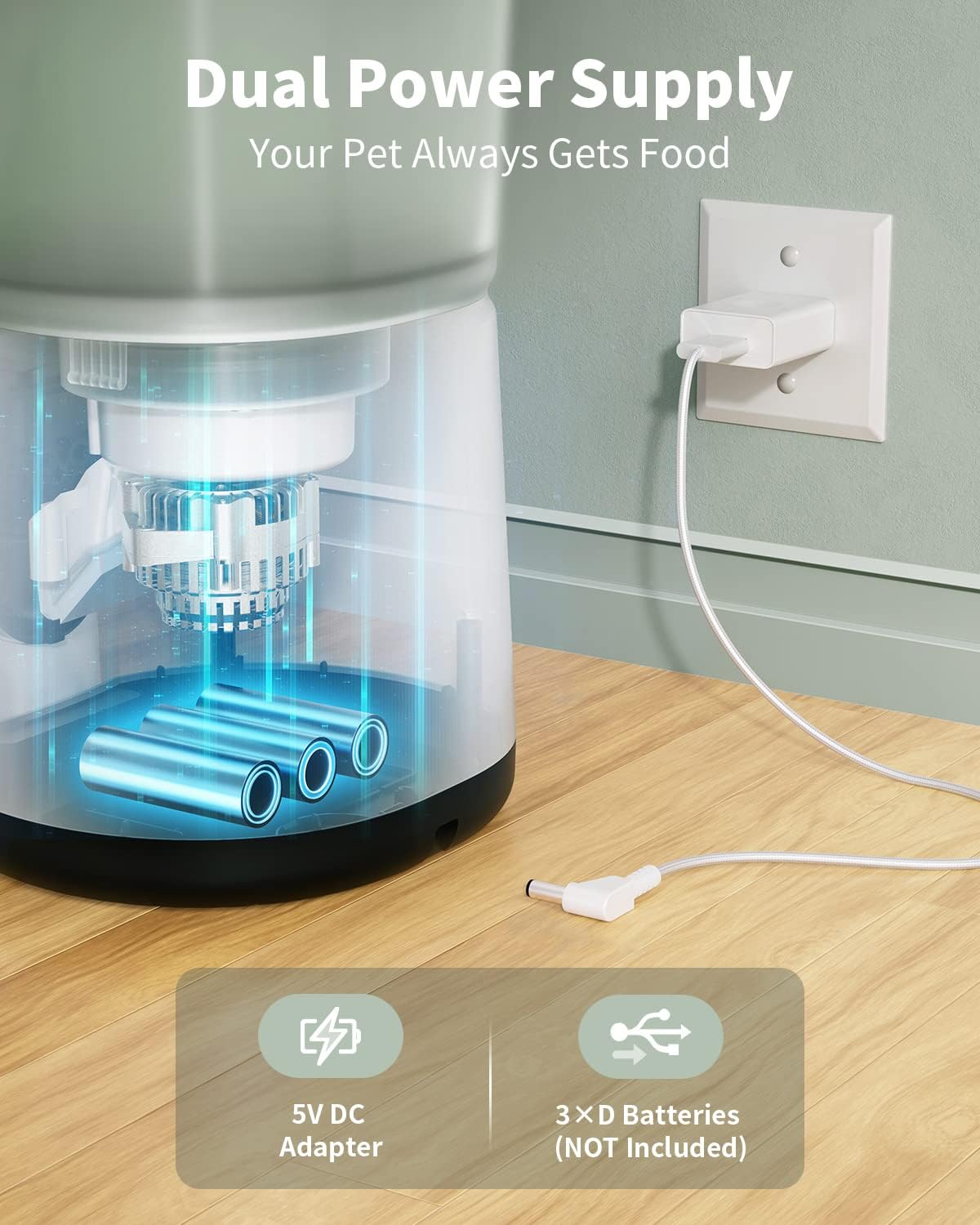
Illustration of the dual power supply system, highlighting the 5V DC adapter connection and the battery compartment for 3 D-size batteries (not included) to ensure continuous operation.
Operating Instructions
Control Panel Overview:
The control panel features an LCD screen and several buttons for programming and manual operation.
- Lock Button: Press and hold for 3 seconds to unlock the screen for programming.
- Microphone Button: Press and hold to record a 10-second voice message. Release to end recording.
- Up/Down Arrows: Use to adjust time, meal, and portion settings.
- SET Button: Press to enter the setting menu and switch between time, meal, and portion settings.
- FEED Button: Press to manually dispense one portion of food.

Detailed view of the control panel, displaying the LCD screen with battery level, lock status, current time, meal number, and portion size. Buttons for recording, navigation, setting, and manual feeding are clearly visible.
Setting Time and Meals:
- Unlock Screen: Press and hold the Lock button for 3 seconds until the screen unlocks.
- Set Current Time: Press SET to enter time setting. Use Up/Down arrows to adjust hours and minutes. Press SET to confirm each.
- Program Meals: After setting the time, press SET again to enter meal programming. You can set up to 4 meals per day.
- Set Meal Time: For each meal (Meal 1 to Meal 4), use Up/Down arrows to set the desired feeding time. Press SET to confirm.
- Set Portion Size: After setting the meal time, use Up/Down arrows to set the portion size (1-20 portions per meal). Each portion is approximately 1.5 teaspoons. Press SET to confirm.
- Record Voice Message (Optional): Press and hold the Microphone button to record a 10-second message. This message will play at each scheduled feeding time.
- Save Settings: The settings will automatically save after 30 seconds of inactivity, or you can press the Lock button to re-lock the screen.

The feeder provides flexible timed feeding with options for 4L capacity, up to 4 meals per day, 20 portions per meal, and 1.5 teaspoons per portion, ensuring right portions at the right time.

The feeder allows for 10-second voice recordings, enabling you to call your pet to their meal, making them feel your presence even when you're away.
Maintenance and Cleaning
Regular cleaning ensures hygiene and proper functioning of your pet feeder.
Cleaning Instructions:
- Unplug the Feeder: Always disconnect the power adapter and remove any backup batteries before cleaning.
- Disassemble: Remove the food tray and the food storage container. The food container can be detached by holding it down and twisting.
- Wash Components: The food tray and food container are washable. Hand wash them with mild soap and water. Rinse thoroughly and allow to air dry completely before reassembly.
- Wipe Main Unit: The main unit with the control panel should only be wiped with a soft, damp cloth. Do not immerse the main unit in water.
- Replace Desiccant: Replace the desiccant bag every 2-4 weeks, or as needed, to maintain food freshness.

The transparent food container is easily detachable and washable by hand to ensure cleanliness and hygiene for your pet's food.
Troubleshooting
Common Issues and Solutions:
- Feeder not dispensing food:
- Check if the food container is empty.
- Ensure the food is not jammed. Clear any blockages in the dispenser mechanism.
- Verify power connection and battery status.
- Check if the screen is locked. Unlock it by holding the lock button for 3 seconds.
- Incorrect portion size:
- Re-program the portion size using the SET and Up/Down buttons.
- Ensure kibble size is consistent and not too large for the dispenser.
- Voice message not playing:
- Re-record the voice message, ensuring it's within the 10-second limit.
- Check volume settings if applicable.
- Feeder not turning on:
- Check power adapter connection.
- Verify batteries are correctly installed and not depleted.
Specifications
| Feature | Detail |
|---|---|
| Brand | Arspic |
| Model Number | AP-DAF033 |
| Capacity | 4 Liters / 16.9 cups |
| Dimensions (LxWxH) | 7.67 x 6.88 x 12.2 inches |
| Weight | 3.88 pounds |
| Material | Acrylonitrile Butadiene Styrene |
| Color | Black |
| Power Supply | 5V DC Adapter, 3 x D Batteries (not included) |
| Meals Per Day | Up to 4 |
| Portions Per Meal | 1-20 portions (approx. 1.5 tsp per portion) |
| Special Features | Portion Control, Timer, Voice Recording, Desiccant Bag Slot |
| Target Species | Cat, Dog |
| Care Instructions | Clean after Use, Hand Wash Only, Keep in a Dry Place |
Warranty and Support
This Arspic product comes with a 2-Year Warranty from the date of purchase. This warranty covers defects in materials and workmanship under normal use.
For warranty claims, technical support, or any inquiries, please contact Arspic customer service through the retailer's platform or the contact information provided in your product packaging.
Please retain your proof of purchase for warranty validation.


