
1. Introduction
Thank you for purchasing the Twister.CK 3-Pack Remote Control Boat set. These high-speed, waterproof RC boats are designed for fun in various water environments. This manual provides essential information for safe setup, operation, and maintenance to ensure optimal performance and longevity of your product.
2. Package Contents
Please verify that all items listed below are included in your package:
- 3 x RC Boats (Blue, Red, Yellow)
- 3 x Remote Controllers (2.4GHz)
- 6 x 3.7V 650mAh Rechargeable Lithium Polymer Batteries (3 pre-installed in boats, 3 spare)
- 3 x USB Charging Cables
- 3 x Screwdrivers
- 1 x User Manual

3. Safety Information
- Age Recommendation: Suitable for ages 8-16 years. Adult supervision is recommended for younger users.
- Water Use Only: The boat's propeller will only activate when the boat is placed in water. This is a safety feature to prevent accidental injury and prolong motor life.
- Battery Safety: Do not overcharge batteries. Always use the provided USB charging cables.
- Waterproof Seal: Ensure the boat's top cover is securely fastened before placing it in water to prevent water ingress into the battery compartment.
- Operating Environment: Use in open water areas like pools, lakes, or bathtubs. Avoid areas with strong currents, obstacles, or other water users.
4. Setup
4.1. Controller Battery Installation
- Using the provided screwdriver, open the battery compartment on the back of the remote controller.
- Insert 2 x 1.5V AA batteries (not included), ensuring correct polarity (+/-).
- Close the battery compartment and secure it with the screw.
4.2. Boat Battery Installation & Charging
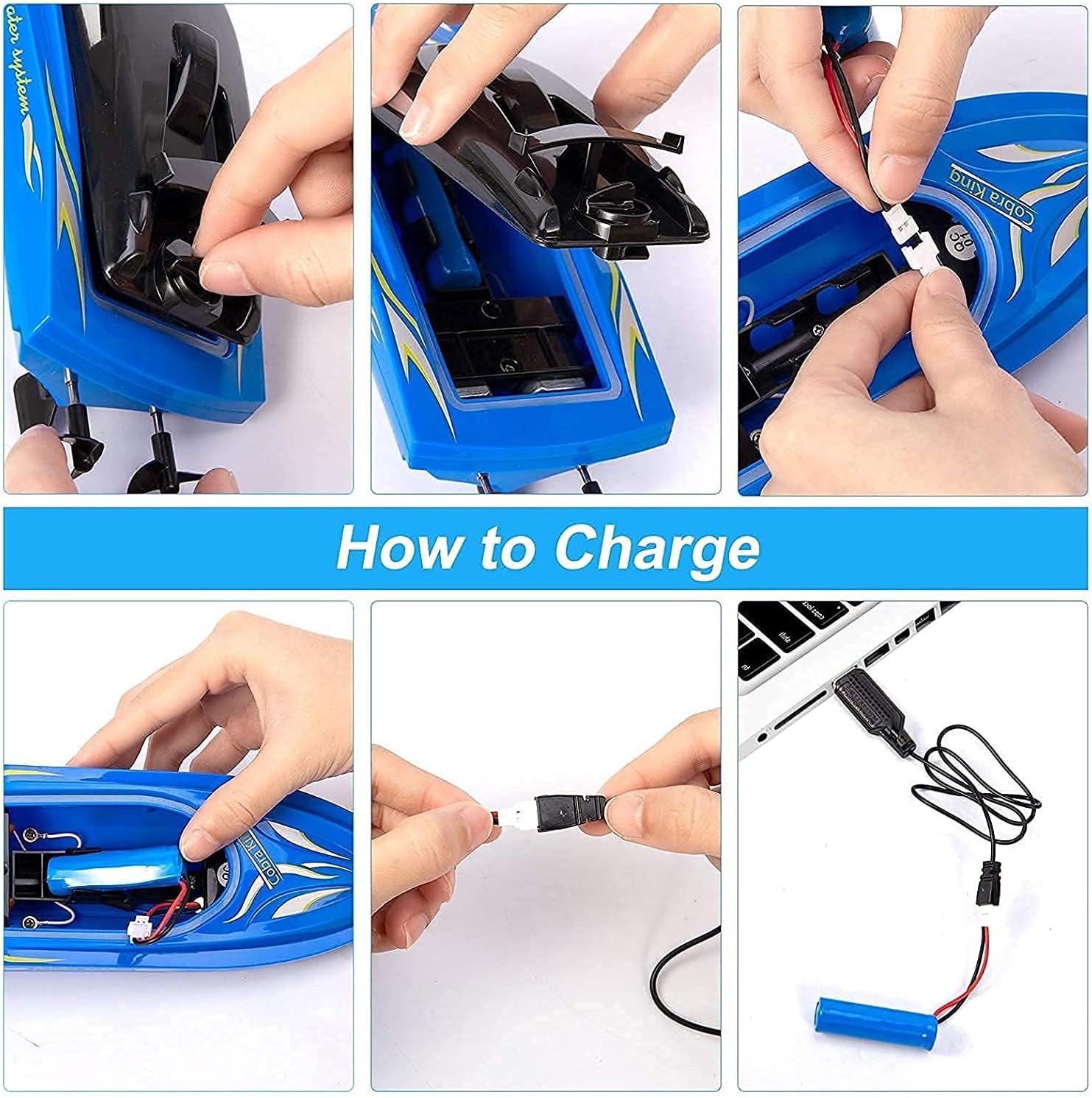
- Locate the top cover of the boat. Gently push the small lever on the cover forward to release it, then lift the cover off.
- Connect one of the 3.7V 650mAh rechargeable batteries to the boat's power connector.
- Carefully tuck the battery and wires into the battery compartment.
- To charge a battery, disconnect it from the boat. Connect the battery to the USB charging cable. Plug the USB end into a compatible USB power source (e.g., computer, USB wall adapter). Charging time is approximately 1.5 hours. Do not overcharge.
- After charging, disconnect the battery and install it into the boat as described above.
4.3. Securing the Boat Cover
Once the battery is installed, align the top cover with the boat's body. Push the cover down firmly and slide the lever backward to lock it in place. Ensure a tight seal to prevent water from entering the electronics compartment.
5. Operating Instructions
5.1. Powering On
Place the boat gently into the water. The boat's motor will only activate when it detects water. Then, turn on the remote controller. The controller and boat should automatically pair. The indicator light on the controller will confirm it's on.
5.2. Controlling the Boat
The 2.4GHz remote controller allows for precise control:
- Forward/Backward: Use the trigger on the controller to move the boat forward or backward.
- Turn Left/Right: Use the steering wheel on the controller to turn the boat left or right.
The boat can reach speeds of up to 10 mph and has a control range of 40-50 meters.


Video 1: Demonstration of the RC boat in action, showcasing its speed and maneuverability.
6. Maintenance
- Drying: After each use, remove the boat from the water, open the top cover, and thoroughly dry the interior and exterior with a soft cloth. This prevents moisture damage to electronic components.
- Battery Care: Store batteries in a cool, dry place. Do not leave batteries fully discharged for extended periods.
- Cleaning: Wipe down the boats and controllers with a damp cloth. Avoid using harsh chemicals.
7. Troubleshooting
| Problem | Possible Cause | Solution |
|---|---|---|
| Boat not moving | Boat not in water; Controller off; Low battery; Loose connection; Unpaired. | Place boat in water; Turn on controller; Charge/replace batteries; Check battery connection; Re-pair controller (turn off both, then turn on boat in water, then controller). |
| Water in battery compartment | Top cover not securely fastened. | Immediately remove battery, dry all components thoroughly with a soft cloth. Ensure cover is tightly sealed for future use. |
| Multiple controllers interfere / one controller controls multiple boats | Interference or automatic pairing. | The 2.4GHz system is designed for independent control. If issues arise, try pairing one boat and controller at a time in separate areas, then bring them together. Ensure each boat is paired with its intended controller. |
8. Specifications
- Brand: Twister.CK
- Model: 3-Pack Remote Control Boat
- Control Frequency: 2.4GHz (4-Channel)
- Control Range: 40-50 meters
- Max Speed: Up to 10 mph
- Boat Battery: 3.7V 650mAh Lithium Polymer (rechargeable)
- Controller Battery: 2 x 1.5V AA (not included)
- Charging Time: Approximately 1.5 hours
- Playing Time: 15-20 minutes per battery
- Boat Dimensions: Approximately 23cm (length) x 7cm (width) x 6cm (height)
- Item Weight: 2.38 pounds (total package)
- Recommended Age: 8 - 16 years

9. Warranty and Support
For any questions, concerns, or support needs regarding your Twister.CK Remote Control Boat set, please refer to your purchase documentation or contact the retailer. Keep your proof of purchase for any warranty claims.