
Kadimendium V01A
ANENG V01A Digital Multimeter User Manual
Model: V01A | Brand: Kadimendium
1. Introduction
This user manual provides detailed instructions for the safe and effective operation of the ANENG V01A Auto Range True RMS Digital Multimeter. This ultra-portable multi-tester is designed for measuring AC/DC current, voltage, resistance, and for continuity testing. Its intelligent measurement capabilities allow for automatic identification and display of measurement data, making it user-friendly for various electrical tasks.
2. Safety Information
Please read all safety warnings and operating instructions carefully before using this multimeter. Failure to follow these instructions may result in electric shock, fire, or serious injury.
- Always ensure the multimeter is in the correct measurement mode before connecting test leads to a circuit.
- Do not exceed the maximum input values specified for each measurement range.
- Exercise extreme caution when working with voltages above 30V AC RMS, 42V peak, or 60V DC. These voltages pose a shock hazard.
- Inspect test leads for damage before each use. Do not use if insulation is damaged or if the metal is exposed.
- Do not operate the multimeter if it appears damaged or is not operating properly.
- Replace batteries immediately when the low battery indicator appears to ensure accurate readings.
- Keep hands and fingers behind the probe barriers during testing.
- This device is designed for indoor use and should not be exposed to rain or moisture.

Image: A warning sign with multilingual text emphasizing the importance of reading product instructions carefully before use.
3. Package Contents
Verify that all items listed below are included in your package. If any items are missing or damaged, please contact customer support.
- 1 x ANENG V01A Digital Multimeter (Battery not included)
- 2 x Test Probes (Red and Black)
- 1 x User Manual

Image: The ANENG V01A Digital Multimeter, its test probes, and the user manual, displayed alongside its product packaging.
4. Product Overview
Familiarize yourself with the components of your ANENG V01A Digital Multimeter.

Image: A clear front view of the ANENG V01A Digital Multimeter, showcasing its display, buttons, and input jacks, accompanied by its red and black test leads.

Image: A direct front view of the ANENG V01A Digital Multimeter, highlighting its display and control panel.

Image: The ANENG V01A Digital Multimeter shown with its integrated kickstand extended, allowing for angled viewing on a flat surface.
Key Components:
- LCD Display: Shows measurement readings, units, and function indicators.
- Function Buttons:
- NCV Button: Activates Non-Contact Voltage detection.
- H/* Button: Data Hold function (short press) and Backlight/Flashlight activation (long press).
- Power Button: Turns the multimeter On/Off.
- Input Jacks:
- COM Jack (Black): Common terminal for all measurements. Connect the black test lead here.
- VΩmA Jack (Red): Input for Voltage, Resistance, and milliampere Current measurements. Connect the red test lead here.
- 10A Fused Jack (Red): Input for high current (up to 10A) measurements. Connect the red test lead here for 10A measurements.
- Test Probes: Red and black leads for connecting to circuits.
5. Setup
5.1 Battery Installation
The ANENG V01A Multimeter requires 2 x AAA batteries (not included) for operation.
- Ensure the multimeter is powered off.
- Locate the battery compartment cover on the back of the multimeter.
- Use a screwdriver to open the battery compartment.
- Insert two AAA batteries, observing the correct polarity (+ and -) as indicated inside the compartment.
- Replace the battery compartment cover and secure it with the screw.
5.2 Connecting Test Leads
Always connect the black test lead to the COM jack. Connect the red test lead to the appropriate input jack based on the measurement you intend to perform.
- For Voltage, Resistance, Continuity, and milliampere Current (mA) measurements: Connect the red test lead to the VΩmA jack.
- For high current (up to 10A) measurements: Connect the red test lead to the 10A Fused jack.

Image: The ANENG V01A Digital Multimeter with its red and black test leads properly connected to the input jacks, ready for use.
6. Operating Instructions
6.1 Power On/Off and Auto Range
Press the Power button to turn the multimeter on. The V01A features an auto-range function, meaning it automatically recognizes and displays the measurement data without requiring manual range selection. To turn off the multimeter, press the Power button again. The device also has an Auto Power Off feature to conserve battery life.

Image: The ANENG V01A Digital Multimeter with its display showing a reading, emphasizing its auto-ranging capability for convenient measurement.
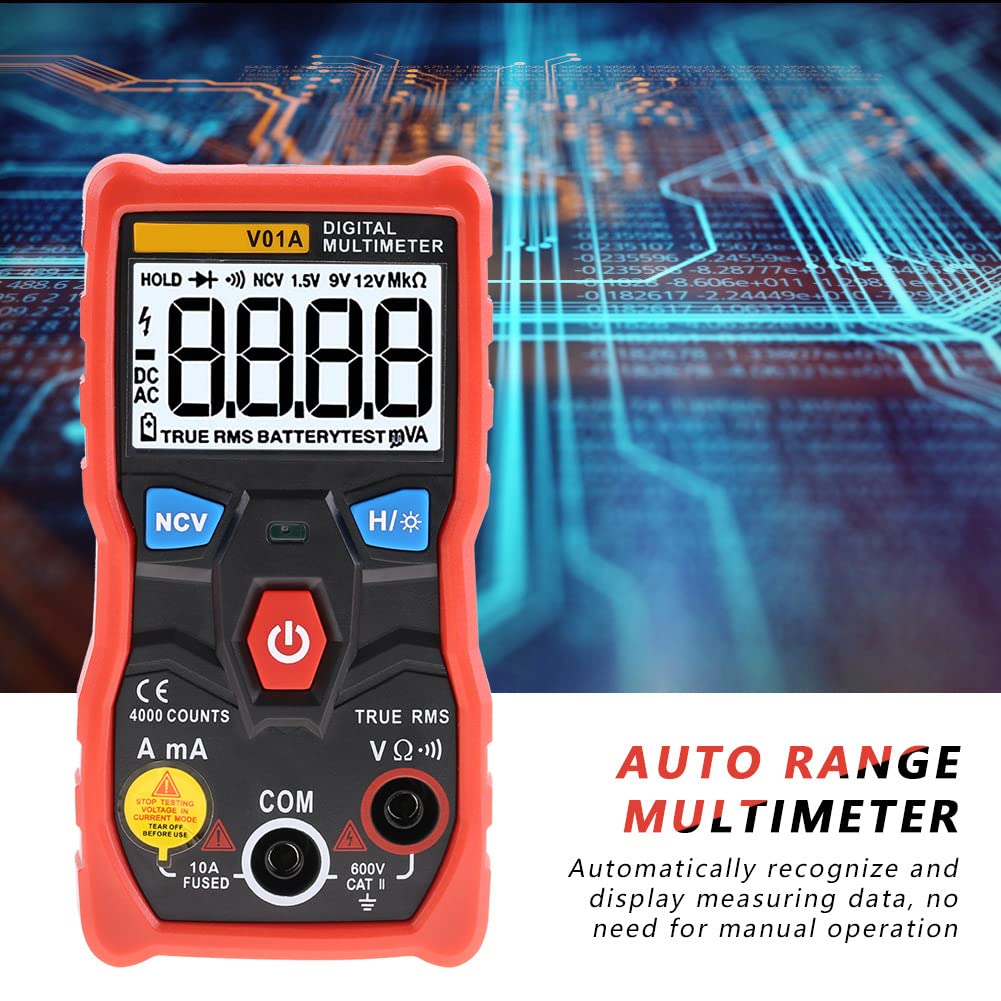
Image: A close-up view of the ANENG V01A Digital Multimeter's display, highlighting the "AUTO RANGE MULTIMETER" text and indicating its automatic measurement recognition.
6.2 Measurement Functions
6.2.1 DC Voltage Measurement
Connect the red test lead to the VΩmA jack and the black test lead to the COM jack. Connect the probes across the DC voltage source. The multimeter will automatically detect and display the DC voltage.

Image: A user's hands holding the multimeter probes to measure components on a circuit board, demonstrating a typical voltage or resistance measurement scenario.
6.2.2 AC Voltage Measurement
Connect the red test lead to the VΩmA jack and the black test lead to the COM jack. Connect the probes across the AC voltage source. The multimeter will automatically detect and display the AC voltage (True RMS).
6.2.3 DC/AC Current Measurement (mA/A)
Caution: To measure current, the multimeter must be connected in series with the circuit. Never connect the multimeter in parallel with a voltage source when in current mode, as this can damage the device or blow the fuse.
- For milliampere (mA) current: Connect the red test lead to the VΩmA jack and the black test lead to the COM jack.
- For ampere (A) current (up to 10A): Connect the red test lead to the 10A Fused jack and the black test lead to the COM jack.
Break the circuit and connect the multimeter in series. The multimeter will automatically detect and display the current.
6.2.4 Resistance Measurement
Connect the red test lead to the VΩmA jack and the black test lead to the COM jack. Ensure the circuit or component is de-energized before measuring resistance. Connect the probes across the component. The multimeter will automatically detect and display the resistance in Ohms (Ω), kilo-Ohms (kΩ), or Mega-Ohms (MΩ).
6.2.5 Continuity Test
Connect the red test lead to the VΩmA jack and the black test lead to the COM jack. Ensure the circuit is de-energized. Touch the probes to the two points you want to test for continuity. If there is continuity (low resistance), the multimeter will emit an audible beep.
6.2.6 Non-Contact Voltage (NCV) Detection
Press the NCV button. Hold the top part of the multimeter near an AC voltage source (e.g., a live wire or outlet). The multimeter will indicate the presence of AC voltage through an audible beep and/or visual indicator on the display, without direct contact.
6.2.7 Battery Test (1.5V, 9V, 12V)
The multimeter can test common battery voltages. Connect the red test lead to the VΩmA jack and the black test lead to the COM jack. Connect the probes to the positive and negative terminals of the battery. The multimeter will display the battery voltage.

Image: A user's hands holding the multimeter probes to test the voltage of a 9V battery, demonstrating the battery test function.
6.3 Special Functions
- Data Hold (H): Short press the H/* button to freeze the current reading on the display. Press again to release.
- Backlight/Flashlight (*): Long press the H/* button to turn on the display backlight and the integrated flashlight. Long press again to turn them off. This is useful for working in dimly lit environments.
- Auto Power Off: The multimeter will automatically power off after a period of inactivity to save battery life.
- Low Battery Indication: A battery icon will appear on the display when the battery voltage is low, indicating that the batteries need to be replaced.
7. Maintenance
7.1 Cleaning
Wipe the case with a damp cloth and mild detergent. Do not use abrasives or solvents. Keep the input jacks free of dust and debris.
7.2 Battery Replacement
When the low battery indicator appears on the display, replace the batteries as described in Section 5.1. Always use 2 x AAA batteries.
7.3 Storage
If the multimeter is not used for a long period, remove the batteries to prevent leakage and damage to the device. Store the multimeter in a cool, dry place, away from direct sunlight and extreme temperatures.
8. Troubleshooting
If you encounter issues with your multimeter, refer to the table below for common problems and solutions.
| Problem | Possible Cause | Solution |
|---|---|---|
| Multimeter does not power on. | Dead or incorrectly installed batteries. | Check battery polarity or replace batteries. |
| No reading or "OL" displayed. | Open circuit, out of range, or incorrect function/lead connection. | Check circuit continuity, ensure measurement is within range, verify test lead connections for the selected function. |
| Inaccurate readings. | Low battery, environmental interference, or damaged test leads. | Replace batteries, move away from strong electromagnetic fields, inspect and replace damaged test leads. |
| Continuity test does not beep. | Open circuit or high resistance. | Ensure good contact with the circuit; the circuit may not be continuous. |
9. Specifications
| Parameter | Value |
|---|---|
| Brand | ANENG (Kadimendium) |
| Model | V01A |
| Display | 4000 counts |
| DC Voltage Range | 4.000V, 40.00V, 400.0V, 600V |
| AC Voltage Range | 4.000V, 40.00V, 400.0V, 600V (True RMS) |
| AC Current Range | 999.9mA, 9.999A |
| DC Current Range | 999.9mA, 9.999A |
| Resistance Range | 4.000kΩ, 40.00kΩ, 400.0kΩ, 4.000MΩ, 40.00MΩ |
| AC Frequency Response | 40Hz-1kHz |
| Continuity Test | Yes |
| NCV (Non-Contact Voltage) | Yes |
| Auto Range | Yes |
| True RMS | Yes |
| Data Hold | Yes |
| Backlight | Yes |
| Flashlight | Yes |
| Auto Power Off | Yes |
| Low Battery Indication | Yes |
| Material | ABS, PVC |
| Sample Rate | 3SPS |
| Operating Environment | 0~40℃, <75%RH |
| Storage Environment | -20~60℃, <80%RH |
| Power Supply | 2 x AAA Batteries (NOT included) |
| Dimensions | 12 x 6 x 2.8 cm / 4.7 x 2.4 x 1.1 inches |
| Weight (Approx.) | 199g / 7.0oz |
10. Warranty and Support
This product comes with a standard manufacturer's warranty. For specific warranty terms and conditions, please refer to the warranty card included with your purchase or contact the seller directly. If you have any questions, require technical assistance, or need to report an issue, please contact Kadimendium customer support through your purchase platform. We are committed to providing timely assistance and ensuring your satisfaction.
Ask a question about this manual
Ask about setup, troubleshooting, compatibility, parts, safety, or missing instructions. Manuals+ will review the question and use this page’s manual context to help answer it.