
Introduction
The 2B GP085 is a versatile 3-in-1 wireless game controller, engineered for seamless compatibility with PC, PlayStation 2 (PS2), and PlayStation 3 (PS3) gaming systems. It utilizes a reliable 2.4 GHz wireless connection, ensuring responsive and stable gameplay. Crafted from durable ABS material, the controller features an ergonomic design for comfortable and secure handling during extended gaming sessions. Additionally, it includes a Turbo function, allowing for rapid, repeated input for specific in-game actions.
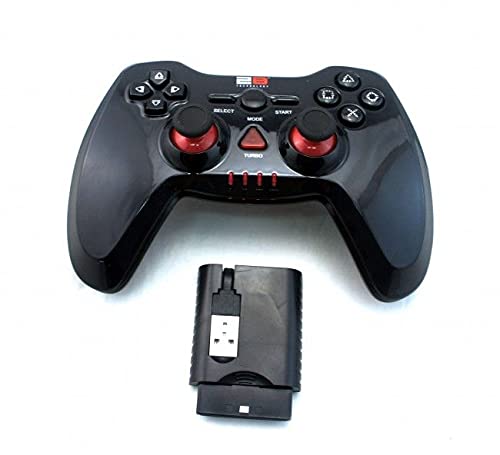
Image showing the front view of the 2B GP085 wireless game controller, highlighting its ergonomic design and button layout.
Setup
To begin using your 2B GP085 wireless game controller, follow these steps:
- 1. Install Batteries: Open the battery compartment on the back of the controller and insert two AAA batteries (not included), ensuring correct polarity.
- 2. Connect the Receiver: Plug the 2.4 GHz USB wireless receiver into an available USB port on your PC, PS2, or PS3 console. The system should automatically detect the receiver.
- 3. Power On Controller: Press the 'MODE' button (or similar power button) on the controller. The indicator light should illuminate, indicating it is powered on and attempting to connect.
- 4. Pairing (if necessary): If the controller does not connect automatically, press and hold the 'CONNECT' button (or a small button usually found near the receiver or battery compartment) on both the controller and the receiver simultaneously for a few seconds until the indicator light on the controller becomes solid, indicating a successful connection.
- 5. System Configuration: For PC use, you may need to install drivers or configure the controller settings within your operating system or game software. For PS2/PS3, the controller should be recognized automatically.
Operating Instructions
This section details the basic operation of your 2B GP085 wireless game controller.
- Power On/Off: Press the 'MODE' button to power on the controller. To power off, press and hold the 'MODE' button for approximately 3-5 seconds until the indicator light turns off.
- Button Functions: The controller features standard gaming buttons, including directional pad (D-pad), analog sticks, action buttons (e.g., X, O, Square, Triangle), shoulder buttons (L1, R1, L2, R2), and 'START', 'SELECT', and 'ANALOG' buttons. Refer to your game's specific controls for button assignments.
- Turbo Function: To activate the Turbo function for a specific button, press and hold the desired action button, then press the 'TURBO' button. The button will now repeatedly register input as long as it is held down. To deactivate Turbo for that button, repeat the process.
- Analog/Digital Mode: Press the 'ANALOG' button to switch between analog and digital modes for the directional controls. The indicator light will show the current mode.
Maintenance
Proper care extends the life of your 2B GP085 controller.
- Cleaning: Use a soft, dry cloth to wipe the surface of the controller. For stubborn dirt, a slightly damp cloth can be used, but ensure no moisture enters the controller's internal components. Do not use harsh chemicals or abrasive cleaners.
- Storage: Store the controller in a cool, dry place away from direct sunlight and extreme temperatures. Avoid placing heavy objects on the controller.
- Battery Care: If the controller will not be used for an extended period, remove the batteries to prevent leakage and potential damage.
Troubleshooting
If you encounter issues with your 2B GP085 wireless game controller, consult the following common solutions.
Controller Not Connecting:
- Ensure the USB receiver is securely plugged into the console/PC.
- Check if the controller batteries are properly installed and have sufficient charge.
- Try re-pairing the controller by pressing the 'CONNECT' buttons on both the controller and receiver.
- Test the USB receiver in a different USB port.
Buttons Not Responding:
- Verify the controller is powered on and connected.
- Check in-game settings to ensure the controller is recognized and configured correctly.
- Clean around the unresponsive button with a cotton swab lightly dampened with rubbing alcohol (ensure controller is off and dry before use).
Short Battery Life:
- Use high-quality batteries.
- Ensure the controller is powered off when not in use.
- Consider using rechargeable batteries.
Lag or Disconnection:
- Ensure there are no obstructions between the controller and the receiver.
- Minimize interference from other 2.4 GHz wireless devices (e.g., Wi-Fi routers, cordless phones).
- Move closer to the receiver.
Specifications
| Model | 2B GP085 |
| Connectivity | 2.4 GHz Wireless |
| Compatibility | PC, PlayStation 2 (PS2), PlayStation 3 (PS3) |
| Material | ABS |
| Features | Ergonomic Design, Turbo Function |
| Package Dimensions | 18.4 x 16.8 x 7.4 cm |
| Package Weight | 320 grams |
| ASIN | B097NMYTKH |
Warranty and Support
For warranty information and technical support regarding your 2B GP085 wireless game controller, please refer to the documentation included with your purchase or visit the official 2B website. Keep your proof of purchase for warranty claims.