1. Introduction
This manual provides detailed instructions for the Taidacent 256x64 3.12 Inch OLED Display Module. This module is designed as a smart terminal for easy integration with various microcontrollers (MCUs) and industrial computers via serial interfaces. It simplifies display operations by allowing users to send simple commands for complex graphical and character displays, eliminating the need for extensive code development on the host MCU.
2. Product Overview
The Taidacent 3.12-inch OLED display module is a versatile graphic display solution. It features a 32-bit RSIC-MCU and supports multiple communication protocols including UART, RS232, and SPI. The module comes with a pre-loaded font library, enabling direct display of various character sets and graphical elements.
Key Features:
- Integrated Font Library: Supports GB2312 series (12x12, 16x16, 24x24, 32x32 Chinese characters) and ASCII code (6x12, 8x16, 12x24, 16x32 characters).
- Built-in Display Functions: Includes commands for display activation/deactivation and contrast adjustment.
- Simplified Graphical Drawing: Enables display of Chinese characters, images, dots, lines, rectangles, and circles with simple serial commands.
- Custom Character Support: Allows creation and storage of custom characters, with 6KB of dedicated storage space.
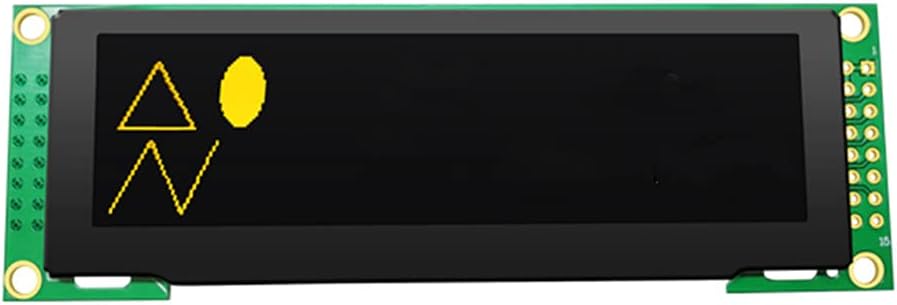
Figure 2.1: Taidacent 3.12 Inch OLED Display Module (Yellow Variant).
3. Setup
3.1 Power Supply
The module operates with either a 3.3V or 5.0V power supply. Ensure the correct voltage is applied to prevent damage. Refer to the pinout diagram for specific power input pins.
3.2 Interface Connection
The module supports UART (TTL), RS232, and 4-wire SPI interfaces. Select the appropriate interface based on your host MCU's capabilities.
- UART (TTL): Connect the module's RXD to the MCU's TXD and the module's TXD to the MCU's RXD. Ensure common ground connection.
- RS232: Requires an RS232 level converter if connecting to a standard RS232 port.
- 4-wire SPI: Connect SCK, MOSI, CS, and DC pins to the corresponding pins on your MCU.
Always ensure proper pin connections and voltage levels before powering on the module.
4. Operating Instructions
The module is controlled by sending specific commands via the chosen serial interface. These commands are typically short byte sequences that instruct the module to perform various display operations.
4.1 Basic Display Control
- Display On/Off: Send the designated command to activate or deactivate the OLED display.
- Contrast Adjustment: Use specific commands to set the display contrast level.
4.2 Character and Graphic Display
To display characters or graphics, send the corresponding command followed by the data (e.g., character codes, pixel data, coordinate values). The module's internal MCU handles the rendering.
- Displaying Text: Send commands for displaying ASCII or GB2312 characters at specified coordinates.
- Drawing Shapes: Commands are available for drawing points, lines, rectangles, and circles by providing coordinate parameters.
- Displaying Images: Send image data along with the appropriate command to render bitmap images.
4.3 Custom Characters
The module allows users to define and store custom characters. Refer to the detailed command set documentation (not included in this manual) for instructions on how to upload and utilize custom character data within the 6KB storage space.
5. Maintenance
The Taidacent OLED Display Module is designed for durability, but proper care ensures longevity.
- Handling: Avoid applying excessive force or bending the module, especially the display area.
- Cleaning: Use a soft, dry, anti-static cloth to gently clean the display surface. Do not use abrasive cleaners or solvents.
- Static Discharge: Always handle the module in an ESD-safe environment to prevent damage from electrostatic discharge.
- Storage: Store the module in a dry, cool environment, away from direct sunlight and extreme temperatures.
6. Troubleshooting
If you encounter issues with your OLED display module, consider the following troubleshooting steps:
- No Display/Blank Screen:
- Verify that the power supply voltage (3.3V or 5V) is correct and stable.
- Check all electrical connections, especially power and ground, and serial communication lines (RXD/TXD, SPI pins).
- Ensure the display is not in an 'off' state; send the 'display on' command.
- Confirm the serial communication parameters (baud rate, data bits, parity, stop bits) match between the MCU and the module.
- Garbled or Incorrect Display:
- Check the integrity of the data being sent. Ensure commands and data bytes are correct according to the module's protocol.
- Verify the baud rate or SPI clock speed is within the module's specifications.
- Ensure proper grounding between the module and the host MCU.
- Module Not Responding:
- Power cycle the module and the host MCU.
- Check for any short circuits or damaged components on the module.
For advanced troubleshooting or specific command details, refer to the comprehensive technical documentation provided by Taidacent, typically available on their product support page.
7. Specifications
The following table outlines the technical specifications for the Taidacent 256x64 3.12 Inch OLED Display Module:
| Parameter | Value |
|---|---|
| Size | 3.12 inch |
| Dimensions (L×W×H) | 100.5 × 33.5 × 6.3 mm |
| Display Area | 78.8 × 21.8 mm |
| Resolution | 256 × 64 dots |
| Control Chip | MCU font chip GT30L32S4w |
| Interface Type | UART (TTL), RS232, 4-wire SPI |
| Display Color | Yellow (for this variant) |
| Display Brightness | 90 cd/m² (typical) |
| Working Voltage | 3.3V or 5.0V |
| Working Temperature | -40℃ to 85℃ |

Figure 7.1: Mechanical Dimensions of the OLED Display Module.
8. Warranty and Support
For warranty information, technical support, or further inquiries, please contact Taidacent directly through their official website or the retailer from whom the product was purchased. Keep your purchase receipt as proof of purchase for any warranty claims.
You can visit the Taidacent Store on Amazon for additional product information and support resources.