
Introduction
Thank you for purchasing the Timelink CR33328M-DS Vintage Desk & Shelf Alarm Clock. This manual provides essential information for the proper setup, operation, and maintenance of your new clock. Designed with an antique black and copper finish, a faux mother-of-pearl dial, and silent sweep movement, this clock combines classic aesthetics with modern functionality.
Please read these instructions carefully before use to ensure optimal performance and longevity of your product.
Product Overview
The Timelink CR33328M-DS is a battery-operated analog alarm clock featuring a vintage design. Key components include the clock face with luminous hands, a durable metal casing, and control knobs located on the back for time and alarm adjustments.
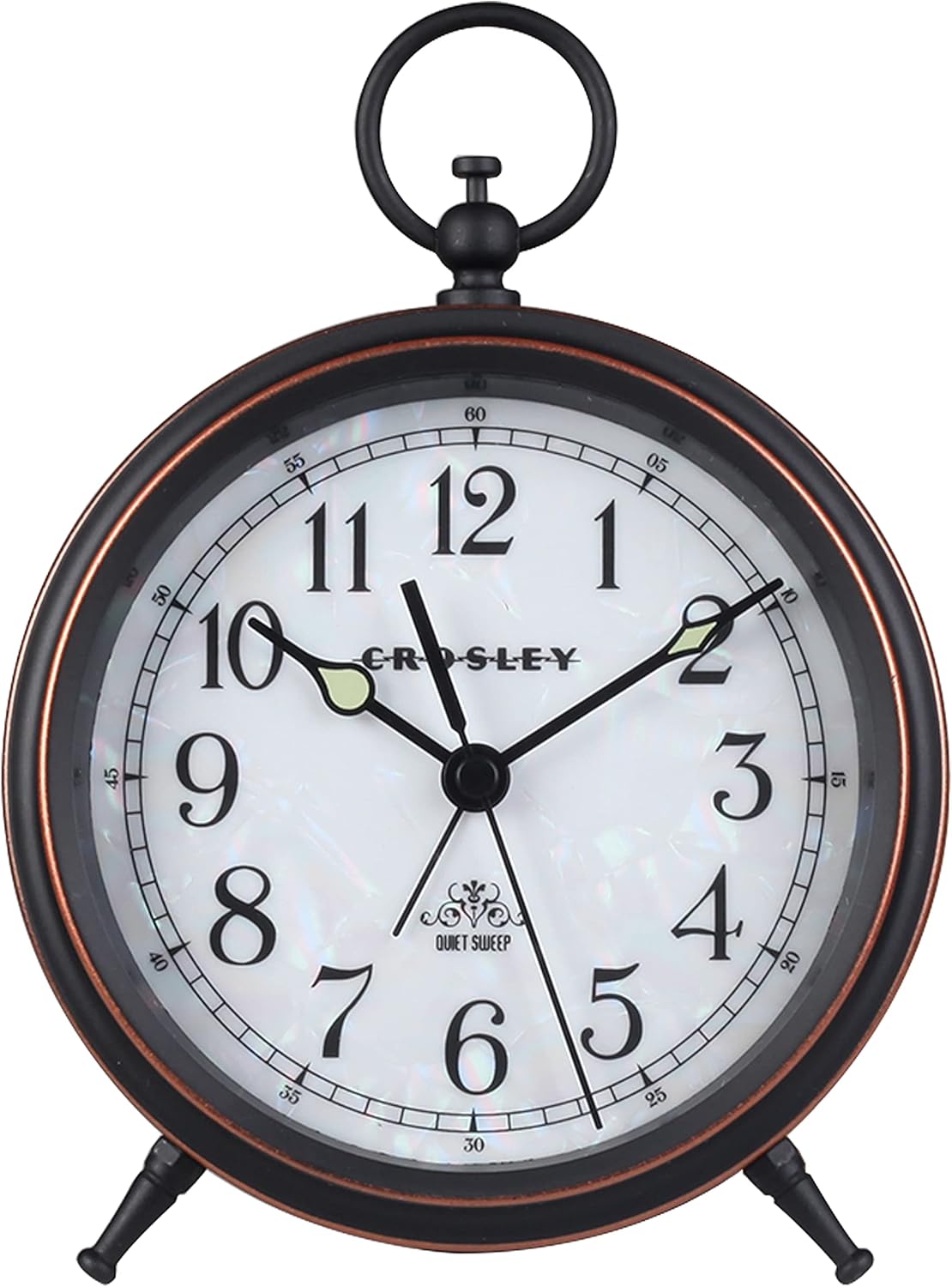
Figure 1: Front view of the Timelink Vintage Desk & Shelf Alarm Clock, showcasing its faux mother-of-pearl dial, antique numerals, and luminous hands.

Figure 2: Angled view of the clock, highlighting the antique black and copper finish on the metal casing.
Setup
1. Battery Installation
- Locate the battery compartment cover on the back of the clock.
- Carefully remove the cover by sliding or lifting it according to the markings.
- Insert one (1) AA battery, ensuring the positive (+) and negative (-) terminals align correctly with the indicators inside the compartment.
- Replace the battery compartment cover securely.
2. Setting the Time
- Locate the time setting knob on the back of the clock (often labeled 'TIME SET' or similar).
- Rotate the knob in either direction until the hour and minute hands display the correct time.
3. Setting the Alarm
- Locate the alarm setting knob on the back of the clock (often labeled 'ALARM SET' or similar).
- Rotate this knob to set the desired alarm time. Note that the alarm hand is typically shorter and distinct from the time hands.
- Ensure the alarm ON/OFF switch (if present) is in the 'ON' position to activate the alarm.

Figure 3: Rear view of the clock, illustrating the battery compartment, time setting knob, alarm setting knob, and alarm ON/OFF switch.
Operating Instructions
Reading the Time
- The clock features a traditional analog display with hour, minute, and second hands.
- The luminous coating on the hour and minute hands allows for visibility in low-light conditions after exposure to sufficient light.
Alarm Function
- To activate the alarm, slide the alarm switch on the back of the clock to the 'ON' position.
- When the set alarm time is reached, the clock will emit an ascending beep sound.
- To stop the alarm, slide the alarm switch to the 'OFF' position.
Silent Sweep Movement
This clock is equipped with a silent sweep quartz movement, which means the second hand moves continuously without a ticking sound. This ensures a quiet environment, ideal for bedrooms or offices.
Maintenance
Cleaning
- Wipe the clock's exterior with a soft, dry cloth.
- Avoid using abrasive cleaners, solvents, or chemical sprays, as these can damage the finish or internal components.
Battery Replacement
- When the clock begins to lose time or the alarm weakens, it is an indication that the battery needs to be replaced.
- Follow the battery installation steps outlined in the 'Setup' section.
- Always dispose of used batteries responsibly according to local regulations.
General Care
- Keep the clock away from direct sunlight, extreme temperatures, and high humidity to prevent damage.
- Avoid dropping the clock or subjecting it to strong impacts.
Troubleshooting
| Problem | Possible Cause | Solution |
|---|---|---|
| Clock not running or running slowly. | Dead or weak battery; incorrectly installed battery. | Replace the battery with a fresh AA battery, ensuring correct polarity. |
| Alarm not sounding. | Alarm switch is OFF; alarm time not set correctly; weak battery. | Ensure the alarm switch is ON. Verify the alarm hand is set to the desired time. Replace the battery if weak. |
| Luminous hands not glowing in the dark. | Insufficient exposure to light. | The luminous material requires exposure to bright light (natural or artificial) to glow in the dark. Place the clock in a well-lit area during the day. The glow will fade over time. |
| Knobs feel loose or broken. | Wear and tear or manufacturing defect. | If within the warranty period, contact customer support for assistance. Avoid excessive force when adjusting knobs. |
Specifications
- Model Number: CR33328M-DS
- Brand: Timelink
- Material: Metal
- Color: Black with Copper Accents
- Display Type: Analog
- Power Source: 1 x AA Battery (not included)
- Product Dimensions: Approximately 12.7 cm (Width) x 17.8 cm (Height)
- Features: Active Alarm, Silent Sweep Movement, Luminous Hands, Faux Mother-of-Pearl Dial
- Room Type: Bedroom, Office, Living Room
- Indoor/Outdoor Use: Indoor
Warranty & Support
The Timelink CR33328M-DS Vintage Desk & Shelf Alarm Clock comes with a 2-year limited warranty from the date of purchase. This warranty covers manufacturing defects under normal use.
For warranty claims, technical support, or any questions regarding your product, please contact the retailer where you purchased the clock or refer to the contact information provided with your purchase documentation.
Please retain your proof of purchase for warranty validation.