
1. Introduction
Thank you for choosing the Philips SpeedPro FC6723/01 Cordless Vacuum Cleaner. This manual provides essential information for the safe and efficient use, maintenance, and troubleshooting of your new appliance. The SpeedPro cordless vacuum cleaner is designed for fast and effective cleaning, featuring a 180-degree suction nozzle for precise dirt pick-up, even in challenging areas like close to walls, furniture, and corners.
2. Safety Information
Please read all safety warnings and instructions carefully before using the appliance. Failure to follow the warnings and instructions may result in electric shock, fire, and/or serious injury.
- This appliance is intended for household use only. Do not use it for any other purpose.
- Keep the appliance and its cord out of reach of children.
- Do not immerse the appliance in water or any other liquid.
- Do not pick up water or any other liquids, hot ashes, or sharp objects with the vacuum cleaner.
- Always ensure the dust container and filters are correctly installed before use.
- Only use the original charging adapter supplied with the appliance.
- Do not use the appliance if it is visibly damaged or if the charging adapter is damaged.
- Unplug the charger from the wall socket before cleaning or performing maintenance.
3. Product Overview
The Philips SpeedPro FC6723/01 is a versatile cordless vacuum designed for efficient cleaning. Key features include:
- 180-Degree Suction Nozzle: Captures up to 98% of dust and dirt in each stroke, allowing for precise cleaning in tight spaces.
- LEDs in the Nozzle: Illuminates hidden dust and dirt on the floor, ensuring thorough cleaning.
- Two Speed Settings: Adjust suction power to suit different floor types and dirt levels.
- Long Runtime: Up to 30 minutes of cleaning power with 18V Li-Ion batteries.
- Integrated Handheld Unit: Easily detaches for quick clean-ups of furniture, car interiors, or hard-to-reach areas.
- Included Accessories: Comes with a crevice tool and brush for specialized cleaning tasks.
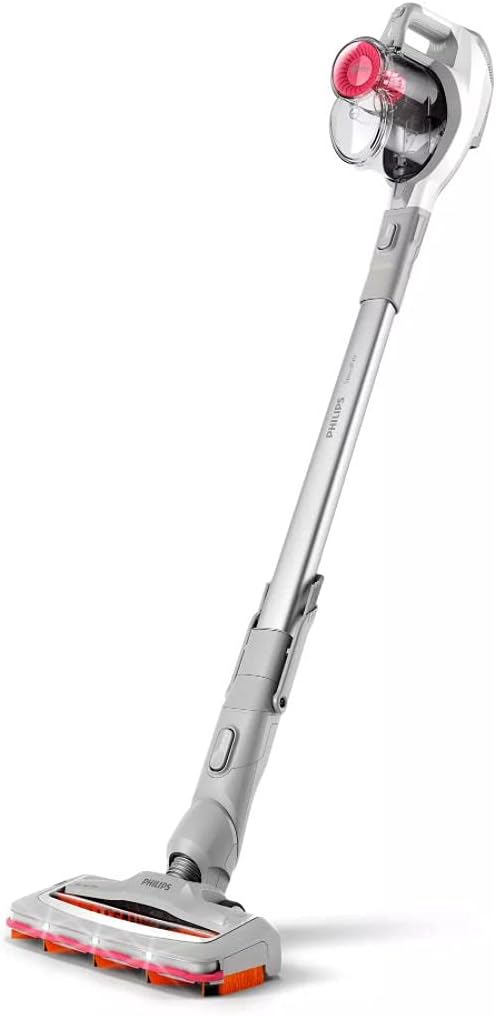
Figure 3.1: The Philips SpeedPro FC6723/01 Cordless Vacuum in its upright stick configuration, showcasing its sleek design and integrated dustbin.

Figure 3.2: Close-up view of the detachable handheld unit, showing the transparent dust container and the PowerCyclone 7 technology.

Figure 3.3: Top-down view of the handheld unit detached from the main stick, alongside the 180-degree suction nozzle, highlighting their connection points.
4. Setup
4.1 Assembly
Your Philips SpeedPro vacuum cleaner comes in several parts for compact packaging. Follow these steps to assemble it:
- Insert the extension tube into the main handheld unit until it clicks into place.
- Attach the 180-degree suction nozzle to the other end of the extension tube, ensuring it clicks securely.
- For handheld use, detach the extension tube and attach the desired accessory (crevice tool or brush) directly to the main unit.
4.2 Charging the Battery
Before first use, fully charge the appliance. The 18V Li-Ion battery provides up to 30 minutes of runtime on a full charge.
- Connect the charging adapter to the charging port on the handheld unit.
- Plug the adapter into a wall socket.
- The charging indicator lights will show the charging status. Allow the battery to charge completely before initial use.
- You can store the vacuum on a wall mount for convenient charging and storage.

Figure 4.1: The Philips SpeedPro FC6723/01 Cordless Vacuum conveniently stored on its wall mount, ready for charging or quick access.
5. Operating Instructions
5.1 Powering On/Off and Speed Settings
To turn on the vacuum, press the power button on the handheld unit. Press it again to switch between the two available speed settings (standard and turbo mode) for different cleaning needs. Press a third time to turn off the appliance.
5.2 Using the 180-Degree Suction Nozzle
The unique 180-degree suction nozzle is designed to capture dirt from all angles, making it effective along walls, in corners, and around furniture. The integrated LEDs on the nozzle illuminate the floor in front of you, revealing hidden dust and debris for a more thorough clean.

Figure 5.1: A user demonstrating the Philips SpeedPro FC6723/01 in a kitchen setting, effectively cleaning spills on the floor.

Figure 5.2: Close-up of the 180-degree suction nozzle with its integrated LEDs, actively cleaning debris from a floor surface.
5.3 Using the Handheld Unit and Accessories
For quick spot cleaning or reaching elevated surfaces, detach the handheld unit from the extension tube. You can then attach the crevice tool for narrow gaps or the brush for upholstery and delicate surfaces.

Figure 5.3: The handheld unit of the Philips SpeedPro FC6723/01 being used to clean crumbs and debris from a sofa, demonstrating its versatility.
6. Maintenance
Regular maintenance ensures optimal performance and extends the lifespan of your vacuum cleaner.
6.1 Emptying the Dust Container
Empty the dust container after each use or when the MAX indicator is reached. To empty:
- Press the release button to detach the dust container from the handheld unit.
- Open the dust container lid and empty the contents into a waste bin.
- Close the lid and reattach the dust container to the handheld unit until it clicks.
6.2 Cleaning the Filters
The Philips SpeedPro uses HEPA, Microfilter, and ULPA filter types. Clean the filters regularly to maintain suction power. It is recommended to clean them monthly or as needed.
- Remove the dust container.
- Take out the filter unit from the dust container.
- Tap the filter unit over a waste bin to remove loose dust.
- Rinse the filter unit under running water. Ensure it is completely dry before reinserting it into the dust container. Drying can take up to 24 hours.
6.3 Cleaning the Nozzle and Brush
Periodically check the nozzle and brush for tangled hair or debris. Use scissors to cut away any tangled hair from the brush roll and remove any blockages from the nozzle opening.
7. Troubleshooting
If you encounter issues with your Philips SpeedPro vacuum cleaner, refer to the following common problems and solutions:
| Problem | Possible Cause | Solution |
|---|---|---|
| Vacuum does not turn on. | Battery is depleted. | Charge the battery fully. |
| Reduced suction power. | Dust container is full. | Empty the dust container. |
| Reduced suction power. | Filters are clogged. | Clean or replace the filters. Ensure they are completely dry before reinserting. |
| Reduced suction power. | Nozzle or tube is blocked. | Check and remove any blockages from the nozzle, extension tube, or handheld unit. |
| Brush roll not spinning. | Hair or debris tangled in brush. | Remove the brush roll and clear any obstructions. |
8. Specifications
- Model:
- FC6723/01
- Brand:
- Philips
- Form Factor:
- Stick (convertible to handheld)
- Power Source:
- Battery Powered
- Battery Type:
- 18V Li-Ion
- Runtime:
- Up to 30 minutes
- Filter Type:
- HEPA, Microfilter, ULPA
- Included Components:
- Brush, Crevice Tool, Nozzle
- Special Features:
- 180 Degree Suction Nozzle, LEDs, Cordless Design, Integrated Tools
- Surface Recommendation:
- Carpeted floors, Hardwood floors, Pet hair removal
9. Warranty and Support
For warranty information, product registration, or technical support, please visit the official Philips website or contact Philips customer service in your region. Keep your proof of purchase for warranty claims.
You can find more information and support at the Philips Store on Amazon.