
1. Introduction
This manual provides essential information for the safe and effective use of your Soozier Foldable Exercise Bike, Model A90-192GY. Please read all instructions carefully before assembly and operation. Retain this manual for future reference.

Figure 1: Soozier Foldable Exercise Bike, Model A90-192GY. This image shows the exercise bike in its upright, unfolded position, ready for use. It features a grey frame, black seat with backrest, black pedals, and a black handlebar with an LCD monitor.
2. Important Safety Information
To reduce the risk of serious injury, read the following safety instructions before using the exercise bike:
- Consult your physician before starting any exercise program.
- Keep children and pets away from the equipment.
- Place the exercise bike on a level surface with adequate clearance around it.
- Inspect the equipment before each use for loose parts or signs of wear. Do not use if damaged.
- Wear appropriate exercise clothing and athletic shoes. Avoid loose clothing that could get caught.
- The maximum user weight capacity for this bike is 242 pounds (110 kg).
- Stop exercising immediately if you feel faint, dizzy, or experience pain.
- Ensure all bolts and nuts are securely tightened before use.
3. Package Contents
Carefully unpack all components and verify that you have received the following parts. If any parts are missing or damaged, contact customer support.
- Main Frame Assembly
- Handlebar with LCD Monitor
- Seat and Backrest Assembly
- Pedals (Left and Right)
- Front and Rear Stabilizers
- Hardware Kit (bolts, washers, nuts, tools)
- User Manual
4. Assembly Instructions
Follow these steps to assemble your Soozier Foldable Exercise Bike. It is recommended to have two people for assembly.
- Attach Stabilizers: Secure the front and rear stabilizers to the main frame using the provided bolts and washers.
- Install Pedals: Attach the left and right pedals to the crank arms. Note that the left pedal tightens counter-clockwise.
- Mount Seat and Backrest: Slide the seat post into the main frame and secure it at the desired height. Attach the backrest to the seat post.
- Connect Handlebar: Attach the handlebar assembly to the main frame. Connect any necessary sensor wires for the LCD monitor.
- Final Check: Ensure all connections are tight and the bike is stable before first use.

Figure 2: Thoughtful details of the exercise bike. This image highlights key components such as the comfortable backrest, TPR foot pedals with adjustable cages, and adjustable anti-slip foot covers for balance, which are important for assembly and user comfort.
5. Operating Instructions
5.1 Adjusting Resistance
Your Soozier exercise bike features 8 levels of magnetic resistance. To adjust the resistance, turn the tension control knob located below the handlebars. Turn clockwise for higher resistance and counter-clockwise for lower resistance.

Figure 3: The 8-level magnetic resistance dial. This image shows a close-up of the tension control knob, indicating settings from 1 (low) to 8 (high) for customizing workout intensity.
5.2 Using the LCD Monitor
The integrated LCD monitor displays important workout data to help you track your progress. It typically shows:
- TIME: Duration of your workout.
- SPEED: Current cycling speed.
- DISTANCE: Distance covered during the current session.
- CALORIES: Estimated calories burned.
- HEART RATE: Your pulse, detected by the hand pulse sensors on the handlebars.
- TOTAL MILAGE (ODO): Total accumulated distance.
- SCAN: Cycles through all functions automatically.
To activate the monitor, simply start pedaling or press the button on the monitor. The monitor is battery-powered (batteries not included).
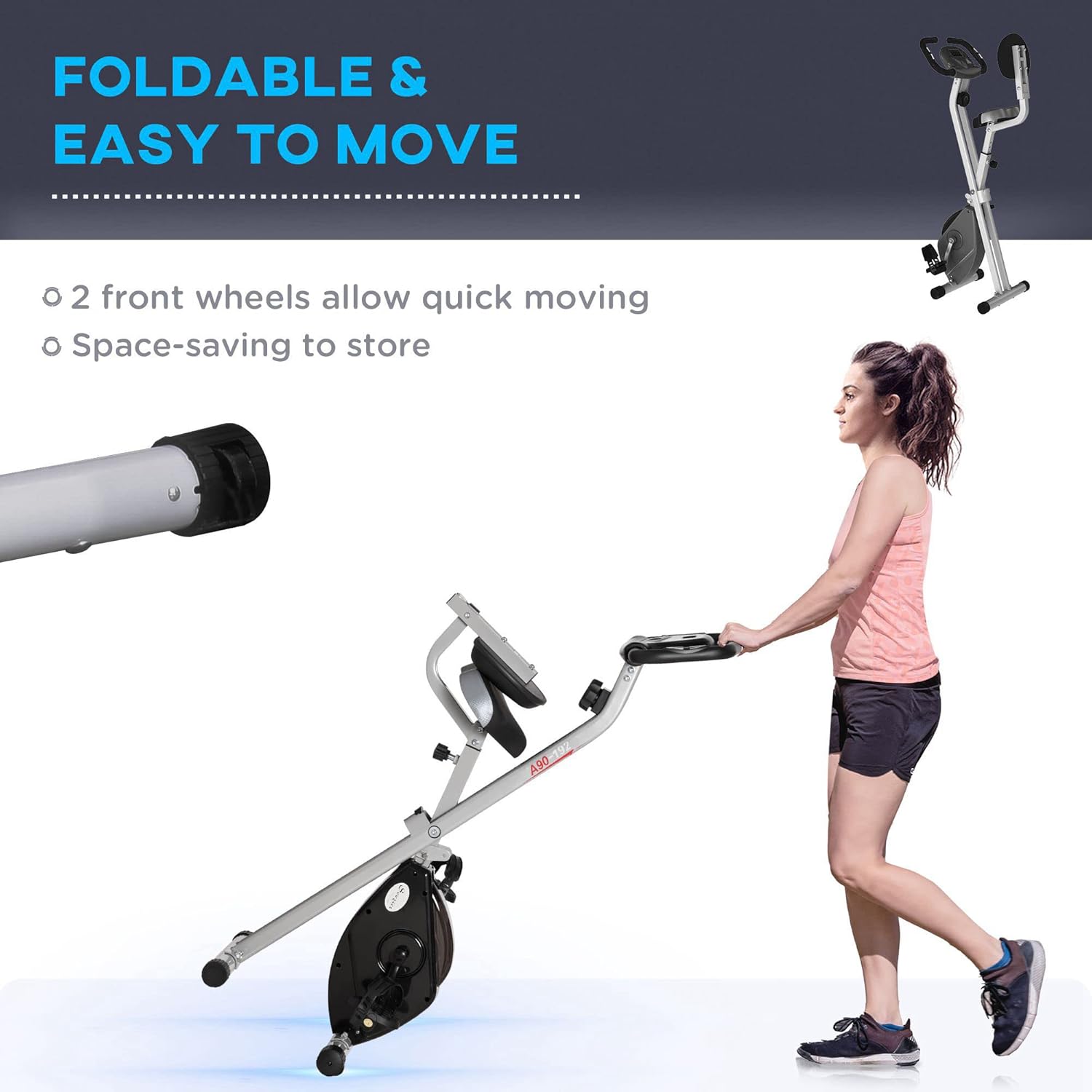
Figure 4: Close-up of the LCD monitor and pulse sensors. This image displays the digital screen showing workout metrics and the integrated pulse sensors on the handlebars for heart rate monitoring.
6. Adjustments
6.1 Seat Height Adjustment
The seat height can be adjusted to five different positions, ranging from 28.75 inches to 32.75 inches (73 cm to 83 cm), to accommodate various user heights (recommended for users 61" - 70.75" tall). To adjust:
- Loosen the adjustment knob located on the seat post.
- Raise or lower the seat to your desired height. Ensure the seat post pin locks into one of the adjustment holes.
- Tighten the adjustment knob securely.

Figure 5: Illustration of the 5-position seat adjustment. This image demonstrates how the seat can be moved up and down to find the most comfortable riding position, with arrows indicating the adjustment range.
7. Folding and Storage
The Soozier exercise bike is designed for easy folding and compact storage, making it ideal for home use where space is limited.
- Ensure the bike is on a stable, flat surface.
- Locate the folding pin or knob on the main frame (refer to assembly diagram if unsure).
- Pull or loosen the pin/knob to release the folding mechanism.
- Carefully fold the bike inward until it is in its compact position.
- Secure the folding mechanism to prevent accidental unfolding.
The bike features two front wheels for easy movement once folded, allowing you to roll it into a storage area.

Figure 6: The exercise bike in its folded state, being moved by a user. This image highlights the bike's portability with its integrated front wheels, making it easy to store in small spaces.
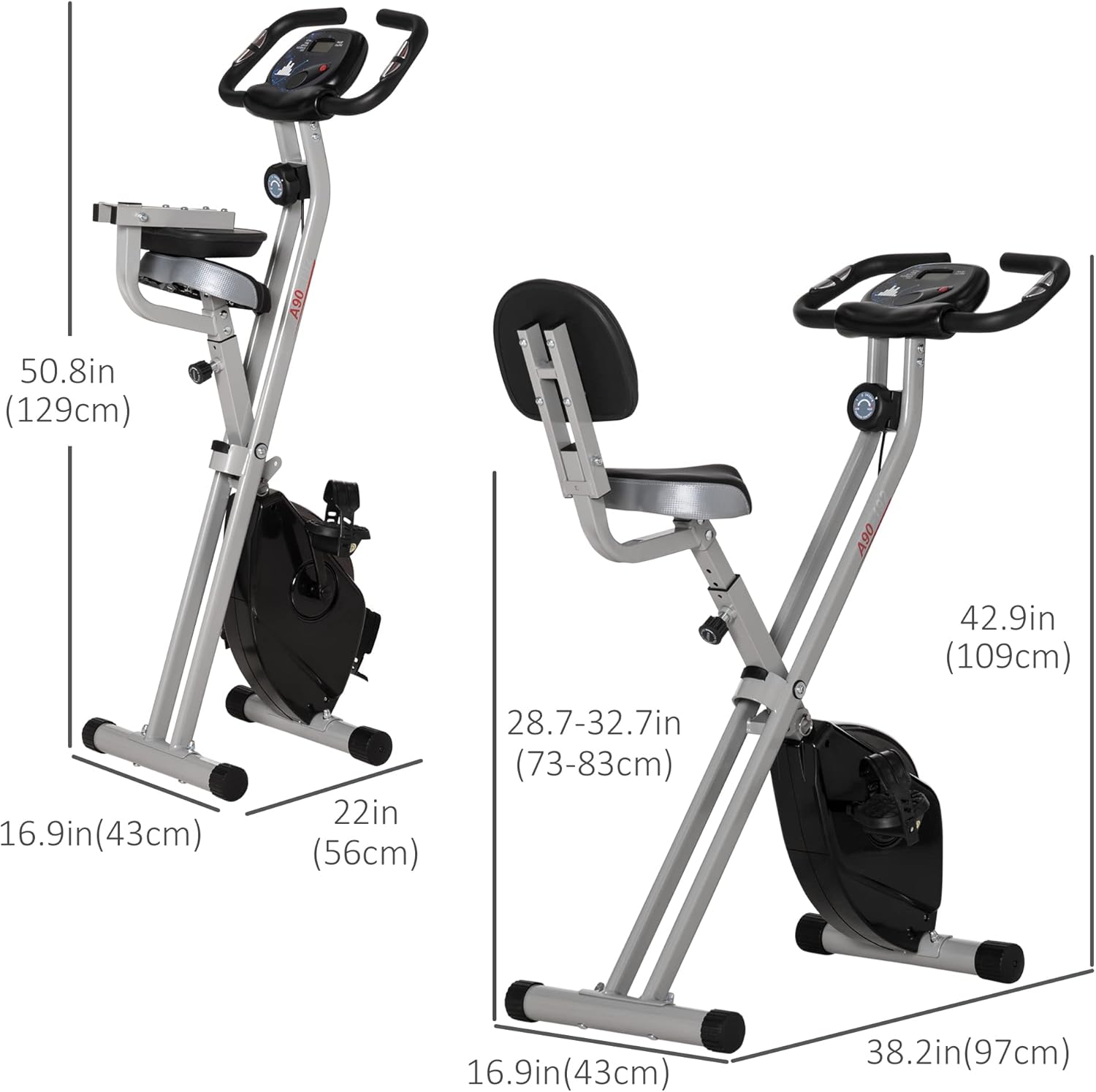
Figure 7: Dimensions of the exercise bike in both folded and unfolded configurations. This diagram provides measurements for width, depth, and height, illustrating its compact design when folded.
8. Maintenance
Regular maintenance ensures the longevity and safe operation of your exercise bike:
- Cleaning: Wipe down the bike with a damp cloth after each use to remove sweat and dust. Avoid abrasive cleaners.
- Check Bolts and Nuts: Periodically check all bolts, nuts, and connections to ensure they are tight. Tighten as necessary.
- Lubrication: No specific lubrication is required for the magnetic resistance system.
- Storage: Store the bike in a cool, dry place away from direct sunlight and extreme temperatures.
9. Troubleshooting
If you encounter issues with your exercise bike, refer to the following common problems and solutions:
- LCD Monitor Not Displaying:
- Check if batteries are installed correctly.
- Replace batteries if they are old or depleted (2x AAA batteries, not included).
- Ensure all sensor wires are securely connected to the monitor.
- Unusual Noise During Operation:
- Check all bolts and nuts for tightness, especially around the pedals and frame joints.
- Ensure the bike is on a level surface.
- Inspect pedals and crank arms for any obstructions or damage.
- Resistance Not Changing:
- Verify that the tension control cable is properly connected and not kinked.
- Ensure the resistance knob is turning freely and engaging the mechanism.
If problems persist, contact customer support.
10. Product Specifications
| Feature | Detail |
|---|---|
| Model Number | A90-192GY |
| Product Dimensions (Unfolded) | 97D x 43W x 109H Centimetres (38.2" D x 17" W x 42.9" H) |
| Product Dimensions (Folded) | 56D x 43W x 129H Centimetres (22" D x 17" W x 50.8" H) |
| Item Weight | 16.47 kg (36.3 lbs) |
| Maximum Weight Capacity | 110 kg (242 lbs) |
| Material | Steel, ABS, PVC |
| Resistance Mechanism | Magnetic |
| Resistance Levels | 8 Levels |
| Display Type | LCD |
| Monitor Functions | Time, Speed, Distance, Calories, Heart Rate, Total Milage (ODO), Scan |
| Power Source (Monitor) | Battery Powered (Batteries not included) |
| Seat Height Adjustment | 5 positions (73-83 cm / 28.75-32.75 inches) |
| Recommended User Height | 155-180 cm (61-70.75 inches) |
| Special Features | Foldable design, Transport wheels, Pulse sensors |
11. Warranty and Support
For warranty information or technical support, please contact the manufacturer:
Manufacturer: Aosom Canada
Place of Business: Markham, Ontario, CA
Telephone: 1-416-792-6088
Please have your model number (A90-192GY) and purchase date available when contacting support.
12. Product Videos
No official product videos from the seller were provided in the product data for this manual.

