
Introduction
This manual provides instructions for the safe and efficient operation of the YUCHENGTECH DS803 Automatic Label Rewinder. Please read this manual thoroughly before using the device and keep it for future reference.
The YUCHENGTECH DS803 is designed to automatically rewind labels as they are printed, ensuring neat and organized label rolls. It features adjustable speed synchronization with your printer and bidirectional winding capabilities.
Safety Information
- Always ensure the device is placed on a stable, flat surface.
- Do not expose the device to water or excessive moisture.
- Keep hands and loose clothing away from moving parts during operation.
- Use only the provided power adapter.
- Unplug the device from the power source before cleaning or performing any maintenance.
- Do not attempt to disassemble or repair the device yourself. Contact qualified personnel for service.
Package Contents
Verify that all items are present in the package:

Figure 1: Package Contents. The image displays the main automatic label rewinder unit, three different sizes of inner cores (76mm, 40mm, 25mm), a power adapter, and an L-shaped fixing clip.
- Automatic Label Rewinder (x1)
- 76mm Inner Core (x1)
- 40mm Inner Core (x1)
- 25mm Inner Core (x1)
- Power Adapter (x1)
- L-shaped Fixing Clip (x1)
Product Overview
The YUCHENGTECH DS803 features a robust design for efficient label handling. Key components include:
- Speed Adjustment Knob: Controls the rewinding speed.
- Power Switch: Turns the device on or off.
- Forward and Reverse Adjustment Button: Changes the winding direction.
- Adjustable Paper Lever: Ensures neat and tight label rolls by guiding the labels.
- Core Holder: Accommodates various inner core sizes (1, 1.5, 3 inches).

Figure 2: Product Details. This image highlights the speed adjustment knob, the power switch, and the forward and reverse adjustment button on the rewinder unit.
Setup
- Placement: Place the label rewinder on a stable, flat surface next to your label printer. Ensure there is enough space for the labels to feed smoothly.
- Core Installation:

Figure 3: Core Installation. This image illustrates how to install 1-inch, 1.5-inch, and 3-inch elastic cores onto the rewinder's spindle. The cores are designed for easy installation and removal.
Select the appropriate inner core (1, 1.5, or 3 inches) that matches your label roll. Slide the core onto the rewinder's spindle. The elastic design allows for easy installation and removal.
- Connect Power: Connect the power adapter to the rewinder and then plug it into a suitable power outlet.
- Positioning the Paper Lever: Adjust the position of the paper lever to match the width of your labels. This ensures the labels are wound neatly and tightly.
Operating Instructions
- Loading Labels: Feed the leading edge of your labels from the printer through the paper lever and attach it securely to the inner core on the rewinder's spindle.
- Power On: Turn on the rewinder using the power switch.
- Adjust Speed: Use the speed adjustment knob to set the rewinding speed. The device can synchronize with your printer's output speed (0-200mm/s). Start with a lower speed and gradually increase it until it matches your printer's output.
- Select Winding Direction: Use the forward and reverse adjustment button to select the desired winding direction. The rewinder supports bidirectional operation.
- Start Printing: Begin your printing task. The rewinder will automatically start winding the labels. When the printer stops, the rewinder will also stop, making it ideal for batch processing.
- Monitoring: Periodically check the label roll to ensure it is winding neatly. Adjust the paper lever or speed if necessary.
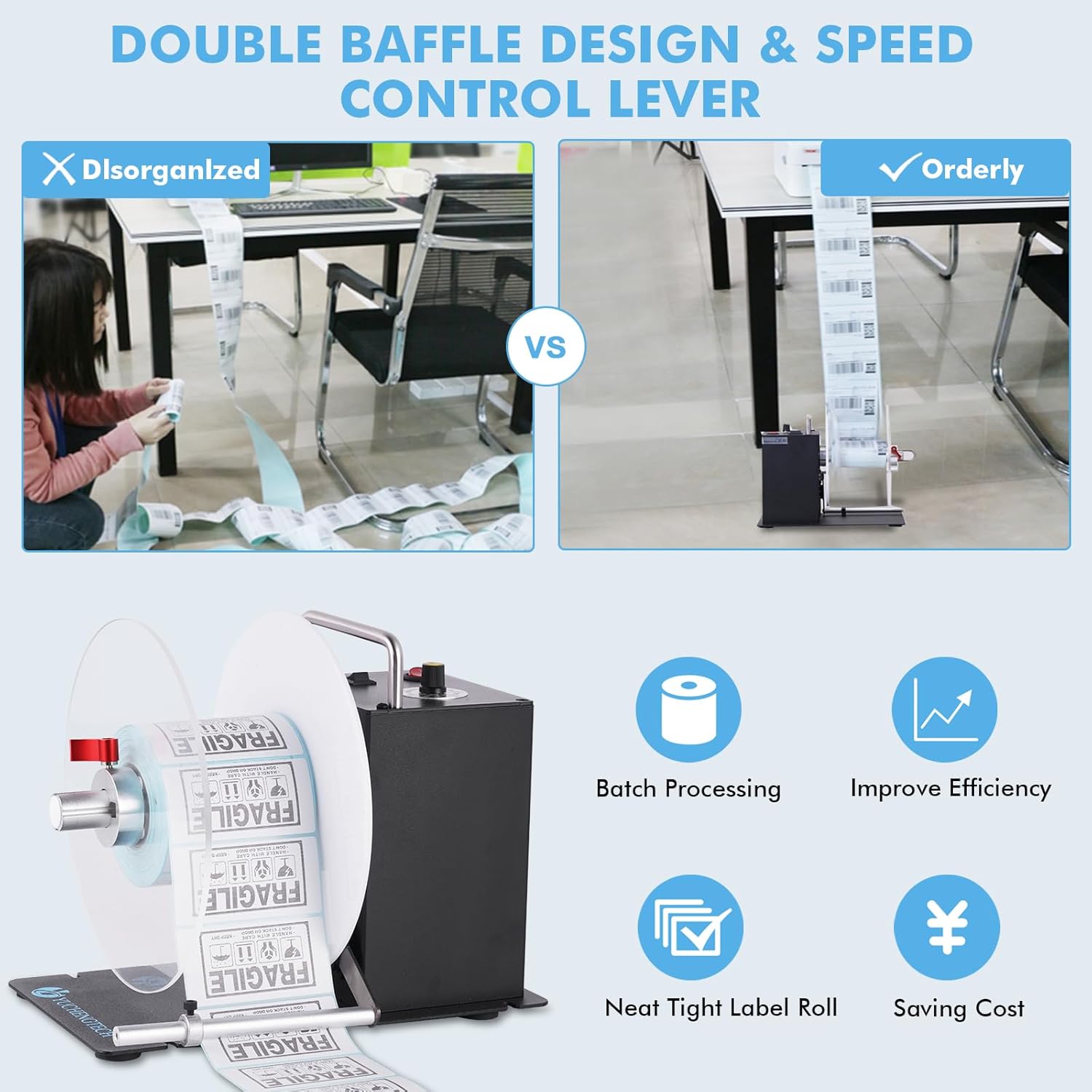
Figure 4: Organized Label Winding. This image contrasts a messy pile of labels with a perfectly wound roll on the rewinder, demonstrating the effectiveness of its double baffle design and speed control lever in achieving neat and tight label rolls.

Figure 5: Printer Compatibility. The image demonstrates the rewinder's strong adaptability, showing it can be used with a variety of label printers and automatically synchronizes with their printing speed.
Maintenance
- Cleaning: Regularly wipe the exterior of the device with a soft, dry cloth. Do not use abrasive cleaners or solvents.
- Inspection: Periodically inspect the spindle and paper lever for any signs of wear or damage.
- Storage: When not in use for extended periods, store the rewinder in a clean, dry place away from direct sunlight.
Troubleshooting
| Problem | Possible Cause | Solution |
|---|---|---|
| Rewinder does not power on. | No power supply; power adapter faulty; power switch off. | Check power connection; ensure power switch is ON; try a different outlet. |
| Labels are not winding neatly or are peeling. | Paper lever incorrectly positioned; speed mismatch with printer; incorrect core size. | Adjust the paper lever to match label width; fine-tune the rewinding speed; ensure the correct core size is used. |
| Rewinder stops unexpectedly. | Printer stopped; label jam; power interruption. | Check printer status; clear any label jams; verify power connection. |
| Labels are too loose or too tight. | Speed setting is incorrect. | Adjust the speed adjustment knob to achieve optimal tension. |
Specifications
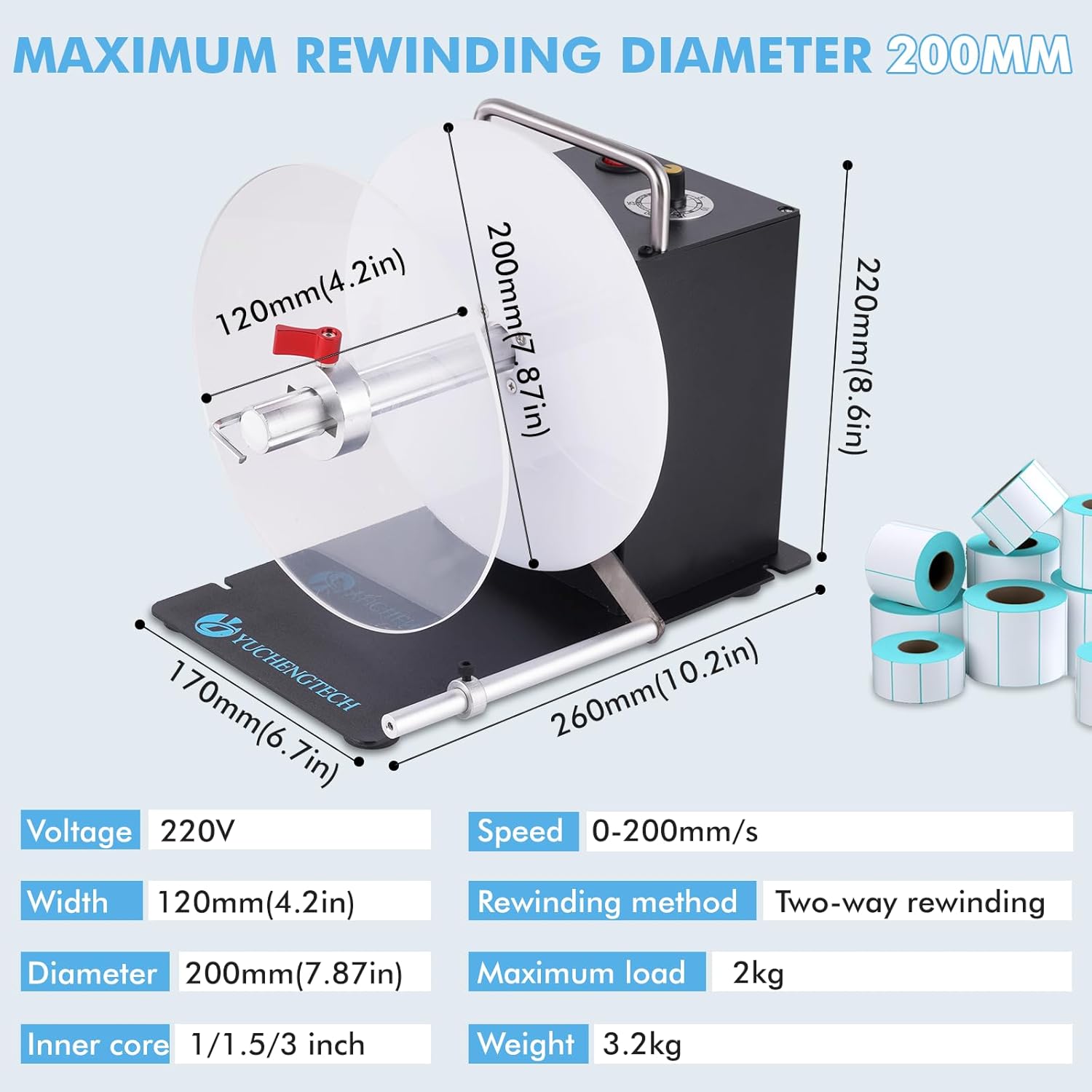
Figure 6: Product Specifications. This image provides a visual representation of the rewinder's maximum dimensions and lists key technical specifications such as voltage, speed, width, diameter, rewinding method, maximum load, inner core sizes, and weight.
| Feature | Specification |
|---|---|
| Model | DS803 |
| Brand | YUCHENGTECH |
| Voltage | 220V |
| Speed | 0-200mm/s |
| Max Label Width | 120mm (4.2 inches) |
| Max Rewinding Diameter | 200mm (7.87 inches) |
| Rewinding Method | Two-way (Bidirectional) |
| Maximum Load | 2kg |
| Inner Core Sizes Supported | 1 inch, 1.5 inches, 3 inches |
| Weight | 3.2kg |
| Connectivity | USB (for synchronization with printer) |
Applications
The YUCHENGTECH DS803 Automatic Label Rewinder is versatile and suitable for various industries and applications, including:

Figure 7: Diverse Applications. This image illustrates the wide range of uses for the label rewinder, including logistics (warehousing), clothing (garment labels), pharmacy (medical labels), and general packaging.
- Logistics and Warehousing: For organizing shipping and inventory labels.
- Clothing and Apparel: For winding garment and shoe labels.
- Pharmacy and Medical: For handling medical and pharmaceutical labels.
- Manufacturing: For product identification and chemical labels.
- Electronics: For electronic and electrical component labels.
- General Packaging: For various packaging label requirements.
Warranty and Support
Information regarding warranty and customer support for the YUCHENGTECH DS803 Automatic Label Rewinder is not available in the provided product details. Please refer to the product packaging or contact the seller directly for warranty terms and support options.