
1. Product Overview
The Scian LD 753 Wrist Blood Pressure Monitor is designed for convenient and accurate blood pressure measurement at home. It features a large LCD display and supports two users with extensive memory storage.
- Large LCD Screen: Provides clear and easy-to-read measurement results.
- Dual User Mode: Stores measurement results for two users separately, with 90 memory storage slots for each user.
- Automatic & One-button Operation: Simplifies the measurement process for systolic, diastolic blood pressure, heart rate, and pulse.
- Blood Pressure Classification Indication: Helps users understand their blood pressure levels according to standard classifications.
- Irregular Heart-beat Detector: Alerts users to potential irregular heartbeats.
- Unique Wrist Pillow Design: Supports the arm during measurement to promote relaxation and accuracy.
- Adjustable Wrist Cuff: Fits wrist sizes from 12.5 cm to 20.5 cm (4.9 inches to 8.1 inches).
- Error & Low Battery Indication: Provides clear alerts for operational issues or low power.
- Date & Time Display: Records the date and time of each measurement.
- Auto Power Off: Conserves battery life.

Image 1.1: Overview of the Scian LD 753 Wrist Blood Pressure Monitor and its main features.
2. Safety Information
Please read all instructions carefully before using this device. Improper use may result in inaccurate readings or device damage.
- Consult your physician before using this device if you have any medical conditions.
- This device is intended for adult use only.
- Do not use this device on infants or children.
- Do not use this device for diagnosis or treatment of any health problem or disease. Always consult your doctor for medical advice.
- Avoid taking measurements in a moving vehicle or during physical activity.
- Keep the device away from strong electromagnetic fields.
- Do not disassemble or attempt to repair the device yourself.
- Dispose of batteries according to local regulations.
3. Package Contents
Verify that all items are present in the package:
- Scian LD 753 Wrist Blood Pressure Monitor Unit
- Adjustable Wrist Cuff (12.5-20.5cm)
- Storage Case / Wrist Pillow
- Instruction Manual (this document)
Note: 2 AAA batteries are required and are not included in the package.
4. Device Components
Familiarize yourself with the parts of your blood pressure monitor:

Image 4.1: Detailed view of the monitor's LCD display.
- LCD Display: Shows blood pressure readings (SYS, DIA), pulse rate (PUL/min), date, time, user indicator (M1/M2), irregular heartbeat symbol, and battery indicator.
- M1 Button: User 1 memory recall.
- Power Button (ⓘ): Powers the device on/off and starts/stops measurement.
- M2 Button: User 2 memory recall.
- Wrist Cuff: Inflatable cuff for wrist measurement.
- Battery Compartment: Located on the back of the device.
5. Setup
5.1. Battery Installation
- Open the battery compartment cover on the back of the monitor.
- Insert two (2) AAA batteries, ensuring correct polarity (+/-).
- Close the battery compartment cover securely.
5.2. Setting Date and Time
After installing batteries, the device may prompt you to set the date and time. If not, press and hold the M1 or M2 button for a few seconds to enter setting mode.
- Use the M1 or M2 button to adjust the flashing number (year, month, day, hour, minute).
- Press the Power button (ⓘ) to confirm each setting and move to the next.
- Once all settings are confirmed, the device will exit setting mode.
6. Operating Instructions
6.1. Preparing for Measurement
- Avoid eating, drinking alcohol, smoking, exercising, or bathing for 30 minutes before measurement.
- Rest for at least 5 minutes before taking a measurement.
- Sit in a comfortable position with your back supported and feet flat on the floor.
- Place your left arm on a table so that the wrist cuff is at approximately the same height as your heart.
6.2. How to Take a Measurement

Image 6.1: Step-by-step guide for accurate measurement.
- Step 1: Wrap the wrist cuff around your left wrist. Ensure the cuff is snug but not too tight.
- Step 2: Position the display in the middle of your wrist. Leave a 1-2 cm gap between the cuff and the bottom of your palm.
- Step 3: Adjust your posture and make sure your wrist is at approximately the same height as your heart. Use the included wrist pillow/storage case for support if needed.
- Step 4: Press the Power button (ⓘ). The machine will start to work automatically. Remain still and quiet until the measurement is complete.
The systolic, diastolic blood pressure, and pulse rate will be displayed on the screen. The result will be automatically saved to the selected user's memory.
6.3. Dual User Mode
The monitor supports two users (User 1 and User 2) to store their readings separately.

Image 6.2: Dual user mode display.
- To select User 1, press the M1 button before starting a measurement.
- To select User 2, press the M2 button before starting a measurement.
- Each user can store up to 90 measurement records. When the memory is full, the oldest reading will be replaced by the newest one.
6.4. Recalling Memory Records
- With the device off, press the M1 button to view User 1's records, or the M2 button for User 2's records.
- Press the same button repeatedly to scroll through previous measurements.
- The monitor will display the average of the last three readings first, then individual readings from most recent to oldest.
7. Interpreting Results
The Scian LD 753 monitor includes a blood pressure classification indicator based on World Health Organization (WHO) guidelines. This visual guide helps you understand your readings at a glance.

Image 7.1: Blood pressure classification chart.
- Green: Optimal/Normal blood pressure.
- Yellow: Elevated blood pressure.
- Red: Hypertension (mild, moderate, severe).
If the irregular heartbeat symbol (a heart icon) appears on the display, it indicates that an irregular heartbeat was detected during the measurement. This does not necessarily mean you have an arrhythmia, but if it appears frequently, consult your doctor.

Image 7.2: Irregular Heartbeat and Body Movement Symbol.
8. Maintenance
8.1. Cleaning
- Clean the monitor and cuff with a soft, dry cloth.
- Do not use abrasive cleaners or immerse the device in water.
8.2. Storage
Store the device in its protective storage case/wrist pillow when not in use.
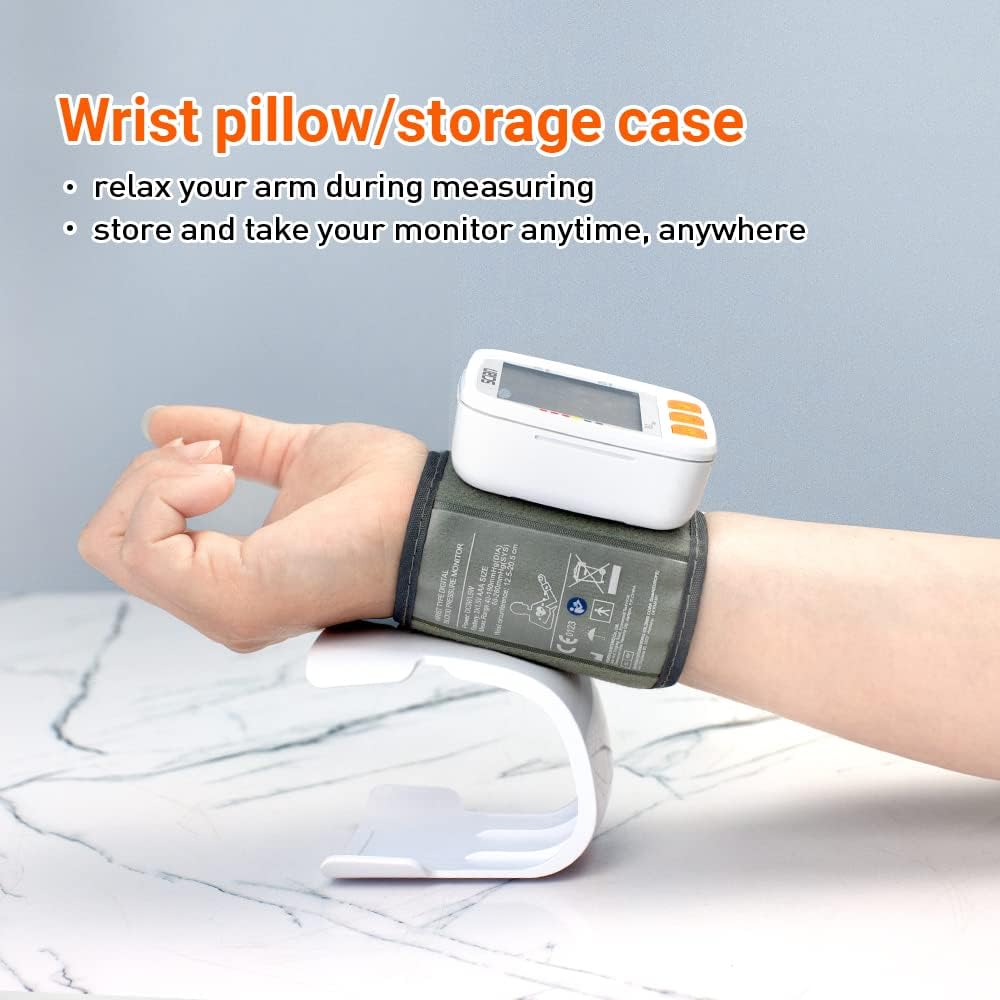
Image 8.1: Wrist pillow for support and storage.
- Keep the device in a cool, dry place, away from direct sunlight and extreme temperatures.
- Remove batteries if the device will not be used for an extended period to prevent leakage.
9. Troubleshooting
| Problem | Possible Cause | Solution |
|---|---|---|
| No display when powered on | Batteries are dead or incorrectly inserted. | Replace batteries or reinsert them with correct polarity. |
| "E" or "Error" displayed | Cuff not applied correctly, movement during measurement, or other measurement error. | Re-apply cuff, remain still and quiet, ensure proper posture. Wait 5 minutes before re-measuring. |
| Inaccurate readings | Improper posture, cuff too loose/tight, or recent physical activity. | Follow measurement instructions carefully. Ensure cuff is at heart level. Rest before measurement. |
| Low battery indicator | Batteries are running low. | Replace with new AAA batteries. |
10. Specifications
- Model Number: LD 753
- Product Dimensions: 2.6 x 2.8 x 1.2 inches
- Item Weight: 4 ounces (0.25 Pounds)
- Power Source: 2 AAA batteries (not included)
- Display Type: LCD
- Cuff Size: 12.5-20.5 cm (4.9-8.1 inches)
- Target Use Body Part: Wrist
- Material Features: Plastic
- Manufacturer: Honsun (Nantong) Co.,Ltd.
11. Warranty and Support
For warranty information and customer support, please refer to the documentation included with your purchase or contact the manufacturer directly. Keep your purchase receipt as proof of purchase.
For further assistance, you may visit the Scian Store on Amazon.