
1. Introduction
This manual provides detailed instructions for the safe and efficient operation, setup, and maintenance of your YOU LIAN MT-130 Automatic Labeling Machine. This machine is designed for precise labeling of round bottles, cans, and jars, and includes an optional date printing function. Please read this manual thoroughly before operating the machine to ensure optimal performance and longevity.
2. Safety Instructions
- Always ensure the machine is properly grounded before connecting to a power source.
- Do not operate the machine with wet hands or in damp environments.
- Keep hands and loose clothing away from moving parts during operation.
- Disconnect power before performing any maintenance, cleaning, or adjustments.
- Use only approved replacement parts and accessories.
- Ensure adequate ventilation around the machine.
- In case of malfunction, immediately power off the machine and consult the troubleshooting section or contact support.
3. Package Contents
Please verify that all items are present in the package:
- YOU LIAN MT-130 Automatic Labeling Machine main unit
- Power cable
- Instruction Manual
- Set of adjustment tools
- Sample label roll (may vary)
- Date printing ribbon (if code printing function is included)
4. Product Components
Familiarize yourself with the key components of the MT-130 machine:

Figure 4.1: Main view of the YOU LIAN MT-130 Automatic Labeling Machine. This image displays the primary motor and the label dispensing mechanism, highlighting the robust construction of the unit.
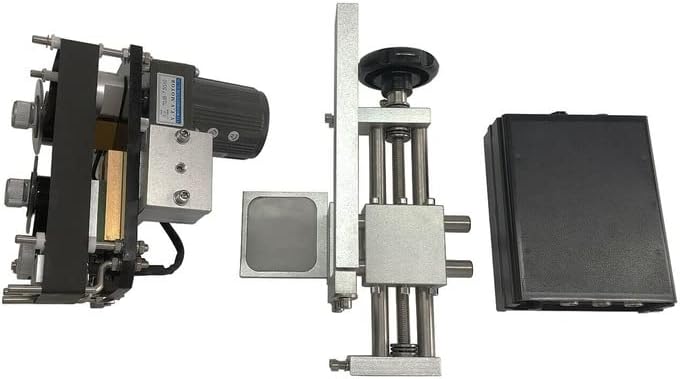
Figure 4.2: Side view illustrating the label application and adjustment mechanism. This view shows the vertical adjustment column and the label sensor, crucial for precise label placement on various container sizes.
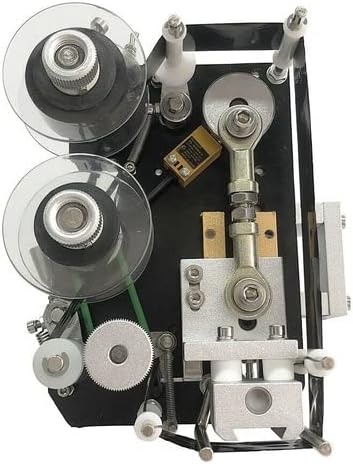
Figure 4.3: Top-down view of the label and ribbon loading area. This image details the label roll spindles, the ribbon spools for the date printer, and the various guides and tensioners that ensure smooth material feeding.
5. Setup
Follow these steps to set up your labeling machine:
- Unpacking: Carefully remove all components from the packaging. Retain packaging for future transport or storage.
- Placement: Place the machine on a stable, level, and clean workbench or desk. Ensure there is sufficient space around the machine for operation and maintenance.
- Power Connection: Connect the power cable to the machine and then to a grounded electrical outlet. Ensure the power switch is in the OFF position before connecting.
- Loading Labels:
- Place the label roll onto the label supply spindle, ensuring the labels unwind in the correct direction.
- Thread the label strip through the guides and over the peeling plate.
- Secure the waste paper onto the take-up reel.
- Loading Date Printing Ribbon (if applicable):
- Install the ribbon onto the designated spools, ensuring proper tension.
- Thread the ribbon through the printing head mechanism.
- Adjusting for Container Size: Use the adjustment knobs to set the height and position of the label applicator to match the diameter and height of your round bottles, cans, or jars. Ensure the container guide is properly aligned.
6. Operating Instructions
Once the machine is set up, follow these steps for operation:
- Power On: Flip the main power switch to the ON position. The indicator light should illuminate.
- Adjusting Labeling Speed: Use the speed control dial (if available) to set the desired labeling speed. Start with a lower speed for initial testing.
- Setting Date Printer (if applicable): If your machine includes the date printing function, set the desired date, batch number, or other code using the provided controls. Refer to the specific date printer module's instructions for detailed settings.
- Loading Containers: Place a container onto the designated position on the conveyor or feeding mechanism.
- Initiating Labeling:
- For semi-automatic models, press the foot pedal or activation button to start the labeling cycle.
- For fully automatic models, ensure the container supply is continuous, and the machine will automatically detect and label.
- Monitoring Operation: Observe the labeling process to ensure labels are applied correctly and consistently. Make minor adjustments as needed.
- Power Off: After completing your labeling task, turn off the main power switch.
7. Maintenance
Regular maintenance ensures the longevity and optimal performance of your machine:
- Daily Cleaning: After each use, wipe down the machine surfaces with a soft, dry cloth. Remove any label residue or dust from the label path, sensors, and rollers.
- Sensor Cleaning: Periodically clean the label detection sensors with a cotton swab and isopropyl alcohol to ensure accurate label detection.
- Lubrication: Apply a small amount of machine oil to moving parts and bearings as indicated in the diagram (refer to specific lubrication points if provided in a separate diagram).
- Ribbon Replacement (if applicable): Replace the date printing ribbon when it runs out or the print quality deteriorates.
- Inspection: Regularly inspect all cables, connections, and mechanical parts for wear, damage, or loose fittings. Tighten any loose screws.
- Storage: If storing the machine for an extended period, ensure it is clean, dry, and covered to protect it from dust and moisture.
8. Troubleshooting
Refer to the table below for common issues and their solutions:
| Problem | Possible Cause | Solution |
|---|---|---|
| Machine does not power on | No power supply; Loose power cable; Blown fuse | Check power outlet; Ensure cable is securely connected; Check and replace fuse if necessary. |
| Labels not dispensing | Label roll empty; Labels jammed; Sensor dirty or misaligned | Replace label roll; Clear any jams; Clean or adjust label sensor. |
| Labels applied crookedly | Container not aligned; Applicator misaligned; Uneven label tension | Adjust container guide; Realign label applicator; Check and adjust label roll tension. |
| Date print is faint or missing | Ribbon empty; Ribbon incorrectly loaded; Print head dirty or damaged | Replace ribbon; Reload ribbon correctly; Clean print head; Contact support if print head is damaged. |
| Machine stops unexpectedly | Overload; Sensor error; Internal fault | Reduce load; Check all sensors; Power cycle the machine; Contact support if problem persists. |
9. Specifications
Technical specifications for the YOU LIAN MT-130 Automatic Labeling Machine:
- Model Name: MT-130 (also MT 2030)
- Brand: YOU LIAN
- Printing Technology: Dot Matrix (for date printer function)
- Special Feature: Automatic Desk Type
- Printer Output: Monochrome (for date printer function)
- Duplex: Automatic
- UPC: 736538535249
- Manufacturer: YOULIAN
- Date First Available: April 15, 2021
10. Warranty and Support
The YOU LIAN MT-130 Automatic Labeling Machine typically comes with a manufacturer's warranty covering defects in materials and workmanship for a specified period from the date of purchase. Please refer to your purchase documentation or contact your vendor for specific warranty terms and conditions.
For technical support, spare parts, or warranty claims, please contact your authorized YOU LIAN dealer or the manufacturer directly. Ensure you have your product model number (MT-130 or MT 2030) and purchase date available when contacting support.
Manufacturer: YOULIAN
(Contact information for specific support channels should be obtained from your point of purchase or the official YOU LIAN website.)