1. Important Safety Instructions
When using electrical appliances, basic safety precautions should be followed, including the following:
- Read all instructions before using the appliance.
- Ensure the appliance is properly grounded.
- Do not operate the oven if the door or door seals are damaged.
- Do not heat liquids or other foods in sealed containers as they are liable to explode.
- Only allow children to use the oven without supervision when adequate instructions have been given so that the child is able to use the oven in a safe way and understands the hazards of improper use.
- Regularly clean the oven and remove any food deposits.
For detailed safety information, refer to the full safety guide provided with your product packaging.
2. Product Overview
The Galanz D90D25Ap-H3 is a digital microwave oven with an integrated grill function, designed for countertop use. It features a 25-liter capacity and multiple power levels for versatile cooking.
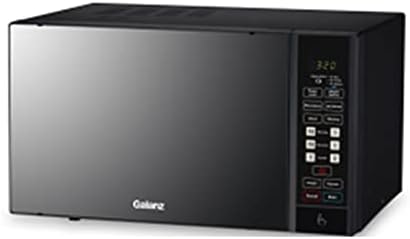
Image: Front view of the Galanz D90D25Ap-H3 Digital Microwave with Grill. The appliance is black with a digital display and a control panel on the right side.
3. Setup and Installation
- Unpacking: Carefully remove all packaging materials from the microwave oven and its accessories. Check for any damage during transit.
- Placement: Place the microwave on a stable, level surface, such as a kitchen countertop. Ensure there is adequate ventilation space around the unit: at least 20 cm (8 inches) above, 10 cm (4 inches) at the rear, and 5 cm (2 inches) on each side. Do not block any ventilation openings.
- Turntable Installation:
- Place the turntable ring inside the oven cavity.
- Position the glass turntable plate securely on top of the turntable ring. Ensure it sits correctly in the center.
- Power Connection: Plug the power cord into a grounded electrical outlet (230V~50Hz).
4. Operating Instructions
4.1 Control Panel Overview
The control panel features a digital display and various buttons for setting cooking time, power levels, and special functions. The display shows the time of day, cooking time, and other indicators.
4.2 Basic Microwave Cooking
- Place food in a microwave-safe container on the glass turntable.
- Close the oven door securely.
- Press the 'Microwave' button (or similar function button) and use the numeric keypad or dial to set the desired cooking time.
- Select the power level if desired (default is usually high). This model offers 5 power levels.
- Press the 'Start' button to begin cooking.
4.3 Grill Function
The grill function is ideal for browning and crisping food.
- Place food on the grill rack (if provided) directly on the turntable.
- Press the 'Grill' button.
- Set the desired grilling time using the controls.
- Press 'Start'.
4.4 Defrost Function
The defrost function allows for thawing frozen foods based on weight or time.
- Place frozen food in the oven.
- Press the 'Defrost' button.
- Select the defrost mode (e.g., by weight or time) and input the required value.
- Press 'Start'.
4.5 Timer Function
The microwave includes a timer function for general kitchen timing or delayed start cooking.
- To set the kitchen timer, press the 'Timer' button and input the desired time.
- To use for delayed start, follow the specific instructions in your full manual for programming a delayed cooking cycle.
5. Maintenance and Cleaning
Regular cleaning helps maintain the performance and longevity of your microwave oven.
- Interior: After each use, wipe the interior with a damp cloth and mild detergent. For stubborn food splatters, heat a cup of water with lemon juice in the microwave for a few minutes to loosen residue before wiping.
- Exterior: Clean the exterior surfaces with a soft, damp cloth. Avoid abrasive cleaners.
- Turntable: The glass turntable and turntable ring can be removed and washed in warm, soapy water or in a dishwasher. Ensure they are completely dry before placing them back in the oven.
- Door Seals: Keep the door seals clean to ensure proper closure and efficient operation.
Always unplug the microwave oven before cleaning.
6. Troubleshooting
If you encounter issues with your microwave, refer to the following common problems and solutions:
- Oven does not start:
- Check if the power cord is securely plugged into the outlet.
- Ensure the door is completely closed.
- Check if a fuse has blown or a circuit breaker has tripped.
- Food not heating:
- Verify that the cooking time and power level are set correctly.
- Ensure the door is fully closed.
- Turntable not rotating:
- Check if the turntable is correctly placed on the turntable ring.
- Ensure there is no obstruction beneath the turntable.
- Sparks or arcing inside the oven:
- Immediately turn off and unplug the oven.
- Remove any metallic objects or containers from the oven.
- Ensure no food residue is stuck to the oven walls or ceiling.
If the problem persists after attempting these solutions, please contact customer support.
7. Specifications
| Feature | Specification |
|---|---|
| Model | D90D25Ap-H3 |
| Brand | Galanz |
| Capacity | 25 Liters |
| Microwave Power Output | 900 Watts |
| Grill Power Output | 1000 Watts |
| Power Consumption (Microwave) | 1400 Watts |
| Voltage | 230V~50Hz |
| Operating Frequency | 2450MHz |
| Installation Type | Countertop |
| Special Features | Turntable, Digital Controls |
| Number of Power Levels | 5 |
| Defrost System | Available |
| Timer Function | Available |
| Net Dimensions (H×W×D) | 220mm × 340mm × 320mm |
| Gross Dimensions (H×W×D) | 281mm × 483mm × 360mm |
| Item Weight | Approx. 12 kg |
| Included Components | Grill, Turntable |
8. Warranty and Support
For information regarding the product warranty, please refer to the warranty card included with your purchase or contact your retailer. Warranty terms and conditions may vary by region and seller.
If you require technical assistance, spare parts, or have any questions not covered in this manual, please contact Galanz customer support or your authorized service center. Contact details can typically be found on the manufacturer's website or in your product documentation.