
Introduction
Thank you for choosing the WearTek X19 Bone Conduction Headphones. These headphones are designed to provide a unique audio experience through bone conduction technology, allowing you to hear your surroundings while enjoying music. Featuring IPX8 waterproofing, 8GB of internal MP3 memory, and Bluetooth 5.0 connectivity, the X19 is ideal for various activities, including swimming and sports.
Please read this manual carefully before using the product to ensure proper operation and to maximize its lifespan.
Key Features
- Bone Conduction Technology: Open-ear design for situational awareness.
- IPX8 Waterproof: Suitable for swimming and water sports.
- 8GB MP3 Memory: Store and play music directly without a connected device.
- Bluetooth 5.0: Stable wireless connection for audio streaming.
- Lightweight Design: Ergonomic and comfortable for extended wear (approx. 34g).
- Magnetic Charging: Convenient and secure charging interface.
- Long Battery Life: Up to 6 hours of playing time.
Product Overview
Familiarize yourself with the components and controls of your WearTek X19 headphones.

Overall view of the WearTek X19 Bone Conduction Headphones, showcasing their ergonomic design.
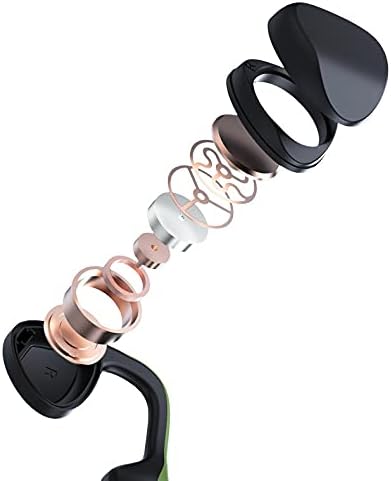
An exploded diagram illustrating the internal components of the bone conduction transducers.

Detailed view of the control buttons: Volume +/Last Song, Volume -/Next Song, and Power On/Off.

The flexible memory titanium band allows for 360-degree bending, ensuring durability and a comfortable fit.
Setup and Charging
Charging the Headphones
Before first use, fully charge your headphones. Use the provided magnetic charging cable.
- Connect the magnetic end of the charging cable to the charging port on the headphones. Ensure the pins align correctly.
- Connect the USB end of the cable to a standard USB power adapter (5V/1A recommended) or a computer's USB port.
- The LED indicator on the headphones will show charging status (e.g., red for charging, blue for fully charged).
- A full charge typically takes approximately 1.5-2 hours.

Close-up of the magnetic charging port and control buttons on the headphones.
Powering On/Off
- To Power On: Press and hold the Power button for 3 seconds until the LED indicator flashes blue and a voice prompt says "Power On".
- To Power Off: Press and hold the Power button for 5 seconds until the LED indicator flashes red and a voice prompt says "Power Off".
Operating Instructions
Bluetooth Pairing
- Ensure the headphones are powered off.
- Press and hold the Power button for 5-7 seconds until the LED indicator flashes red and blue alternately, indicating pairing mode.
- On your device (smartphone, tablet, etc.), enable Bluetooth and search for "X19".
- Select "X19" from the list of available devices to connect. A voice prompt will confirm "Connected".
Music Playback (Bluetooth Mode)
- Play/Pause: Short press the Power button.
- Volume Up: Short press the "+" button.
- Volume Down: Short press the "-" button.
- Next Track: Long press the "-" button.
- Previous Track: Long press the "+" button.
MP3 Mode (Internal Memory)
The X19 headphones have 8GB of built-in memory for storing music directly. This mode is ideal for swimming or when you prefer not to carry a connected device.
- Transferring Music: Connect the headphones to a computer using the magnetic charging cable. The headphones will appear as a removable disk. Drag and drop your audio files (e.g., MP3 format) into the headphone's storage.
- Switching to MP3 Mode: While the headphones are on, double-press the Power button to switch between Bluetooth mode and MP3 mode. A voice prompt will indicate the current mode.
- Controls in MP3 Mode: The music playback controls (Play/Pause, Volume, Next/Previous Track) are the same as in Bluetooth mode.
Call Management
- Answer/End Call: Short press the Power button.
- Reject Call: Long press the Power button for 2 seconds.
Wearing the Headphones

Proper placement of the bone conduction transducers in front of the ear, with the band resting behind the head.

The lightweight and secure fit makes the X19 headphones suitable for sports and active use.
Water Resistance (IPX8)
The WearTek X19 headphones are rated IPX8, meaning they are protected against prolonged immersion in water. This makes them suitable for swimming and other water-based activities.
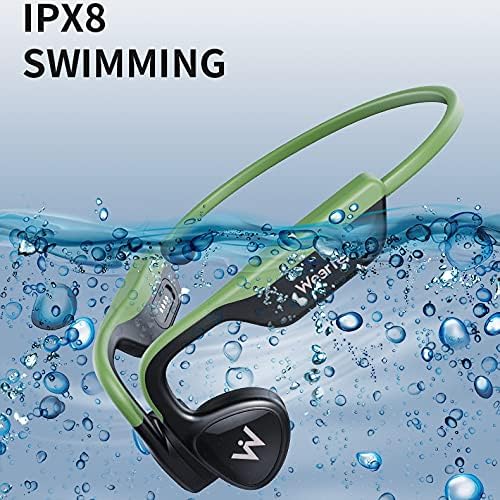
The IPX8 rating ensures the headphones can withstand submersion, making them ideal for swimming.
- For optimal performance in water, use the MP3 mode as Bluetooth signals do not transmit well through water.
- After use in chlorinated or saltwater, rinse the headphones with fresh water and dry thoroughly before charging.
- Do not charge the headphones if the charging port is wet.
Maintenance
- Cleaning: Wipe the headphones with a soft, damp cloth. Do not use abrasive cleaners or solvents.
- Storage: Store the headphones in a cool, dry place away from direct sunlight and extreme temperatures.
- Charging Port: Keep the magnetic charging port clean and dry to prevent corrosion and ensure proper charging.
- Battery Care: To preserve battery life, charge the headphones regularly, even if not used frequently. Avoid fully discharging the battery for extended periods.
Troubleshooting
| Problem | Possible Solution |
|---|---|
| Headphones do not power on. | Ensure the headphones are charged. Connect to the charger and check the LED indicator. |
| Cannot pair via Bluetooth. | Ensure headphones are in pairing mode (flashing red/blue). Turn off and on Bluetooth on your device. Forget previous pairings and try again. |
| No sound or low volume. | Check headphone and device volume levels. Ensure headphones are correctly positioned on your cheekbones. Switch between Bluetooth and MP3 mode to verify audio source. |
| Headphones stop working after swimming. | Ensure the charging port was completely dry before charging. Rinse with fresh water and dry thoroughly after each use in water. Contact customer support if the issue persists. |
| Cannot transfer music to MP3 memory. | Ensure the headphones are connected to the computer and recognized as a removable disk. Try a different USB port or cable. |
Specifications
| Feature | Detail |
|---|---|
| Model Number | 52161514 |
| Brand | WearTek |
| Connectivity | Bluetooth 5.0, MP3 (8GB Internal Memory) |
| Water Resistance | IPX8 (Waterproof) |
| Ear Placement | Open Ear (Bone Conduction) |
| Battery Life | Up to 6 hours playing time |
| Charging Type | Magnetic Charging |
| Item Weight | 0.03 Kilograms |
| Control Method | Touch/Button |
Safety Information
- Do not attempt to disassemble or modify the headphones.
- Keep out of reach of children.
- Avoid exposing the headphones to extreme temperatures or direct flame.
- Do not use the headphones at excessively high volumes for prolonged periods to prevent hearing damage.
- Be aware of your surroundings when using open-ear headphones, especially in traffic or hazardous environments.
Warranty and Support
WearTek products are designed for reliability and performance. For warranty information, technical support, or customer service inquiries, please refer to the contact information provided with your purchase or visit the official WearTek website.
Please retain your proof of purchase for warranty claims.