Product Overview
This manual provides instructions for the Portable Foldable Rechargeable Fan, designed for versatile use as a standing, table, or desk fan. It features a silent operation, three speed settings, and a long-lasting rechargeable battery, making it suitable for various indoor and outdoor environments.

Image: The Portable Foldable Rechargeable Fan shown in its compact folded state, as a desk fan, and fully extended as a standing fan. This illustrates its adaptable design for different uses.
Key Features
- Portable & Foldable Design: Easily transforms from a compact unit (12cm) to a desk fan (41cm) or a standing fan (106cm).
- Rechargeable Battery: Equipped with a 7200mAh battery providing over 5 hours of operation on a single charge via micro-USB.
- Quiet Operation: Operates at less than 40dB, ensuring minimal noise even at maximum speed.
- Adjustable Airflow: Features 3 speed settings for customized cooling.
- Wide Oscillation: Head can tilt 180° vertically and rotate 75° horizontally for broad air distribution.
- Integrated Phone Holder: A convenient slot on the base allows for horizontal placement of a smartphone or small device when used as a desk fan.
- Stable Base: Anti-slip design on the base ensures stability during operation.

Image: A detailed view of the fan, pointing out its key features including the three high-power blades, the adjustable shaft, the integrated phone holder in the base, and the anti-slip material on the bottom for enhanced stability.
Setup and Assembly
The Portable Foldable Rechargeable Fan comes pre-assembled and requires minimal setup. Follow these steps to prepare your fan for use:
- Unfold the Fan: Gently pull the fan head upwards from its compact, folded position.
- Adjust Height: Extend the telescopic rod to your desired height. The fan offers three main height settings:
- Compact/Folded: Approximately 12 cm (4.7 inches) for easy storage and transport.
- Desk Fan: Approximately 41 cm (16.1 inches) for tabletop or desk use.
- Standing Fan: Fully extended to approximately 106 cm (41.7 inches) for floor use.
- Position the Fan Head: Adjust the angle of the fan head vertically (up to 180°) and horizontally (up to 75°) to direct airflow.
- Charge the Battery: Before first use, fully charge the fan using the provided micro-USB cable. Connect the cable to the fan's charging port and a compatible USB power source (e.g., computer, wall adapter). The charging indicator light will show charging status.
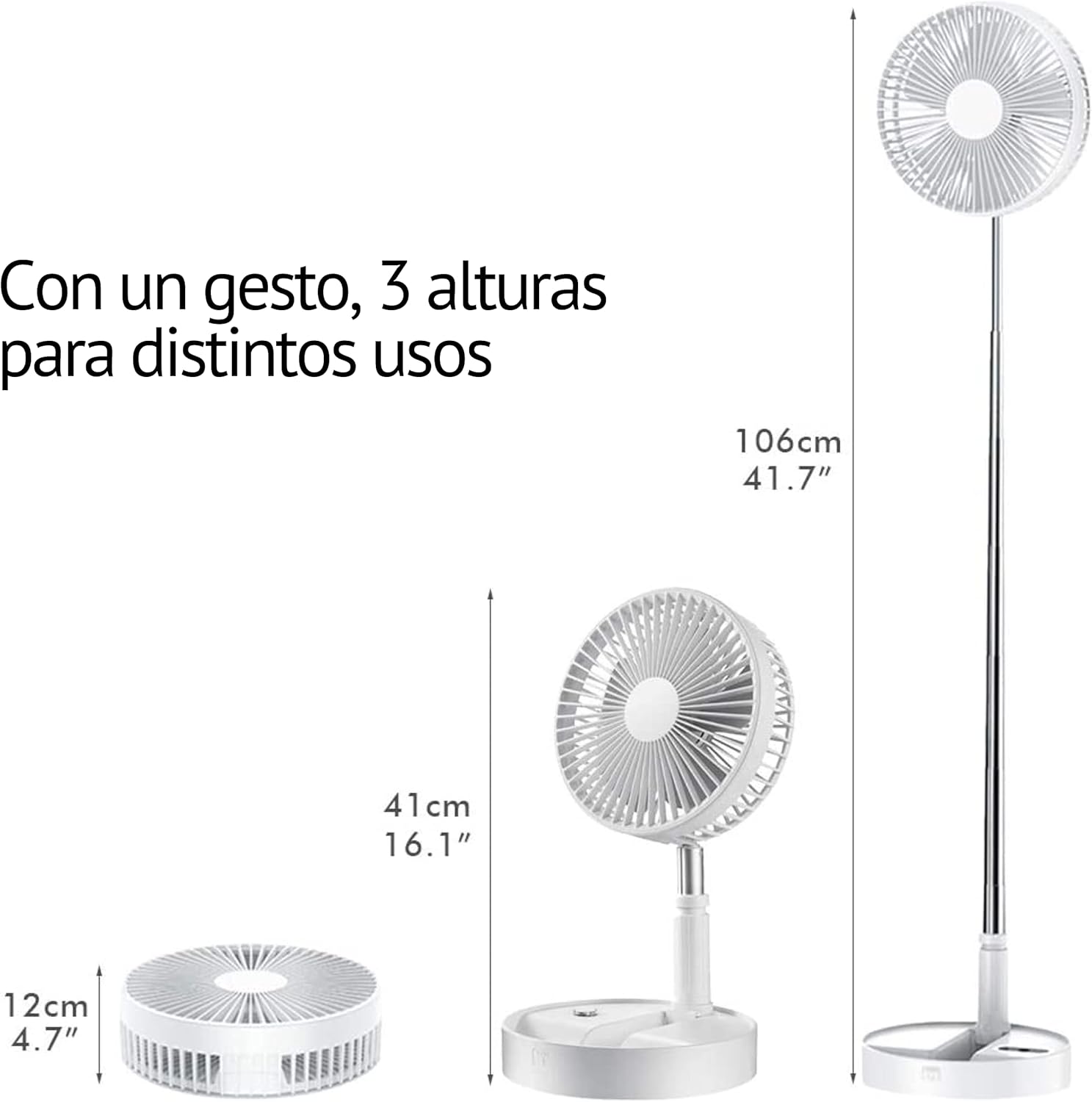
Image: This illustration demonstrates the fan's versatility by showing its three distinct height configurations: a compact 12cm when folded, an intermediate 41cm for desk use, and a fully extended 106cm for standing operation.
Operating Instructions
To operate your Portable Foldable Rechargeable Fan, follow these simple steps:
- Power On/Off: Press the power button located on the base of the fan to turn it on. Press it again to turn it off.
- Adjust Fan Speed: While the fan is on, press the power button repeatedly to cycle through the three available speed settings (Low, Medium, High).
- Oscillation: If your model supports automatic oscillation, press the oscillation button (if present) to activate or deactivate the horizontal swing. Otherwise, manually adjust the fan head for desired direction.
- Charging: When the battery is low, connect the micro-USB cable to the charging port. The fan can be used while charging.
Using the Phone Holder
When the fan is in its desk or table configuration, you can utilize the integrated phone holder:
- Locate the designated slot on the top surface of the fan's base.
- Carefully place your smartphone or other small device horizontally into the slot.
- Ensure the device is stable before leaving it unattended.
Maintenance and Care
Regular maintenance ensures optimal performance and extends the lifespan of your fan. Always disconnect the fan from power before cleaning.
- Cleaning the Fan Blades: Use a soft, dry cloth to wipe dust from the fan blades and grille. For stubborn dirt, a slightly damp cloth can be used, but ensure no water enters the motor housing.
- Cleaning the Base and Body: Wipe the exterior surfaces with a soft, damp cloth. Do not use abrasive cleaners, solvents, or harsh chemicals.
- Storage: When not in use for extended periods, fold the fan into its compact form and store it in a cool, dry place away from direct sunlight and extreme temperatures.
- Battery Care: To maintain battery health, avoid fully discharging the battery frequently. If storing for a long time, charge the battery to about 50% every few months.
Troubleshooting
| Problem | Possible Cause | Solution |
|---|---|---|
| Fan does not turn on. | Battery is depleted. Power button not pressed correctly. | Charge the fan using the micro-USB cable. Ensure the power button is pressed firmly. |
| Weak airflow. | Fan speed is set too low. Obstruction in front or behind the fan. Dust accumulation on blades. | Increase the fan speed setting. Ensure clear space around the fan. Clean the fan blades and grille. |
| Fan is noisy. | Fan is not on a stable surface. Foreign object caught in blades. | Place the fan on a flat, stable surface. Turn off and unplug the fan, then check for and remove any obstructions. |
| Battery not charging. | Charging cable or adapter is faulty. Charging port is damaged. | Try a different micro-USB cable and/or power adapter. Contact customer support if the port appears damaged. |
Specifications
- Model: B0977F1K8W
- Brand: Generic
- Color: White
- Power: 3.7 Watts
- Voltage: 5 Volts
- Battery Capacity: 7200mAh
- Operating Time: Up to 5+ hours (depending on speed setting)
- Noise Level: Approximately 25-40 dB
- Dimensions (Folded): 20 x 20 x 12 cm (approx. 7.9 x 7.9 x 4.7 inches)
- Dimensions (Extended - Standing): 20 x 20 x 106 cm (approx. 7.9 x 7.9 x 41.7 inches)
- Weight: 720 g (approx. 1.59 lbs)
- Special Features: Foldable, Adjustable Height, Phone Holder, Quiet Operation
Warranty and Support
For warranty information and customer support, please refer to the seller's policy on the platform where the product was purchased. Keep your purchase receipt as proof of purchase.
For further assistance or inquiries, please contact the manufacturer or seller directly through the contact information provided with your purchase or on the product listing page.