
1. Product Overview
The Infinix Note 10 is a feature-rich smartphone designed for communication, entertainment, and productivity. It comes equipped with a large display, powerful processor, and versatile camera system to enhance your mobile experience.
1.1 Package Contents
- Infinix Note 10 Smartphone
- Charger Adapter
- USB Cable
- SIM Ejector Tool
- Quick Start Guide
- Warranty Card
1.2 Device Layout

Figure 1.1: Front View of Infinix Note 10. This image shows the front of the smartphone, highlighting the large display and the front-facing camera located at the top center.
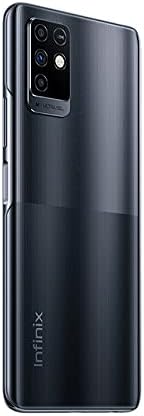
Figure 1.2: Back View of Infinix Note 10. This image displays the rear of the device, featuring the multi-camera module in the upper left corner and the Infinix branding towards the bottom.
2. Important Safety Information
Please read all safety information before using your device to ensure safe and proper use. Failure to follow these instructions may result in injury, damage to your device, or other hazards.
- Battery Safety: Do not disassemble, impact, squeeze, or put the battery into fire. If severe swelling occurs, discontinue use.
- Charging: Use only Infinix-approved chargers and cables. Unapproved chargers may cause fire, explosion, or other hazards.
- Water Resistance: This device is not water-resistant. Avoid exposure to liquids.
- Driving Safety: Always prioritize driving and obey all local laws and regulations. Avoid using your phone while driving.
- Medical Devices: Maintain a safe distance between your phone and medical devices like pacemakers to avoid interference.
- Disposal: Dispose of the device and battery properly according to local regulations. Do not dispose of with household waste.
3. Getting Started: Setup
3.1 Charging the Battery
Before first use, fully charge the device. Connect the USB cable to the charging port on your phone and the other end to the power adapter. Plug the adapter into a wall outlet. The charging indicator will appear on the screen.
3.2 Installing SIM and MicroSD Cards
- Locate the SIM card tray on the side of your device.
- Insert the SIM ejector tool into the small hole next to the tray and push gently until the tray pops out.
- Place your Nano-SIM card(s) and/or microSD card into the designated slots on the tray, ensuring the gold contacts face down.
- Carefully push the tray back into the slot until it is flush with the device.
3.3 Initial Setup
Press and hold the Power button until the Infinix logo appears. Follow the on-screen prompts to:
- Select your language.
- Connect to a Wi-Fi network.
- Sign in with your Google account or create a new one.
- Set up screen lock (PIN, pattern, fingerprint).
- Review and accept terms and conditions.
4. Operating Your Infinix Note 10
4.1 Basic Navigation
- Tap: Touch an icon or option to select it.
- Swipe: Drag your finger across the screen to scroll or navigate between screens.
- Pinch: Use two fingers to zoom in or out on photos or web pages.
- Long Press: Press and hold an item for more options.
4.2 Making Calls and Sending Messages
To make a call, open the Phone app, enter the number, and tap the call icon. To send a message, open the Messages app, tap the new message icon, enter the recipient and your message, then send.
4.3 Camera Usage
Open the Camera app from your home screen or app drawer. Tap the shutter button to take a photo. Swipe left or right to switch between different modes like Video, Portrait, or Super Night. Tap the camera switch icon to toggle between front and rear cameras.
4.4 Connectivity
- Wi-Fi: Go to Settings > Network & internet > Wi-Fi. Turn Wi-Fi on and select your desired network.
- Bluetooth: Go to Settings > Connected devices > Bluetooth. Turn Bluetooth on and pair with available devices.
- Mobile Data: Go to Settings > Network & internet > Mobile network to manage your data connection.
4.5 App Management
To install apps, open the Google Play Store. To uninstall an app, long-press its icon on the home screen or in the app drawer, then drag it to 'Uninstall' or select 'App info' and choose 'Uninstall'.
5. Maintenance and Care
5.1 Cleaning Your Device
Use a soft, lint-free cloth to clean the screen and body of your phone. Avoid using harsh chemicals or abrasive materials. Do not spray cleaners directly onto the device.
5.2 Battery Care
- Avoid extreme temperatures, which can degrade battery life.
- Do not leave the phone charging for extended periods after it's fully charged.
- For optimal battery health, try to keep the charge level between 20% and 80%.
5.3 Software Updates
Regularly check for software updates to ensure your device has the latest features, security patches, and performance improvements. Go to Settings > System > System update.
5.4 Data Backup
Regularly back up your important data (photos, contacts, documents) to a cloud service (like Google Drive) or a computer to prevent data loss.
6. Troubleshooting Common Issues
| Problem | Possible Solution |
|---|---|
| Device won't turn on | Ensure the battery is charged. Press and hold the Power button for at least 10 seconds. |
| Apps crashing or freezing | Clear app cache (Settings > Apps > [App Name] > Storage > Clear cache). Restart the device. |
| Poor battery life | Reduce screen brightness, close unused apps, disable unnecessary features like GPS or Bluetooth when not in use. |
| Cannot connect to Wi-Fi | Restart your router and phone. Forget the network and reconnect. Ensure Wi-Fi is enabled. |
| Phone is slow | Clear storage space, uninstall unused apps, restart the device regularly. |
If the issue persists, consider performing a factory reset (back up your data first) or contacting customer support.
7. Technical Specifications
| Feature | Specification |
|---|---|
| Model Name | Note 10 |
| Brand | Infinix |
| Operating System | Android 10.0 |
| Installed RAM Memory Size | 6 GB |
| Memory Storage Capacity | 128 GB |
| Screen Size | 6.95 Inches (Visible screen diagonal: 7" / 18 cm) |
| CPU Model | Snapdragon |
| Wireless Carrier | Unlocked for All Carriers |
| Cellular Technology | 4G |
| Connectivity Technology | Bluetooth, USB, Wi-Fi |
| Batteries | 1 Lithium Polymer battery (included) |
| Package Dimensions | 18.6 x 10.8 x 6.2 cm |
| Item Weight | 250 g |
| Manufacturer | Infinix |
| Date First Available | 26 June 2021 |
8. Warranty and Support
8.1 Warranty Information
Your Infinix Note 10 comes with a limited warranty. Please refer to the warranty card included in your package for specific terms, conditions, and duration. Keep your purchase receipt as proof of purchase for warranty claims.
8.2 Customer Support
For technical assistance, troubleshooting beyond this manual, or warranty service, please contact Infinix customer support. Visit the official Infinix website for contact details, FAQs, and service center locations.
Note: Specifications are subject to change without prior notice.