
1. Introduction
This instruction manual provides essential information for the proper installation, operation, and maintenance of your MZBYDLM D0925W14B7PZA58 14V Cooling Fan. Please read this manual thoroughly before use to ensure optimal performance and longevity of the product.
2. Safety Information
Observe the following safety precautions to prevent damage to the product or injury to yourself:
- Ensure power is disconnected from the system before installation or maintenance.
- Handle the fan by its frame to avoid damaging the blades or wiring.
- Do not attempt to modify the fan or its wiring.
- Verify correct voltage and current ratings before connecting the fan to a power source.
- Keep fingers and other objects clear of the fan blades during operation.
3. Package Contents
The package should contain the following item:
- 1 x MZBYDLM D0925W14B7PZA58 14V Cooling Fan
4. Specifications
| Model | D0925W14B7PZA58 |
| Dimensions | 92mm x 92mm x 25mm (3.62"L x 3.62"W x 0.98"H) |
| Voltage | 14V |
| Current | 0.17A |
| Power Connector | 4-Pin |
| Cooling Method | Air |
| Compatible Devices | Desktop |
| Material | Copper (internal components) |
5. Setup and Installation
Follow these steps for proper installation of the cooling fan:
- Power Disconnection: Before beginning installation, ensure that the power supply to your device is completely disconnected and unplugged from the wall outlet.
- Identify Mounting Location: Locate the appropriate mounting position for a 92mm fan within your system. This is typically a case fan mount or a specific component cooling mount.
- Secure the Fan: Position the fan in the desired location. Use appropriate screws (not included) to secure the fan to the mounting points. Ensure the fan is oriented correctly for airflow (typically blowing air into or out of the case, depending on your cooling strategy).
- Connect Power: Connect the fan's 4-pin power connector to a compatible 4-pin fan header on your motherboard or fan controller. Ensure the connector is fully seated.

Image 1: Front view of the MZBYDLM D0925W14B7PZA58 14V Cooling Fan. This image displays the fan's front side, highlighting the central label with the model number D0925W14B7PZA58, voltage (DC14V), and current (0.17A). The fan features seven black blades and a visible 4-pin power cable with red, black, and blue wires extending from the frame.
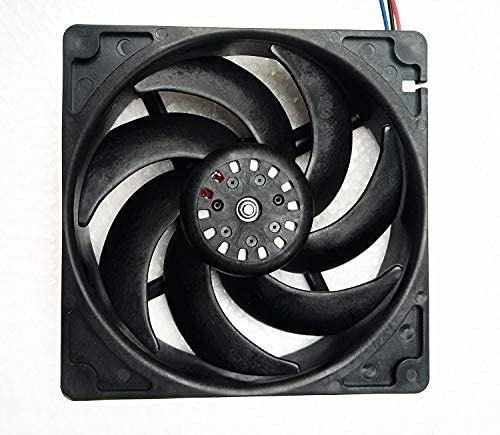
Image 2: Rear view of the MZBYDLM D0925W14B7PZA58 14V Cooling Fan. This image shows the back of the fan, revealing the motor hub and the curvature of the seven black fan blades. The fan frame is black, and the overall design is square.
6. Operating Instructions
Once installed and connected, the MZBYDLM D0925W14B7PZA58 fan operates automatically when power is supplied to its 4-pin header. The fan is designed for continuous operation to provide consistent cooling. Its silent operation ensures minimal acoustic disturbance while effectively dissipating heat.
- Power On: After installation, restore power to your device. The fan should begin spinning.
- Monitor Performance: Observe the fan's operation to ensure it is spinning freely and quietly.
- Airflow Direction: Confirm that the fan is moving air in the intended direction for optimal cooling efficiency within your system.
7. Maintenance
Regular maintenance helps ensure the longevity and efficient operation of your cooling fan:
- Dust Removal: Periodically (e.g., every 3-6 months), disconnect power and gently clean dust from the fan blades and frame using compressed air or a soft brush. Accumulation of dust can impede airflow and reduce cooling performance.
- Inspection: Visually inspect the fan for any signs of damage, loose wiring, or obstructions. Ensure the fan blades are intact and free from cracks.
- Bearing Check: Listen for unusual noises during operation, which could indicate a failing bearing. If excessive noise occurs, consider replacing the fan.
8. Troubleshooting
If you encounter issues with your MZBYDLM D0925W14B7PZA58 cooling fan, refer to the following troubleshooting guide:
| Problem | Possible Cause | Solution |
| Fan does not spin | No power, incorrect wiring, faulty fan header, or fan failure. | Ensure power is connected. Verify the 4-pin connector is correctly and securely plugged into a functional fan header. Check for any damage to the fan's wiring. If possible, test the fan on a different header or with a known working power source. |
| Fan makes unusual noise | Dust accumulation, loose mounting, bearing wear, or obstruction. | Disconnect power and clean the fan blades. Ensure the fan is securely mounted and not vibrating against the case. Check for any cables or objects obstructing the fan blades. If the noise persists, the fan's bearings may be worn, and replacement is recommended. |
| Insufficient cooling | Incorrect airflow direction, dust buildup, or inadequate fan speed. | Verify the fan is oriented to push air in the desired direction. Clean any dust from the fan and surrounding vents. If your system allows, check fan speed settings in BIOS/UEFI or fan control software. |
| Wiring incompatibility | Replacement fan has different wiring configuration than original. | It is crucial to ensure that the wiring configuration (pinout) of the replacement fan matches the original fan or the intended connection point. Even if the model number is similar, wiring can vary. If the wiring is different, the fan may not function correctly or could cause damage. Contact the seller for clarification or a compatible replacement if this is the case. |
9. Warranty and Support
The MZBYDLM D0925W14B7PZA58 14V Cooling Fan is covered by the manufacturer's standard warranty. For specific warranty terms, duration, and to initiate a warranty claim, please refer to the documentation provided at the time of purchase or contact your retailer.
For technical support, installation questions, or any other inquiries regarding your product, please contact the manufacturer or your point of purchase. When contacting support, please have your product model number (D0925W14B7PZA58) and purchase details readily available.