
VLM DRC-888, DRC-446
Instruction Manual: VLM Propeller Holders
For Vivitar DRC-888 and DRC-446 Drones
Introduction
This manual provides essential information for the installation, operation, and maintenance of your VLM Propeller Holders, designed specifically for Vivitar DRC-888 and DRC-446 Drones. These high-quality replacement parts ensure the secure attachment of your drone's propellers, which is crucial for stable flight and optimal performance.
Please read this manual thoroughly before attempting any installation or maintenance to ensure proper use and to prevent damage to your drone or the propeller holders.
What's Included

The VLM Propeller Holder kit typically includes:
- Propeller Holders (black cylindrical pieces)
- Mounting Screws (small threaded fasteners)
- Washers (small silver rings)
This image displays the complete set of components included in the VLM Propeller Holder kit, showing the black cylindrical holders, the silver washers, and the small mounting screws.
Setup and Installation
Before beginning installation, ensure your drone is powered off and the battery is disconnected. Work on a clean, flat surface to prevent loss of small components.
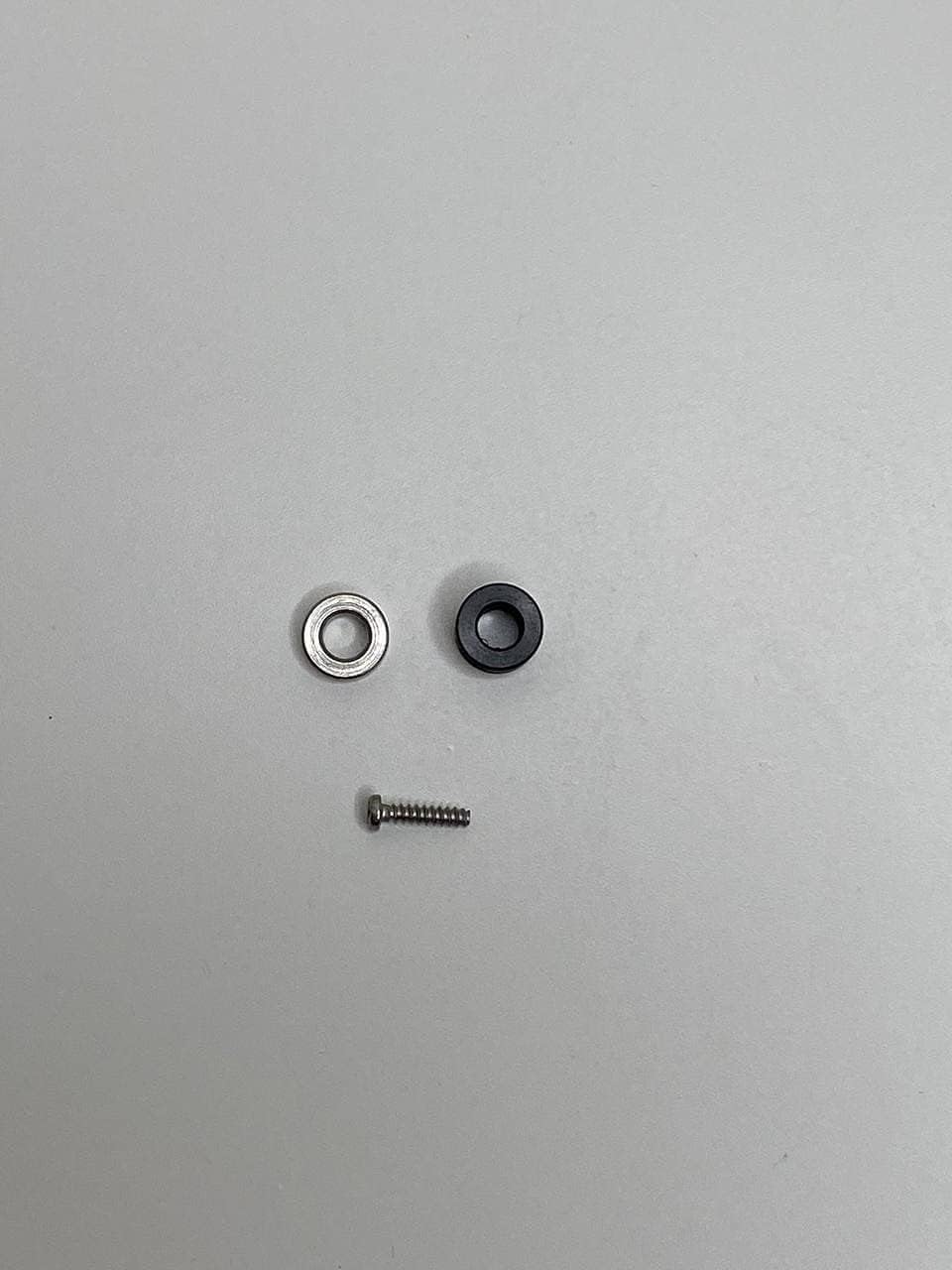
This image shows a single set of propeller holder components: one black cylindrical holder, one silver washer, and one mounting screw, illustrating how they fit together.
- Remove Existing Propeller Holder: Carefully unscrew and remove the old or damaged propeller holder from the drone's motor shaft. Keep track of any small parts.
- Prepare New Holder: Take one new propeller holder, one washer, and one screw from the kit. Place the washer onto the screw.
- Position Holder: Align the new propeller holder with the motor shaft on your drone. Ensure it sits flush and correctly.
- Secure with Screw: Insert the screw with the washer through the designated hole in the propeller holder and into the motor shaft. Gently tighten the screw until the holder is secure. Do not overtighten, as this can strip the threads or damage the holder/motor.
- Repeat for All Holders: Follow these steps for each propeller holder that needs replacement.
- Verify Installation: Once all holders are installed, gently tug on each one to ensure it is firmly attached and does not wobble.
Operating Considerations
While the propeller holders themselves do not have an "operation" in the traditional sense, their proper installation is critical for the safe and effective operation of your Vivitar drone.
- Pre-Flight Check: Always perform a visual inspection before each flight. Ensure all propeller holders are securely fastened and show no signs of damage or looseness.
- Propeller Attachment: Ensure propellers are correctly attached to the holders according to your drone's specific instructions. Loose propellers can lead to unstable flight or crashes.
Maintenance
Regular maintenance of your propeller holders will extend their lifespan and ensure continued safe operation of your drone.
- Visual Inspection: Periodically inspect the propeller holders for any signs of wear, cracks, deformation, or damage, especially after any hard landings or impacts.
- Tightness Check: Check the tightness of the mounting screws regularly. Vibrations during flight can sometimes cause screws to loosen over time. Retighten gently if necessary.
- Cleaning: If dust or debris accumulates on the holders, gently wipe them clean with a soft, dry cloth. Avoid using harsh chemicals or abrasive materials.
- Storage: Store spare propeller holders in a cool, dry place away from direct sunlight and extreme temperatures to prevent material degradation.
Troubleshooting
This section addresses common issues you might encounter with your propeller holders.
| Problem | Possible Cause | Solution |
|---|---|---|
| Propeller holder is loose. | Mounting screw is loose. | Gently tighten the mounting screw. Do not overtighten. |
| Propeller holder is damaged (cracked, bent). | Impact during flight or landing; material fatigue. | Replace the damaged propeller holder immediately with a new one from the kit. Do not fly with damaged parts. |
| Drone experiences unusual vibrations during flight. | Loose or damaged propeller holder; unbalanced propeller. | Check all propeller holders for tightness and damage. Ensure propellers are correctly balanced and attached. Replace any faulty components. |
Specifications
- Product Name: VLM Propeller Holders
- Compatible Drones: Vivitar DRC-888, Vivitar DRC-446
- Manufacturer: VLM Group
- ASIN: B09756ZNM5
- Material: High-quality materials (as per product description)
- Recommended Age: 12 years and up (for drone operation, not the holders themselves)
Warranty and Support
Specific warranty information for the VLM Propeller Holders is not provided in the product details. For any warranty claims, technical support, or inquiries regarding this product, please contact the manufacturer directly.
Manufacturer: VLM Group
Please refer to the seller's or manufacturer's official website for contact information and the most up-to-date warranty policy.
Important Safety Information
- Always ensure the drone is powered off and the battery is removed before performing any maintenance or installation.
- Keep small parts away from children.
- Do not attempt to modify the propeller holders. Use only as intended.
- If a propeller holder is damaged, replace it immediately. Do not attempt to repair damaged parts.