
Introduction
Welcome to your new SMARTY 2.0 Smart Watch SW022I. This manual provides detailed instructions to help you set up, operate, and maintain your device, ensuring you get the most out of its features. Please read this manual carefully before using your smartwatch.
Setup
1. Initial Charging
Before first use, fully charge your smartwatch. Connect the charging cable to the charging port on the watch and to a standard USB power adapter. The watch display will indicate charging status.
2. App Installation and Pairing
To unlock the full potential of your SMARTY 2.0 Smart Watch, download the official SMARTY app on your smartphone. The app is available for both iOS and Android devices.
- Scan the QR code provided in the watch packaging or search for 'SMARTY' in your phone's app store.
- Install the app and create an account or log in.
- Ensure Bluetooth is enabled on your smartphone.
- Open the SMARTY app and follow the on-screen instructions to pair your watch. The app will guide you through the pairing process, typically involving selecting your watch from a list of nearby devices.
3. Language Selection
After pairing, you can select your preferred language directly on the watch or through the app settings. Navigate to the 'Settings' menu on your watch, then 'Language', and choose from the available options.
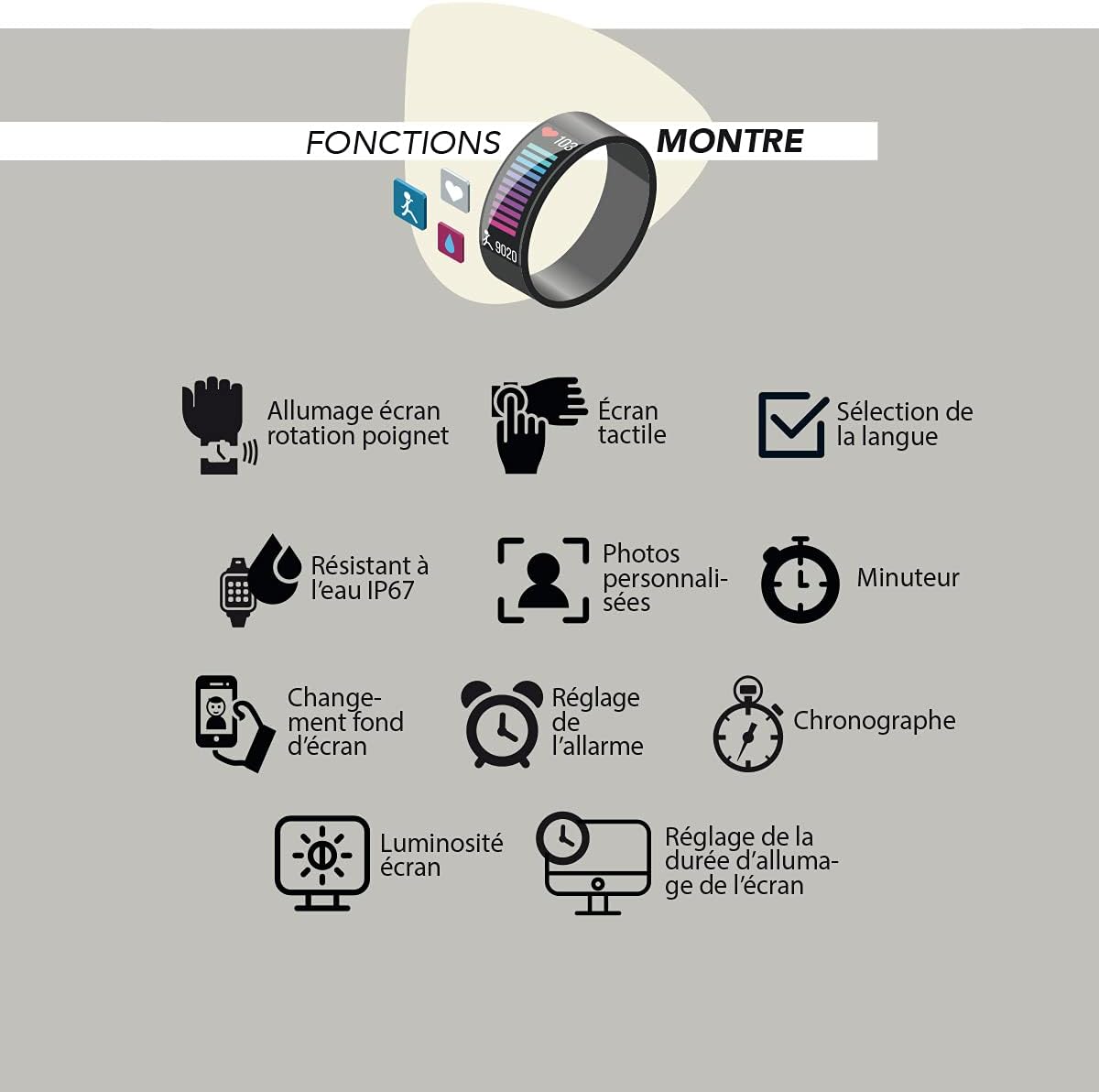
Image: The smartwatch display showing various functions including language selection, touch screen, and wrist rotation activation.
4. Customizing Watch Face
Personalize your watch by changing the watch face. This can be done through the SMARTY app or directly on the watch. The watch supports custom photos as watch faces.
Operating Instructions
Basic Navigation
- Touch Screen: Swipe left, right, up, or down to navigate through menus and functions. Tap to select.
- Wrist Rotation: Enable 'Screen on wrist rotation' in settings to automatically wake the screen when you raise your wrist.
Watch Functions
- Timer: Access the timer function to set countdowns.
- Chronograph: Use the stopwatch feature for timing events.
- Alarm Setting: Set and manage alarms through the watch or the app.
- Screen Brightness: Adjust the screen brightness for optimal visibility in different lighting conditions.
- Screen On Duration: Configure how long the screen stays active after being woken up.
Health Monitoring
Your smartwatch is equipped with various sensors to monitor your health and well-being.

Image: An illustration of the smartwatch's health and well-being functions, including sleep control, general well-being, heart rate, anti-stress, blood oxygen (O2), blood pressure, programmable pressure test, and programmable cardiac test.
- Sleep Control: Tracks your sleep patterns and quality.
- Heart Rate: Monitors your heart rate throughout the day.
- Blood Oxygen (O2): Measures your blood oxygen saturation levels.
- Blood Pressure: Provides blood pressure readings.
- Anti-stress: Features designed to help manage stress levels.
- Programmable Tests: Conduct programmable blood pressure and cardiac tests.
Mobile Functions
Connect your smartwatch to your smartphone for enhanced functionality.

Image: An illustration of the smartwatch's mobile functions, including finding the watch, music control, message notifications, call notifications, Bluetooth calling, and remote photo/selfie control.
- Message Notifications: Receive alerts for incoming messages.
- Call Notifications: Get notified of incoming calls.
- Bluetooth Call: Make and receive calls directly from your watch when connected via Bluetooth.
- Music Control: Control music playback on your smartphone.
- Find Watch: Use your phone to locate your watch if it's misplaced nearby.
- Remote Photo - Selfie: Use your watch as a remote shutter for your phone's camera.
Sport and Fitness Tracking
Track your physical activities and monitor your fitness progress.

Image: An illustration of the smartwatch's sport functions, including pedometer/distance, calorie consumption, sedentary reminder, water consumption reminder, route tracking, weather, and specific sport modes like walking, running, climbing, and cycling, with metrics for BPM, calories, and time.
- Pedometer & Distance: Counts your steps and calculates distance covered.
- Calorie Consumption: Estimates calories burned during activities.
- Sport Modes: Dedicated modes for Walking, Running, Climbing, and Cycling, tracking metrics like heart rate (BPM), calories, and time.
- Route Tracking: Tracks your route during outdoor activities.
- Sedentary Reminder: Reminds you to move after periods of inactivity.
- Water Consumption Reminder: Prompts you to drink water regularly.
- Weather: Displays current weather information.
Maintenance
Water Resistance (IP67)
Your SMARTY 2.0 Smart Watch is rated IP67 water resistant. This means it is protected against dust ingress and can withstand immersion in water up to 1 meter for up to 30 minutes. It is suitable for daily use, such as washing hands or light rain. However, it is not recommended for swimming, diving, or exposure to high-pressure water.
Cleaning
To clean your watch, gently wipe the screen and strap with a soft, damp cloth. Avoid using harsh chemicals or abrasive materials, as these can damage the device. Ensure the charging contacts are clean and dry before charging.
Charging
Charge your watch regularly to ensure continuous operation. Use only the provided charging cable. Avoid exposing the watch to extreme temperatures during charging.
Troubleshooting
- Watch not turning on: Ensure the watch is fully charged. Connect it to the charger for at least 30 minutes.
- Unable to pair with smartphone:
- Ensure Bluetooth is enabled on your phone.
- Make sure the watch is within range of your phone.
- Restart both your watch and smartphone.
- Try unpairing and re-pairing the device through the SMARTY app.
- Inaccurate health data: Ensure the watch is worn snugly on your wrist, not too tight or too loose. Clean the sensors regularly. Note that the watch is not a medical device and readings are for reference only.
- Notifications not appearing: Check app permissions on your smartphone to ensure the SMARTY app has access to notifications. Verify notification settings within the SMARTY app.
- Short battery life: Reduce screen brightness, shorten screen on duration, and disable unnecessary features or continuous monitoring if not required.
Specifications
| Feature | Detail |
|---|---|
| Model Number | SW022I |
| Brand | SMARTY |
| Dimensions | 24 x 2 x 1.1 cm |
| Weight | 160 g |
| Shape | Rectangular |
| Water Resistance | IP67 |
| First Available Date | May 29, 2021 |
Warranty Information
Specific warranty details for the SMARTY 2.0 Smart Watch SW022I are typically provided with your purchase documentation. Please refer to the warranty card or contact your retailer for information regarding warranty coverage and terms.
Customer Support
For further assistance, technical support, or inquiries not covered in this manual, please contact SMARTY customer support. Refer to your product packaging or the official SMARTY website for contact details.


