
Pyle PDA6BU.6
Pyle PDA6BU.6 Wireless Bluetooth Power Amplifier System
Instruction Manual
Introduction
This manual provides detailed instructions for the setup, operation, and maintenance of your Pyle PDA6BU.6 Wireless Bluetooth Power Amplifier System. Designed for home theater and acoustic sound systems, this 2-channel stereo receiver offers 200W of power, accommodating two sets of speakers for high-quality amplified audio.
Key features include Bluetooth wireless music streaming, multiple input options (USB, SD card, AUX, RCA, microphone), EQ controls, and an integrated LCD display. Please read this manual thoroughly to ensure proper use and to maximize the performance of your amplifier.
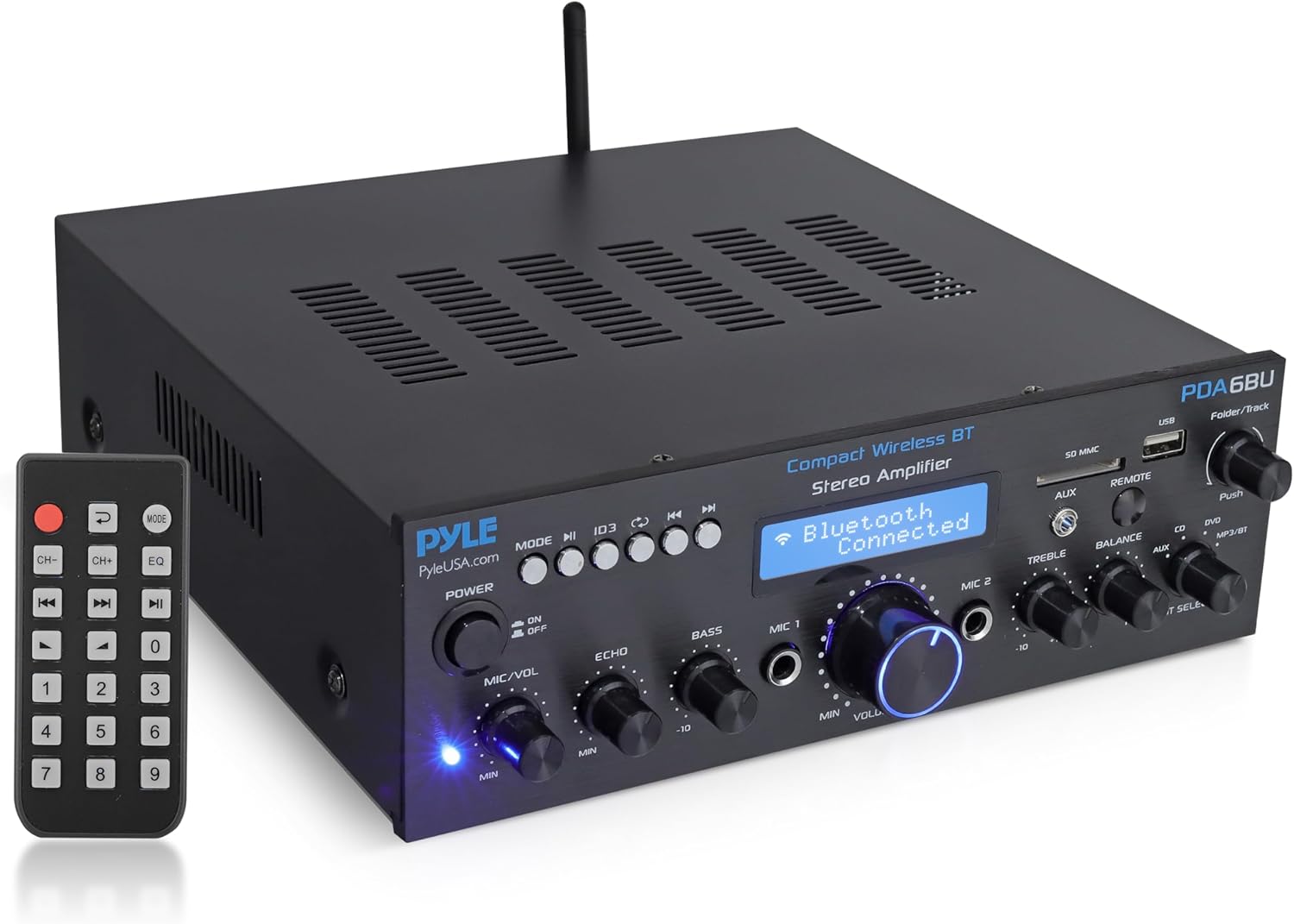
Figure 1: Pyle PDA6BU.6 Wireless Bluetooth Power Amplifier System with included remote control.
Product Overview Video
Video 1: An official overview of the Pyle PDA6BU.6 Wireless Bluetooth Power Amplifier System, highlighting its features and capabilities.
Setup
1. Unpacking and Contents
Carefully remove all components from the packaging. Verify that all items listed below are present and undamaged:
- Pyle PDA6BU.6 Desktop Stereo Amplifier
- Remote Control
- FM Antenna
- Quick Start Guide (refer to the PDF user manual for full details)
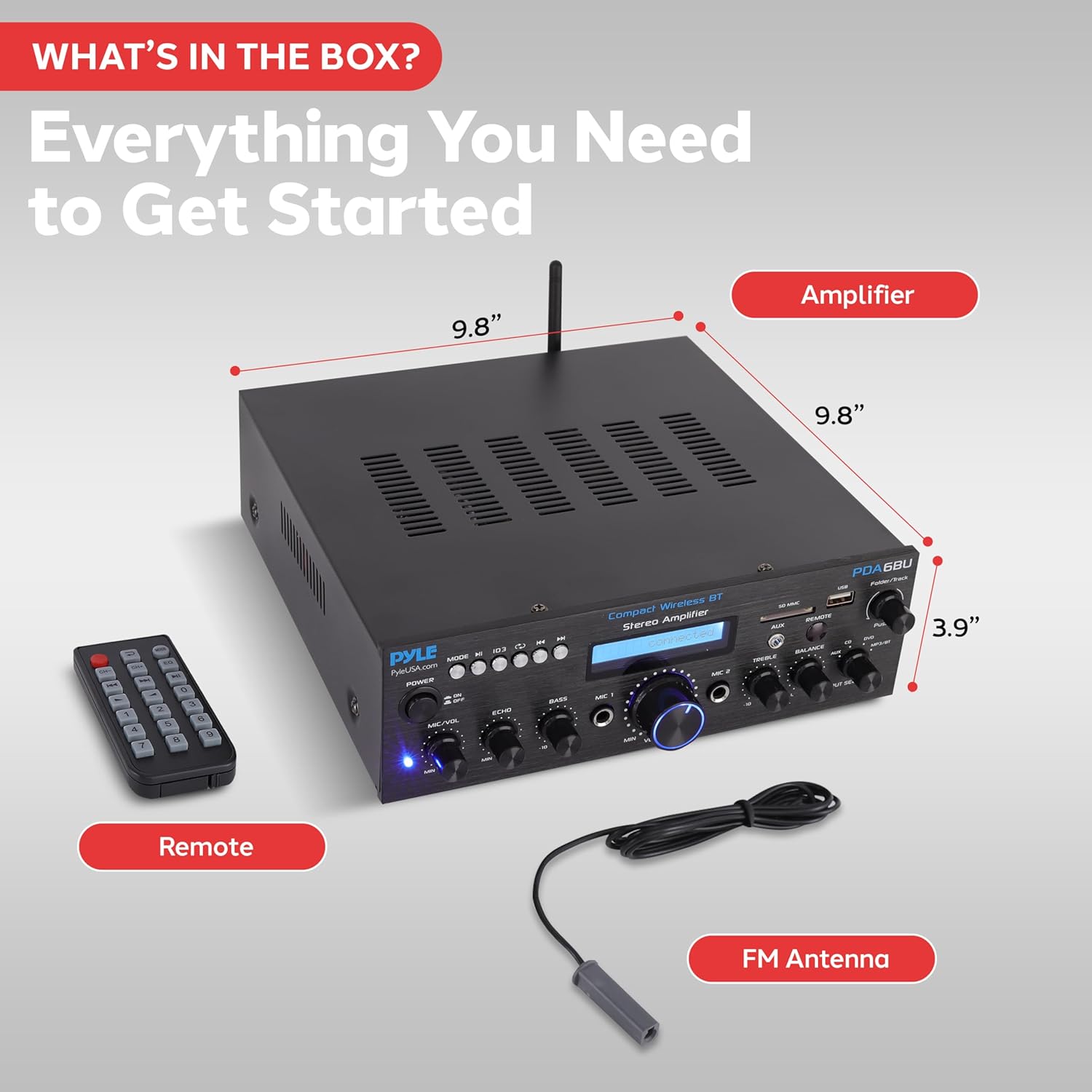
Figure 2: Contents included in the Pyle PDA6BU.6 package.
2. Power Connection
Before connecting the amplifier to a power outlet, ensure the voltage selector switch on the rear panel is set to the correct voltage for your region (110V or 220V). Connect the power cord to the amplifier and then to a suitable wall outlet.
3. Speaker Connections
Connect your speakers to the speaker output terminals on the rear panel. The amplifier supports two sets of speakers (Main Speakers 4-16Ω). Ensure correct polarity (red to red, black to black) for optimal sound quality.
4. Audio Source Connections
The PDA6BU.6 offers various input options:
- RCA Audio Input: Connect external audio sources such as a CD player, DVD player, or tape deck to the 'CD' or 'DVD' RCA input jacks.
- 3.5mm AUX Input: Connect portable devices like smartphones or MP3 players to the 'AUX' input on the front panel.
- USB/SD Card: Insert a USB flash drive or SD memory card into the respective slots on the front panel for digital audio playback.
- Microphone Inputs: Connect up to two 1/4" microphones to the 'MIC 1' and 'MIC 2' inputs on the front panel.
- FM Antenna: Connect the included FM antenna to the 'FM ANT.' terminal on the rear panel for radio reception.

Figure 3: Overview of multiple input and output connections.
Operating Instructions
1. Power On/Off
To power on the amplifier, press the 'POWER' button on the front panel. The LCD display will illuminate. To turn off, press the 'POWER' button again. Note that the remote control's power button may put the unit into a standby mode, leaving the LCD lit but blanked, while the front panel button provides a hard power cutoff.
2. Input Selection
Rotate the 'INPUT SELECTOR' knob on the front panel to choose your desired audio source (AUX, CD, DVD, MP3/BT). For USB, SD card, or Bluetooth, select 'MP3/BT'.
3. Bluetooth Connectivity
To connect a Bluetooth device:
- Select 'MP3/BT' using the Input Selector knob. The LCD display will show "Bluetooth connected" or "Bluetooth pairing".
- Enable Bluetooth on your smartphone, tablet, or computer.
- Search for available devices and select 'Pyle Audio' from the list.
- Once paired, the amplifier will confirm the connection. You can now stream audio wirelessly.

Figure 4: Bluetooth streaming setup with the amplifier.
4. USB/SD Card Playback
Insert a USB flash drive or SD memory card into the corresponding slot. The amplifier will automatically detect and begin playing compatible audio files (e.g., MP3). Use the 'Folder/Track' knob to navigate through folders and tracks. The LCD display supports ID3 tag song readout, showing track titles.
5. FM Radio Operation
Select 'MP3/BT' input. Press the 'MODE' button on the front panel or remote until 'FM' is displayed. Use the 'PREV' and 'NEXT' buttons to tune to desired radio stations. The LCD will show the frequency.
6. Audio Controls
Adjust the sound output using the following controls on the front panel:
- MIC/VOL: Adjusts the volume of the connected microphones.
- ECHO: Controls the echo effect for microphone inputs.
- BASS: Adjusts the low-frequency audio output.
- TREBLE: Adjusts the high-frequency audio output.
- BALANCE: Adjusts the left/right speaker balance.
- VOLUME: Master volume control for overall sound output.

Figure 5: Front panel audio control center.
7. Microphone Usage (Karaoke)
The dual 1/4" microphone inputs are ideal for karaoke or public address. Connect your microphones and adjust the 'MIC/VOL' and 'ECHO' knobs to achieve desired vocal effects.

Figure 6: Utilizing the dual microphone inputs for karaoke.
Maintenance
To ensure the longevity and optimal performance of your Pyle PDA6BU.6 amplifier, follow these maintenance guidelines:
- Cleaning: Use a soft, dry cloth to clean the exterior of the unit. Avoid using liquid cleaners or solvents, as they may damage the finish or internal components.
- Ventilation: Ensure the amplifier has adequate ventilation. Do not block the ventilation openings on the top or sides of the unit. Proper airflow prevents overheating.
- Storage: If storing the amplifier for an extended period, disconnect it from the power outlet and store it in a cool, dry place away from direct sunlight and extreme temperatures.
- Cable Management: Periodically check all cable connections to ensure they are secure and free from damage. Loose connections can affect sound quality.
Troubleshooting
If you encounter issues with your Pyle PDA6BU.6 amplifier, refer to the following common problems and their solutions:
| Problem | Possible Cause | Solution |
|---|---|---|
| No Power | Power cord not securely connected; Power switch off; Incorrect voltage selection. | Check power cord connection; Ensure front panel power button is ON; Verify 110V/220V selector switch is correct. |
| No Sound Output | Incorrect input selected; Speaker wires loose or incorrectly connected; Volume too low; Mute activated. | Select correct input source; Check speaker wire connections and polarity; Increase Master Volume; Ensure unit is not muted. |
| Bluetooth Connection Issues | Device too far from amplifier; Amplifier not in Bluetooth pairing mode; Interference. | Ensure device is within 40+ ft range; Select 'MP3/BT' input; Restart both amplifier and Bluetooth device; Avoid placing near other wireless devices. |
| Remote Control Not Working | Batteries dead or incorrectly inserted; Obstruction between remote and unit; Remote not pointed directly at unit. | Replace batteries; Remove obstructions; Point remote directly at the amplifier's IR sensor. |
| Distorted Sound | Volume too high; Incorrect impedance speakers; Damaged audio cables. | Reduce volume; Ensure speakers are 4-16Ω; Replace audio cables if damaged. |
If the problem persists after attempting these solutions, please contact Pyle customer support for further assistance.
Specifications
- Power Output: 200 Watts (100W RMS)
- Channels: 2-Channel
- Speaker Impedance: 4-16 Ohms
- Bluetooth Version: 5.0 (as per A+ content, product description says 40+ ft range, not version)
- Wireless Range: 40+ ft
- Inputs: 2 x RCA Audio, 2 x 1/4" Microphone, USB, SD Card, 3.5mm AUX, FM Radio Antenna
- Outputs: RCA Audio Output, 2 Pairs Banana Plug Speaker Output
- Display: LCD with ID3 Tag Readout
- Dimensions (L x W x H): 9.84" x 9.84" x 3.54"
- Weight: 3.63 lbs
- Model Number: PDA6BU.6
Warranty and Support
For warranty information and customer support, please refer to the official Pyle website or the documentation included with your product. You can also find the User Manual (PDF) online for detailed information.
User Manual (PDF): Download Here
For technical assistance or service inquiries, please contact Pyle customer support directly.
Related documentsPDA6BU.6


Ask a question about this manual
Ask about setup, troubleshooting, compatibility, parts, safety, or missing instructions. Manuals+ will review the question and use this page’s manual context to help answer it.