
Introduction
This manual provides detailed instructions for the setup, operation, maintenance, and troubleshooting of your ASONPAO LiftMaster 891LM Security+2.0 1-Button Garage Door Opener Remote. Please read these instructions carefully before use to ensure proper functionality and safety.
Important Compatibility Information
This remote control is designed to work exclusively with LiftMaster and Chamberlain garage door openers manufactured from 2011 to the present that feature a Yellow Learn Button. It is a replacement for models 891LM and 950ESTD.
The remote is NOT compatible with garage door openers that have Red/Orange, Purple, or Green learn buttons, nor with DIP switch models or Craftsman Series 100.

Ensure your garage door opener has a yellow learn button for compatibility.
What's in the Box
- Garage Door Opener Remote (with battery included)
- User Manual
- Visor Clip
Specifications

Detailed product specifications.
| Feature | Detail |
|---|---|
| Model Number | 891LM/950ESTD |
| Dimensions | 6.2 x 3.9 x 0.7 inches |
| Item Weight | 2.39 ounces |
| Battery Type | 2 x 3V CR2032 Lithium Metal batteries (included) |
| Working Range | Up to 164 feet |
| Frequency | 310/315/390MHz |
| Channel | 1 |
| Shell Material | Durable ABS Alloy |
| Security Technology | Security+2.0 Rolling Code |
| Color | Black |
Setup and Programming
Follow these steps to program your ASONPAO garage door opener remote:
- Locate the Learn Button: On your garage door opener motor unit, locate the yellow learn button.
- Activate Programming Mode: Press and immediately release the yellow learn button. The learn indicator light on the motor unit will glow steadily for 30 seconds.
- Program the Remote: Within 30 seconds of pressing the learn button, press and hold any button on your ASONPAO remote control.
- Confirm Programming: Release the button on the remote control when the garage door opener lights blink or two clicks are heard. This indicates successful programming.
If programming multiple remotes, repeat steps 1-4 for each additional remote.
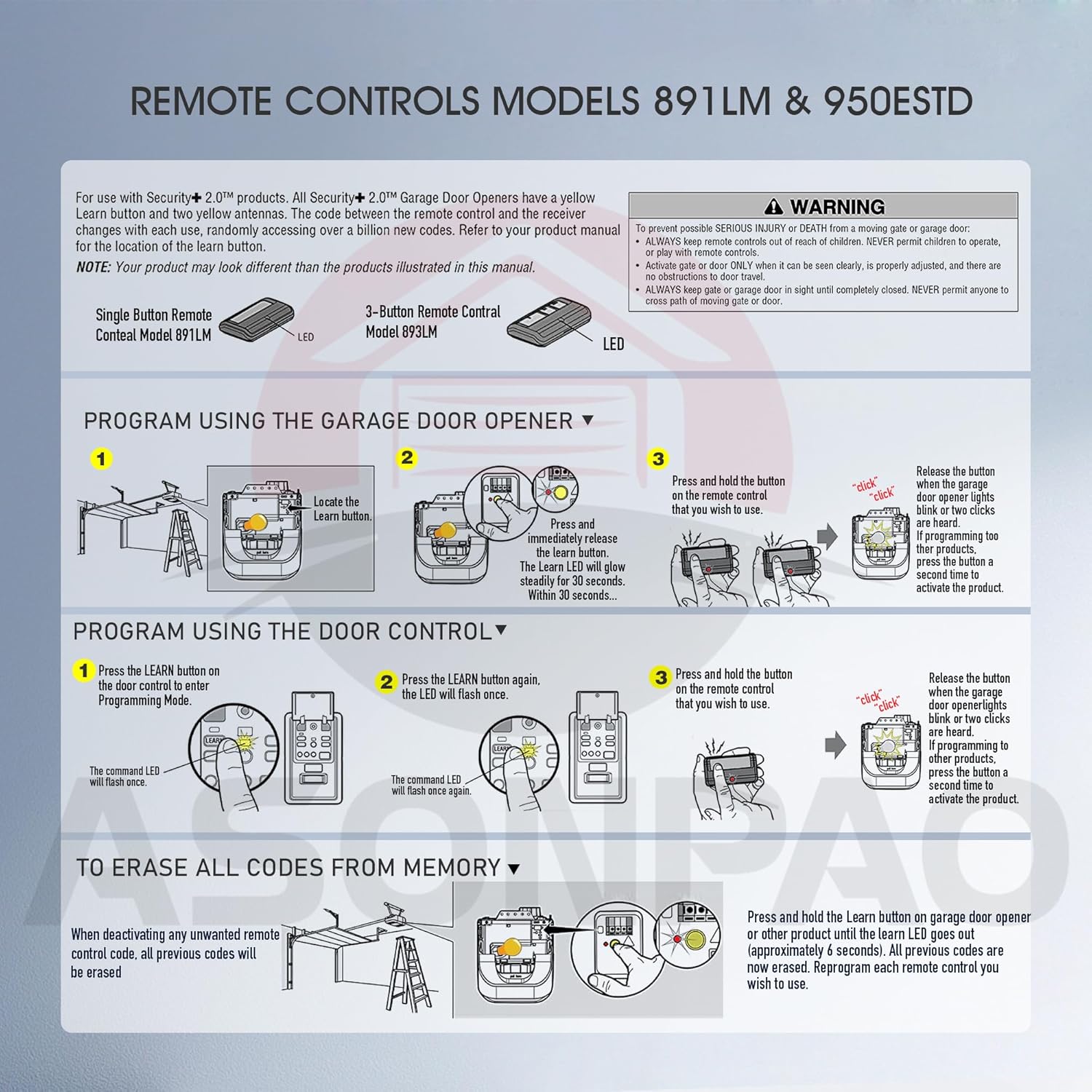
Visual guide for programming your remote.
Video Instructions:
Video: Programming instructions for 891LM/950ESTD remote by ASONPAO.
Video: ASONPAO 891LM/950ESTD Programming Guide.
To Erase All Codes from Memory:
To deactivate any unwanted remote control codes, press and hold the yellow learn button on the garage door opener motor unit until the learn indicator light goes out (approximately 6 seconds). All previous codes will be erased. Reprogram each remote or keyless entry you wish to use.
Operating Instructions
Once programmed, simply press the single button on your ASONPAO remote control to open or close your garage door. The remote features a 164-foot range for convenient operation.

Operating the remote from a distance.

The remote's compact design allows for easy carrying and use with the included visor clip.
Maintenance
Battery Replacement:
The remote control uses two 3V CR2032 lithium batteries. These batteries typically last up to 5 years. To replace them, carefully open the remote casing, remove the old batteries, and insert new ones with the positive side up (+). Dispose of used batteries properly according to local regulations.

The remote is powered by a long-lasting 240mAh lithium battery.
Troubleshooting
- Remote Not Responding:
- Check the battery. If the indicator light on the remote does not illuminate or is dim, replace the batteries.
- Ensure the remote is within the 164-foot operating range of the garage door opener.
- Verify that your garage door opener has a yellow learn button and is compatible with this remote (2011-present LiftMaster/Chamberlain models).
- Re-program the remote following the 'Setup and Programming' instructions.
- Interference: If the remote's range is reduced or inconsistent, check for potential sources of radio frequency interference near your garage door opener or remote.
- Car Programming Issues: Some vehicle built-in garage door opener systems may have specific compatibility requirements. If you experience difficulty programming your car's system with this remote, consult your vehicle's manual or the vehicle manufacturer's support.
Warranty and Support
ASONPAO provides a 10-year warranty for this product, ensuring reliability and performance. We also offer 24/7 Amazon tech support to assist with any queries or issues you may encounter.
For support, please contact us through our store homepage by clicking "Ask a question" or via our support email. We aim to respond within 24 hours.

ASONPAO offers comprehensive support and warranty for your product.