
Sony E10SNSEL35F14GM
Sony FE 35mm F1.4 GM Lens User Manual
Model: E10SNSEL35F14GM
Product Overview
The Sony FE 35mm F1.4 GM (G Master) lens is a high-performance wide-angle prime lens designed for Sony E-mount full-frame cameras. It delivers exceptional resolution and stunning bokeh, making it suitable for a wide range of photographic and videographic applications, including landscapes, portraits, street photography, and low-light shooting. This bundle includes a Lexar Professional SDHC/SDXC 1667x UHS-II 64GB Memory Card for enhanced storage and transfer speeds.

Figure 1: Sony FE 35mm F1.4 GM lens and Lexar Professional 64GB Memory Card.
Key Features
- Compact Wide Prime Lens: Offers a versatile 35mm focal length with a compact design.
- Stunning G Master Bokeh and Resolution: Achieved through advanced optical design, including two XA (Extreme Aspherical) elements.
- F1.4 Maximum Aperture: Provides extraordinary brightness for low-light performance and shallow depth of field.
- ED (Extra-low Dispersion) Glass Element: Reduces chromatic aberration for superior image quality.
- Nano AR Coating II: Suppresses reflections, flare, and ghosting, enhancing clarity.
- 11-Blade Circular Aperture: Contributes to smooth, natural-looking bokeh.
- XD (Extreme Dynamic) Linear Motors: Ensures fast, precise, and quiet autofocus performance.
- Linear Response MF: Provides precise manual focus control.
- Minimum Focus Distance: Capable of focusing as close as 0.82 ft (0.25 m) in manual focus mode for close-up shots.
- Dust and Moisture Resistant Design: Enhances reliability in various shooting conditions.
- Fluorine Front-Element Coating: Helps repel dirt and fingerprints for easier cleaning.
- Customizable Focus Hold Button: Allows assignment of various functions for quick access.
- Aperture Ring with Click Switch: Manual aperture ring with selectable on/off click for stills or movie shooting.
Safety Information
Before using the lens, please read this manual thoroughly and retain it for future reference. Improper handling can lead to malfunction, damage, or injury. Always ensure the lens is securely attached to the camera body before use. Avoid direct exposure to sunlight through the lens, as this can damage the camera's image sensor. Keep the lens away from extreme temperatures, humidity, and dust.
Handling Precautions
- Do not leave the lens exposed to direct sunlight or near a heater.
- Do not carry the camera with the lens attached by holding the lens only.
- Keep the lens contacts clean.
- Do not disassemble or modify the lens.
- Use a soft, dry cloth to clean the lens surface. For stubborn dirt, use a lens cleaning solution.
Setup
Attaching the Lens
- Remove the rear lens cap and the camera body cap.
- Align the white index mark on the lens with the white index mark on the camera body.
- Mount the lens by rotating it clockwise until it clicks into place.

Figure 2: Side view of the lens, highlighting the E-mount and alignment dot.
Detaching the Lens
- While pressing the lens release button on the camera body, rotate the lens counter-clockwise until it stops.
- Remove the lens.
- Attach the front and rear lens caps to protect the lens elements.
Attaching the Lens Hood
The supplied lens hood (ALC-SH164) helps to reduce flare and ghosting caused by extraneous light and protects the lens from minor impacts. Align the red dot on the lens hood with the red dot on the lens, then rotate the hood clockwise until it clicks into place.
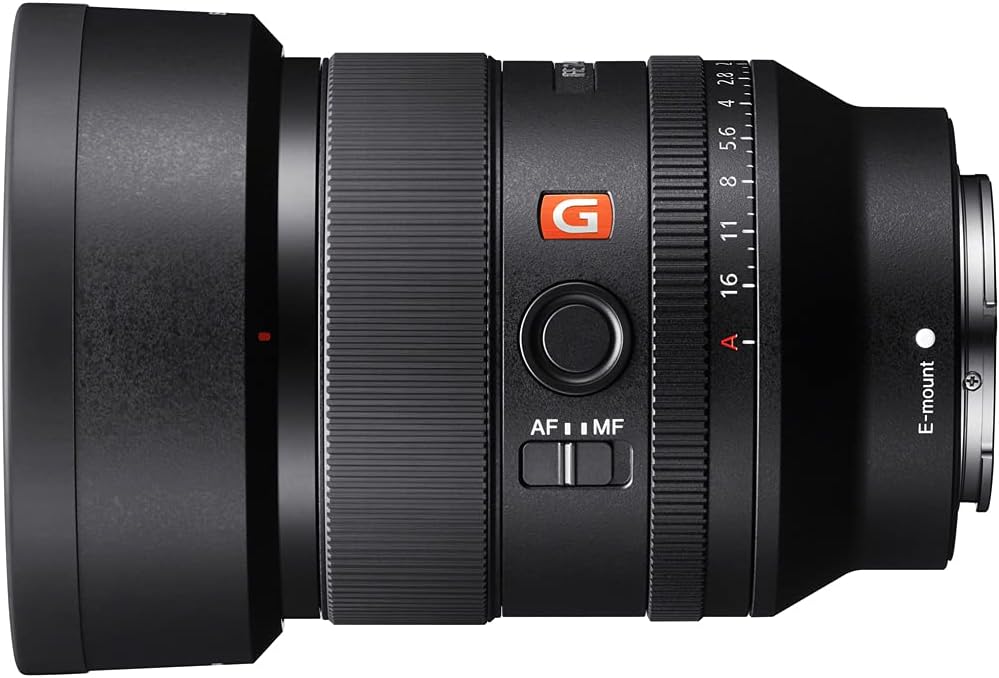
Figure 3: Lens with the hood attached.
Inserting the Memory Card
The Lexar Professional SDHC/SDXC 1667x UHS-II 64GB Memory Card is included for high-speed data storage. Insert the memory card into the camera's SD card slot with the label facing the correct direction, as indicated by your camera's manual. Ensure it clicks securely into place.

Figure 4: Lexar Professional 64GB SDXC UHS-II Memory Card.
Operating the Lens
Focus Mode Switch (AF/MF)
The lens features an AF/MF switch to quickly toggle between autofocus and manual focus modes. Slide the switch to AF for autofocus or MF for manual focus. When using manual focus, rotate the focus ring to adjust focus.

Figure 5: AF/MF switch on the lens barrel.
Aperture Ring and Click Switch
The lens has a dedicated aperture ring for direct control over the aperture. You can set the aperture from F1.4 to F16, or to 'A' for automatic aperture control via the camera. The CLICK ON/OFF switch allows you to enable or disable the click stops on the aperture ring. Turning clicks off is beneficial for smooth aperture transitions during video recording.

Figure 6: Aperture ring and CLICK ON/OFF switch.
Focus Hold Button
The focus hold button can be customized via your camera's menu to perform various functions, such as focus hold, Eye AF, or other assigned controls. Pressing this button will lock the focus at the current distance when in autofocus mode.

Figure 7: Focus hold button on the lens barrel.
Maintenance
Cleaning the Lens
- Lens Surface: Use a lens blower to remove dust and then gently wipe with a soft, clean lens cloth. For stubborn smudges or fingerprints, use a small amount of lens cleaning solution applied to the cloth, not directly to the lens.
- Lens Body: Wipe with a soft, dry cloth. Do not use organic solvents such as thinner or benzene.
Storage
- Store the lens with both front and rear caps attached to prevent dust and scratches.
- Avoid storing the lens in direct sunlight, high temperatures, or high humidity.
- If storing for an extended period, place it in a dry, cool place, preferably with a desiccant.
Troubleshooting
Common Issues and Solutions
- Lens not recognized by camera:
- Ensure the lens is securely attached to the camera body.
- Clean the lens and camera contacts with a dry, soft cloth.
- Update camera firmware if available.
- Autofocus not working:
- Check if the AF/MF switch on the lens is set to AF.
- Ensure the camera's focus mode is set to autofocus.
- Check lighting conditions; very low light can affect AF performance.
- Images are blurry:
- Verify focus settings (AF/MF).
- Check shutter speed to avoid motion blur, especially in low light.
- Ensure lens elements are clean.
If problems persist, consult your camera's instruction manual or contact Sony customer support.
Specifications
| Attribute | Value |
|---|---|
| Mount | Sony E-mount |
| Format | 35 Mm Full Frame |
| Focal Length | 35 mm |
| 35 Mm Equivalent Focal Length (APS-C) | 52.5 mm |
| Lens Groups / Elements | 10 groups, 14 elements |
| Angle Of View (35 Mm) | 63° |
| Angle Of View (APS-C) | 44° |
| Maximum Aperture | F1.4 |
| Minimum Aperture | F16 |
| Aperture Blades | 11 (Circular Aperture) |
| Minimum Focus Distance | 0.89 ft (AF), 0.82 ft (MF) / 0.27 m (AF), 0.25 m (MF) |
| Maximum Magnification Ratio | 0.23x (AF), 0.26x (MF) |
| Filter Diameter | 67 mm |
| Image Stabilization (Steadyshot) | - (Body-integrated) |
| Hood Type | Round, Bayonet Type (ALC-SH164) |
| Dimensions (Diameter x Length) | 3 x 3.88 inches (76 x 96 mm) |
| Weight | 18.5 oz (524 g) |
| Included Memory Card | Lexar Professional SDHC/SDXC 1667x UHS-II 64GB |
Warranty and Support
This Sony product is covered by a manufacturer's warranty. For detailed warranty terms, conditions, and registration information, please refer to the warranty card included with your product or visit the official Sony support website. Keep your proof of purchase for warranty claims.
For technical support, troubleshooting assistance, or service inquiries, please contact Sony customer support or visit their official website:
Please have your product model number (E10SNSEL35F14GM) and serial number ready when contacting support.
Ask a question about this manual
Ask about setup, troubleshooting, compatibility, parts, safety, or missing instructions. Manuals+ will review the question and use this page’s manual context to help answer it.