
HOMCOM 836-377
HOMCOM Industrial Style Home Office Desk with Filing Cabinet
Model: 836-377
1. Introduction
This manual provides detailed instructions for the assembly, operation, and maintenance of your HOMCOM Industrial Style Home Office Desk. Please read all instructions carefully before assembly and use to ensure safe and correct operation.
CALIFORNIA PROPOSITION 65 WARNING: This product may contain chemicals known to the State of California to cause cancer, birth defects, or other reproductive harm.
2. Package Contents
Before beginning assembly, verify that all parts and hardware are present. Refer to the included parts list in your product packaging to identify each component. If any parts are missing or damaged, please contact customer support.

Figure 2.1: Overview of the HOMCOM Industrial Style Home Office Desk.
3. Setup and Assembly
Assembly is required for this product. It is recommended to assemble the desk on a soft, clean surface to prevent scratches. Ensure all connections are secure before use.
3.1 Tools Required
- Phillips head screwdriver (not included)
- Allen wrench (usually included with hardware)
3.2 Assembly Steps
- Unpack Components: Carefully remove all parts from the packaging and lay them out. Compare them with the parts list to ensure everything is present.
- Assemble Frame: Attach the steel frame components using the provided screws and Allen wrench. Ensure the X-shape back frame is correctly positioned for stability.
- Attach Desktop: Secure the desktop panel to the assembled frame.
- Assemble Drawers: Construct the drawers according to the instructions. Pay close attention to the installation of the mute sliding rails.
- Install Filing Drawer: For the filing drawer, install the hanging bars designed to accommodate letter-size papers.
- Final Checks: Ensure all screws are tightened and the desk is stable.

Figure 3.1: Detail of the mute sliding rail and X-shape back frame for structural integrity.

Figure 3.2: The desk features a drawer and an under-the-desk open storage compartment.

Figure 3.3: The filing drawer is equipped with hanging bars for letter-size documents.
4. Operating Instructions
The HOMCOM Industrial Style Home Office Desk is designed for efficient workspace organization.
4.1 Using the Drawers
The desk includes a standard drawer and a filing cabinet drawer. Both drawers operate on smooth sliding rails for easy access. The filing drawer is specifically designed to hold letter-size hanging files, helping to keep your documents organized.
4.2 Utilizing Open Storage
The under-the-desk open storage space provides convenient access for books, plants, or other daily essentials. This area can also be used to store a computer tower or other office equipment.
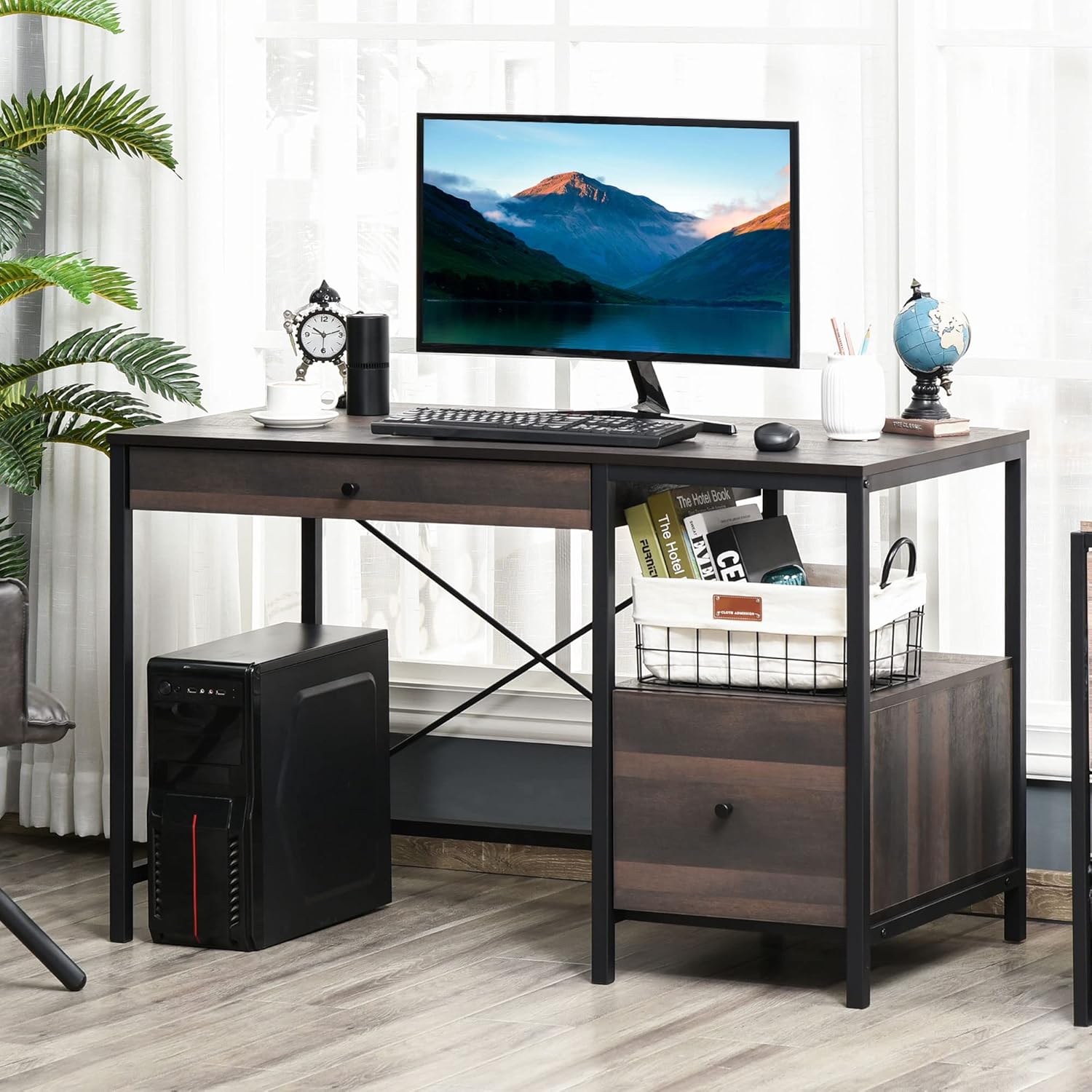
Figure 4.1: The desk provides ample space for a monitor, computer tower, and other office supplies.
5. Maintenance and Care
To maintain the appearance and longevity of your desk, follow these simple care instructions:
- Cleaning: Wipe the surfaces with a dry cloth. Avoid abrasive cleaners or harsh chemicals that may damage the finish.
- Spills: Immediately wipe up any spills to prevent staining or damage to the engineered wood.
- Inspection: Periodically check all screws and connections to ensure they remain tight. Retighten as necessary.
6. Troubleshooting
If you encounter issues during assembly or use, refer to the following common solutions:
- Drawer Not Fitting/Sticking:
a. Ensure all drawer components are assembled correctly and the sliding rails are aligned.
b. Verify that the drawer housing is installed squarely within the desk frame. Sometimes, inserting the drawer housing from a specific side can resolve alignment issues.
c. Check for any obstructions in the drawer slides. - Desk Wobbles:
a. Confirm that all screws, especially those connecting the frame and desktop, are fully tightened.
b. Ensure the desk is placed on a level surface. Adjustable feet (if present) can be used to stabilize the desk. - Missing Parts:
a. Double-check all packaging materials.
b. If parts are genuinely missing, contact HOMCOM customer support with your product model number and a description of the missing part.
7. Specifications
| Feature | Detail |
|---|---|
| Model Number | 836-377 |
| Overall Dimensions (L x W x H) | 47.25" x 23.5" x 29.5" |
| Material | Engineered Wood, Steel Frame |
| Color | Black, Walnut Brown |
| Number of Drawers | 2 |
| Number of Shelves | 2 (including open storage area) |
| Max Load (Total) | 154 lbs |
| Max Load (Desktop) | 110 lbs |
| Max Load (Shelf) | 22 lbs |
| Max Load (Drawer) | 11 lbs |
| Item Weight | 70 lbs |
| Manufacturer | Aosom LLC |

Figure 7.1: Key dimensions of the HOMCOM Industrial Style Home Office Desk.
8. Warranty and Support
For warranty information, missing parts, or technical support, please contact the manufacturer, Aosom LLC, or your retailer. Keep your purchase receipt and product model number (836-377) handy for faster service.
Ask a question about this manual
Ask about setup, troubleshooting, compatibility, parts, safety, or missing instructions. Manuals+ will review the question and use this page’s manual context to help answer it.