
Introduction
Thank you for choosing the SURNICE Wireless Remote Control Outlet Kit. This kit provides a convenient way to control your electronic devices remotely, enhancing comfort and energy efficiency in your home or office. Please read this manual carefully before use to ensure proper installation, operation, and maintenance.
Safety Instructions
- Electrical Safety: Always ensure the total load of connected devices does not exceed the maximum power rating of 2300W. Overloading can cause the outlet to automatically shut off for safety, or lead to electrical hazards.
- Child Safety: The outlets are designed with a plastic plate that blocks the socket, providing enhanced protection for children. However, always keep electrical devices out of reach of children.
- Indoor Use Only: This product is designed for indoor use. Do not expose to water, moisture, or extreme temperatures. The IP20 rating indicates protection against solid objects larger than 12.5mm, but no protection against liquids.
- Proper Installation: Ensure the outlets are fully inserted into wall sockets. Do not force them into incompatible sockets.
- Maintenance: Do not attempt to disassemble or repair the device yourself. Refer all servicing to qualified personnel.
- Battery Handling: The remote control uses a CR2032 battery. Ensure correct polarity when inserting. Dispose of used batteries responsibly.
Package Contents
Verify that all items are present in your package:
- 4 x SURNICE Wireless Remote Control Outlets
- 1 x Remote Control (with 1 CR2032 battery included)
- 1 x User Manual (this document)

This image displays the complete SURNICE Wireless Remote Control Outlet Kit, including four white remote control outlets and a compact white remote control unit.
Product Features
- Extended Range: Control devices up to 40 meters (130 feet) away in open areas. The strong signal can penetrate walls, allowing control from different rooms.
- Plug and Play: The outlets and remote are pre-programmed for immediate use, requiring no complex setup.
- High Power Capacity: Each outlet supports devices up to 2300W, suitable for various household appliances.
- Enhanced Safety: Features a child-protective plastic plate in the socket and an automatic overload shut-off mechanism.
- Energy Efficient: Low standby power consumption (less than 0.5W) helps reduce energy waste.
- Compact Design: Mini-sized outlets ensure they do not obstruct adjacent sockets.
- Programmable and Expandable: Easily program or re-program outlets to specific remote buttons (A, B, C, D) and expand your system with additional SURNICE remote control outlets.

This graphic emphasizes the energy-saving aspect of the SURNICE remote control outlets, indicating a standby power consumption of less than 0.5W. Icons for energy saving, safety, and mini-size are also shown.
Setup
1. Remote Control Battery Installation
The remote control comes with a pre-installed CR2032 battery. If you need to replace it:
- Locate the battery compartment on the back of the remote control.
- Open the compartment cover.
- Insert a new CR2032 battery with the positive (+) side facing up.
- Close the battery compartment cover securely.
2. Pairing Outlets with Remote Control
The outlets are pre-programmed to the remote control. If re-pairing is needed or for new outlets:
- Plug the remote control outlet into a wall socket.
- Press and hold the small button on the side of the remote control outlet until its indicator light starts blinking.
- While the indicator light is blinking, press the desired 'ON' button (A, B, C, or D) on the remote control.
- The indicator light on the outlet will stop blinking and remain solid for a moment, then turn off, indicating successful pairing.
- Repeat this process for each remote control outlet you wish to pair.

A close-up view of the SURNICE remote control outlets and the remote control, illustrating their compact design.
Operating Instructions
Once the outlets are plugged in and paired, you can control them using the remote control:
- Individual Control: Press the 'ON' button (A, B, C, or D) corresponding to the desired outlet to turn it on. Press the respective 'OFF' button to turn it off.
- All On/Off: Press the 'ALL ON' button to turn on all paired outlets simultaneously. Press the 'ALL OFF' button to turn off all paired outlets simultaneously.

An illustration showing a hand holding the SURNICE remote control, demonstrating its use to wirelessly control an appliance plugged into a remote control outlet, with a television in the background.

This image showcases diverse applications for the SURNICE remote control outlets, including controlling Christmas decorations, bedside lamps, and office electronics, highlighting their versatility.
Maintenance
- Cleaning: Disconnect the remote control outlets from power before cleaning. Use a dry, soft cloth to wipe the surfaces. Do not use liquid cleaners or abrasive materials.
- Battery Replacement: Replace the CR2032 battery in the remote control when its range decreases or it stops responding. Follow the battery installation steps in the Setup section.
- Storage: Store the outlets and remote control in a cool, dry place when not in use for extended periods.
Troubleshooting
| Problem | Possible Cause | Solution |
|---|---|---|
| Outlet does not respond to remote. | 1. Remote control battery is low or dead. 2. Outlet is not paired with the remote. 3. Outlet is out of range. 4. Obstructions blocking the signal. | 1. Replace the CR2032 battery in the remote. 2. Re-pair the outlet with the remote (refer to Setup section). 3. Move closer to the outlet. 4. Reduce obstructions between remote and outlet. |
| Outlet turns off unexpectedly. | 1. Connected device exceeds 2300W maximum load. 2. Power outage. | 1. Disconnect high-power devices. Ensure total load is below 2300W. 2. Check household power supply. |
| Reduced remote control range. | 1. Remote control battery is low. 2. Excessive interference from other devices. 3. Too many obstacles (walls, furniture). | 1. Replace the CR2032 battery. 2. Try using the remote in a different location or away from other electronics. 3. Reduce physical obstructions. |
Specifications
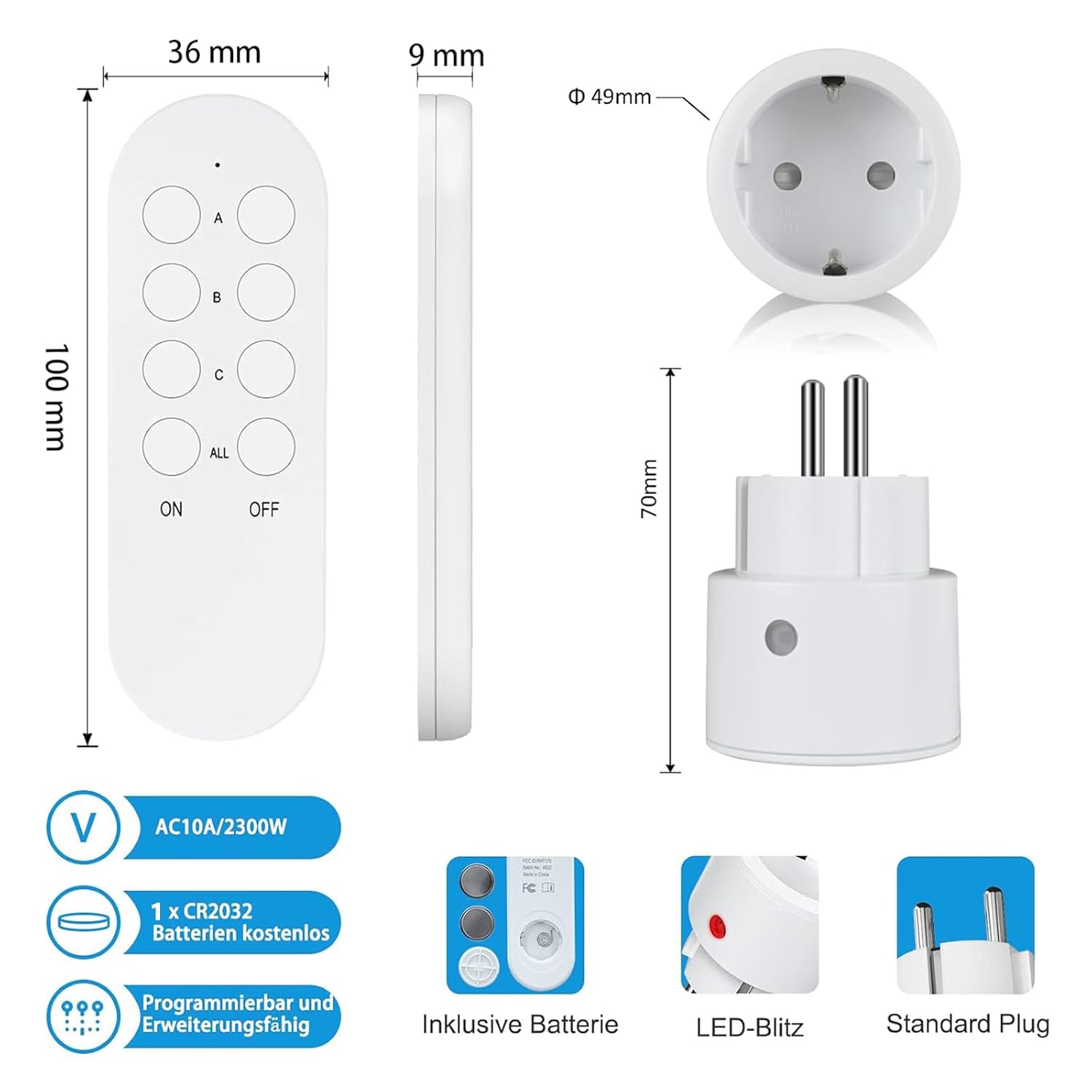
A detailed diagram illustrating the physical dimensions of both the remote control (100mm length, 36mm width, 9mm thickness) and the remote control outlet (70mm height, 49mm diameter). Key features such as AC10A/2300W rating, included CR2032 battery, programmability, LED indicator, and standard Schuko plug type are highlighted.
| Feature | Detail |
|---|---|
| Model Number | SN10032+SN20021 |
| Brand | SURNICE |
| Max Power Rating | 2300 Watts |
| Operating Voltage | 230 Volts |
| Remote Control Range | Up to 40 meters (without obstacles) |
| Remote Control Battery | 1 x CR2032 (included) |
| Outlet Dimensions (L x W x H) | 6 x 5 x 7 cm |
| Outlet Weight | 61 Grams |
| Connector Type | Schuko (Type F) |
| Contact Material | Copper |
| International Protection (IP) Rating | IP20 |
| Certifications | CE |
| Control Method | Remote Control |
| Number of Positions | 4 (for individual control) |
Warranty and Support
Specific warranty information is not available in this manual. For warranty details, product support, or any inquiries, please contact SURNICE customer service or refer to the product packaging and purchase documentation. Keep your proof of purchase for any warranty claims.
