
1. Introduction
Thank you for choosing the YIHUA 948 Professional Desoldering Station. This comprehensive bundle includes the YIHUA 948 Desoldering Station and the YIHUA #948A Replacement Soldering Iron Handpiece/Handle, along with a variety of essential accessories. This manual provides detailed instructions for the safe and effective operation, setup, maintenance, and troubleshooting of your desoldering station.
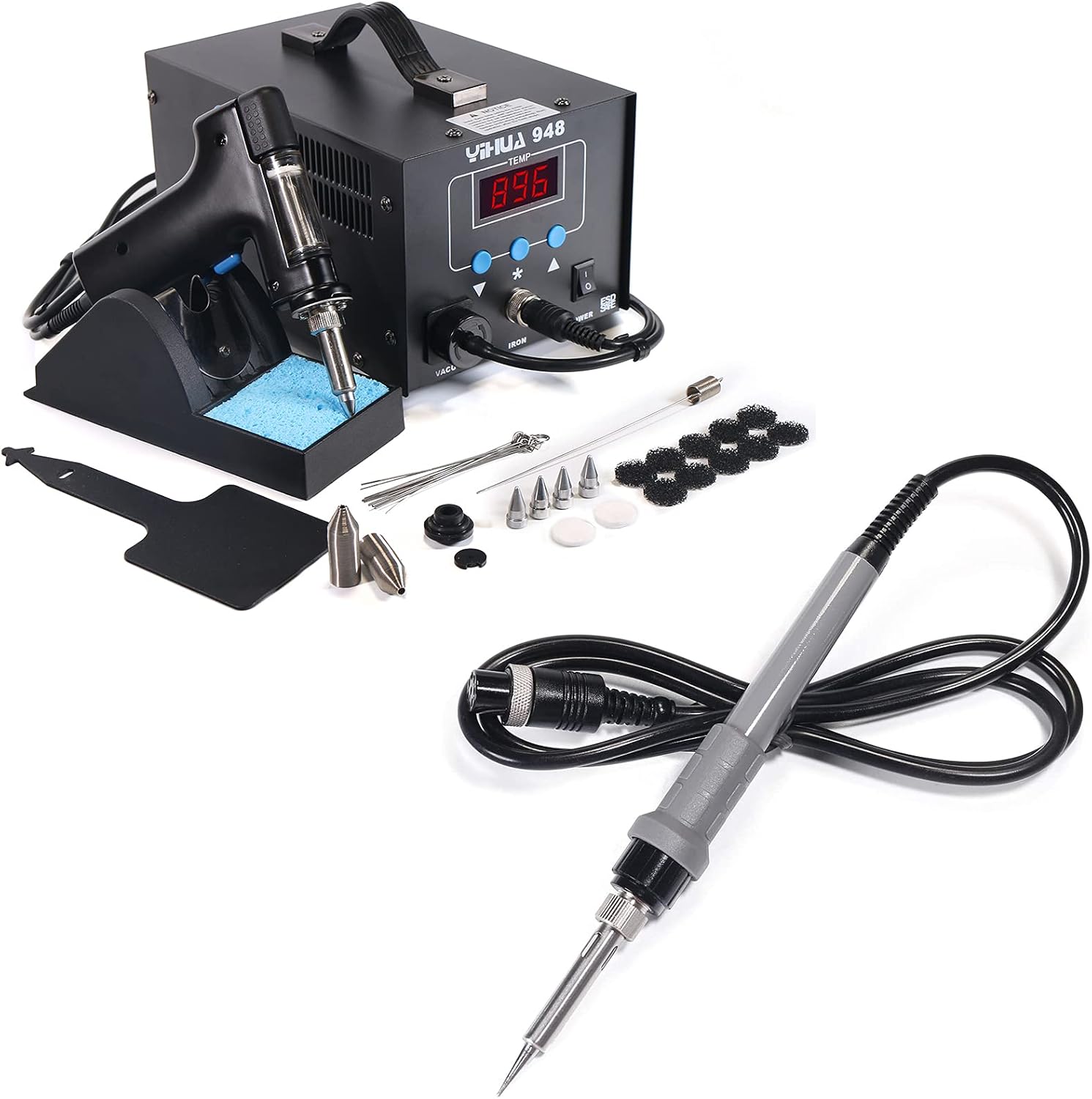
Image 1.1: YIHUA 948 Desoldering Station and 948A Soldering Iron with included accessories.
2. Safety Instructions
Please read and understand all safety instructions before operating the YIHUA 948 Desoldering Station. Failure to follow these instructions may result in electric shock, fire, or serious injury.
- Always operate the unit in a well-ventilated area to avoid inhaling fumes from soldering/desoldering.
- Wear appropriate personal protective equipment, including safety glasses, to protect against splashes of molten solder.
- Do not touch the desoldering gun nozzle or soldering iron tip when hot. Temperatures can reach up to 896°F (480°C).
- Ensure the power cord is properly grounded and connected to a 110-127V AC outlet.
- Never leave the desoldering station unattended when powered on.
- Keep the workstation clean and free of flammable materials.
- Disconnect the power plug from the outlet before performing any maintenance or when the unit is not in use.
- Do not use the unit if the power cord or any part of the station is damaged.
3. Package Contents
Verify that all items listed below are included in your package:
- YIHUA 948 Professional Desoldering Station
- YIHUA #948A Soldering Iron Handpiece/Handle
- 10 x Filtration Adsorbers
- 4 x Desoldering Nozzles
- 1 x Silicone Pad
- 2 x Filter Springs
- 2 x Ceramic Filters
- 2 x Rubber Retainers
- 1 x Desoldering Gun Holder
- 1 x Cleaning Sponge
- 1 x Cleaning Pin Set
- 1 x Cleaning Pin
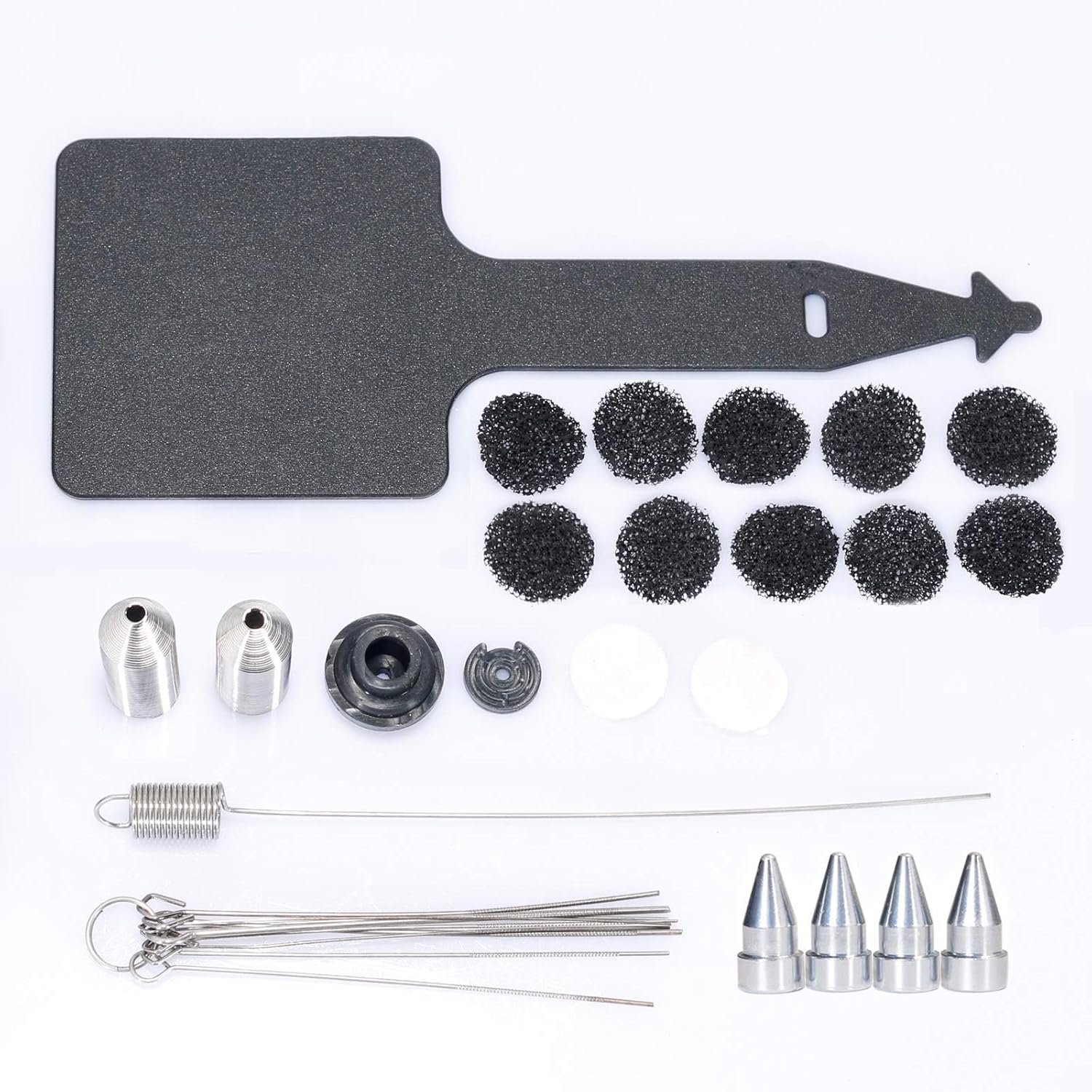
Image 3.1: Included accessories for the YIHUA 948 Desoldering Station.
4. Setup
Follow these steps to set up your YIHUA 948 Desoldering Station:
- Placement: Place the desoldering station on a stable, heat-resistant surface in a well-ventilated area.
- Connect Desoldering Gun: Connect the desoldering gun to the designated port on the front panel of the station. Ensure a secure connection.
- Connect Soldering Iron (Optional): If using the #948A soldering iron, connect its 8-pin female connector to the 'IRON' port on the station.

Image 4.1: The 8-pin female connector for the #948A soldering iron.
- Install Holder: Attach the desoldering gun holder to the side of the station. Place the cleaning sponge in the designated tray.
- Power Connection: Plug the power cord into the station and then into a standard 110-127V AC power outlet.
- Initial Check: Before powering on, ensure all connections are firm and the workstation is clear.
5. Operating Instructions
The YIHUA 948 Desoldering Station features a temperature stabilization function to maintain the set temperature for consistent performance.
5.1 Power On and Temperature Setting
- Turn on the power switch located on the front panel. The LED display will show the current temperature.
- Use the temperature adjustment buttons (up/down arrows) to set the desired temperature. The station's temperature range is 662°F to 896°F (350°C to 480°C).
- Allow the station to preheat for approximately 5 minutes to reach the set temperature.
5.2 Desoldering Procedure
- Ensure the desoldering gun nozzle is clean and free of obstructions.
- Place the hot nozzle directly onto the solder joint you wish to desolder. Allow the solder to melt completely.
- Once the solder is molten, press the trigger on the desoldering gun to activate the vacuum pump and suck up the molten solder.
- Release the trigger once the solder is removed.
- Repeat the process for other solder joints as needed.
5.3 Nozzle Pre-tinning and Usage
All desoldering nozzles come pre-tinned to prevent oxidation. This is a protective measure and does not indicate a blocked nozzle.

Image 5.1: Pre-tinned nozzles before and after use.
To extract the pre-tinned solder:
- Turn on the station and allow it to preheat for approximately 5 minutes.
- Once preheating is complete, press the desoldering trigger to extract the pre-tinned solder from the nozzle.
Recommended Temperature: For most applications, we recommend using the desoldering station at 662°F to 700°F (350°C to 371°C). Avoid keeping the nozzle on the solder pad for too long when using a high-temperature setting to prevent damaging the pad.

Image 5.2: Recommended temperature guidelines for soldering.
- The set temperature for a soldering iron/station should be approximately 50°C / 90°F above its melting point to ensure a better solder connection.
- An additional approximately 100°C / 180°F higher temperature is recommended to provide a heat reserve for quick thermal recovery of the tip after the solder connection is made.
6. Maintenance
Regular maintenance is crucial for optimal performance and longevity of your desoldering station. Always ensure the unit is powered off and cooled down before performing maintenance.
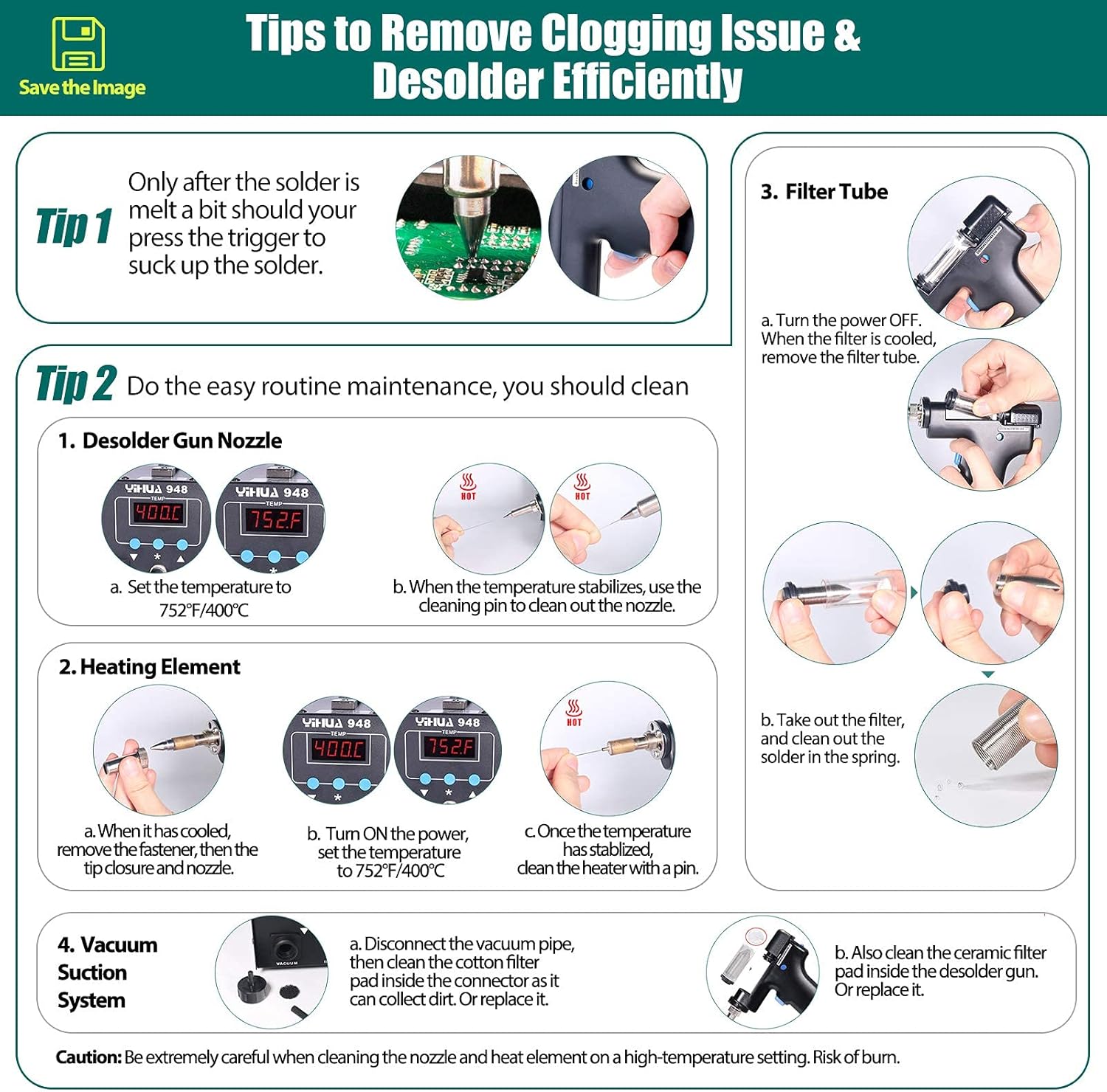
Image 6.1: Tips for removing clogging and efficient desoldering.
6.1 Desolder Gun Nozzle Cleaning
- Set the temperature to 752°F (400°C).
- When the temperature stabilizes, use the cleaning pin to clear out the nozzle.
6.2 Heating Element Cleaning
- When the unit has cooled, remove the fastener, then the tip closure and nozzle.
- Turn the power ON and set the temperature to 752°F (400°C).
- Once the temperature has stabilized, clean the heating element with a pin.
6.3 Filter Tube Cleaning
- Turn the power OFF. When the filter tube is cooled, remove it.
- Take out the filter and clean out any solder in the spring.
6.4 Vacuum Suction System Cleaning
- Disconnect the vacuum pipe.
- Clean the cotton filter pad inside the connector as it can collect dirt. Replace if necessary.
- Also clean the ceramic filter pad inside the desolder gun. Replace if necessary.
Caution: Be extremely careful when cleaning the nozzle and heating element on a high-temperature setting. Risk of burn.
7. Troubleshooting
This section addresses common issues you might encounter with your YIHUA 948 Desoldering Station.
7.1 Clogging Issues
If the desoldering gun experiences clogging, it is often due to accumulated solder or debris.
- Symptom: Reduced suction power or inability to remove solder.
- Solution: Perform the nozzle, heating element, filter tube, and vacuum suction system cleaning procedures detailed in Section 6. Ensure all components are thoroughly cleaned and reassembled correctly.
- Prevention: Regularly clean the desoldering gun after use, especially the nozzle and filter system, to prevent solder buildup.
7.2 Temperature Instability
- Symptom: Displayed temperature fluctuates significantly or does not reach the set temperature.
- Solution: Check all connections, especially the desoldering gun and soldering iron (if connected) to the main unit. Ensure they are securely plugged in. If the issue persists, contact customer support.
7.3 No Power
- Symptom: The unit does not power on when the switch is flipped.
- Solution: Verify the power cord is securely plugged into both the station and a working 110-127V AC outlet. Check the power outlet with another device to ensure it is functional. Inspect the power cord for any visible damage.
8. Specifications
| Feature | Specification |
|---|---|
| Model | YIHUA 948 |
| Input Voltage | 110-127V AC (US-standard power plug) |
| Display Type | LED |
| Temperature Range | 662°F ~ 896°F (350°C ~ 480°C) |
| Temperature Stability | ±5°F (±3°C) |
| Material | Rubber (for certain components) |
| Included Components | Nozzles, filters, cleaning tools, silicone pad, holder |
9. Warranty and Support
YIHUA stands behind its products with dedicated customer support.
- Manufacturer Coverage: Enjoy our 12-month US-exclusive manufacturer technical coverage.
- Professional Assistance: Access 24/7 professional assistance on Amazon for any queries or issues.
- Compatibility Check: If you are unsure about the compatibility of replacement parts, especially the #948A soldering iron, please contact us via Amazon's Messaging System for confirmation.