
Relaxdays 10036829_111
Relaxdays Electric Height-Adjustable Desk Frame User Manual
Model: 10036829_111
Introduction
Thank you for choosing the Relaxdays Electric Height-Adjustable Desk Frame. This manual provides essential information for the safe assembly, operation, and maintenance of your new desk frame. Please read it thoroughly before use and keep it for future reference.

Image: The Relaxdays Electric Height-Adjustable Desk Frame, shown with a desktop and monitor, illustrating its use in an office environment.
Safety Instructions
To ensure safe operation and prevent injury, please observe the following safety guidelines:
- Always ensure the desk is properly anchored to the floor.
- Do not exceed the maximum weight limit of 70 kg.
- Exercise caution when adjusting height and width to prevent injuries from pinching or crushing.
- Keep children and pets away from the desk during operation.
- Ensure all cables are properly managed to avoid tripping hazards or damage.
- Only use the provided power cable and adapter.
- If any unusual noise or movement occurs, immediately stop operation and unplug the desk.
Package Contents
Please check that all components are present before beginning assembly:
- Electric Desk Frame components (legs, crossbar, feet)
- Control Panel
- Power Adapter
- Power Cable
- All necessary assembly tools (screws, Allen keys, etc.)
- Instruction Manual
Assembly Instructions
Assembly is recommended for 2 people. Follow these steps carefully:
- Unpack Components: Carefully remove all parts from the packaging and lay them out on a clean, flat surface.
- Assemble Legs and Feet: Attach the feet to the bottom of each leg using the provided screws.
- Connect Crossbar: Connect the two legs with the adjustable crossbar. Ensure the motor and control unit are correctly oriented.
- Adjust Width: Adjust the width of the frame to match your desired tabletop size (recommended for tabletops 100-160 cm wide and 50-80 cm deep). Secure the crossbar at the chosen width.
- Attach Tabletop: Place your tabletop onto the assembled frame. Secure the tabletop to the frame using appropriate screws (tabletop not included).
- Install Control Panel: Mount the control panel to the underside of the tabletop in an easily accessible location.
- Connect Power: Connect the power cable to the power adapter, and then connect the adapter to the desk frame's motor unit. Plug the power cable into a suitable electrical outlet.
- Level the Desk: Use the adjustable feet at the bottom of the legs to ensure the desk is stable and level on your floor.
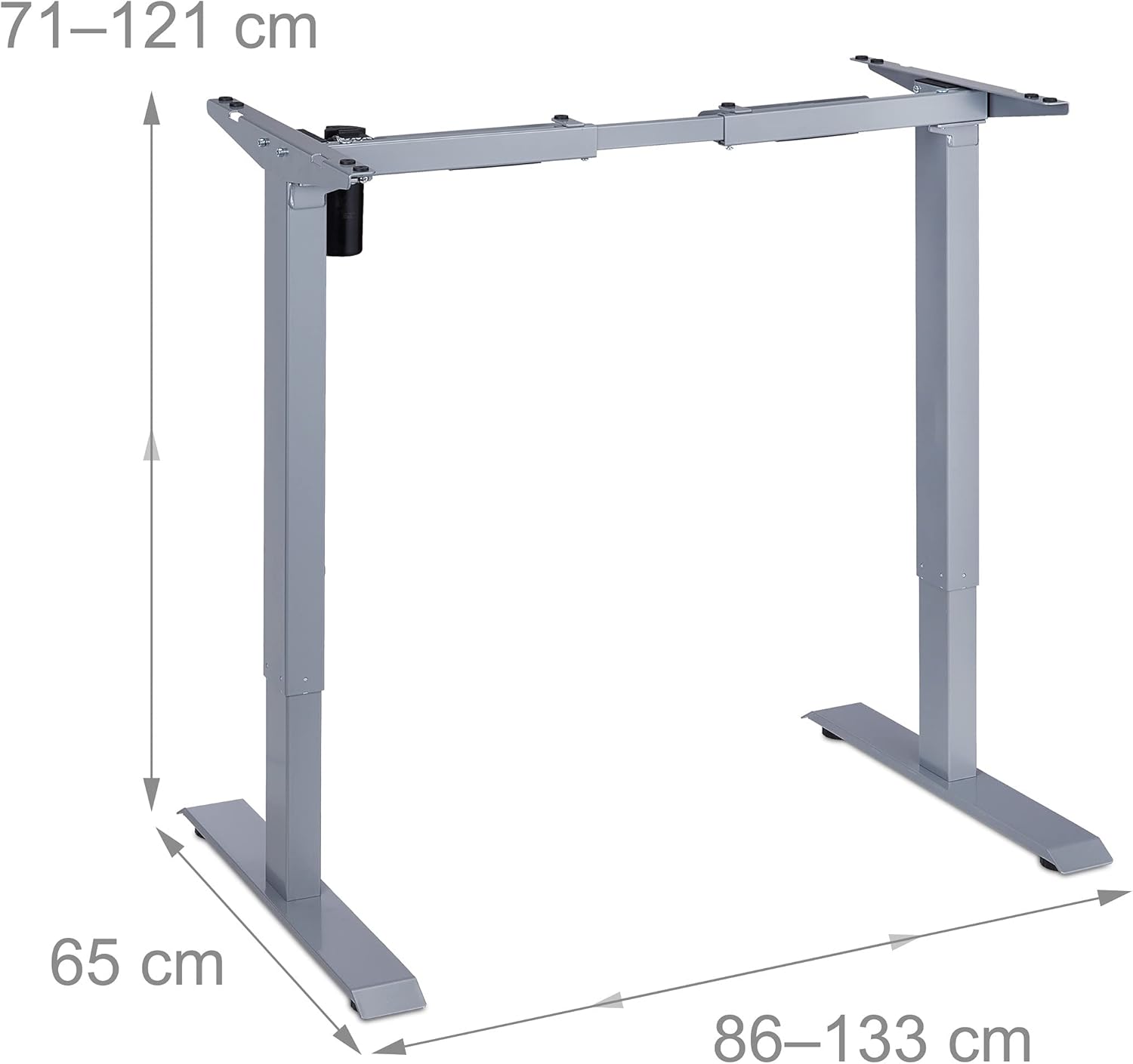
Image: Dimensions of the desk frame, showing adjustable height from 71-121 cm and width from 86-133 cm.

Image: Visual representation of the desk frame's height adjustment mechanism.

Image: Visual representation of the desk frame's width adjustment capability.

Image: Detail of the adjustable leveling feet for stability.
Operating Instructions
The electric desk frame allows for easy height adjustment to switch between sitting and standing positions.
- Adjusting Height: Use the ^ (up) and v (down) buttons on the control panel to raise or lower the desk to your desired height. The desk can be adjusted between 71 cm and 121 cm.
- Noise Level: The motor operates at less than 50 dB, ensuring quiet adjustments.

Image: The control panel with up and down arrow buttons for height adjustment.

Image: A user demonstrating the standing position at the adjustable desk.
Product Video
Video: An official product video demonstrating the Relaxdays Electric Height-Adjustable Desk Frame in use, showcasing its height adjustment capabilities and different color options.
Maintenance
Regular maintenance ensures the longevity and optimal performance of your desk frame:
- Cleaning: Wipe the frame with a soft, damp cloth. Avoid abrasive cleaners or solvents.
- Inspections: Periodically check all screws and connections to ensure they are tight.
- Cable Management: Ensure power cables are not pinched or damaged.
Troubleshooting
If you encounter any issues, refer to the following common problems and solutions:
- Desk not moving:
- Check if the power cable is securely plugged into the wall outlet and the desk frame.
- Ensure the power adapter is correctly connected.
- Verify there are no obstructions preventing movement.
- Uneven height:
- Ensure the desk is not overloaded beyond the 70 kg weight limit.
- Check that the adjustable feet are properly leveled.
- Unusual noises:
- Stop operation immediately.
- Inspect for any loose parts or obstructions.
- Contact customer support if the noise persists.
Specifications
| Feature | Detail |
|---|---|
| Brand | Relaxdays |
| Model Number | 10036829_111 |
| Color | Grey |
| Material | Alloy Steel (Base), Plastic (Top Material Type) |
| Desk Design | Standing Desk |
| Height Adjustment Range | 71 cm - 121 cm |
| Width Adjustment Range | 86 cm - 133 cm (for tabletops 100-160 cm wide) |
| Recommended Tabletop Depth | 50 cm - 80 cm |
| Maximum Load Capacity | 70 kg |
| Noise Level | Less than 50 dB |
| Item Weight | 21.09 Kilograms |
| Special Features | Ergonomic, Adjustable, Electric |
| Assembly Recommendation | 2 people |
| Tools Included | Yes |
| Customizable | Yes |
| Mounting Type | Table mounting |
Warranty and Support
This Relaxdays product comes with a Limited Warranty.
For warranty claims, technical support, or any questions not covered in this manual, please contact Relaxdays customer service. Refer to your purchase documentation or the official Relaxdays website for contact details.
Relaxdays Official Website: Visit Relaxdays Store
Ask a question about this manual
Ask about setup, troubleshooting, compatibility, parts, safety, or missing instructions. Manuals+ will review the question and use this page’s manual context to help answer it.