
Introduction
Thank you for choosing the Mitlker Digital Kitchen Timer JS118. This manual provides essential information for the proper setup, operation, and maintenance of your new timer. Please read these instructions carefully before use and retain them for future reference.
Product Overview
The Mitlker Digital Kitchen Timer JS118 is a versatile timer designed for various applications, including cooking, classroom activities, exercise, and time management. It features a large digital display, loud alarm, and multiple placement options.

Figure 1: Timer Components. This image displays the front and back of the Mitlker Digital Kitchen Timer JS118, highlighting its key components such as the large digital display, ON/OFF switch, MIN (minutes) button, SEC (seconds) button, START/STOP button, RESET button, hanging hook, retractable stand, magnet, and AAA battery compartment.
Setup
1. Battery Installation
- Locate the battery compartment on the back of the timer (refer to Figure 1).
- Slide open the battery compartment cover.
- Insert one (1) AAA battery, ensuring the correct polarity (+/-) as indicated inside the compartment.
- Close the battery compartment cover securely.
Note: The AAA battery is not included with the timer.
2. Initial Placement
The Mitlker Digital Kitchen Timer JS118 offers multiple placement options:
- Table-top: Utilize the retractable stand on the back of the timer to place it on any flat surface.
- Magnetic Surface: The timer features a magnetic back, allowing it to be attached to metal surfaces such as refrigerators or ovens.
- Hanging: A hook is provided for hanging the timer on a wall hook or similar fixture.

Figure 2: Magnetic Placement. This image shows the Mitlker Digital Kitchen Timer JS118 magnetically attached to a refrigerator door in a kitchen setting, demonstrating one of its convenient placement options.
Operating Instructions
1. Power On/Off
Locate the ON/OFF switch on the side of the timer (refer to Figure 1). Slide the switch to turn the timer on or off.
2. Count-Down Timer Function
- Ensure the timer display shows 00:00. If not, press the MIN and SEC buttons simultaneously to reset the timer.
- Press the MIN button to set the desired minutes. Hold the button for faster adjustment.
- Press the SEC button to set the desired seconds. Hold the button for faster adjustment.
- Once the desired time is set, press the START/STOP button to begin the countdown.
- To pause the countdown, press the START/STOP button again. Press it once more to resume.
- When the countdown reaches 00:00, an alarm will sound for 60 seconds. Press any button to stop the alarm.
3. Count-Up Timer Function
- Ensure the timer display shows 00:00. If not, press the MIN and SEC buttons simultaneously to reset the timer.
- Press the START/STOP button to begin counting up from 00:00.
- To pause the count-up, press the START/STOP button again. Press it once more to resume.
- To reset the count-up timer to 00:00, press the MIN and SEC buttons simultaneously while the timer is paused or running.

Figure 3: Timer Operation. This image illustrates the steps for using both the count-up and count-down functions of the Mitlker Digital Kitchen Timer JS118, showing button presses and display changes.
4. Alarm Sound
The timer features a loud alarm that sounds for 60 seconds when the countdown reaches zero. To silence the alarm at any point, press any button on the timer.
5. Versatile Use

Figure 4: Application Examples. This image demonstrates the timer being used in different settings, such as during a yoga session and while studying, highlighting its adaptability for various time management needs.
Maintenance
- Cleaning: Wipe the timer with a soft, damp cloth. Do not use abrasive cleaners or immerse the timer in water.
- Battery Replacement: Replace the AAA battery when the display becomes dim or the timer stops functioning correctly. Always dispose of used batteries responsibly.
- Storage: When not in use for extended periods, remove the battery to prevent leakage and store the timer in a cool, dry place.
Troubleshooting
| Problem | Possible Cause | Solution |
|---|---|---|
| Timer does not turn on or display is dim. | Battery is dead or incorrectly installed. | Replace the AAA battery, ensuring correct polarity. |
| Alarm is not loud enough or does not sound. | Timer is off, battery is low, or environmental noise is too high. | Ensure timer is on. Replace battery. Use in a quieter environment. |
| Timer does not adhere securely to magnetic surfaces. | Surface is not fully magnetic, uneven, or dirty. | Ensure the magnetic surface is clean, flat, and made of suitable metal. |
| Buttons are unresponsive. | Battery is low or internal error. | Replace battery. If problem persists, contact customer support. |
Specifications
- Model: JS118
- Brand: Mitlker
- Color: Pink
- Material: Plastic
- Product Dimensions (D x W x H): 1" x 2" x 3" (approximately 2.54 cm x 5.08 cm x 7.62 cm)
- Item Weight: 1.76 ounces (0.05 kg)
- Maximum Time: 99 minutes, 59 seconds
- Alarm Sound Duration: 60 seconds
- Screen Size: 2.76 Inches (diagonal)
- Power Source: 1 x AAA battery (not included)
- UPC: 677998396622
- Date First Available: June 4, 2021
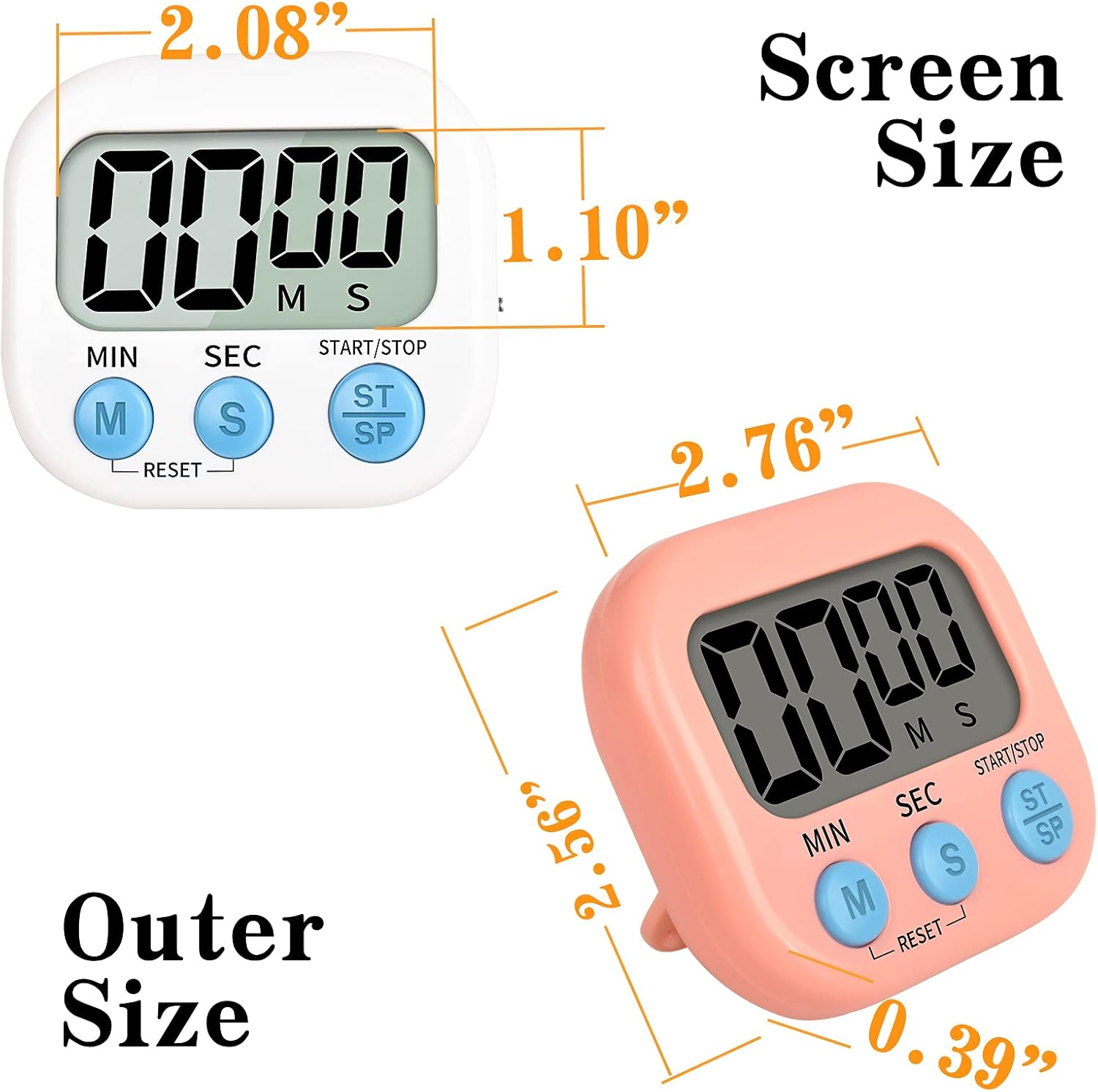
Figure 5: Product Dimensions. This image provides a detailed diagram of the Mitlker Digital Kitchen Timer JS118, illustrating its screen size and outer dimensions in inches.
Warranty and Support
For information regarding warranty coverage, product support, or any inquiries not addressed in this manual, please contact Mitlker customer service directly. Contact details can typically be found on the product packaging or the official Mitlker website.


