
Introduction
Thank you for choosing the Mitlker Digital Kitchen Timer. This compact and versatile timer is designed for various applications, including cooking, classroom activities, bathroom timing, and general time management. It features a large digital display, loud alarm, magnetic back, and a retractable stand for convenient placement.

Image: Front view of the Mitlker Digital Kitchen Timer, displaying the large digital readout and the 'M', 'S', and 'ST/SP' buttons.
Product Features
- Large Clear Digits: Easy-to-read display for quick time checks.
- Loud Alarm: A 60-second alarm duration ensures you hear it from another room.
- Magnetic Back: Allows for convenient attachment to metallic surfaces like refrigerators.
- Retractable Stand: Provides stable tabletop placement.
- Hanging Hook: An additional option for hanging the timer.
- Count-Up and Count-Down Functions: Versatile for various timing needs.
- Maximum Time: Supports up to 99 minutes and 59 seconds.

Image: Detailed diagram highlighting the various components of the timer, such as the large digital display, ON/OFF switch, set minute/second buttons, start/stop button, hanging hook, retractable stand, magnet, and AAA battery compartment.
Setup
1. Battery Installation
- Locate the battery compartment on the back of the timer.
- Slide open the battery cover.
- Insert one (1) AAA battery, ensuring correct polarity (+/-). (Battery not included)
- Close the battery cover securely.
2. Placement Options
- Magnetic Attachment: The strong magnet on the back allows the timer to be securely attached to metal surfaces like refrigerators or whiteboards.
- Tabletop Stand: Pull out the retractable stand on the back to place the timer upright on any flat surface.
- Hanging: Utilize the small hook at the top for hanging the timer on a nail or hook.

Image: The digital timer magnetically attached to a refrigerator door, demonstrating its versatile placement options in a kitchen environment.
Operating Instructions
Buttons Overview:
- M: Minute setting button
- S: Second setting button
- ST/SP: Start/Stop button
- RESET: Press M and S buttons simultaneously to reset to 00:00.
Count-Up Function:
- Ensure the timer display is at 00:00. If not, press the M and S buttons simultaneously to reset.
- Press the ST/SP button to start the count-up timer.
- Press ST/SP again to pause the timer.
- Press ST/SP once more to resume.
- To stop and reset, press ST/SP to pause, then press M and S simultaneously.
Count-Down Function:
- Ensure the timer display is at 00:00. If not, press the M and S buttons simultaneously to reset.
- Press the M button repeatedly to set the desired minutes.
- Press the S button repeatedly to set the desired seconds.
- Once the desired time is set, press the ST/SP button to start the countdown.
- The timer will alarm for 60 seconds when it reaches 00:00. Press any button to stop the alarm.
- To pause the countdown, press ST/SP. Press again to resume.
- To reset the timer during a countdown, press ST/SP to pause, then press M and S simultaneously.

Image: Visual guide illustrating the steps for operating the timer in both count-up and count-down modes, indicating which buttons to press for each action.
Maintenance
- Clean the timer with a soft, dry cloth. Do not use abrasive cleaners or immerse in water.
- If the display becomes dim or the alarm weakens, replace the AAA battery.
- Store the timer in a cool, dry place when not in use for extended periods.
- Avoid dropping the timer or exposing it to extreme temperatures.
Troubleshooting
| Problem | Possible Cause | Solution |
|---|---|---|
| Display is blank or dim. | Battery is dead or incorrectly installed. | Replace the AAA battery, ensuring correct polarity. |
| Alarm is not loud enough. | Low battery or environmental noise. | Replace battery. Ensure timer is placed in a quiet area. |
| Timer not responding to button presses. | Battery issue or internal malfunction. | Replace battery. If problem persists, contact customer support. |
| Magnet detaches from timer. | Adhesive failure. | Re-attach with strong adhesive suitable for plastic and magnets. |
Specifications
| Model Number | JS-118 |
| Brand | Mitlker |
| Color | White |
| Material | Plastic |
| Product Dimensions (D x W x H) | 0.39" x 2.76" x 2.56" |
| Screen Size | 2.76 Inches |
| Item Weight | 1.76 ounces (0.05 Kilograms) |
| Time Units | Minutes (M), Seconds (S) |
| Maximum Time | 99 minutes, 59 seconds |
| Alarm Sound Duration | 60 seconds |
| Power Source | 1 x AAA battery (Not included) |
| UPC | 677998396615 |
| Country of Origin | China |
| Date First Available | June 4, 2021 |
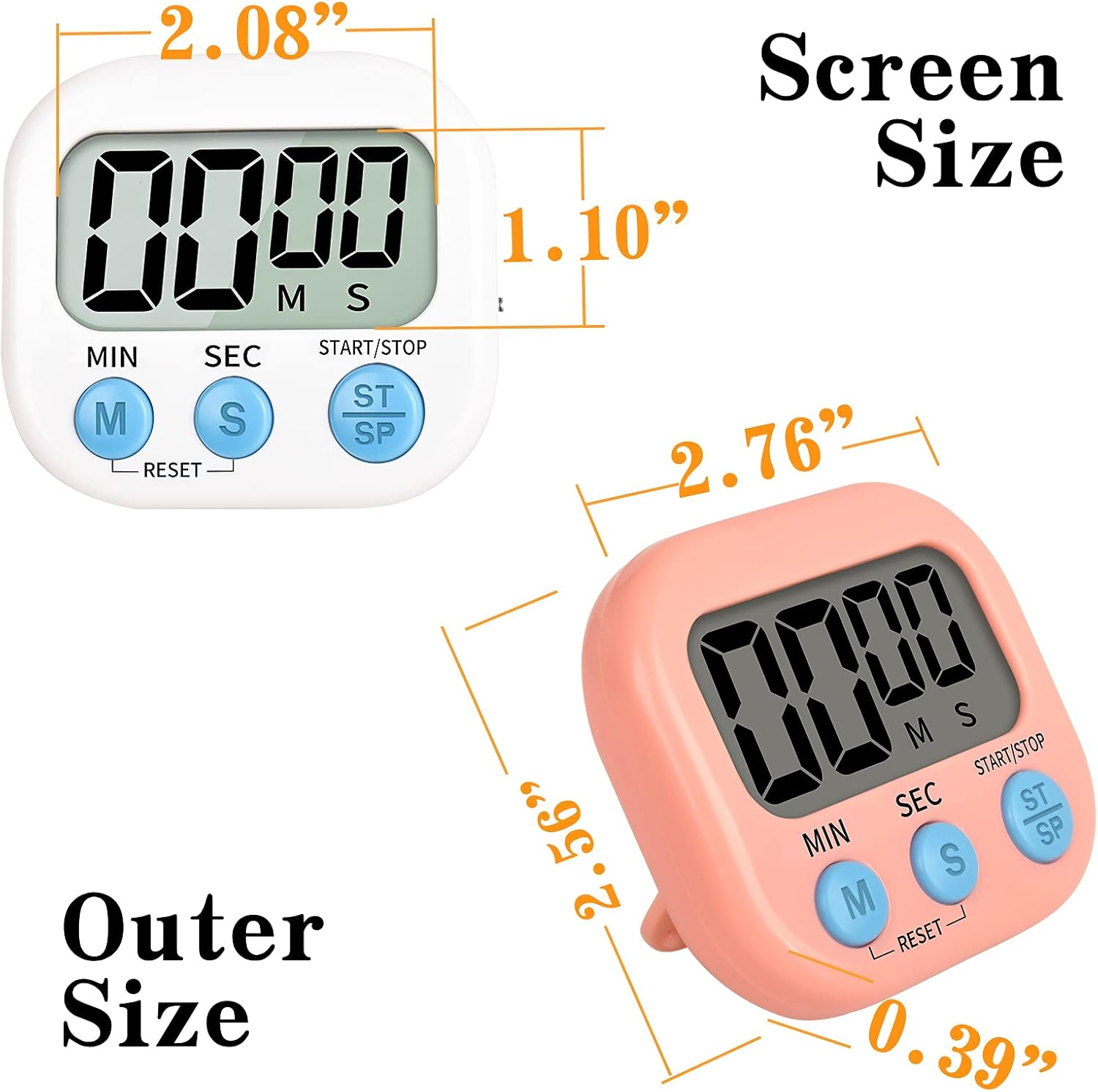
Image: Diagram illustrating the precise screen dimensions (2.08" x 1.10") and overall outer dimensions (2.76" x 2.56" x 0.39") of the timer.
Warranty and Support
For any questions, concerns, or technical support regarding your Mitlker Digital Kitchen Timer, please contact our customer service team. While specific warranty details are not provided in this manual, we are committed to ensuring your satisfaction with our products.
Please refer to the seller's information on your purchase platform for direct contact methods or visit the official Mitlker website for further assistance.