
1. Introduction
Thank you for choosing the EDECOA 3500W 24V Pure Sine Wave Power Inverter. This device converts 24V DC battery power into 110V/120V AC household electricity, suitable for various applications including RVs, off-grid systems, and backup power. This manual provides essential information for safe installation, operation, and maintenance. Please read it thoroughly before using the inverter.

Image 1.1: EDECOA 3500W 24V Pure Sine Wave Power Inverter. This image shows the overall design of the inverter, highlighting its robust construction and cooling fins.
2. Safety Instructions
Failure to follow these safety guidelines can result in electric shock, fire, or serious injury. Always exercise caution when working with electrical systems.
- Ventilation: Ensure the inverter is installed in a well-ventilated area. Do not block the cooling fans.
- Dry Location: Keep the inverter away from water, rain, and moisture.
- Proper Grounding: The inverter must be properly grounded to prevent electric shock.
- Input Voltage: Connect the inverter only to a 24V DC power source. Connecting to a different voltage can damage the unit.
- Polarity: Always connect the battery cables with correct polarity (positive to positive, negative to negative). Reverse polarity will cause damage.
- Overload Protection: Do not exceed the inverter's continuous power rating (3500W) or peak power rating (7000W). Overloading can trigger protection mechanisms or damage the unit.
- Temperature: Avoid operating the inverter in extreme temperatures. The intelligent fan control (IFC) and over-temperature protection are designed to manage heat, but proper ambient conditions are crucial.
- Maintenance: Only qualified personnel should perform maintenance or repairs.
3. Package Contents
Verify that all items are present in the package:
- EDECOA 3500W 24V Pure Sine Wave Power Inverter
- Battery cables (pair of cables with terminal rings)
- ET-RC Remote control (with 4-meter cable)
- Accessory bag (may include spare fuses, mounting hardware)
- User Manual (this document)

Image 3.1: Inverter and included accessories. This image displays the main inverter unit along with the battery cables and the remote control, as typically found in the package.
4. Product Overview
4.1 Inverter Front and Rear Panels

Image 4.1: Inverter front and rear panels. The top view shows the rear panel with 24VDC input terminals (positive and negative) and cooling fans. The bottom view shows the front panel with four AC 120V outlets, an AC terminal block, a power switch, an ET-RC remote port, and indicator lights (WORK, ERROR).
4.2 AC Terminal Block

Image 4.2: Updated AC Terminal Block Cover. This image highlights the AC terminal block with its protective cover, designed for secure and direct wiring of appliances requiring higher power.
4.3 Remote Controller (ET-RC)

Image 4.3: ET-RC Remote Controller. This image shows the remote controller with its LCD display, power button, and two USB ports. The remote allows for convenient monitoring and control of the inverter from a distance.
5. Setup and Installation
Proper installation is critical for the inverter's performance and safety.
5.1 Mounting the Inverter
- Choose a dry, cool, and well-ventilated location.
- Ensure there is sufficient space around the inverter for airflow, especially around the cooling fans.
- Mount the inverter securely using appropriate hardware.
5.2 Battery Connection
Connect the inverter directly to a 24V battery bank. Use the provided battery cables or cables of adequate gauge for your application. Ensure connections are tight to prevent voltage drop and overheating.
- Connect the red battery cable to the positive (+) terminal of the inverter and the positive terminal of the 24V battery.
- Connect the black battery cable to the negative (-) terminal of the inverter and the negative terminal of the 24V battery.
- Double-check all connections for correct polarity before proceeding.
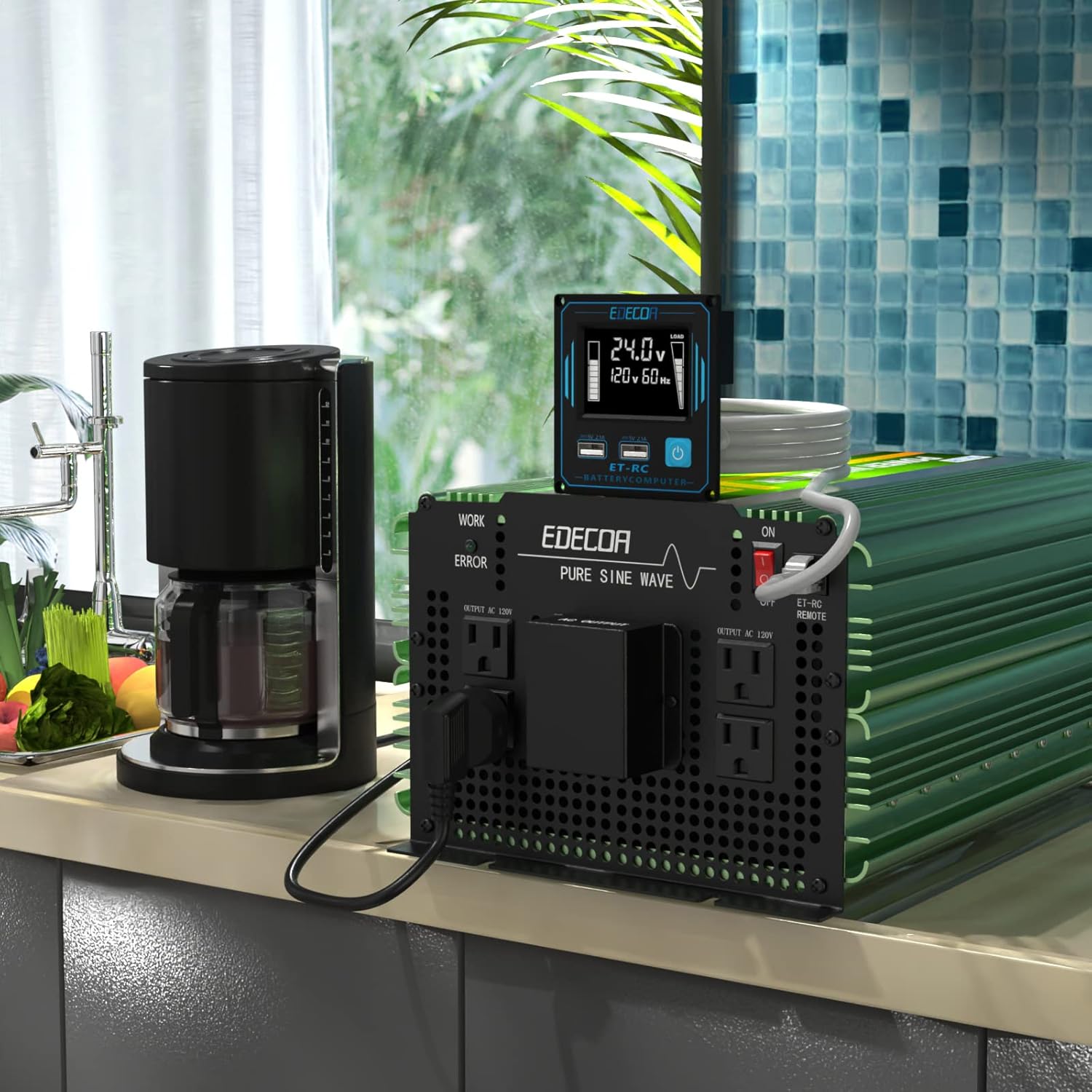
Image 5.1: Inverter dimensions and battery cables. This image illustrates the physical dimensions of the inverter and shows the included heavy-gauge battery cables, emphasizing the importance of proper cable selection for safe operation.
5.3 Grounding
Connect the inverter's chassis to a reliable earth ground using a suitable ground wire. This is a critical safety step.
5.4 Remote Controller Connection
Plug the 4-meter RJ45 cable from the ET-RC remote controller into the 'ET-RC REMOTE' port on the inverter's front panel.
6. Operating Instructions
6.1 Powering On/Off
- After all connections are secure, switch the main power switch on the inverter to the 'ON' position. The 'WORK' indicator light should illuminate.
- Alternatively, use the power button on the ET-RC remote controller to turn the inverter on or off.
- To power off, switch the inverter to 'OFF' or use the remote's power button.
6.2 Connecting Appliances
You can connect AC appliances to the four standard US outlets or directly to the AC terminal block.
- AC Outlets: Suitable for appliances under 1800 watts (0-15A).
- AC Terminal Block: Recommended for appliances requiring higher continuous power, up to 3500 watts (0-30A). Ensure proper wiring to the N (Neutral), L (Live), and G (Ground) terminals.
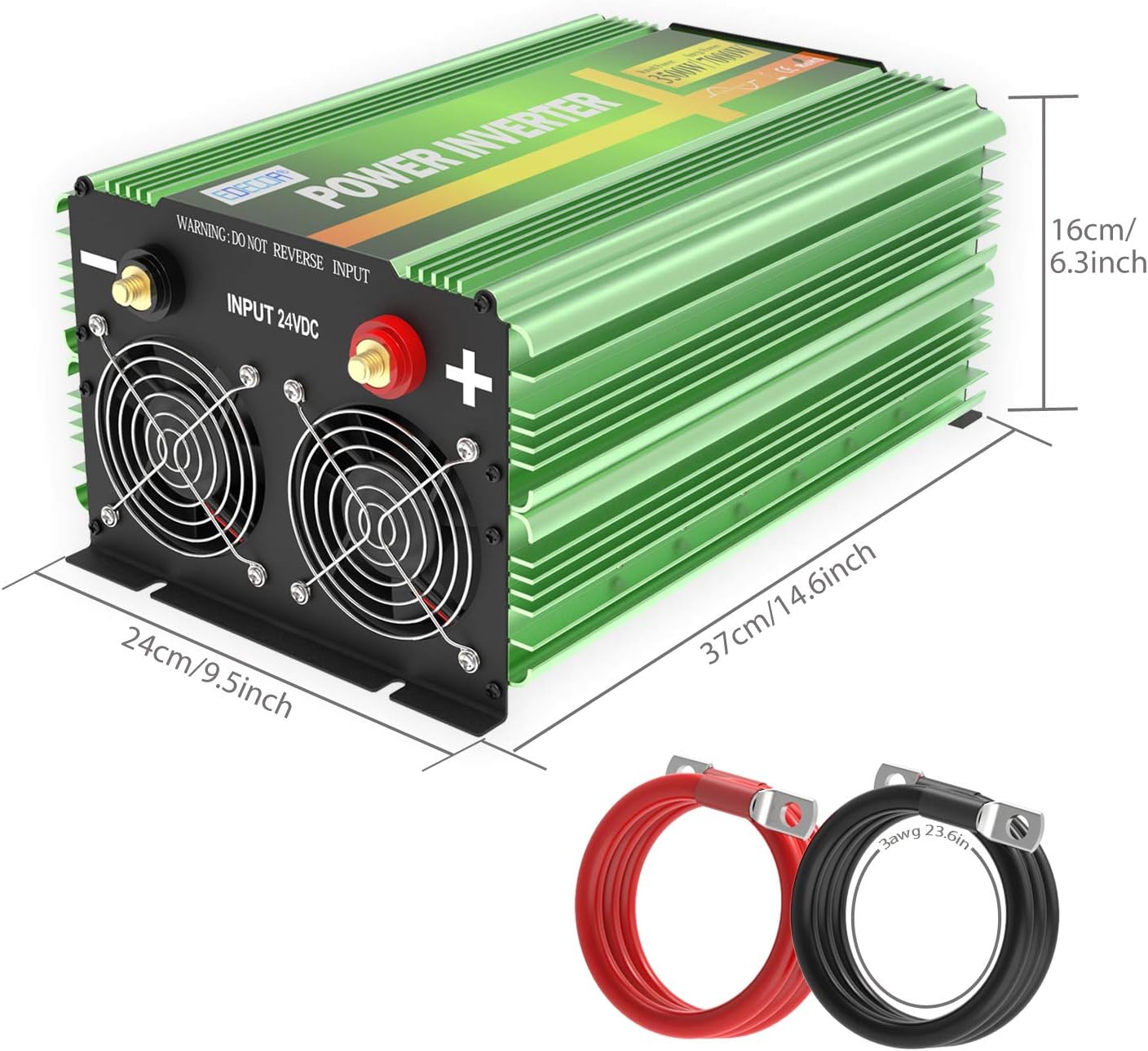
Image 6.1: EDECOA 3500W 24V Inverter in use. This image shows the inverter connected and powering a coffee maker, demonstrating a typical application.
6.3 Understanding the ET-RC Remote Display
The ET-RC remote controller provides real-time operational data:

Image 6.2: ET-RC Remote Controller Display Details. This diagram labels the various indicators on the remote's LCD screen, including: 1. Power Switch, 2. Dual USB (5V 2.1A), 3. Alarm, 4. Over-temperature Protection, 5. Low Input Voltage, 6. Battery Capacity, 7. High Input Voltage, 8. AC Output Voltage, 9. DC Input Voltage, 10. Overload Protection, 11. Wattages of Appliances, 12. Fan Working Status, 13. Frequency.
- Battery Capacity: Indicates the remaining charge in your 24V battery bank.
- Load Level: Shows the current power draw from connected appliances.
- Temperature: Displays the inverter's internal temperature.
- Fan Status: Indicates if the cooling fans are active.
- DC Input Voltage: Shows the voltage from your 24V battery.
- AC Output Voltage: Displays the output AC voltage (110V/120V).
- Frequency: Shows the output AC frequency (60 Hz).
- Protection Indication: Icons will illuminate to indicate various protection states (e.g., overload, low voltage, over-temperature).
7. Maintenance
Regular maintenance ensures optimal performance and longevity of your inverter.
- Cleaning: Periodically clean the exterior of the inverter with a dry cloth. Ensure cooling vents and fans are free from dust and debris.
- Connections: Regularly check all electrical connections (battery cables, AC wiring, ground wire) to ensure they are tight and free from corrosion. Loose connections can cause overheating and power loss.
- Ventilation: Confirm that the installation area remains well-ventilated and that nothing obstructs the inverter's cooling fans.
- Battery Health: Monitor your battery bank's health. A weak battery can cause the inverter to trigger low voltage protection.
8. Troubleshooting
If you encounter issues, refer to the following common problems and solutions:
| Problem | Possible Cause | Solution |
|---|---|---|
| No power output / Inverter does not turn on | Loose battery connections, low battery voltage, blown fuses, inverter switch off, remote not working. | Check battery cable connections and polarity. Verify battery voltage (must be above 21V for 24V system). Check internal/external fuses. Ensure inverter switch is ON. If using remote, check its cable connection. |
| Overload protection triggered (LCD shows overload icon) | Connected appliance exceeds inverter's continuous or peak power rating. | Reduce the total load by disconnecting some appliances. Ensure starting (surge) power of motors/compressors does not exceed 7000W peak. |
| Over-temperature protection triggered (LCD shows temperature icon) | Poor ventilation, blocked cooling fans, high ambient temperature, prolonged high load. | Ensure adequate ventilation. Clear any obstructions from cooling fans. Reduce load. Allow inverter to cool down. |
| Low input voltage protection (LCD shows low voltage icon) | Battery voltage is too low. | Recharge or replace the battery. The inverter will shut down to protect the battery from deep discharge. |
| High input voltage protection (LCD shows high voltage icon) | Battery voltage is too high. | Check the charging system. Ensure battery voltage does not exceed 30V for a 24V system. |
| Remote controller not responding | Loose RJ45 cable, faulty remote. | Check the RJ45 cable connection at both ends. Try using the main power switch on the inverter. If the main switch works but the remote does not, the remote or its cable may be faulty. |
9. Specifications
Detailed technical specifications for the EDECOA 3500W 24V Pure Sine Wave Power Inverter:
- Brand: EDECOA
- Model Name: 3500W-24V
- Input Voltage: 24 Volts DC
- Output Continuous Power: 3500 Watts
- Output Peak Power: 7000 Watts (<10ms)
- Output Voltage: 110 Volts / 120 Volts AC
- Electrical Output Waveform: Pure Sine Wave
- Frequency: 60 Hz
- Number of AC Outlets: 4 (US sockets)
- Additional Output: 1 AC Terminal Block
- Display Type: LCD (on remote controller)
- Protection Features: Input low voltage, Input over voltage, Overload, Over temperature, Reverse polarity, Automatic voltage regulation (AVR), Intelligent power management (IPM), Intelligent fan control (IFC)
- Dimensions (L x W x H): 14.6" x 9.5" x 6.3" (37cm x 24cm x 16cm)
- Power Source: Battery Powered
- Recommended Uses: Home, RV, Camping, Off-grid applications
10. Warranty and Support
The EDECOA 3500W 24V Pure Sine Wave Power Inverter comes with a 12-Month warranty from the date of purchase.
For warranty claims, technical assistance, or any questions not covered in this manual, please contact EDECOA customer support through their official channels. Keep your purchase receipt as proof of purchase for warranty validation.