
TYNB OC-RC66
TYNB OC-RC66 PC Gaming Chair Instruction Manual
Model: OC-RC66 | Brand: TYNB
1. Introduction
Thank you for choosing the TYNB OC-RC66 PC Gaming Chair. This manual provides essential information for the safe assembly, operation, maintenance, and troubleshooting of your new chair. Please read these instructions carefully before assembly and retain them for future reference.
2. Safety Information
- Ensure all parts are present and undamaged before assembly. Do not use if any parts are missing or broken.
- Follow assembly instructions precisely. Improper assembly can lead to instability and injury.
- Do not stand on the chair. Use it only for seating one person at a time.
- Do not exceed the maximum weight capacity of 250 pounds (113 kg).
- Keep children away from the chair during assembly. Small parts can be a choking hazard.
- Avoid placing the chair near heat sources or in direct sunlight for prolonged periods to prevent material degradation.
- Regularly check all bolts and screws to ensure they are tight. Retighten as necessary.
3. Package Contents
Before beginning assembly, verify that all components listed below are present in your package. If any parts are missing or damaged, please contact customer support.
- Backrest
- Seat Cushion
- Armrests (2)
- Seat Mechanism
- Gas Lift Cylinder
- Gas Lift Cover
- Five-Star Base
- Casters (5)
- Lumbar Support Pillow
- Headrest Pillow
- Hardware Pack (screws, washers, Allen wrench)
- Installation Manual (this document)
4. Setup and Assembly Instructions
Assembly typically takes 10-15 minutes. Follow these steps carefully.
- Attach Casters to Base: Insert each of the five casters into the holes at the end of each leg of the five-star base. Push firmly until they click into place.
- Insert Gas Lift: Place the gas lift cylinder into the center hole of the assembled five-star base. Cover the gas lift cylinder with the gas lift cover.
- Attach Seat Mechanism: Align the seat mechanism with the screw holes on the underside of the seat cushion. Ensure the front of the mechanism faces the front of the seat. Secure with screws provided in the hardware pack.
- Attach Armrests: Attach the armrests to the seat cushion using the provided screws. Ensure they are securely fastened.
- Attach Backrest: Align the backrest with the mounting plates on the seat cushion or armrests (depending on design). Secure with screws.
- Connect Seat to Base: Carefully place the assembled seat and backrest onto the gas lift cylinder, ensuring the center hole of the seat mechanism aligns with the top of the gas lift. Press down firmly to secure.
- Attach Pillows: Secure the lumbar support pillow and headrest pillow to the backrest using their integrated straps.
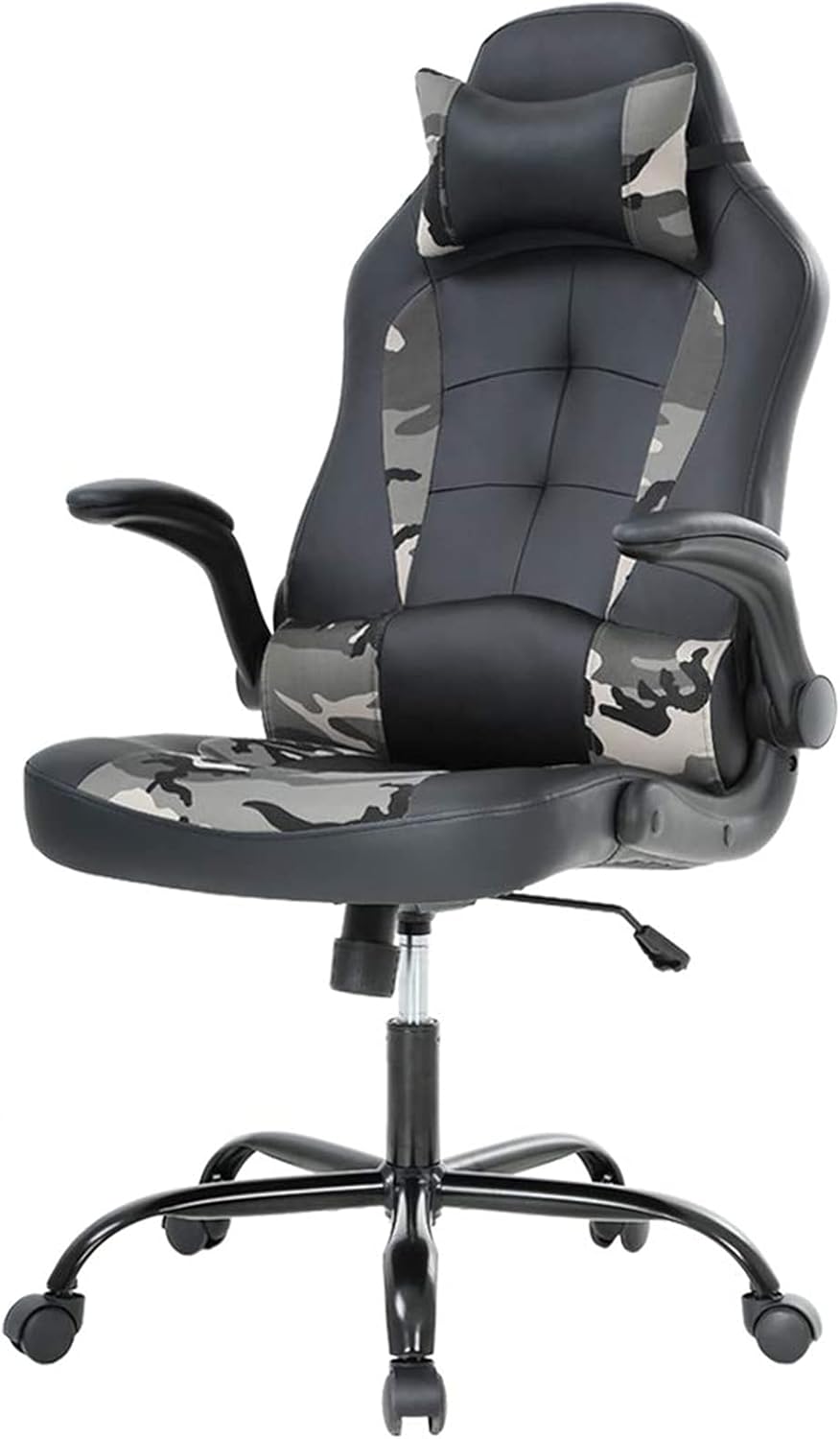
Image 4.1: Fully assembled TYNB OC-RC66 PC Gaming Chair, showcasing its ergonomic design and camouflage accents.

Image 4.2: Close-up view highlighting the chair's materials, including camo fabric and high-density foam, and the wider backrest design.
5. Operating Instructions
Your TYNB OC-RC66 chair offers several adjustment features for personalized comfort.
5.1. Height Adjustment
To adjust the seat height, pull the lever located under the right side of the seat upwards. While holding the lever, stand up to raise the seat or remain seated to lower it. Release the lever at your desired height to lock it in place.
5.2. Recline Function
To recline the backrest, pull the lever located under the left side of the seat upwards. Lean back to your desired angle and release the lever to lock the recline position. To return to an upright position, pull the lever again and lean forward slightly.
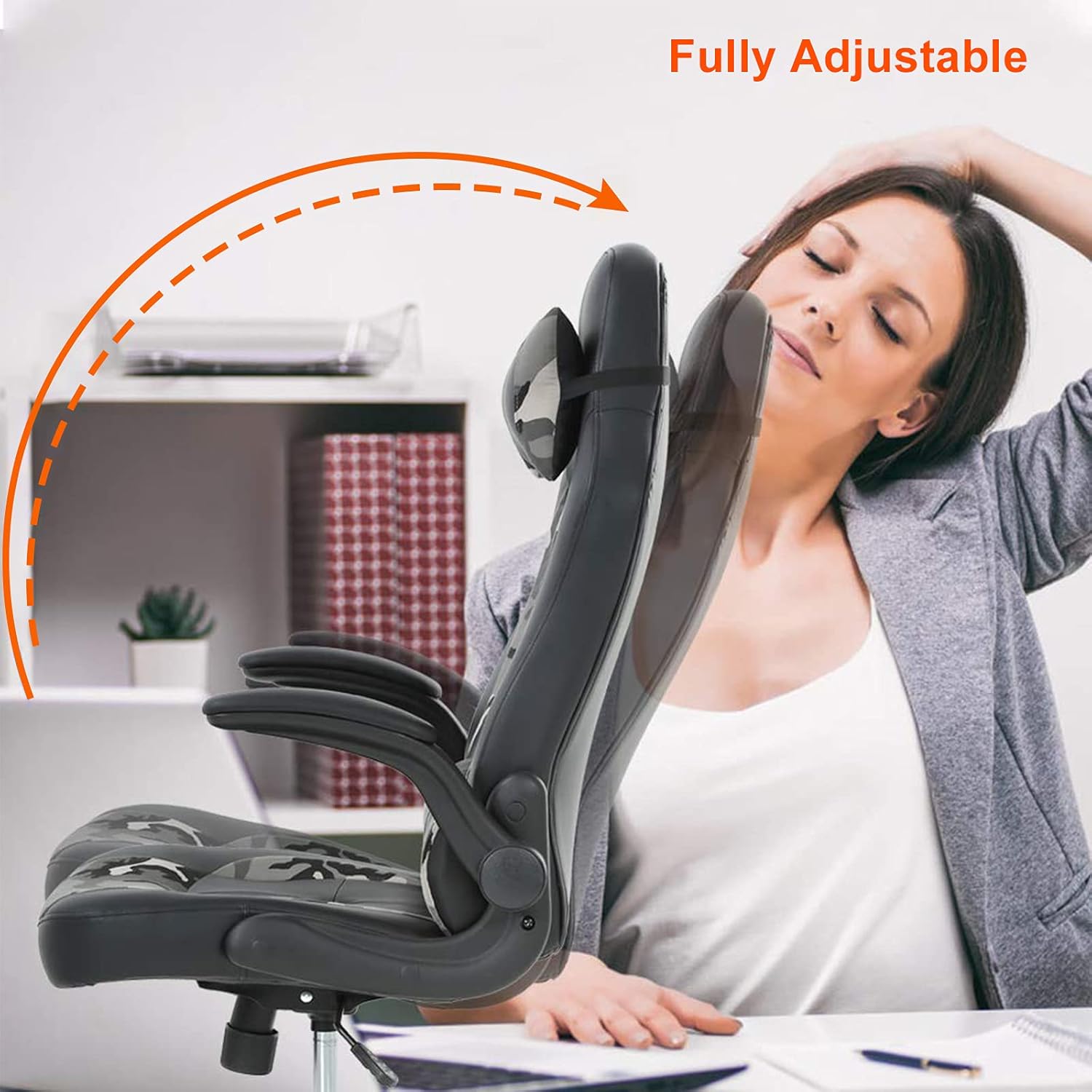
Image 5.1: Illustration of the chair's fully adjustable recline feature, allowing users to tilt the backrest for comfort.
5.3. Flip-Up Armrests
The armrests on your chair are designed to flip up. This feature allows you to tuck the chair closer to your desk or save space when not in use. Simply lift the armrests upwards until they lock into their vertical position. To lower them, pull them down until they click into the horizontal position.

Image 5.2: Demonstration of the adjustable flip-up armrests, illustrating how they can be raised to save space or tuck the chair under a desk.
6. Maintenance
Proper care will extend the life and appearance of your chair.
- Cleaning: For PU leather and mesh surfaces, wipe with a soft, damp cloth. For stubborn stains, use a mild soap solution and wipe dry immediately. Avoid harsh chemicals or abrasive cleaners.
- Hardware Check: Periodically check all screws and bolts (every 3-6 months) and tighten them if they have loosened.
- Caster Care: Keep casters clean from hair and debris to ensure smooth movement.
- Avoid Direct Sunlight: Prolonged exposure to direct sunlight can cause the material to fade or crack.
7. Troubleshooting
Here are solutions to common issues you might encounter:
- Chair Squeaks: Check and tighten all screws, especially those connecting the seat mechanism to the seat and the backrest. A small amount of silicone lubricant can be applied to moving parts if necessary.
- Difficulty Adjusting Height: Ensure the gas lift lever is fully engaged. If the chair still doesn't adjust, the gas lift cylinder may need replacement. Contact customer support.
- Chair Wobbles: Verify that all screws are tightened. Ensure the five-star base is properly assembled and casters are fully inserted.
- Casters Not Rolling Smoothly: Remove any hair or debris wrapped around the caster wheels. Clean the wheels with a damp cloth.
8. Specifications
| Feature | Detail |
|---|---|
| Model | OC-RC66 |
| Brand | TYNB |
| Color | Camo |
| Product Dimensions (D x W x H) | 27.79" x 28.2" x 47.8" |
| Maximum Weight Recommendation | 250 Pounds |
| Material | PU Leather, Mesh |
| Special Features | Ergonomic Design, Lumbar Support, Headrest, Flip-Up Armrests, 360-degree Swivel |
| Certifications | BIFIMA Quality-Certified Components |
| UPC | 840137977901 |
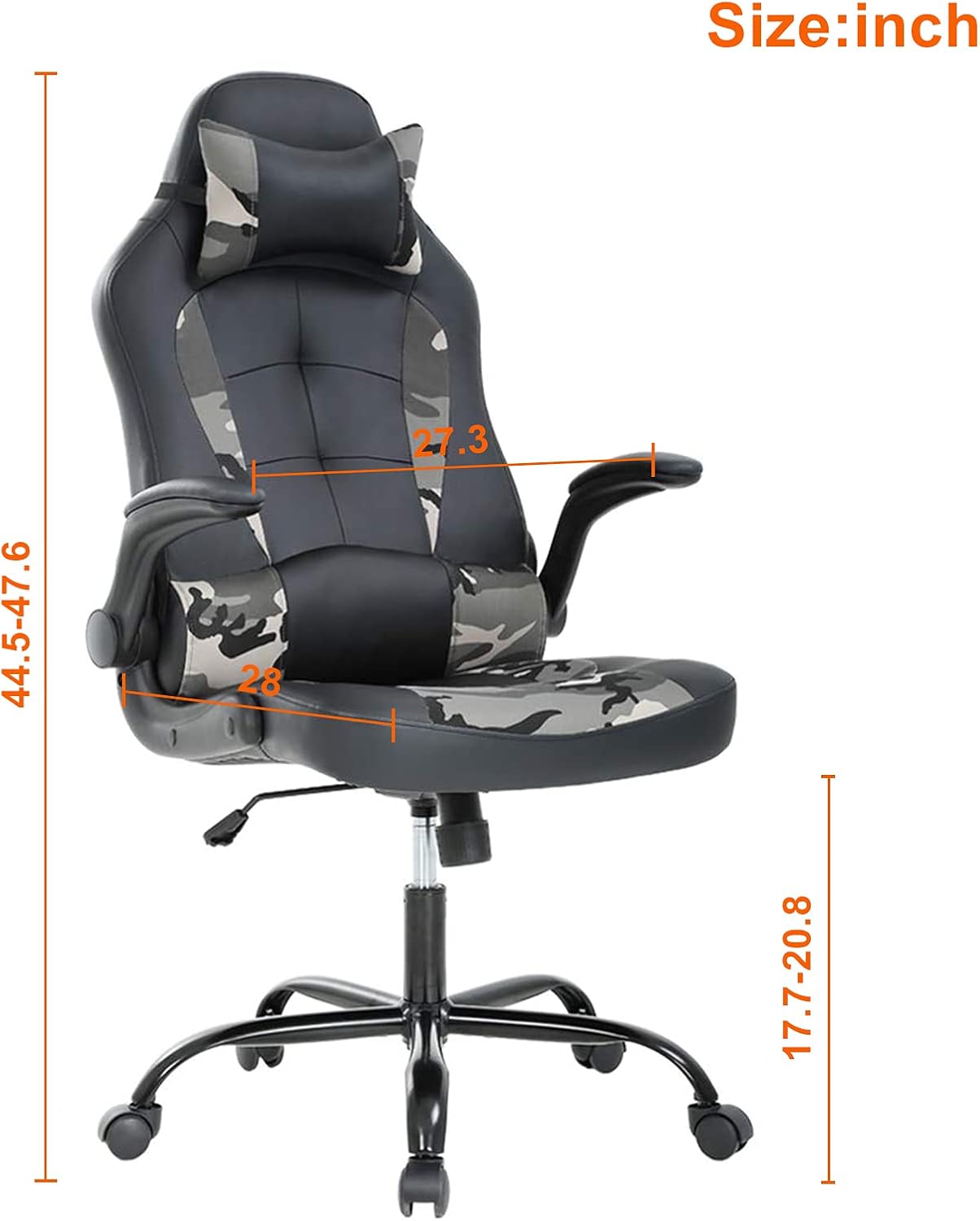
Image 8.1: Detailed dimensions of the TYNB OC-RC66 PC Gaming Chair for reference.
9. Warranty and Support
TYNB is committed to providing quality products. While specific warranty details are not provided in this manual, we offer dedicated customer support.
If you encounter any quality problems, missing parts, or require assistance with assembly or operation, please contact the TYNB customer service team. Our experienced customer service team will respond within 24 hours to assist you.
For support, please refer to the contact information provided at the point of purchase or visit the official TYNB brand store online.
Ask a question about this manual
Ask about setup, troubleshooting, compatibility, parts, safety, or missing instructions. Manuals+ will review the question and use this page’s manual context to help answer it.