
1. Introduction
The D Debra Audio CM Series UHF Wireless Lavalier Microphone system (CM-02 Dual Mics) is designed for high-quality audio recording with DSLR cameras, smartphones, and other compatible devices. It utilizes the UHF frequency band for stable signal transmission and offers 30 selectable channels to minimize interference. This system is suitable for interviews, live recording, vlogging, and various other audio capture applications.

Image 1.1: The D Debra CM-02 Dual Mics system demonstrating compatibility with a range of devices such as digital cameras, video cameras, recording equipment, laptops, active speakers, mirrorless cameras, portable devices, and smartphones.
2. Package Contents
Please verify that all items listed below are included in your package:
- Receiver (x1)
- Transmitter (x2)
- Lavalier Microphone (x2)
- Camera Clip (x1)
- Camera Cable (x1)
- Mobile Phone Cable (x2)

Image 2.1: Visual representation of the D Debra CM-02 Dual Mics package contents, showing one receiver, two transmitters, two lavalier microphones, one camera clip, one camera cable, and two mobile phone cables.
3. Product Overview
Familiarize yourself with the components and their functions:

Image 3.1: Detailed diagram illustrating the receiver and transmitter units, highlighting their respective antennas, power/volume controls, signal indicators, audio output (OUT) on the receiver, and microphone input (MIC) on the transmitter. Also shown are the mobile phone and camera connection cables.
Receiver Unit
- Receive Antenna: For receiving wireless signals from the transmitter.
- OFF / ON / Volume Control: Powers the unit on/off and adjusts the audio output level.
- Signal and Power Indicator: Displays operational status and battery level.
- OUT (Audio Output): 3.5mm jack for connecting to cameras, smartphones, or other recording devices.
Transmitter Unit
- Transmitter Antenna: For sending wireless signals to the receiver.
- OFF / ON / Volume Control: Powers the unit on/off and adjusts the microphone input gain.
- Signal and Power Indicator: Displays operational status and battery level.
- MIC (Microphone Input): 3.5mm jack for connecting the lavalier microphone.
4. Setup Instructions
4.1 Powering On/Off
To power on or off both the receiver and transmitter units, rotate the OFF/ON/Volume control knob. Ensure the units are fully charged or have sufficient battery power before use.
4.2 Channel Selection
The system features 30 selectable UHF channels. If you experience interference, you can change the operating channel on both the transmitter and receiver to find a clear frequency. Refer to the unit's display for current channel information.
4.3 Connecting to a Camera / DV Camera
- Attach the camera clip to the receiver unit.
- Mount the receiver onto your DSLR camera's hot shoe or other compatible shooting equipment using the camera clip.
- Connect one end of the provided camera cable to the 'OUT' port of the receiver.
- Connect the other end of the camera cable to the 'MIC' input interface of your camera.
- Connect the lavalier microphone to the 'MIC' input of the transmitter unit.
- Clip the lavalier microphone to the speaker's clothing, ensuring it is positioned correctly for optimal sound capture.

Image 4.1: Step-by-step guide for connecting the wireless microphone system to a camera. This includes attaching the camera clip, mounting the receiver to the camera, and connecting the audio cable from the receiver's output to the camera's microphone input.
4.4 Connecting to a Smartphone
- Connect one end of the provided mobile phone cable to the 'OUT' port of the receiver.
- Connect the other end of the mobile phone cable to the 3.5mm audio jack of your smartphone. (Note: For smartphones without a 3.5mm jack, an appropriate adapter may be required, not included).
- Connect the lavalier microphone to the 'MIC' input of the transmitter unit.
- Clip the lavalier microphone to the speaker's clothing.
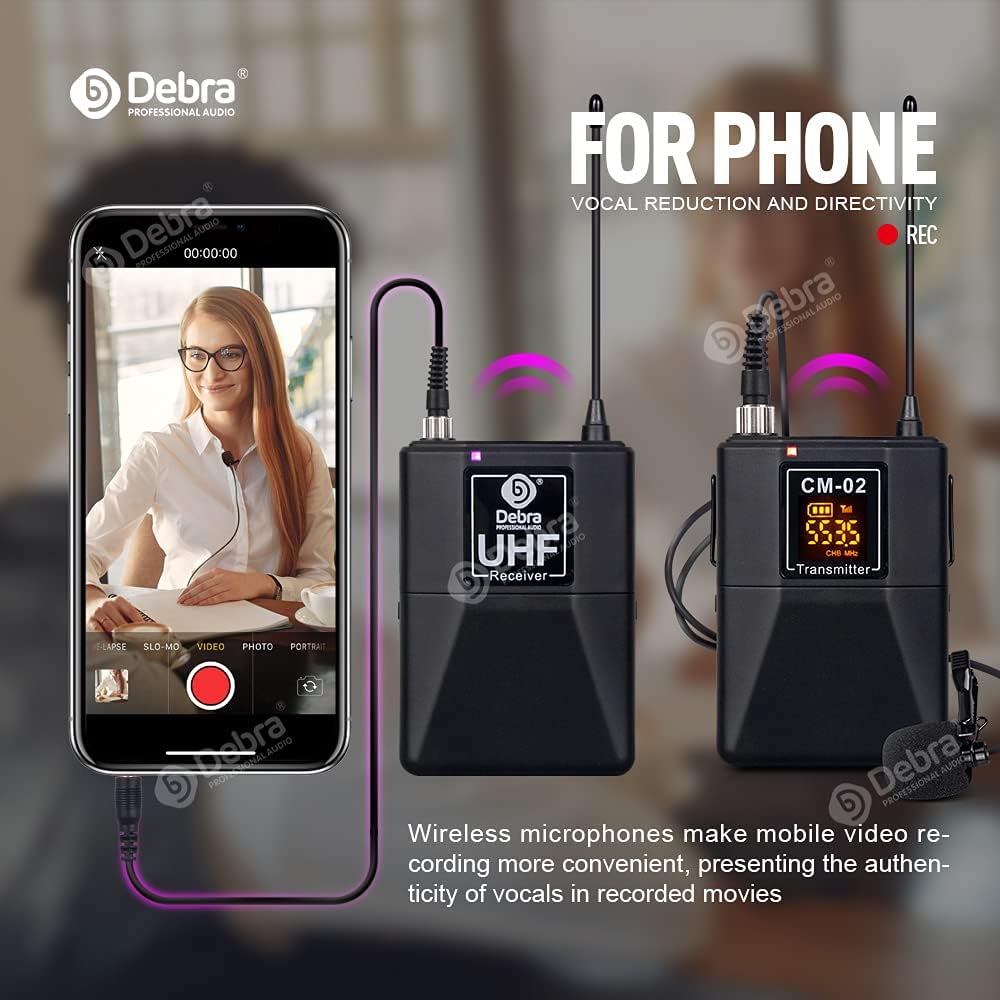
Image 4.2: Illustration of the wireless microphone system connected to a smartphone for recording. The receiver is linked to the phone via a cable, while the transmitter wirelessly sends audio from the lavalier microphone.
5. Operating Instructions
5.1 Adjusting Volume/Gain
The OFF/ON/Volume control knob on both the receiver and transmitter units also functions as a volume/gain adjustment. Rotate it clockwise to increase the level and counter-clockwise to decrease it. Adjust these levels to achieve optimal audio quality without distortion.
5.2 Monitoring Function
The system supports a monitoring function, allowing you to listen to the recorded audio in real-time. This feature is not limited by distance within the signal range and helps ensure the sound quality of the person being recorded. If your recording device has a headphone output, you can monitor the audio directly.
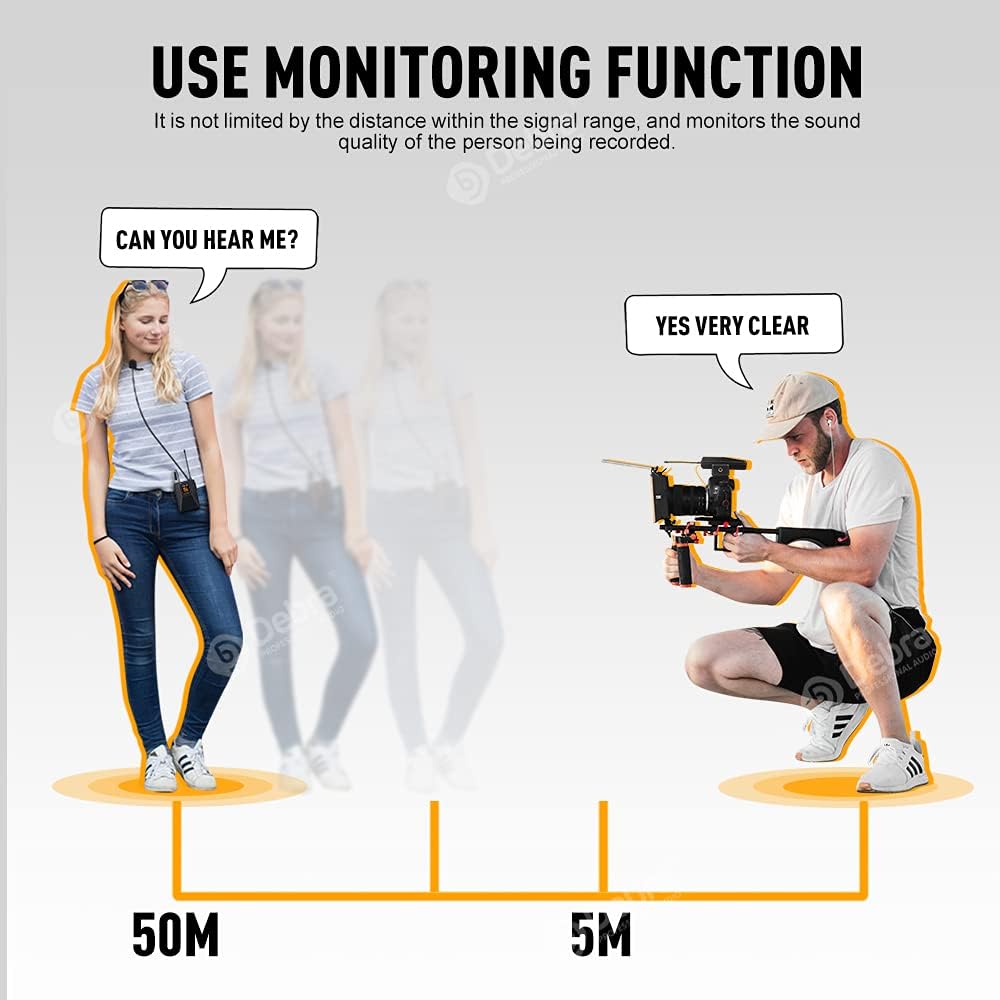
Image 5.1: Visual explanation of the monitoring function, showing effective audio monitoring over distances up to 50 meters, allowing the operator to confirm sound quality from the subject.
5.3 Transmission Range
In an open environment, the CM-02 system benefits from the stability of the UHF signal, allowing for a transmission distance of approximately 50 meters (164 feet) with minimal transmission delay. Ensure a clear line of sight between the transmitter and receiver for best performance.

Image 5.2: Depiction of the system's ultra-long distance transmission, highlighting a stable 50-meter range for wireless audio capture.
5.4 Usage Scenarios
The D Debra CM-02 Dual Mics system is versatile and can be used in various professional and personal recording environments:
- On-Site Interviews: Capture clear dialogue in outdoor or indoor interview settings.
- Photographic Recording: Enhance audio quality for video content created with DSLR or mirrorless cameras.
- Mobile Device Shooting: Improve vocal clarity for vlogs, live streams, and other content recorded with smartphones.

Image 5.3: Examples of the wireless microphone system in use for on-site interviews, photographic recording, and mobile device shooting, demonstrating its adaptability.
6. Maintenance
- Cleaning: Use a soft, dry cloth to clean the units. Avoid using harsh chemicals or abrasive materials.
- Storage: Store the microphone system in a cool, dry place away from direct sunlight and extreme temperatures.
- Battery Care: If the units are not used for an extended period, ensure they are fully charged before storage and periodically recharged to maintain battery health.
- Microphone Care: Handle the lavalier microphones gently. Avoid pulling on the cable or exposing the microphone capsule to moisture.
7. Troubleshooting
| Problem | Possible Cause | Solution |
|---|---|---|
| No sound or low volume | Units not powered on; Low battery; Incorrect volume settings; Incorrect cable connection; Mismatched channels. | Ensure both receiver and transmitter are powered on. Check battery levels. Adjust volume/gain on both units. Verify cables are securely connected to correct ports. Ensure receiver and transmitter are on the same channel. |
| Interference or static noise | Other wireless devices operating on the same frequency; Obstructions between units. | Change to a different channel on both the receiver and transmitter. Ensure a clear line of sight between units. Move away from other electronic devices that may cause interference. |
| Short transmission range | Low battery; Obstructions; Environmental factors. | Ensure batteries are fully charged. Minimize obstructions between the transmitter and receiver. Operate in an open environment for optimal range. |
| Microphone not working | Lavalier microphone not properly connected to transmitter; Damaged microphone. | Ensure the lavalier microphone is securely plugged into the transmitter's 'MIC' input. Test with another microphone if available to rule out a faulty lavalier mic. |
8. Specifications
| Feature | Detail |
|---|---|
| Model | CM-02 Dual Mics |
| Microphone Form Factor | Lavalier |
| Connectivity Technology | Auxiliary, UHF |
| Connector Type | 3.5 mm Jack |
| Number of Channels | 30 Selectable Channels |
| Transmission Range | Up to 50m (164ft) in open environments |
| Audio Sensitivity | 98 Decibels |
| Signal to Noise Ratio | 98 dB |
| Impedance | 30 Ohm |
| Frequency Response | 18 KHz |
| Power Source | Battery Powered (1 Lithium Ion battery required per unit) |
| Compatible Devices | Camcorder, Camera, Smartphone |
| Special Feature | Portable |
| Polar Pattern | Omnidirectional |
9. Warranty and Support
For warranty information and technical support, please refer to the documentation provided with your purchase or contact D Debra customer service through their official website or the retailer where the product was purchased. Keep your proof of purchase for warranty claims.