
1. Introduction
This manual provides essential instructions for the safe and efficient operation, installation, and maintenance of your Advon Solar PCU ASP-1200. Please read this manual thoroughly before using the device to ensure proper functionality and to prevent damage or injury. Keep this manual for future reference.
2. Safety Information
Always observe the following safety precautions to reduce the risk of electric shock, fire, or injury:
- Ensure all connections are secure and correctly polarized before powering on the unit.
- Do not open the PCU casing. There are no user-serviceable parts inside. Refer all servicing to qualified personnel.
- Install the PCU in a well-ventilated area, away from direct sunlight, moisture, and flammable materials.
- Keep children and unauthorized persons away from the unit.
- Disconnect all power sources (solar, battery, grid) before performing any maintenance or cleaning.
- Use appropriate personal protective equipment (PPE) when working with batteries and electrical systems.
3. Product Overview
The Advon Solar PCU ASP-1200 is an integrated power conditioning unit designed to manage power from solar panels, batteries, and the utility grid. It prioritizes solar power utilization to maximize energy savings.
3.1 Key Features
- Tested and Trusted Technology for reliable performance.
- Intelligent power priority management for Solar, Battery, and Grid based on availability and user settings.
- Three-stage power saving mode for optimized energy consumption.
- User-selectable parameters and multi-color display for easy monitoring and customization.
- Highly efficient design and fully compatible with various solar and battery setups.
3.2 Front Panel Components
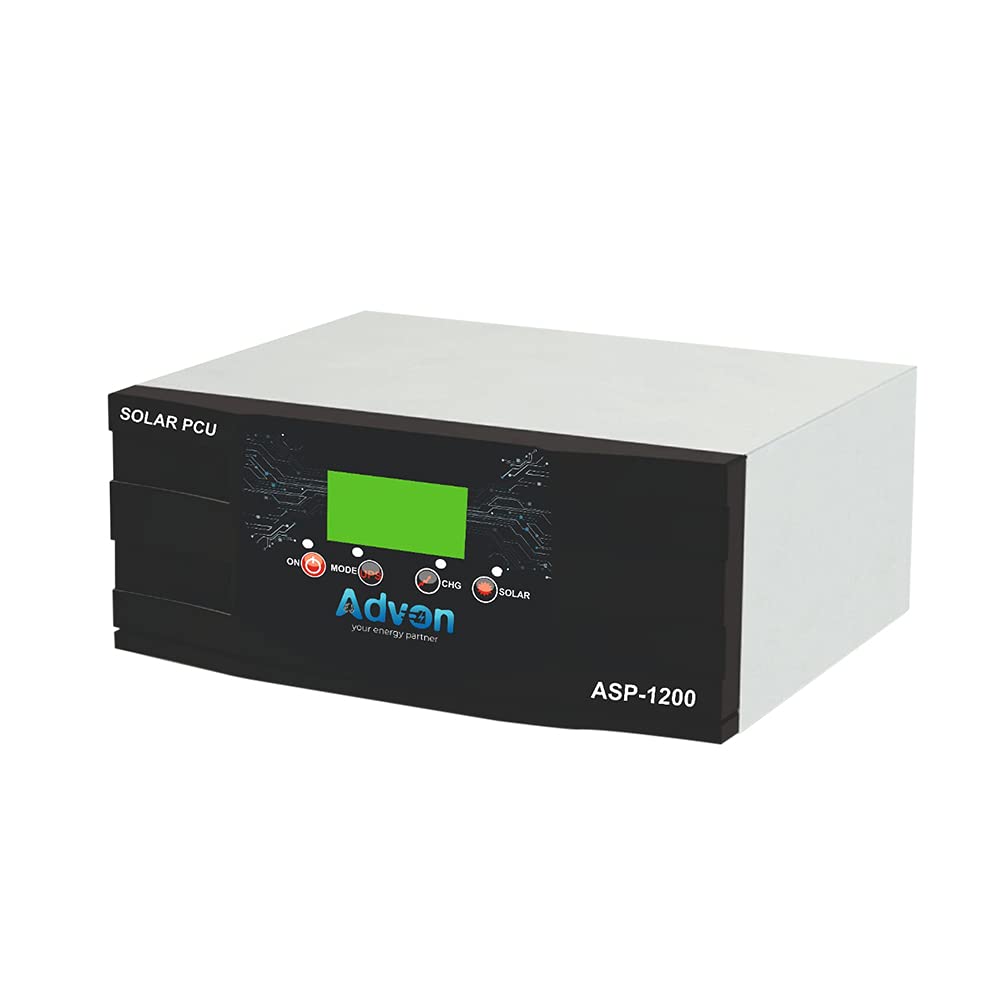
Figure 1: Front view of the Advon Solar PCU ASP-1200. The front panel features a central display screen, control buttons (ON, MODE, CHG, SOLAR indicators), the Advon brand logo, and the model number ASP-1200.
The front panel includes a display (LCD or LED, depending on the unit) that shows operational status, battery voltage, solar input, and other critical information. Control buttons allow users to navigate menus and adjust settings. Indicator lights provide quick visual feedback on the unit's status, such as power on, charging, and solar activity.
4. Setup and Installation
Proper installation is crucial for the safe and efficient operation of your Solar PCU. It is recommended that installation be performed by a qualified technician.
4.1 Site Selection
- Choose a cool, dry, and well-ventilated location.
- Avoid areas with direct sunlight, high humidity, or corrosive gases.
- Ensure sufficient clearance around the unit for proper airflow.
4.2 Wiring Connections (General Guidelines)
- Battery Connection: Connect the battery bank to the designated battery terminals on the PCU. Ensure correct polarity (positive to positive, negative to negative). Use appropriate gauge wiring.
- Solar Panel Connection: Connect the solar panel array to the solar input terminals. Verify that the solar panel voltage and current are within the PCU's specifications (e.g., 900W Max Solar PV Panel).
- Grid Input Connection: Connect the utility grid power supply to the AC input terminals.
- Load Output Connection: Connect your electrical loads to the AC output terminals.
- Grounding: Ensure the PCU is properly grounded according to local electrical codes.
Important: Always connect the battery first, then solar panels, then grid input, and finally the load. When disconnecting, reverse the order.
5. Operating Instructions
5.1 Powering On/Off
- To Power On: After all connections are secure, switch on the main power breaker for the PCU. The unit will perform a self-test, and the display will illuminate.
- To Power Off: Disconnect the load, then switch off the grid input, solar input, and finally the battery connection. Turn off the main power breaker.
5.2 Display and Indicators
The multi-color display provides real-time information. Refer to the specific display icons and messages in the detailed user guide for comprehensive understanding. Common indicators include:
- ON Indicator: Illuminates when the PCU is operational.
- MODE Indicator: Shows the current operating mode (e.g., Solar Priority, Grid Priority).
- CHG Indicator: Indicates that the battery is currently being charged.
- SOLAR Indicator: Illuminates when solar power is being utilized or is available.
5.3 Operating Modes and Parameter Settings
The Advon Solar PCU ASP-1200 offers user-selectable parameters to customize its operation. These typically include:
- Solar Priority: The PCU will primarily use solar power to run loads and charge batteries. Grid power is used only when solar is insufficient.
- Battery Priority: The PCU will use battery power first, then solar, and finally grid.
- Grid Priority: The PCU will use grid power first, then solar, and finally battery.
- Charging Current: Adjustable battery charging current.
- Low Battery Cut-off: Setting for the minimum battery voltage before the PCU shuts down to protect the battery.
Use the MODE button and other control buttons on the front panel to navigate through the display menu and adjust these settings. Refer to the full user manual for detailed instructions on parameter configuration.
6. Maintenance
Regular maintenance ensures the longevity and optimal performance of your Advon Solar PCU.
- Cleaning: Periodically clean the exterior of the PCU with a dry, soft cloth. Do not use liquid cleaners or solvents. Ensure ventilation openings are free from dust and debris.
- Connections: Annually check all electrical connections for tightness and corrosion. Loose connections can cause overheating and poor performance.
- Battery Inspection: If using lead-acid batteries, check electrolyte levels and specific gravity regularly. Keep battery terminals clean and free of corrosion.
- Environmental Check: Ensure the installation environment remains within recommended temperature and humidity ranges.
Always disconnect all power sources before performing any maintenance.
7. Troubleshooting
This section provides solutions to common issues you might encounter. For problems not listed here, contact Advon customer support.
| Problem | Possible Cause | Solution |
|---|---|---|
| PCU does not power on. | No battery connection or low battery voltage; main breaker off. | Check battery connections and voltage. Ensure main breaker is on. |
| No solar charging. | Solar panels not connected; insufficient sunlight; faulty panel/wiring. | Verify solar panel connections. Check for shading. Inspect panels and wiring. |
| No AC output. | Overload; short circuit; PCU in fault mode. | Reduce load. Check for short circuits in wiring. Refer to display for error codes. |
| Battery not charging from grid. | Grid input not connected; grid power unavailable; charging settings. | Check grid input connection. Verify grid power. Adjust charging parameters. |
8. Technical Specifications
| Feature | Specification |
|---|---|
| Model Number | ASP-1200 |
| Capacity | 1100VA |
| DC Voltage | 12 Volts |
| PWM Solar Charger Current | 50 AMP |
| Max Solar PV Panel (WP) | 900W |
| Display Type | LCD or LED |
| Material | Plastic |
| Product Dimensions (LxWxH) | 32.5 x 33 x 18.5 cm |
| Item Weight | 10 kg |
| Country of Origin | India |
| Manufacturer | Advon |
9. Warranty and Support
The Advon Solar PCU ASP-1200 comes with a 24-month warranty from the date of purchase, covering manufacturing defects. Please retain your purchase receipt as proof of warranty.
For technical assistance, troubleshooting, or warranty claims, please contact Advon customer support:
- Email: advon3046@gmail.com
- Please refer to the official Advon website for the most current contact information and service center locations.
Unauthorized repairs or modifications will void the warranty.


