
ALITOVE ALT-0570
ALITOVE 5V 70A 350W AC to DC Power Supply User Manual
Model: ALT-0570
Brand: ALITOVE
1. Introduction
This manual provides essential information for the safe and efficient operation of your ALITOVE 5V 70A 350W AC to DC Power Supply. This device is designed to convert AC input voltage (110V/220V) to a stable DC 5V output, suitable for various electronic applications such as LED lighting projects, CCTV cameras, audio amplifiers, and industrial automation systems. Please read this manual thoroughly before installation and use.

Figure 1.1: ALITOVE 5V 70A 350W Power Supply. This image shows the overall appearance of the power supply unit, highlighting its metallic casing and terminal block.
2. Safety Information
For your safety and to prevent damage to the unit, observe the following precautions:
- Indoor Use Only: This power supply is designed for indoor use in dry environments. Do not expose to water, moisture, or high humidity.
- Proper Ventilation: Ensure adequate airflow around the unit. Do not block ventilation holes. The built-in cooling fan requires clear space to operate effectively.
- Input Voltage Selection: Before connecting power, verify the 110V/220V switch is set correctly for your region's AC supply. Incorrect setting can cause severe damage.
- Professional Installation Recommended: Wiring should be performed by a qualified electrician to ensure proper and safe connections.
- Overload Protection: Do not exceed the maximum output current of 70A. Overloading can trigger built-in protections or damage the unit.
- Grounding: Ensure the unit is properly grounded to prevent electrical shock.
- No User Serviceable Parts: Do not open the casing. Refer all servicing to qualified personnel.
3. Product Features
- Input Voltage: AC 110V/220V (selectable via switch).
- Output Voltage: DC 5V.
- Output Current: 1A to 70A (350W max).
- Adjustable Output: Output voltage is ±10% adjustable via a potentiometer.
- Multiple Output Channels: Features three sets of output channels for versatile connectivity.
- Cooling System: Built-in cooling fan with temperature detector. Fan activates when internal temperature reaches 113°F (45°C) for efficient heat dissipation.
- Safety Protections: Automatic over-voltage protection, over-current protection, over-temperature protection, and short circuit protection.
- Applications: Ideal for LED lighting, radio transceivers, CCTV cameras, audio amplifiers, industrial automation, and electronic communications.
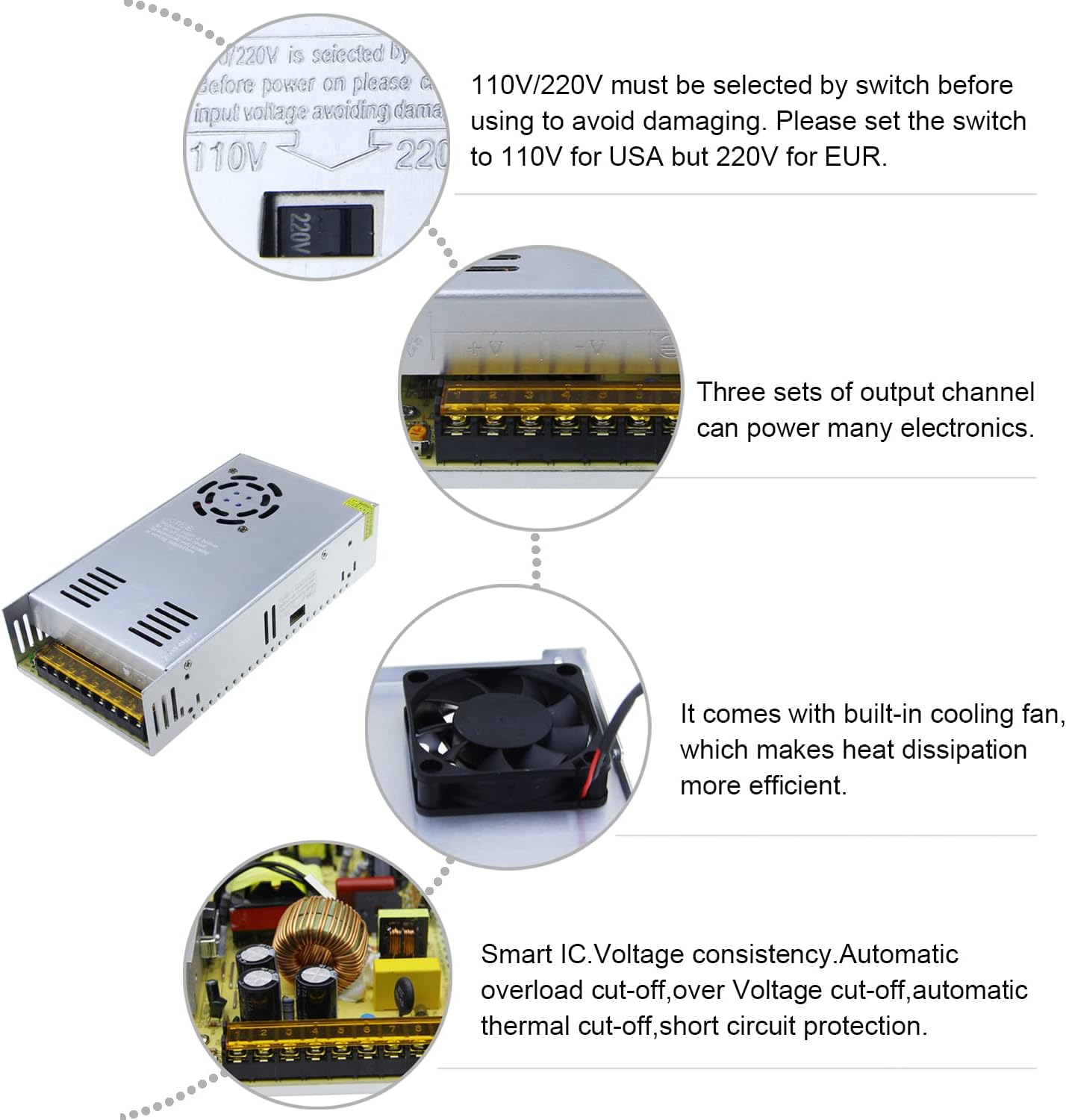
Figure 3.1: Key features of the power supply. This image illustrates the internal cooling fan, the 110V/220V input voltage selection switch, and the multiple output channels, emphasizing the smart IC for voltage consistency and protection features.
4. Setup
Follow these steps for proper setup:
- Verify Input Voltage Switch: Locate the 110V/220V selector switch on the side of the unit. Ensure it is set to match your local AC power supply (e.g., 110V for USA, 220V for Europe). Failure to do so will damage the unit.
- Mounting: Securely mount the power supply in a well-ventilated area, away from heat sources and flammable materials.
- AC Input Wiring: Connect your AC power cord (not included) to the input terminals.
- L: Live wire
- N: Neutral wire
- ⌂: Ground wire (Earth)
- DC Output Wiring: Connect your DC load to the output terminals.
- +V: Positive DC output
- -V: Negative DC output (GND)
- Initial Power On: After all connections are made and verified, connect the AC power cord to the wall outlet. The indicator light on the unit should illuminate.

Figure 4.1: Terminal connections and voltage adjustment. This image clearly labels the AC input terminals (L, N, Ground), DC output terminals (+V, -V), the indicator light, and the DC output voltage adjustment potentiometer.
5. Operating
Once the power supply is set up, it is ready for operation.
- Voltage Adjustment: The output voltage can be fine-tuned by ±10% using the small potentiometer (labeled 'ADJ' or 'VR1') located near the output terminals. Use a small screwdriver to carefully turn the potentiometer clockwise to increase voltage or counter-clockwise to decrease it. Always verify the output voltage with a multimeter before connecting sensitive devices.
- Cooling Fan Operation: The integrated cooling fan will automatically activate when the internal temperature reaches approximately 113°F (45°C). This ensures optimal operating temperature and extends the lifespan of the unit. The fan may not run constantly, especially under light loads or in cooler environments.
- Load Management: Ensure the total current draw of your connected devices does not exceed 70A. While the unit has overload protection, continuous operation near or above its maximum capacity can reduce its lifespan.
6. Maintenance
Minimal maintenance is required for this power supply.
- Cleaning: Periodically clean the exterior of the unit with a soft, dry cloth. Do not use liquid cleaners or solvents. Ensure ventilation openings are free from dust and debris.
- Ventilation: Regularly check that the cooling fan and ventilation grilles are not obstructed. Proper airflow is crucial for heat dissipation.
- Connections: Occasionally inspect all wiring connections to ensure they remain tight and secure. Loose connections can lead to overheating or intermittent operation.
- Storage: If storing the unit for an extended period, keep it in a cool, dry place, away from direct sunlight and extreme temperatures.
7. Troubleshooting
Refer to the table below for common issues and their solutions.
| Problem | Possible Cause | Solution |
|---|---|---|
| No output voltage / Indicator light off |
|
|
| Output voltage too low or unstable |
|
|
| Cooling fan not running |
|
|
| Unit shuts down unexpectedly |
|
|
8. Specifications
| Specification | Value |
|---|---|
| Model Number | ALT-0570 |
| Input Voltage | AC 110V/220V (Switchable) |
| Output Voltage | DC 5V |
| Output Current | 70 Amps (Max) |
| Output Power | 350 Watts (Max) |
| Output Voltage Adjustment | ±10% |
| Minimum Frequency | 50 Hz |
| Maximum Frequency | 60 Hz |
| Product Dimensions (L x W x H) | 8.46 x 4.53 x 1.97 inches (21.5 x 11.5 x 5 cm) |
| Item Weight | 1.76 pounds (800 Grams) |
| Safety Standard | CE |
| Cooling | Built-in Fan (Temperature Controlled) |

Figure 8.1: Product dimensions. This image provides a visual representation of the power supply's length, width, and height in both centimeters and inches.
9. Warranty and Support
For warranty information and technical support, please contact ALITOVE directly or refer to the product listing on the platform where it was purchased. Keep your purchase receipt as proof of purchase.
Manufacturer: ALITOVE
For further assistance, you may visit the ALITOVE Store on Amazon.
Ask a question about this manual
Ask about setup, troubleshooting, compatibility, parts, safety, or missing instructions. Manuals+ will review the question and use this page’s manual context to help answer it.